Cline SDK v0.2.2 Update: Telemetry Simplification and Model Catalog Adjustments
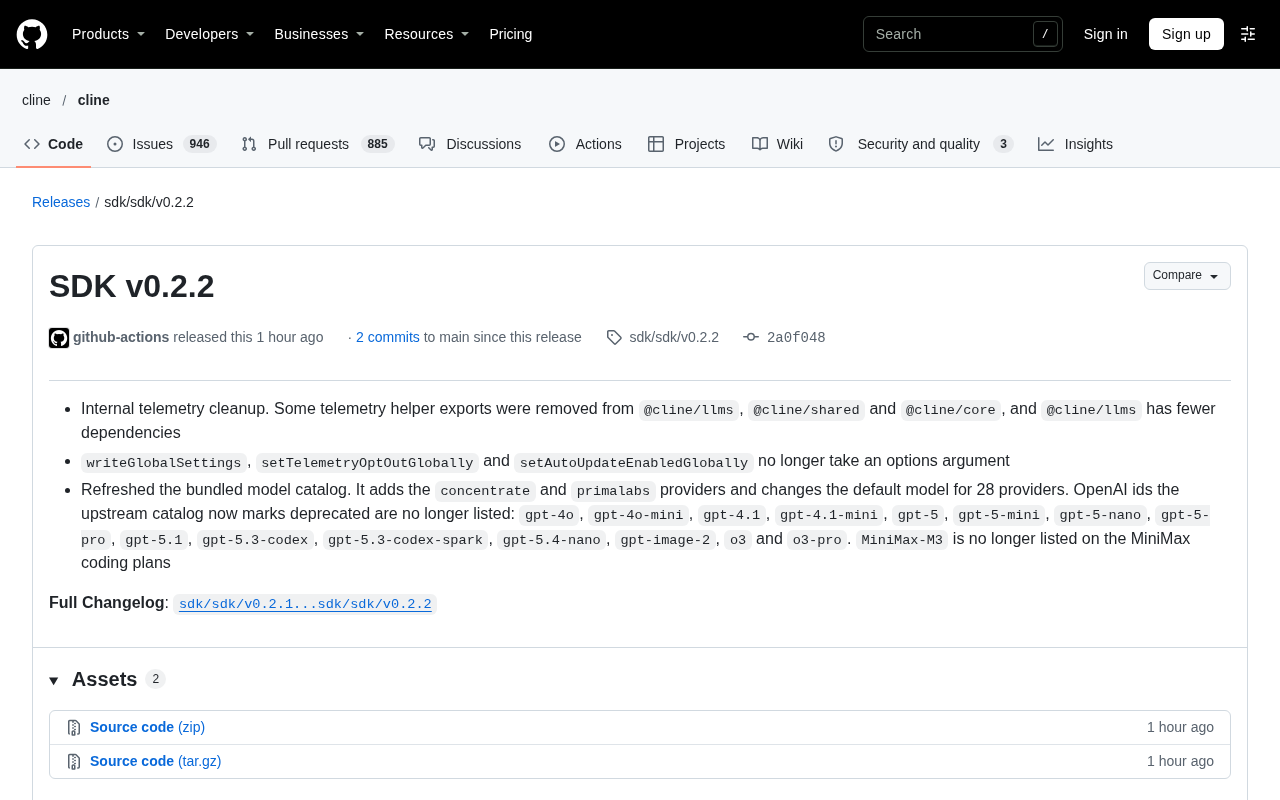
Cline SDK v0.2.2 removes telemetry exports, simplifies settings function signatures, and refreshes the model catalog—a breaking maintenance release.
Cline SDK has released v0.2.2. This update introduces no new features but focuses on internal cleanup, bringing several compatibility changes worth noting. The @cline/llms, @cline/shared, and @cline/core packages have removed some telemetry helper exports, and @cline/llms dependencies have been reduced accordingly. The writeGlobalSettings, setTelemetryOptOutGlobally, and setAutoUpdateEnabledGlobally functions no longer accept an options parameter, so existing calls need to remove extra arguments. On the model catalog side, two new providers—concentrate and primalabs—have been added, default models for 28 providers have been adjusted, and deprecated models including the gpt-4o, gpt-4.1, gpt-5 series, o3 series, and MiniMax-M3 have been removed. The release notes provide no migration guide, so it's recommended to check imports, settings calls, and hardcoded model IDs before upgrading.
Cline's SDK has released version v0.2.2. According to the release notes, this update doesn't introduce new features but focuses on internal cleanup: removing telemetry-related helper exports, adjusting the call signatures of several global settings functions, and refreshing the built-in model catalog. For developers using the Cline SDK to build tools or integrate AI coding capabilities, this is a compatibility change worth noting.
Telemetry Helper Exports Removed, Dependencies Streamlined
The most direct impact of this update falls on three packages: @cline/llms, @cline/shared, and @cline/core—some telemetry-related helper exports have been deleted. The release notes describe this action as "internal telemetry cleanup," meaning these interfaces may not have been intended for external use originally, but if you directly referenced them in your code, you'll encounter import failures after upgrading.
At the same time, the number of dependencies for @cline/llms has been reduced. For an LLM integration layer referenced in multiple places, fewer dependencies typically mean a smaller installation footprint and less upstream maintenance burden—a practical benefit of this kind of internal cleanup.
Telemetry refers to the SDK collecting usage data at runtime—such as feature invocation counts, error types, and latency distributions—and reporting it to the maintainers to improve the product. The implementation is typically carried by helper exports: collection functions, reporting clients, event constants, etc. These symbols often don't appear in public documentation, but package managers don't distinguish between "public API" and "internal implementation"—as long as an export exists, it can be imported. So when maintainers mark them as internal and remove them from the export table, it falls under breaking changes in semantic versioning. For teams with compliance requirements that need precise control over data egress, telemetry interface changes are also worth reviewing in sync to confirm that opt-out switch behavior hasn't been affected.
Global Settings Function Signatures Simplified
Three functions no longer accept an options parameter: writeGlobalSettings, setTelemetryOptOutGlobally, and setAutoUpdateEnabledGlobally.
This change is a breaking change at the API level. Option objects previously passed when calling these functions will now be ignored or directly cause type errors, depending on the calling method and language type checking. If your code wraps these calls, you'll need to remove the extra parameters accordingly. Given that these three functions are all related to telemetry opt-out and auto-update switches, they typically appear in initialization flows or enterprise deployment configurations—it's recommended to check these locations first.
Model Catalog Refresh: Two New Providers, Widespread Default Model Changes
The model catalog update is the most information-dense part of this release.
Two new providers have been added: concentrate and primalabs. Meanwhile, the default models for 28 providers have changed. Default model changes won't cause old calls to fail immediately, but they will route the same interface to different models across versions—output style, capabilities, and costs may all change accordingly. It's recommended to review the actual performance of critical paths after upgrading.
More noteworthy is the list of removed models. The release notes list models marked as deprecated in the OpenAI upstream catalog and therefore no longer appearing in the list: gpt-4o, gpt-4o-mini, gpt-4.1, gpt-4.1-mini, gpt-5, gpt-5-mini, gpt-5-nano, gpt-5-pro, gpt-5.1, gpt-5.3-codex, gpt-5.3-codex-spark, gpt-5.4-nano, gpt-image-2, o3, and o3-pro. This list covers almost all the mainstay models from previous generations—if you've hardcoded any of them in your configuration, they'll no longer be resolvable through the SDK after upgrading.
Additionally, MiniMax-M3 no longer appears in MiniMax coding plans. Users who use this model for coding scenarios will need to switch to other available models.
The model catalog is a list of model metadata maintained internally by the SDK, typically including model IDs supported by each provider, context windows, pricing, capability flags (such as whether tool calling or vision input is supported), and default model mappings. The SDK uses this list for parameter validation and routing before making requests, so catalog refreshes are data-layer changes rather than code-layer changes: they don't necessarily change function signatures, but they do change which model the same call actually hits. Tools like Cline bundle the catalog rather than fetching it at runtime to ensure offline availability and version reproducibility—the trade-off is that each catalog update amounts to an implicit behavior change, and users need to include SDK versions and model availability together in their testing scope.
Upgrade Recommendations
This update is more of a maintenance release in nature, but it's not zero-cost for users. You can check from three directions:
- Search your code for direct imports of the removed telemetry helper functions, as well as internal symbols from
@cline/llms,@cline/shared, and@cline/core; - Verify the call sites of the three global settings functions and remove the extra options parameters;
- Check whether your configuration hardcodes any of the removed model IDs, especially the OpenAI series and
MiniMax-M3, and confirm that scenarios relying on default model behavior meet expectations after the catalog refresh.
The release notes themselves don't provide a migration guide or compatibility layer. For the complete change record, refer to the changelog from v0.2.1 to v0.2.2.
Background Notes
Semantic versioning (SemVer) conventions stipulate that breaking API adjustments are only allowed with major version changes, but in practice many projects do internal cleanup in minor or patch versions, arguing that "non-public interfaces aren't protected by compatibility commitments." To judge whether an upgrade carries risk, you shouldn't just look at the version number—you should watch for words like removed, renamed, and signature changed in the changelog. This v0.2.2 is a patch-level release, yet it includes export deletions and function signature simplifications, indicating that Cline classifies these symbols as internal APIs. For users, the pragmatic approach is to pin the SDK version in your lockfile and do a full search of import paths before upgrading, rather than relying on version numbers to infer compatibility.
Related articles

Michael Nielsen Takes Down His Classic Neural Network Textbook, Sparking Community Discussion
Michael Nielsen's classic free textbook Neural Networks and Deep Learning has been taken offline, sparking discussion on Hacker News about the reasons and impact.

Inside the AI Training Data Market: The Trade-off Between Exclusivity and Discounts
G2i founder Gabe Greenberg reveals the dual-track pricing of the AI training data market: labs pay a premium for exclusive data or accept discounts that allow others to buy it.

SessionGraph: Unifying All Coding Agent Sessions in One Interactive Graph
SessionGraph aggregates coding agent sessions into an interactive graph, helping developers review, debug, and manage AI coding workflows across sessions. This article examines its positioning, value, and open questions.