Cline v4.1.23 Update Breakdown: Model Catalog Refresh and Stability Fixes

Cline v4.1.23 fixes response truncation misclassification, 400 error regressions, and refreshes provider default models.
Cline v4.1.23 is a reliability-focused maintenance release with two main tracks. First, model ecosystem updates: GPT-6.1 Sol joins the recommended list, Solar Mini 4 is added to the free tier, and default models change across more than a dozen providers — Vultr users with pinned models will need to reselect manually. Second, pipeline robustness fixes: interrupted responses without a finish reason now trigger a continuation request instead of being misclassified as complete; the 400 error regression for custom Anthropic base URLs is resolved; Generate Commit Message now respects .clinerules; MCP tool output supports paginated reading; and a race condition in the task approval flow is fixed.
Release Overview
AI coding assistant Cline has shipped v4.1.23. While this is a minor release, it delivers targeted improvements across the model catalog, commit message generation, MCP tool interactions, and the task approval workflow. For developers who rely on Cline daily, several of these fixes directly address real-world pain points.
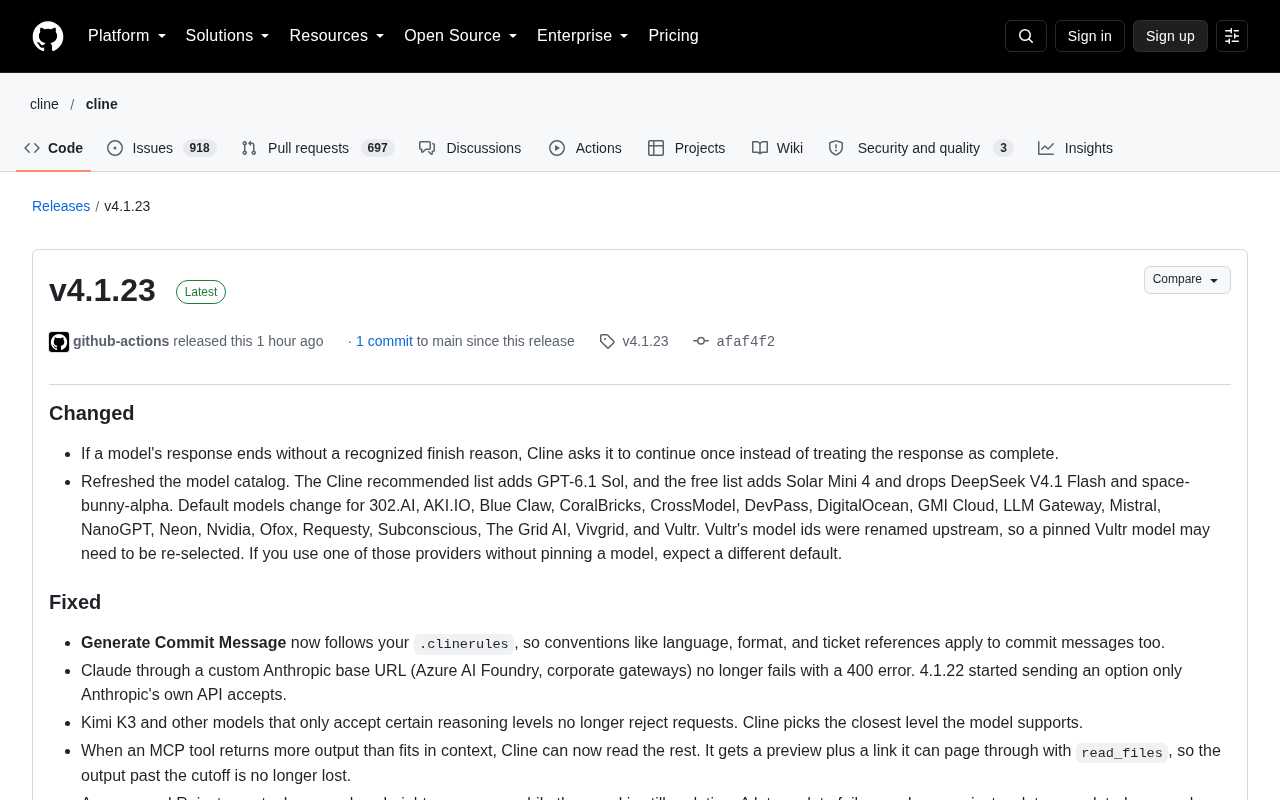
At a high level, the changes fall into two tracks: ongoing model ecosystem maintenance (additions, removals, and default model updates), and robustness improvements to response handling and tool-call pipelines. Let's break each one down.
Behavior Change: Smart Continuation on Interrupted Responses
v4.1.23 adjusts a subtle but impactful behavior — when a model's response is interrupted without a recognizable finish_reason, Cline no longer treats the partial output as complete. Instead, it proactively asks the model to continue once.
The value here is avoiding the "truncation equals completion" misclassification. In real coding workflows, LLMs occasionally cut off their output early for various reasons. If the tool simply declares the task done, developers end up with incomplete code or explanations. Having Cline ask "please continue" covers most truncation cases and reduces the need for manual retries.
When an LLM returns a response via API, it typically includes a finish_reason field with values like stop (normal completion), length (token limit reached), or tool_calls (tool invocation triggered). When this field is missing or empty, it usually means the request was unexpectedly cut off at the network or server level — not a deliberate stop by the model. Previously, Cline treated all such cases as complete, sometimes leaving developers with half-written functions or unclosed code blocks. The fix in v4.1.23 essentially adds a "when uncertain, ask again" safeguard at the finish_reason validation layer — a classic defensive programming pattern.
Model Catalog Refresh and Default Model Changes
This release includes a significant refresh of the model catalog, touching the recommended list, free-tier list, and default configurations across multiple providers.
Recommended and Free List Updates
GPT-6.1 Sol has been added to Cline's recommended list. On the free-tier side, Solar Mini 4 is now included, while DeepSeekAd V4.1 Flash and space-bunny-alpha have been removed. These adjustments reflect the Cline team's ongoing tracking of model cost-effectiveness and availability — free-tier model turnover in particular tends to be frequent.
Downstream Impact of Provider Default Model Changes
Default models have changed for more than a dozen providers, including 302.AI, AKI.IO, Blue Claw, CoralBricks, CrossModel, DevPass, DigitalOcean, GMI Cloud, LLM Gateway, Mistral, NanoGPT, Neon, Nvidia, Ofox, Requesty, Subconscious, The Grid AI, Vivgrid, and Vultr.
Vultr deserves special attention: its model IDs were renamed upstream, so users who had pinned a specific Vultr model may need to re-select. And if you use any of the providers listed above without a pinned model, the update will silently switch you to the new default — which may behave differently from what you're used to. Teams that care about output consistency should take a moment after upgrading to confirm which model is actually being called.
Key Fixes: Commit Messages and Compatibility
The fix list in this release hits several high-frequency pain points directly.
Generate Commit Message Now Respects .clinerules
The "Generate Commit Message" feature now honors the project's .clinerules configuration. This means language preferences, formatting conventions, and issue reference rules all apply to generated commit messages. For teams with strict commit standards, AI-generated commits will now automatically align with project style — no more manual rewrites after the fact.
400 Error Fix for Custom Anthropic Endpoints
Invoking Claude via a custom Anthropic base URL — for example, through Azure AI Foundry or an enterprise internal gateway — was throwing 400 errors. The root cause was a parameter introduced in v4.1.22 that only the official Anthropic API accepts, causing requests routed through third-party gateways to fail. v4.1.23 fixes this regression, which is especially important for users on enterprise deployments.
Reasoning Level Compatibility
Models like Kimi K3 that only accept specific reasoning levels were previously rejecting requests due to level mismatches. Cline now automatically selects the closest supported reasoning level for such models, improving cross-model compatibility.
.clinerules is Cline's project-level behavior configuration file. Placed at the root of a repository, it constrains Cline's language, output format, and prohibited actions within that project — similar to how .eslintrc governs ESLint or .editorconfig governs EditorConfig. In collaborative settings, committing .clinerules to version control means all team members automatically inherit the same constraints when using Cline, reducing inconsistencies caused by individual configuration differences.
MCP Tool and Task Workflow Improvements
On the tool-call pipeline side, v4.1.23 resolves several issues that were disrupting workflow continuity.
When an MCP (Model Context Protocol) tool returns output that exceeds the context window, Cline can now read the remainder: it receives an initial preview along with a link that allows paginated reading via read_files, so content beyond the cutoff point is no longer lost. This is particularly useful when dealing with large files or long log outputs.
The task approval workflow is also more reliable: clicking "Approve" or "Reject" while the approval panel is still updating now takes effect immediately — a late-arriving update failure can no longer accidentally affect an unrelated subsequent approval action. Additionally, reopening an old task no longer leaves behind stale Focus Chain checklist rows from the previous session.
MCP (Model Context Protocol) is an open protocol led by Anthropic, designed to standardize how AI models interact with external tools and data sources. It defines a unified interface for tool registration, invocation requests, and result returns, allowing tools from different providers to be called by the same AI client without requiring custom adapters for each one. Cline uses MCP to support file read/write, code execution, browser control, and other tool extensions. Context window limits are a common bottleneck in MCP tool calls — a model's single-pass context capacity is finite (typically tens of thousands to hundreds of thousands of tokens), and when tool output (such as large log files or long documents) exceeds this limit, the overflow was previously discarded silently. The paginated reading mechanism in v4.1.23 is a direct fix for this scenario.
Summary
v4.1.23 is a classic maintenance release: no sweeping new features, but every change targets a real point of friction in daily use. The ongoing model catalog updates reflect Cline's strategy of rapidly tracking the multi-model ecosystem, while the compatibility and workflow fixes deliver tangible reliability improvements. Users relying on default models from affected providers — especially Vultr — are worth spending a minute post-upgrade to verify their current model configuration.
Related articles

Chain of Thought Isn't Just for AI: How Humans Can Use CoT to Improve Thinking Quality
Chain of Thought isn't just a prompt trick for large models. Starting from a Hacker News discussion, this article analyzes why CoT works for human thinking too, breaks down actionable ways to transfer it, and highlights the key differences between human CoT and machine CoT.
Cloudflare Teams Up with OpenAI: Closi…
Cloudflare Teams Up with OpenAI: Closing the Loop from Vulnerability Discovery to Defense with AI
Cloudflare uses OpenAI Daybreak to investigate security vulnerabilities and generate reviewable remediation plans, while developers use Codex to boost coding efficiency and quality.

Orca Multi-Agent Orchestration in Practice: A Guide to Parallel Collaboration with Claude and Codex
Orca is Stable AI's free open-source agent workbench supporting 34 agents like Claude Code and Codex in parallel. Learn its Git worktree isolation, multi-model orchestration, and mobile management.