Cline v4.1.24 Update: Default Model Overhaul, AI Coding Plugin Says Goodbye to Errors
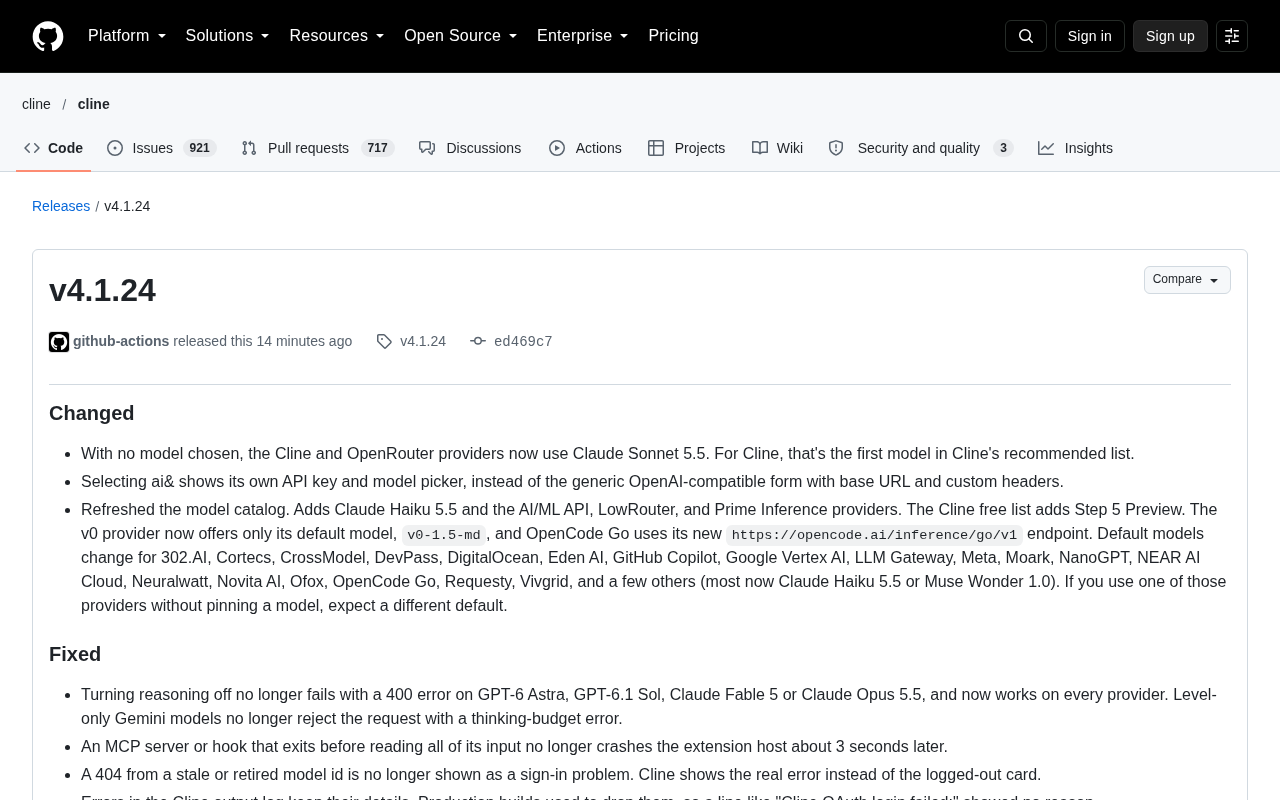
Cline v4.1.24 focuses on stability, switching the default model to Claude Sonnet 5.5 and fixing a batch of errors.
Cline has released v4.1.24, with the focus not on new features but on stability and default experience. When no model is manually specified, Cline and OpenRouter now default to Claude Sonnet 5.5, while many other providers switch to Claude Haiku 5.5 or Muse Wonder 1.0, and the model catalog adds several providers. Provider selection interaction is improved, with `ai&` now showing its own API key and model selector. The fix list covers multiple long-standing pain points: disabling reasoning no longer triggers 400 errors, invalid model IDs causing 404s are no longer misdiagnosed as login issues, production builds no longer lose error log details, and extension host crashes caused by MCP servers exiting early are resolved. On auto-compaction, images no longer inflate token estimates, and missing context windows fall back to the selected model's own configuration. The team reminds users to check whether their current default model has changed.
AI coding tool Cline has released the v4.1.24 update. The focus of this update isn't new features but "internal refinement" — a large-scale switch of default models, a refactored provider selection logic, and a batch of long-standing error issues that have been frustrating users. For developers who spend their days coding in Cline, this is a noticeably smoother upgrade.
Default Model Overhaul: Claude Sonnet 5.5 Becomes the Top Choice
The most striking change in this update is the sweeping adjustment to default models. When you haven't manually specified a model, both the Cline and OpenRouter providers will now automatically use Claude Sonnet 5.5. For Cline itself, this is also the first model in its recommended list, effectively elevating the out-of-the-box default experience to the recommended configuration.
The impact extends well beyond these two providers. The official team also refreshed the model catalog, adding Claude Haiku 5.5, along with providers such as AI/ML API, LowRouter, and Prime Inference. The list of providers whose default models have changed is quite long, including 302.AI, Cortecs, CrossModel, DevPass, DigitalOcean, Eden AI, GitHub Copilot, Google Vertex AI, LLM Gateway, Meta, Moark, NanoGPT, NEAR AI Cloud, Neuralwatt, Novita AI, Ofox, OpenCode Go, Requesty, Vivgrid, and more. Most of these have switched their defaults to Claude Haiku 5.5 or Muse Wonder 1.0.
One thing to keep in mind: if you use any of the above providers without manually locking in a model, your default model will change. Developers who are used to just opening the tool and going may one day notice that the conversation style or output quality feels different — this is usually because the default model has been switched.
What a "default model" is and why it matters: In AI coding assistants like Cline, a "default model" refers to the large language model the system automatically calls when the user hasn't actively selected one in the interface. Since many developers are used to just opening the tool and coding, rarely venturing into settings to specify a model, the default model effectively determines most people's daily experience — including the tone of responses, code style, reasoning depth, response speed, and cost. Different models have different strengths: some lean toward fast completions, some excel at long-context reasoning, and some are friendlier to specific languages or frameworks. When a provider's default model is switched, users don't receive a pop-up notification — they just find one day that the output feels different. That's why the article emphasizes "remember to check which model you're currently using" as a very practical piece of advice — especially in team collaboration scenarios or situations that depend on stable output, locking in a known model is often more controllable than chasing the latest default.
Provider Selection Experience Improved
Beyond the models themselves, the interaction for selecting providers has also been improved. Now when you select ai&, it shows its own API key and model selector, rather than that generic OpenAI-compatible form (which requires filling in a base URL and custom headers). This change may seem like a detail, but in practice it reduces configuration confusion — users no longer have to guess which fields to fill in and which to leave blank.
The model catalog update also brings a few specific adjustments: Cline's free list adds Step 5 Preview; the v0 provider now only offers the default model v0-1.5-md; and OpenCode Go has switched to a new inference endpoint at https://opencode.ai/inference/go/v1.
The relationship between providers and models: In AI coding tools, "provider" and "model" are two layers of abstraction. A provider is the platform that actually offers API services, such as OpenRouter, GitHub Copilot, Google Vertex AI, DigitalOcean, and so on; a model is the specific large language model available for calling on those platforms. Cline itself doesn't train models — it acts as a client that forwards requests to these providers. As a result, the same model may be offered through different providers, with differences in pricing, rate limits, and regional compliance. Configuring a provider typically requires entering an API key, and some providers also require a base URL, custom headers, or an organization ID. The "OpenAI-compatible form" is what asks for this underlying connection information, whereas providers like ai& that come with their own selector eliminate manual entry, lowering the barrier to entry and reducing connection failures caused by mis-filled fields.
Error Fixes: From 400 Errors to Login Cards
The list of issues fixed in v4.1.24 is quite long, and they're all pitfalls developers encounter in daily use.
The reasoning toggle no longer throws 400 errors. Previously, when turning off the reasoning feature, models like GPT-6 Astra, GPT-6.1 Sol, Claude Fable 5, and Claude Opus 5.5 would directly return 400 errors. Now this operation works normally across all providers, and Gemini's level-only models no longer reject requests due to thinking-budget errors.
Invalid model IDs are no longer misdiagnosed as login issues. When an expired or delisted model ID caused a 404, Cline used to pop up a "logged out" card, making people think it was an account problem. Now it directly shows the real error, saving you the detour of troubleshooting your login status.
Error logs no longer lose details. Production builds used to drop error details from Cline output logs, so entries like "Cline OAuth login failed:" had no reason attached. Now that this is fixed, you can finally see the complete information when troubleshooting.
MCP server crash issue resolved. When an MCP server or hook exited before reading all its input, the extension host would crash after about 3 seconds. This subtle timing issue has now been fixed.
Improvements to Auto-Compaction and Token Estimation
Auto-compaction is a critical mechanism in long-conversation scenarios, and there are two related fixes this time.
One is the issue of images inflating token estimates. Screenshots and other images used to be counted in token estimation, causing auto-compaction to trigger prematurely before the conversation was anywhere near the context limit. After the fix, images no longer inflate the estimate, so compaction timing is more accurate.
The other is the fallback logic for context windows. When a model's context window isn't recorded in the model catalog, auto-compaction now uses the selected model's own context window instead of having nothing to go on. This is especially useful for new models or niche providers whose catalog information is incomplete.
Context windows and token estimation: The total amount of content a large language model can process per request is limited, and this upper limit is called the "context window," usually measured in tokens. A token is the smallest unit into which the model splits text — a piece of code, a word, or even a punctuation mark may correspond to one or more tokens; images are also converted into large numbers of tokens. When the conversation history plus the current input approaches the context window limit, the model will error out or lose earlier information. The purpose of auto-compaction is to summarize earlier conversation into a shorter summary when nearing the limit, freeing up space. But if token estimation runs high, compaction triggers too early, sacrificing valuable context; if it runs low, requests may be rejected. That's why fixing image token accounting, and falling back to the model's own configuration when catalog context window info is missing, directly affects whether long conversations can proceed stably.
Other Detail Fixes
- When deleting a slash command from the input box, the spacing of surrounding text no longer gets scrambled
- Rule files in the form of symlinks now load correctly, and skills under the
.claude/skillsdirectory can also be discovered - When some models return null instead of the text to be replaced, editor tools no longer receive null
- Settings migrated from older versions no longer add an empty SAP AI Core provider
None of these fixes looks big on its own, but together they cover configuration, logging, editing experience, context management, and more. For a coding assistant deeply integrated into the IDE, this kind of "de-burring" update often improves day-to-day smoothness more than new features do.
MCP and the extension host: MCP (Model Context Protocol) is a protocol that lets AI assistants connect to external tools and data sources in a unified way. Developers can use it to plug capabilities like file systems, databases, and internal APIs into Cline. A hook is custom logic that executes when a specific event is triggered. These components typically run in the "extension host" process — the background process that hosts the IDE plugin runtime. If an MCP server or hook exits before reading all its input, the extension host hangs waiting on an unfinished pipe and eventually crashes after about 3 seconds, manifesting as the entire plugin suddenly failing in the editor. These timing issues are often hard to reproduce and pinpoint, requiring fixes at the level of process communication and lifecycle management — and once fixed, they significantly improve stability during long sessions.
The Signal Behind This Update
Judging from the contents of v4.1.24, Cline is doing two things: first, aligning the default experience with the recommended configuration (led by Claude Sonnet 5.5); second, systematically cleaning up long-accumulated errors and edge cases. For users, the most direct impact is this — if you haven't manually specified a model, remember to check which one you're actually using.
Related articles

How Big Can Stars Really Get? The Physical Limits of the Largest Stars
Red supergiants are the largest stars by volume, with radii up to 2,000 times the Sun, engulfing the inner solar system. But there is no precise upper limit on stellar size—models predict up to 15,000 solar radii. The most massive blue stars are far smaller than red supergiants—biggest and heaviest are two different things.

Apple HomeView Smart Display Full Feature Breakdown: Wall-Mount or Desktop, $299
Apple launches HomeView, a $299 smart display with wall-mount and desktop options, 12MP camera for facial recognition, smart home control, music playback, and recipe step-by-step cooking. Full breakdown of watch faces, apps, privacy, and cooking integration.

Where Did the Promised New Studio Go? Craft Computing Answers After Five Years
Craft Computing's host responds to viewer questions: the new studio promised five years ago was shelved as construction costs soared from $30,000 to $75,000, and was replaced by a 168-square-foot garage conversion.