Cline v4.1.25 Released: Major Updates to Cloud Sandbox Tasks and Model Catalog

Cline v4.1.25 launches cloud sandbox tasks, refreshes the model catalog, and fixes long-request timeouts and URL handling.
Cline releases v4.1.25, centered on Cline Cloud sessions: users can run tasks in a hosted sandbox on a specified GitHub repository and branch, with tasks continuing after the editor is closed and status shown in Recent and History with proactive notifications, currently rolling out gradually. On the model side, when no manual selection is made, the Cline provider defaults to Gemini 4 Argon, while OpenRouter keeps Claude Sonnet 5.5; the catalog adds Boundless and Standard Compute, SambaNova defaults to MiniMax M3, Gemini 4 Argon joins the recommended list while Grok 4.7 is removed, and multiple providers' defaults are adjusted in sync—verify the actual model called after upgrading. Underlying fixes resolve BodyTimeoutError from 5 minutes of silence during long requests to local models, and make OpenAI Compatible base URLs used strictly as entered without silently appending /v1, with one-time compatibility for old configurations.
Cline has released version 4.1.25, bringing cloud sandbox tasks, a refreshed model catalog, and a series of underlying fixes. For developers who rely heavily on AI coding assistants, this update delivers substantive changes in both collaboration workflows and model selection.
Cline Cloud Sessions: Run Tasks in the Cloud
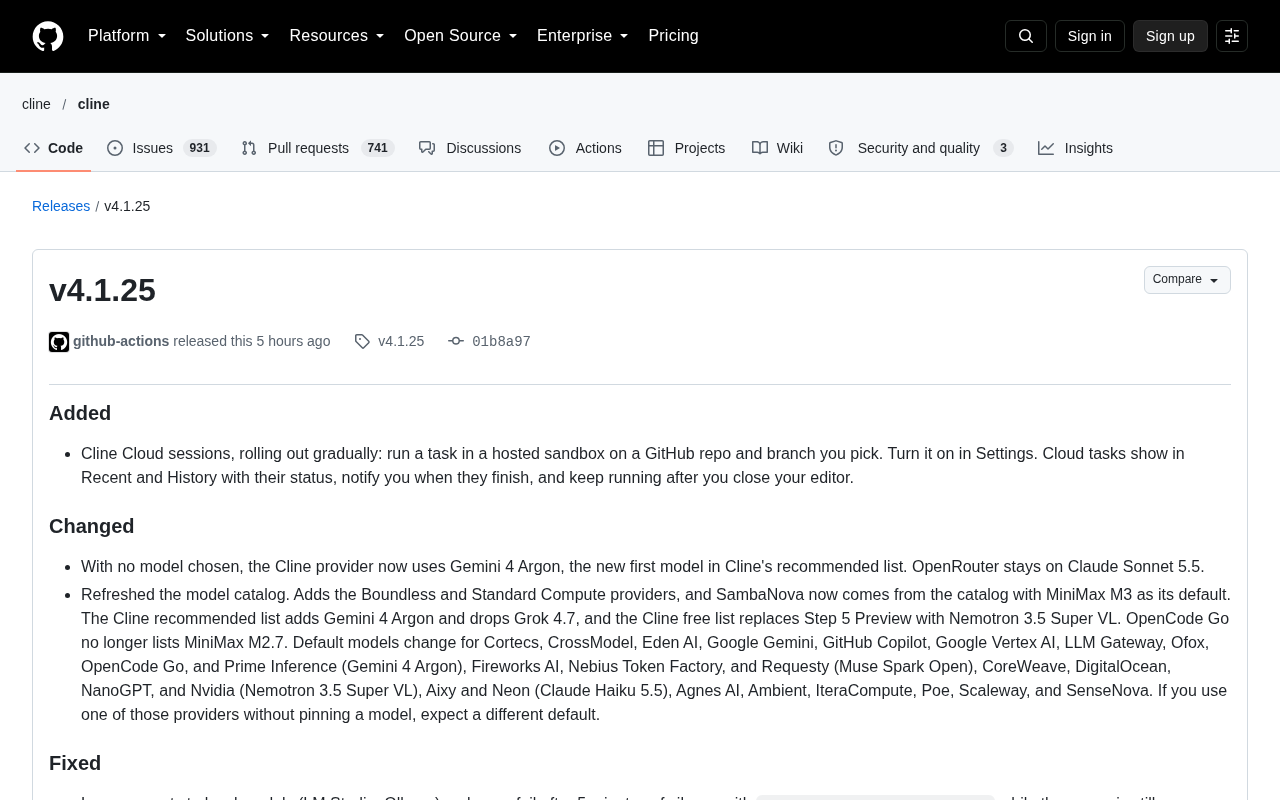
The most notable new feature in this update is Cline Cloud sessions. Users can run tasks in a hosted sandbox on a specified GitHub repository and branch, without having to tie the entire process to a local editor.
Enabling it is simple—just toggle the corresponding switch in Settings. Cloud tasks appear in the Recent and History lists with real-time status. Users are notified when a task completes, and tasks continue running even after the editor is closed.
The idea behind this design is to shift AI coding tasks from "sitting at your computer waiting for results" to "submit and go do something else." For long-running large tasks, or for teams that want to process multiple repositories in parallel, cloud sandboxes offer a more flexible workflow. This feature is currently rolling out gradually and may not be immediately visible to all users.
A hosted sandbox refers to an isolated execution environment managed by a service provider, typically in the form of a container or lightweight virtual machine, with its own file system, dependencies, and network policies. Compared to running locally, a hosted sandbox decouples computation and storage from the developer's machine, so the task lifecycle no longer depends on whether the editor process is alive. This also means cloud sessions require a complete chain of capabilities: repository authentication, branch pulling, environment initialization, and status reporting. For an AI coding assistant, the sandbox must also handle syncing model-generated patches, command execution results, and repository state back to a place the user can see—which is why task status appears in real time in Recent and History, with completion notifications delivered through the notification system.
Default Model Switch: Gemini 4 Argon Takes the Top Spot
When no model is manually selected, the Cline provider now defaults to Gemini 4 Argon—the new top model on Cline's recommended list. OpenRouter keeps its default of Claude Sonnet 5.5 unchanged.
The model catalog has also undergone a refresh:
- Added two new providers: Boundless and Standard Compute
- SambaNova now loads from the catalog, with MiniMax M3 as the default model
- Gemini 4 Argon added to Cline's recommended list, while Grok 4.7 is removed
- Cline's free list replaces Step 5 Preview with Nemotron 3.5 Super VL
- OpenCode Go no longer lists MiniMax M2.7
Cline also adjusted default models for multiple providers, including Cortecs, CrossModel, Eden AI, Google Gemini, GitHub Copilot, Google Vertex AI, LLM Gateway, Ofox, OpenCode Go, Prime Inference (Gemini 4 Argon), Fireworks AI, Nebius Token Factory, Requesty (Muse Spark Open), CoreWeave, DigitalOcean, NanoGPT, Nvidia (Nemotron 3.5 Super VL), Aixy, Neon (Claude Haiku 5.5), Agnes AI, Ambient, IteraCompute, Poe, Scaleway, and SenseNova.
If you use any of the above providers without pinning a specific model, your default model will change after the update. This is an easy-to-overlook but directly impactful change—it's worth checking after upgrading whether the model actually being called matches your expectations.
In AI coding tools, provider and model catalog are two concepts at different levels. A provider refers to the service actually handling inference requests, such as OpenRouter, Fireworks AI, Nvidia, Scaleway, and so on; the model catalog is the list of models these providers offer along with their metadata. Cline maintains two additional lists on top of this: the recommended list (the sequence of models Cline considers best in overall performance) and the free list (models that can be called at zero cost). When a user hasn't explicitly pinned a model, the tool sends requests using the default at the top of the recommended list. So when the default changes, the model actually called, the billing basis, and the output style can all change accordingly—which is the direct reason to verify things after upgrading.
Underlying Fixes: Long-Request Timeouts and URL Handling
In this round of fixes, two items have a significant impact on day-to-day usage.
The first is the long-request timeout issue with local models. Previously, when making long requests to local models like LM Studio or Ollama, if the server was still processing a large prompt, more than 5 minutes of silence would result in a terminated: BodyTimeoutError failure. The new version resolves this issue, so long-running inference is no longer misjudged as a connection interruption.
The second is the handling logic for OpenAI Compatible base URLs. URLs are now used strictly as the user enters them—a bare host address like https://abc.com will no longer be silently appended with /v1. To maintain compatibility with legacy configurations, bare host URLs saved by earlier versions will have /v1 added once, ensuring existing settings continue to work.
Additionally, images and files attached when Cline answers user questions are now correctly passed to the model instead of being dropped; when a provider error interrupts a streaming response midway, Cline will retry up to 3 times before declaring that round a failure. In the JetBrains plugin, the Run task card stays above the Auto-approve bar, and Auto Compact along with its policy settings have been relocated back to Feature settings.
BodyTimeoutError typically comes from the underlying HTTP client's timeout limit on the response body reading stage. In streaming or long-inference scenarios, the server may return no data chunks for an extended period due to large prompt size, GPU memory scheduling, or queuing. If the client treats this silent period as a connection interruption, it will terminate the request outright. Local inference services like LM Studio and Ollama are especially prone to triggering this when single-machine resources are constrained. There are generally two approaches to fixing such issues: one is to raise or remove the timeout threshold for the response body stage, and the other is to introduce a heartbeat or keep-alive mechanism to distinguish genuine interruptions from mere processing delays. Understanding this helps assess which self-hosted or locally deployed scenarios may still encounter similar problems.
OpenAI Compatible base URL is an interface prefix convention that many third-party services expose in order to be compatible with the OpenAI SDK. The official OpenAI SDK habitually appends version paths like /v1 after the base URL, which leads some clients to take it upon themselves to add /v1 when a user enters a bare host address like https://abc.com—causing 404s or routing errors for services that don't need that path in the first place. Cline's switch to using the URL strictly as entered is a correction of this historical behavior; at the same time, doing a one-time /v1 completion for bare host addresses saved by earlier versions is a stateful backward-compatibility strategy that prevents old configurations from immediately breaking after an upgrade.
What This Update Means
Looking at the feature combination, Cline is advancing both "cloud tasks" and "free model switching" simultaneously. Cloud sandboxes address the constraints of local compute and editor lifecycle, while the model catalog reshuffle reflects the rapid iteration in model selection among AI coding tools—the recommended list, free list, and each provider's defaults change with nearly every version.
For developers, the pragmatic approach is: after upgrading, confirm whether the default model matches your expectations, and check whether any provider's default change affects cost or output quality; also keep an eye on the gradual rollout of cloud sessions—if your use case involves long tasks or parallel work across multiple repositories, this feature is worth trying early.
One-line Summary
Cline v4.1.25 launches cloud sandbox tasks, refreshes the model catalog, and fixes long-request timeouts and URL handling.
Paragraph Summary
Cline has released v4.1.25, with the core addition being Cline Cloud sessions: users can run tasks in a hosted sandbox on a specified GitHub repository and branch, with tasks continuing to execute after the editor is closed, status appearing in Recent and History with proactive notifications, currently rolling out gradually. On the model side, when no manual selection is made, the Cline provider now defaults to Gemini 4 Argon, while OpenRouter keeps Claude Sonnet 5.5; the catalog adds Boundless and Standard Compute, SambaNova defaults to MiniMax M3, the recommended list adds Gemini 4 Argon and removes Grok 4.7, and multiple providers' default models have been adjusted in sync—so it's worth verifying the actual model being called after upgrading. Underlying fixes resolve the BodyTimeoutError caused by 5 minutes of silence during long requests to local models, and make OpenAI Compatible base URLs used strictly as entered without silently appending /v1, with one-time compatibility for old configurations.
Related articles

Chain of Thought Isn't Just for AI: How Humans Can Use CoT to Improve Thinking Quality
Chain of Thought isn't just a prompt trick for large models. Starting from a Hacker News discussion, this article analyzes why CoT works for human thinking too, breaks down actionable ways to transfer it, and highlights the key differences between human CoT and machine CoT.
Cloudflare Teams Up with OpenAI: Closi…
Cloudflare Teams Up with OpenAI: Closing the Loop from Vulnerability Discovery to Defense with AI
Cloudflare uses OpenAI Daybreak to investigate security vulnerabilities and generate reviewable remediation plans, while developers use Codex to boost coding efficiency and quality.

Orca Multi-Agent Orchestration in Practice: A Guide to Parallel Collaboration with Claude and Codex
Orca is Stable AI's free open-source agent workbench supporting 34 agents like Claude Code and Codex in parallel. Learn its Git worktree isolation, multi-model orchestration, and mobile management.