CloakFetch: Helping Coding Agents Bypass Cloudflare Anti-Bot Protection

CloakFetch bypasses anti-bot systems for Coding Agents by dispatching a real stealth browser
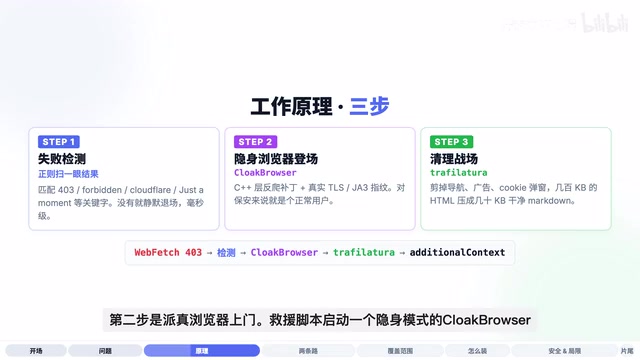
CloakFetch is an open-source tool that solves the pain point of Coding Agents being blocked by anti-bot systems like Cloudflare. It works in three steps: detecting when an Agent's request fails, automatically launching a real Chromium browser with anti-detection patches to re-fetch the page, then using Trafilatura to extract the main content and convert it to clean Markdown before passing it back to the Agent. The entire process is transparent to the Agent and supports multiple mainstream Coding Agents including Claude Code.
When you ask Claude Code or another Coding Agent to fetch a webpage, there's nothing more frustrating than having the Agent throw up its hands and tell you "403 Forbidden" or "Just A Moment" — and then the entire task grinds to a halt. The reason behind this is that anti-bot systems like Cloudflare have identified the Agent as a robot and blocked it at the door.
The open-source tool CloakFetch was built to solve exactly this problem. Its core approach is clever — the moment an Agent gets blocked, it quietly dispatches a browser that "looks like a real person" to knock on the door again, grabs the content, cleans it up, and hands it back to the Agent. Throughout the entire process, the Agent doesn't even know the door was ever closed.
Why Coding Agents Need CloakFetch
A huge number of content sites on the internet have an invisible "security guard" standing at the entrance. Cloudflare, Datadome, Akamai, PerimeterX, Imperva, Kasada, AWS WAF… these anti-bot products are essentially security systems from different companies, and their core job is to distinguish whether the visitor is a real person or a robot.
These systems' detection capabilities are far more sophisticated than they appear on the surface. Take Cloudflare as an example — it uses multi-dimensional fingerprinting to distinguish humans from bots. TLS fingerprinting (JA3/JA4) is one of the hardest layers to forge — different HTTP clients produce unique "handshake signatures" when establishing encrypted connections, due to differences in supported cipher suite ordering, TLS extension lists, and other details. The signatures from curl and Python requests are completely different from those of a Chrome browser. Beyond that, these systems also detect HTTP/2 frame ordering, browser-specific JavaScript APIs (such as the navigator.webdriver property), Canvas/WebGL rendering fingerprints, and whether injected obfuscated JS challenges are properly executed.
Ordinary HTTP clients — including curl, Python's requests library, and the built-in WebFetch tools that come with various Coding Agents — are like robots wearing plastic fake mustaches in front of these security guards. They're spotted instantly. Science.org, many news sites, and numerous academic publishers all deploy this kind of protection. The result is that when you ask your Agent to look something up, it comes back with nothing but a cold HTTP 403 Forbidden, and then the entire task chain breaks.
For developers doing research, information aggregation, or building scraping pipelines, this is a high-frequency pain point. CloakFetch supports multiple mainstream Coding Agents including Claude Code, Codex, OpenCode, and OpenClaude, providing an elegant automated solution.
How CloakFetch Works: Three-Step Rescue
Step 1: Failure Detection
A lightweight script watches alongside the Agent's tool calls, scanning the returned results every time WebFetch completes execution. It uses regex to check whether the content contains keywords like 403, Forbidden, Cloudflare, or Just A Moment. If nothing matches, it acts as if nothing happened; the moment it detects a match, it knows the last request was blocked by the security guard, and immediately triggers the rescue process.
Step 2: Send a Real Browser
The rescue script launches a stealth-mode CloakBrowser — a real Chromium browser with anti-detection patches applied at a low level, with TLS fingerprints identical to those of a regular user's Chrome.
This involves a key technical detail: standard headless browsers (like Puppeteer or Playwright in headless mode) have numerous detectable characteristics — navigator.webdriver is set to true, GPU rendering features are missing, the Chrome extension list is empty, etc. The "anti-detection patches" used by CloakBrowser (also known as undetected-chromedriver or stealth mode) work by injecting JavaScript at browser startup to override these leaked characteristics, while also modifying TLS handshake parameters to match real Chrome. To the security system, it looks like a normal user browsing the web normally.
It patiently waits for Cloudflare's JS challenge to complete, waits for the page to fully render, and then captures the complete page content.
Step 3: Clean Up
A modern webpage easily starts at several hundred KB, of which 90% consists of navigation bars, recommendation widgets, ads, and cookie popups — the actual article content might only be a screen or two. Feeding an entire webpage directly to the Agent is like handing over a complete newspaper including all the advertising inserts — it wastes tokens and is difficult to parse.
CloakFetch uses Trafilatura, a parsing library specifically designed for content extraction. Trafilatura is a Python library developed by researchers at the University of Leipzig in Germany. Its core algorithm is based on text density analysis and DOM tree structure heuristics: the text density of body paragraphs is far higher than that of navigation bars and ad areas, and the link-text ratio is also notably different. Compared to generic HTML parsing solutions, Trafilatura achieves higher accuracy when processing news articles, blogs, and academic pages, effectively filtering out noise content like comment sections, sidebar recommendations, and cookie declarations. It strips away all the clutter, keeps only the main content, compresses hundreds of KB of HTML into tens of KB of clean Markdown, and sends it back to the Agent through the Hook's backfill channel. For AI Agents, this step isn't just about saving tokens — more importantly, it reduces the interference of irrelevant information on the model's reasoning.
Two Installation Paths: Hook Mode vs Skill Mode
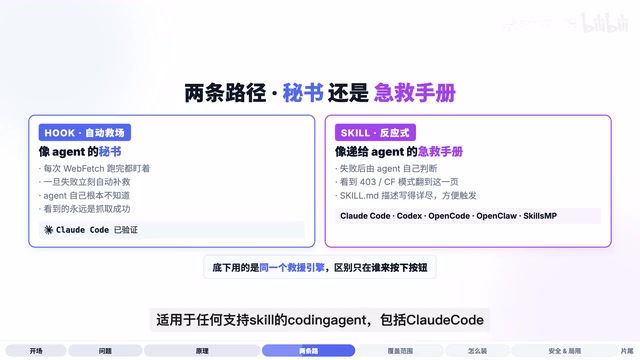
CloakFetch provides two installation paths, differentiated by how the rescue is triggered.
Hook Mode: Fully Automatic Secretary
Hook mode has primarily been validated on Claude Code, since the Hook mechanism was first introduced by Claude Code.
Hooks are interception point mechanisms provided by Claude Code during the tool call lifecycle, similar to middleware or AOP (Aspect-Oriented Programming) concepts in software development. Developers can inject custom scripts at the pre-hook or post-hook stages of tool calls. Scripts can read tool inputs and outputs, modify results, or even completely replace return values. CloakFetch cleverly leverages the post-hook — it checks immediately after WebFetch returns results, and if it detects failure signatures, it quietly replaces the result with content fetched by the real browser. The entire process is completely transparent to the Agent's main reasoning loop.
Hook mode is like giving the Agent a secretary who watches every time the Agent calls WebFetch. The moment a failure is detected, it automatically steps in to fix things. The Agent itself has no idea a failure ever occurred — it always sees a successful fetch result.
The specific installation takes three steps:
- Copy the two Hook scripts from the repository to Claude Code's Hooks directory
- Write one environment variable in the configuration to tell it where CloakBrowser's virtual environment is installed
- Register the Hook in Claude Code's configuration file and bind it
Related articles
 Product Reviews
The Programmer's Desk Setup Guide: Building a Workspace That Feels Like Home
Discover how programmers build productive, comfortable workspaces. From multi-monitor setups to ergonomic design, explore the desk philosophy that drives focus and flow.
 Product Reviews
Qoder vs Cursor Real-World Comparison: Which $20/Month AI IDE Is Better?
Hands-on comparison of Qoder vs Cursor AI IDEs: Agent autonomy, human interaction count, and architecture decisions. Qoder needed only 2 interactions vs Cursor's 8.
 Product Reviews
Cursor Cloud Agent Demo: Eliminating Bottlenecks Across the Entire Software Development Lifecycle
Deep analysis of Cursor's Cloud Agent demo showing how cloud VMs, automated test artifacts, and a full-chain control plane systematically eliminate human bottlenecks across the software development lifecycle.