Cloud Glass: An Open-Source Floating Window Tool for Monitoring Multiple Claude Code Sessions

Cloud Glass is a floating window tool that monitors multiple Claude Code terminal sessions in real time.
Cloud Glass solves the pain point of not being able to intuitively track task progress when running multiple Claude Code terminals. It uses a floating window with four color-coded states — blue (reading), orange (thinking), purple (writing code), and green (completed) — supports auto-scaling layout, runs entirely locally without internet connection, is open-source on GitHub, and features simple installation.
The Pain Point of Running Multiple Claude Code Sessions
If you use Claude Code for programming, you've probably encountered this scenario: you have several terminal windows open simultaneously, with Claude handling different coding tasks. But here's the problem — you have no idea which task has finished and which is still spinning. So you end up constantly switching between windows to check status, which is incredibly annoying and seriously disrupts your workflow.
Claude Code is Anthropic's AI programming assistant terminal tool that allows developers to interact directly with the Claude model in a command-line environment to accomplish code generation, debugging, refactoring, and other tasks. Unlike traditional IDE plugins, Claude Code uses the terminal as its core interface and supports direct read/write access to the local file system, making it particularly well-suited for engineers working with large codebases. Due to its terminal-native nature, developers often open multiple terminal sessions to handle different modules in parallel, which creates the need for multi-session state management.
As AI programming tools become more widespread, "parallel AI-driven development" is emerging as a new workflow paradigm. Instead of serially waiting for one AI task to complete before starting the next, developers now have multiple AI sessions simultaneously handling frontend components, backend APIs, unit tests, and other modules. This approach can significantly compress development cycles, but it also introduces cognitive overhead — the human brain struggles to track the progress of multiple asynchronous tasks simultaneously.
To address this pain point, a developer created a small tool called Cloud Glass — a floating status monitoring window that stays on top of your screen, letting you see the real-time status of all your Claude Code sessions at a glance.
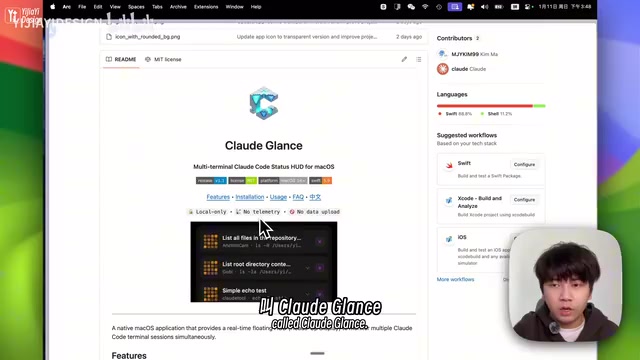
Cloud Glass's Color Status System
Cloud Glass uses different colors to represent Claude Code's current working state, with a very intuitive design:
- Blue: Claude is reading files
- Orange: Claude is thinking
- Purple: Claude is writing code
- Green checkmark: Task completed
Each state also features different animation effects, making it not only practical but also visually engaging. When a task shows a green checkmark, you know it's time to check the results — no need to repeatedly switch windows to confirm. The design philosophy behind this color system aligns with the concept of "Observability" in modern software engineering — aggregating status information scattered across multiple terminal windows into a single view, fundamentally reducing the context-switching cost for developers.

Auto-Scaling Layout and Local Privacy Protection
Smart Layout Adapts to Multiple Windows
Another highlight of Cloud Glass is its auto-scaling feature. Open one terminal and it shows one cell; open three and it shows three cells, without taking up too much screen space. This is extremely friendly for users who habitually run multiple Claude Code sessions in parallel.
From a technical implementation perspective, Cloud Glass is a macOS native application that leverages system-level window management APIs to ensure the status panel always stays above other windows (the Always-on-top floating window feature, achieved by setting NSWindow's window level). The core challenge lies in continuously monitoring state changes across multiple terminal processes with low resource consumption, typically accomplished through inter-process communication (IPC), file system watchers, or stdout parsing mechanisms to capture Claude Code's real-time running status and dynamically adjust the number of layout cells in the floating window.
Fully Local Execution with No Internet Connection Required
Regarding privacy and security, this project runs entirely locally — it doesn't connect to the internet and never uploads any data. Your code and project information won't be leaked, so you can use it with confidence.
This design is particularly important in the AI programming tools space. Many companies' codebases contain trade secrets, proprietary algorithms, or compliance-sensitive information, and any tool that uploads code to third-party servers faces strict security scrutiny. A Local-first architecture means all data processing happens on the user's device without any external network requests, fundamentally eliminating data leakage risks. This philosophy aligns closely with the "Local-first Software" movement that has gained traction in the developer tools space in recent years — emphasizing users' complete control over their own data, with full functionality even in offline conditions.

How to Install Cloud Glass
The installation process is very straightforward:
- Go to the GitHub project page
- Download the DMG installer
- Drag it to the Applications folder to complete installation
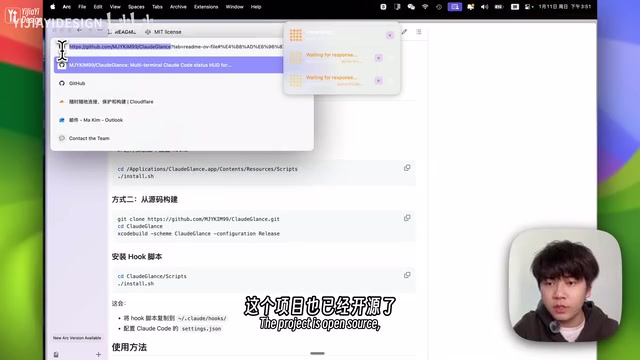
This project is fully open-source and can be downloaded and used directly from GitHub.
Use Cases and Summary
Cloud Glass is especially suitable for:
- Developers who frequently run multiple Claude Code terminals for parallel task processing
- Engineers who need to manage multiple AI programming sessions simultaneously
- Programmers who want to reduce window switching and improve work efficiency
As a lightweight auxiliary tool, Cloud Glass solves the real pain point of managing multiple Claude Code windows. It doesn't change your workflow — it simply provides a clear status overview when you need it. Open-source, locally run, and easy to install, it's worth trying for heavy Claude Code users.
Key Takeaways
- Cloud Glass is a floating window tool that monitors the working status of multiple Claude Code terminals in real time
- It intuitively distinguishes states using four colors: blue (reading), orange (thinking), purple (writing code), and green (completed)
- Supports auto-scaling layout that dynamically adjusts the number of display cells based on open terminals
- Runs entirely locally without internet connection, ensuring privacy and security for your code and project information
- The project is open-source on GitHub with one-click DMG installation
Related articles
 Product Reviews
The Programmer's Desk Setup Guide: Building a Workspace That Feels Like Home
Discover how programmers build productive, comfortable workspaces. From multi-monitor setups to ergonomic design, explore the desk philosophy that drives focus and flow.
 Product Reviews
Qoder vs Cursor Real-World Comparison: Which $20/Month AI IDE Is Better?
Hands-on comparison of Qoder vs Cursor AI IDEs: Agent autonomy, human interaction count, and architecture decisions. Qoder needed only 2 interactions vs Cursor's 8.
 Product Reviews
Cursor Cloud Agent Demo: Eliminating Bottlenecks Across the Entire Software Development Lifecycle
Deep analysis of Cursor's Cloud Agent demo showing how cloud VMs, automated test artifacts, and a full-chain control plane systematically eliminate human bottlenecks across the software development lifecycle.