Code Your Way to Video: A Deep Dive into the web-video-produce Open Source Project

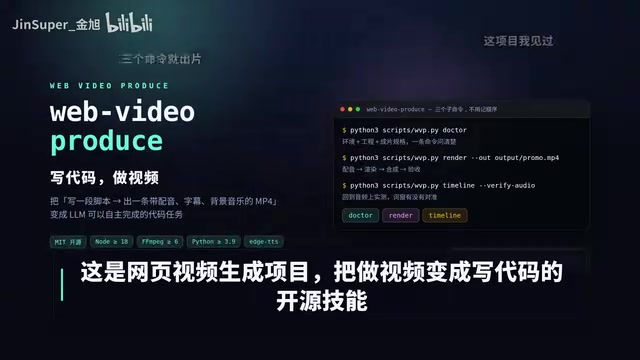
web-video-produce uses React + Remotion to engineer video production from script to final cut — fully automated.
web-video-produce is an open source Code-to-Video framework built on React and Remotion that turns every video frame into a pure function output, enabling fully versionable and reproducible video production. Creators write a segmented script; the system auto-generates voiceovers (14 Chinese TTS voices), subtitles, and frame-accurate timelines. Visuals support Canvas charts and real-time Three.js 3D shaders; live footage can be integrated via a cut list; audio features built-in multi-band sidechain compression; and pre-delivery QC automatically validates color space, peak levels, and loudness.
When Video Is No Longer "Cut" Together
Anyone who has created video content knows the pain all too well: shooting, editing, syncing timelines, adding subtitles — a few-minute clip can easily eat up an entire day. An open source project called web-video-produce is attempting to completely overhaul this tedious process by turning "making videos" into "writing code."
As the project author puts it, these videos are "not cut — they're computed." Creators simply write a segmented script, and voiceovers, subtitles, and timelines are generated automatically, with the timeline precisely aligned to the actual rendered frames. This Code-to-Video approach is fundamentally about making video production engineering-grade and reproducible.
The Technical Foundation: React + Remotion — "Every Frame Is a Pure Function"
The core philosophy of this project is describing video using React and Remotion. Remotion is a framework that has gained traction in recent years for writing video with React — it treats every frame of a video as a computable UI state.
In other words, every frame is the output of a pure function: given a point in time, render a deterministic image. The immediate benefit is that video content becomes fully versionable, reusable, and parameterizable. Change a single line in the script, and the corresponding part of the video updates in sync — no manual re-editing required.

Charts and 3D: Canvas and Shaders Generated on the Fly
On the visual side, the project supports drawing charts with Canvas, while 3D elements are handled via Three.js (referred to as "Free.js" in the original, likely a slip of the tongue), with shaders generated on the fly. This means data visualizations, dynamic charts, and 3D animations — assets that previously required dedicated tools — can now be produced directly in code.
For technical, data-driven, and educational content creators, this capability is especially valuable: charts update automatically with the data, eliminating the need to redo animations by hand.
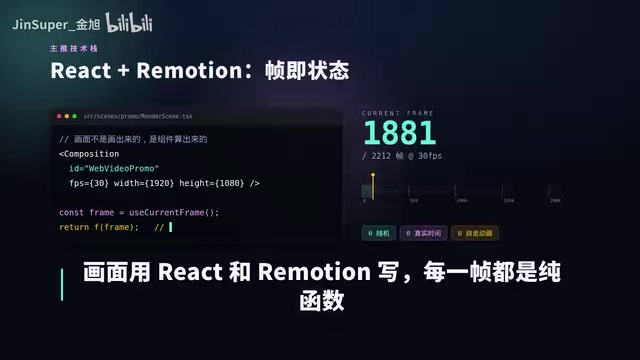
Remotion was released in 2021 by Jonny Burger, with its core idea rooted in React's declarative UI philosophy: UI is a function of state, and video follows the same principle — a frame is a function of a point in time. Developers use useCurrentFrame() to get the current frame number, compute animation parameters from it, and let headless Chromium capture each frame into an MP4. This architecture makes videos natively compatible with Git version control, enabling multi-person collaboration and CI/CD-based automated rendering. Compared to tools like After Effects, Remotion's strengths lie in logic reuse and data-driven workflows; its weakness is that rendering speed is constrained by CPU/GPU screenshot throughput, which can make long videos slow to render.
Beyond Code-Generated Visuals: Real Footage Fits In Too
Notably, this project doesn't exclude real filmed footage. Pixel-accurate live-action material can also enter the pipeline — simply provide a "cut list" and the system will automatically handle trimming, splicing, and transitions.
This significantly expands its practical value. Code-generated visuals excel at charts, subtitles, and animations, while real footage retains expressive power that can't be replicated. Combining the two means creators can control both composited and live-action footage within a single code-driven workflow.
Voiceover and Audio: 14 Chinese Voice Tones, Chasing a Human Sound
Audio processing is one of this project's standout features. Voiceovers are generated via HTTS (text-to-speech service), with 14 Chinese voice tones available for flexible selection.
What's especially interesting is the engineering detail the author put into perceptual naturalness: by removing periods to smooth out sentence-level prosody and keeping speech rate variation within 5%, the synthesized voice "instantly sounds like a real person," avoiding the robotic stiffness typical of TTS systems.

Intelligent Sidechain Processing for Background Music
Background music is also composed in code, using multi-band sidechain compression. In simple terms: whenever the voiceover kicks in, the background music automatically ducks in volume to make way, then recovers once the voice stops. This is a standard technique in professional mixing — it keeps narration clear without sacrificing the musical atmosphere. Building this kind of professional audio processing into an automated pipeline is a testament to the project's engineering maturity.
Sidechain compression is standard practice in broadcast, podcasting, and film post-production: a compressor monitors a "trigger signal" (here, the voiceover track), and once the trigger exceeds a threshold, it applies gain reduction to a second audio source (the background music). The multi-band version processes the spectrum in segments, compressing only the midrange where vocal energy is concentrated while preserving low-frequency drums and high-frequency ambience — resulting in a more natural sound. Embedding this processing into the code rendering pipeline means that every time a script is regenerated, the sidechain parameters automatically update to match the new voiceover timeline, with no need for a mixing engineer to manually keyframe the automation. It's a textbook example of workflow automation.
Automated Quality Control Before Delivery
Before the final video is delivered, the project also runs an automated technical QC pass: checking key indicators like color space, peak levels, and loudness all at once.
This built-in QC mechanism ensures that output videos meet technical standards, preventing common issues like color cast or audio clipping. For scenarios requiring high-volume output with consistent quality, this kind of automated validation is particularly important.
Video delivery technical specs typically span three dimensions: color space refers to standards like BT.709 (web) or BT.2020 (HDR) — a mismatch can cause color shifts after uploading to different platforms; peak level refers to the instantaneous maximum audio level, and exceeding -1 dBFS can cause clipping distortion during encoding; loudness follows the EBU R128 / ITU-R BS.1770 standard, measured in LUFS — platforms like YouTube and Douyin apply automatic loudness normalization, which can push non-compliant audio down in volume. Automatically validating these three metrics is the equivalent of running a "technical compliance test" before submission — especially critical for high-volume production pipelines.
Who Is It For, and What Does It Mean?
Overall, web-video-produce represents a shift in content production paradigm: transforming video from a craft into software engineering. It's especially well-suited for technical bloggers, data visualization content, tutorial videos, and teams that need to produce content at scale using templates.
That said, there's a clear barrier to entry — you'll need a working knowledge of React and front-end development. For creators without a coding background, the onboarding cost is non-trivial. But for developers, it means being able to manage video with familiar engineering methodologies: version control, component reuse, automated pipelines — the full stack.
The project is open source on GitHub. Search for WebVideo Produce to find it. For developers interested in exploring automated video production, this is a direction well worth experimenting with.
Related articles

Receipt Forgery Detection Near Random? Real-World Struggles and Solutions in Document Image Forensics
A receipt forgery detection project with ROC-AUC near random reveals the pitfalls of small-sample document forensics. Explores anomaly detection, self-supervised pre-training, and numerical consistency as viable alternatives.

From Workflows to Eval-Driven Development: A Paradigm Shift in How We Solve Problems with AI
AI problem-solving is shifting from deterministic workflows to "define evals + hillclimb." This piece explores how eval-driven development reshapes tasks, data vendors, human roles, and Agent UX.

Tesla Powerwall + Electric Vehicle: A Dual Backup Power Solution for Outages
Tesla Powerwall combined with EV bidirectional charging can provide multi-layer home backup power during outages. We break down runtime, V2H realities, and Supercharger loop feasibility.