Codex and Cursor Localization and Model Switching, All Solved by One Small Tool

Bilibili creator shares CCX Plus, a one-stop tool for Codex and Cursor localization and model switching.
The article introduces a small tool called CCX Plus that addresses two common pain points for Chinese users of Codex and Cursor: interface language barriers and frequent model-switching issues like connection failures and tool invocation errors. The creator emphasizes these are toolchain configuration issues, not model flaws. CCX Plus provides localization and simplifies model switching—just install and select it in Codex. It connects reliably, avoids garbled text, doesn't interrupt, and applies configuration changes immediately. Note this is personal experience sharing without technical or security details.
In today's world where AI programming tools are increasingly widespread, Codex and Cursor have become daily staples for many developers. However, the native interfaces of both tools are primarily in English, and the model switching process is cumbersome, causing inconvenience for many Chinese-speaking users. Recently, a Bilibili creator shared a small tool called CCX Plus, claiming it can solve both pain points—localization and model switching—in one go.
Localization and Model Switching: Two High-Frequency Pain Points
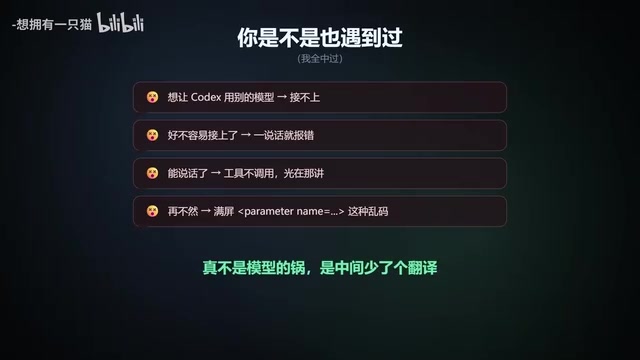
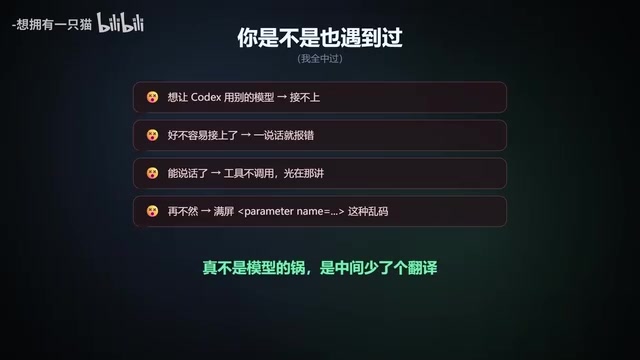
According to the creator, he encountered quite a few pitfalls while using Codex and Cursor: language barriers in the interface led to low operational efficiency, and switching models frequently resulted in issues like "can't connect," "errors," and "tools not being invoked." He emphasized that these problems "are really not the model's fault"—they stem from friction at the toolchain configuration level.
For domestic developers, an English interface not only increases cognitive load but can also lead to misconfigurations through incorrect operations. The complexity of model switching directly affects the efficiency of multi-model comparison and flexible model selection. The creator's experience resonated with many viewers.
The "friction at the toolchain configuration level" mentioned here refers to the intermediate layer—composed of clients, proxy services, API gateways, and local configurations—that exists in the actual use of AI programming assistants, beyond the capabilities of the large models themselves. Codex typically refers to the OpenAI Codex series models or their derivative programming assistants, while Cursor is an AI code editor that integrates multiple large models; both allow users to connect different models via API keys or custom endpoints. When users switch models, they need to change parameters such as endpoint addresses, model names, and authentication methods—any mismatch can result in connection failures, garbled returned content, or tool calls not being recognized. These issues are unrelated to model reasoning capability; they arise from misalignment in protocol compatibility, character encoding, and session persistence mechanisms within the configuration chain.
What Is CCX Plus?
CCX Plus is referred to by the creator as "that translator." Its core function is to provide localization support and simplify the model switching process. According to the video, users simply install CCX Plus, "toss it aside and forget about it," and then select it in Codex to complete model switching. This "install and forget" design philosophy lowers the barrier to entry.
The creator summarized why he has used CCX Plus long-term: it connects reliably, doesn't produce garbled text, doesn't interrupt, doesn't require fiddling, and configuration changes take effect immediately. These features may seem basic, yet they are precisely the weak points of many tools in localization and proxy scenarios.
The phrase "toss it aside and forget about it" actually describes the operating mode of a local proxy or intermediate-layer tool: the tool runs in the background as a persistent process or local service, exposing an interface compatible with Codex/Cursor. Users simply point the model endpoint in their client to this local address. Localization is typically achieved by intercepting and replacing interface text or injecting language packs, while model switching relies on the proxy layer to uniformly manage authentication and routing for multiple upstream APIs. Since changes occur at the proxy layer rather than in the client itself, configuration updates take effect without restarting the client—this is the common technical approach behind the "configuration changes take effect immediately" experience.
Why Is It Worth Trying?
Based on the creator's feedback, the value of CCX Plus lies in stability and immediate effect. Localization without garbled text means character encoding is handled properly; no interruption indicates reliable connection persistence; and immediate effect of configuration changes saves the hassle of restarting or waiting. For users who need to frequently switch models for testing or development, these details can significantly improve workflow smoothness.
As a side note, the video content is primarily personal experience sharing and does not cover CCX Plus's technical implementation details, compatibility scope, or security information. Viewers should assess the tool's source and risks themselves before trying it.
"No garbled text" is an easily underestimated metric in Chinese development environments. When AI programming tools transmit code, comments, and Chinese prompts, if the proxy layer does not handle UTF-8 encoding correctly—or performs improper escaping and truncation on request bodies—Chinese characters may become garbled, code indentation may be disrupted, or even JSON parsing may fail. Similarly, "no interruption" involves connection keep-alive and timeout retry strategies. In scenarios with frequent multi-model switching, the proxy needs to maintain stable session channels to avoid rebuilding connections on every switch. Although these details don't concern model capability, they directly determine whether a tool can enter daily development workflows.
Summary
The need for localization and model switching in Codex and Cursor is real. CCX Plus addresses this scenario in a lightweight way and earned the creator's recommendation for its "connects reliably, no garbled text, no interruption" experience. If you're also troubled by similar issues, you might want to keep an eye on how this small tool performs in practice.
Related articles

AI Comic Drama with WorkBuddy from Scratch: A Step-by-Step Skill Pack Installation Guide
Learn how to create AI comic dramas with WorkBuddy from scratch. This guide covers installation, Skill pack import and invocation, plus a script generation demo with manual revision tips to get you through the first step from script to storyboard.

WorkBuddy Agent Runs the Entire GEO Database Mining Pipeline with a Single Prompt
WorkBuddy agent automates GEO database mining: from data search and curation to batch correction, differential analysis, co-expression networks, feature gene screening, and immune infiltration—a single prompt generates a complete bioinformatics report, greatly lowering the barrier to bioinformatics analysis.

PC Memory Wasted? Hacker News Debates Centralized Data Centers
Hacker News users argue that personal computer memory is wasted and should be centralized in data centers, sparking debate on centralized vs. distributed computing resource allocation. This article analyzes the logic behind the claim, the costs of centralization, and new tensions in memory resource allocation in the AI era.