Codex Beginner's Guide: Four Forms & A Deep Comparison of the Top 3 AI Coding Tools

Codex's four forms explained — App is best for beginners and front-end devs; use all three big tools together.
This article compares Codex and Claude Code across pricing, stability, and capability focus, while also covering Codex's four usage forms. The standalone App form offers the most complete experience and lowest barrier to entry, especially for front-end developers and beginners. Codex edges out Claude Code on API cost and stability, with stronger UI and visual interaction output; Claude Code excels at logical correctness and back-end tasks. The final recommendation: master all three — Cursor, Claude Code, and Codex — to stay adaptable across different team environments and development scenarios.
Codex in Four Forms: From Plugin to Standalone App
As AI coding tools evolve at a rapid pace, Codex has expanded from a single usage mode into four distinct forms — CLI (terminal), web-based, plugin, and the newly released standalone App. Many developers first encounter Codex through its plugin form, embedded into popular development tools as a code assistant — and that remains the most common entry point.
That said, the App form is the one most worth recommending. Among all four, the App offers the most complete feature set and the highest level of integration. It can run independently while also working alongside traditional IDEs like VS Code, making the transition smoother for developers already comfortable with IDE-based workflows.
For those newer to programming — or still learning the ropes — the App's visual interface lowers the barrier to entry significantly.
Note: The Codex referenced here is OpenAI's AI coding Agent product launched in 2025 — distinct from the earlier code completion model Codex released in 2021. It is powered by reasoning models including o3 and o4-mini. The CLI form lets developers invoke Codex directly from the terminal. The web form requires no local setup and runs entirely in the browser. The plugin form embeds Codex capabilities into mainstream IDEs like VS Code and JetBrains. And the standalone App form provides a full visual project management interface with multi-file editing, task tracking, and deep VS Code integration — currently the most feature-complete entry point available.
Codex vs Claude Code: Pricing and Key Differences
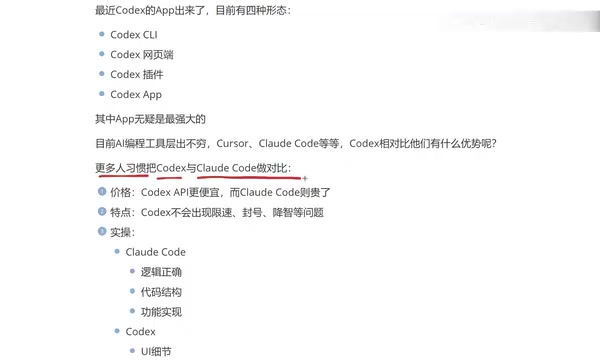
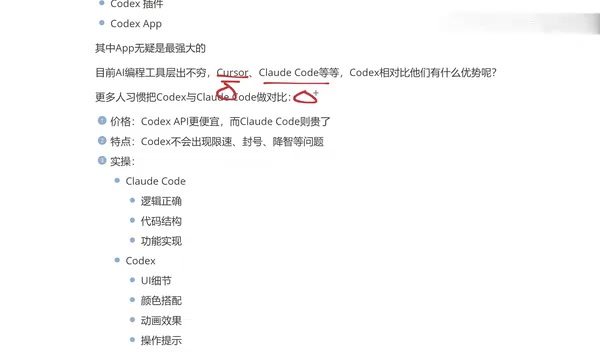
The AI coding tool landscape is crowded, but Cursor, Claude Code, and Codex are widely recognized as the "big three." Because they're often used in similar workflows, Codex and Claude Code are frequently compared head-to-head.
On pricing, Codex has notably lower API costs, while Claude Code tends to run more expensive. From a pure cost-efficiency standpoint, Codex is often the easier choice.
On stability, Claude Code can be frustrating in practice — rate limiting and account restrictions come up more often. Codex offers a more consistent experience in this regard. The question of "quality degradation" is more debated — some users report experiencing it with Codex too, but in real-world front-end development use, this hasn't been particularly noticeable, so it's worth keeping an eye on rather than drawing firm conclusions.

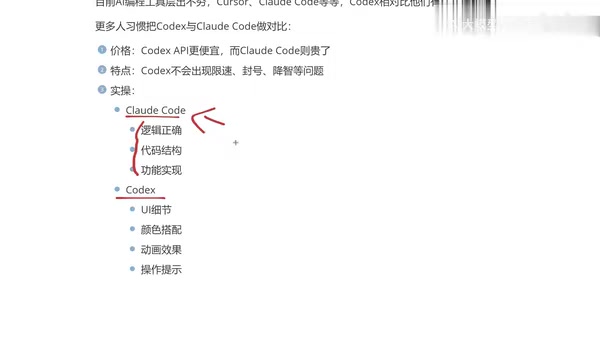
On capability focus, the two tools diverge in interesting ways: Claude Code prioritizes logical correctness, code structure, and functional implementation — which is why many back-end developers prefer it. Codex, on the other hand, pays more attention to UI details, color choices, animation effects, and interaction cues, making it a natural fit for App and front-end development.
This conclusion comes from hands-on comparison over time. As a front-end developer, Codex's attention to visual and interactive detail genuinely aligns better with day-to-day needs. That said, Claude Code likely has an edge on raw logical reasoning, which is why plenty of developers still choose it. As always, the right tool depends on the job.
Note: Claude Code is Anthropic's command-line AI coding tool, built on Claude models (primarily Claude Sonnet/Opus). It centers on terminal-based interaction and emphasizes deep codebase understanding and multi-step autonomous execution. It uses a token-based API pricing model, and costs can run high when handling complex reasoning tasks. The "quality degradation" phenomenon mentioned above is a common concern in the AI coding tool community — it refers to situations where, under high load or resource constraints, a provider silently switches to a less capable model version, causing output quality to drop without the user being aware. This issue has been reported across multiple platforms and reflects a broader service reliability challenge facing AI tools today.
Why You Should Learn All Three
Here's an important point worth emphasizing: developers are better off getting comfortable with all three — Cursor, Claude Code, and Codex — rather than locking into just one.
The reason is practical. Different companies hold licenses or accounts for different tools, and some teams mandate specific AI coding platforms. Knowing more than one means you can adapt quickly regardless of the environment you land in.
Personally, the journey started with Cursor — used it for over half a year — but the subscription costs added up, and each renewal felt like a burden. When Claude Code launched, switching to domestic model integrations brought the cost down considerably.
However, using Claude Code with domestic model integrations left something to be desired in terms of output quality. On top of that, its CLI-first design isn't particularly welcoming to developers who aren't comfortable working in the terminal. By comparison, Codex's standalone App offers a much friendlier interaction experience — and it pairs especially well with VS Code.
Note: Cursor is currently the most widely adopted AI-assisted coding IDE, built as a deep customization of VS Code, with Tab completion and inline editing at its core. It supports a range of popular models. Its paid plan (Pro, around $20/month) includes a limited quota of premium model usage, with additional charges beyond that threshold — meaning heavy users can end up paying significantly more than the sticker price, which is the context behind the "renewal pressure" mentioned above. "Integrating domestic models" refers to replacing the underlying model in tools like Claude Code via API Key substitution, swapping in compatible interfaces from domestic providers (e.g., DeepSeekAd, Qwen) to reduce costs. This approach typically trades off some degree of model capability.
Summary: Who Is Codex For?
With lower API costs, relatively stable performance, and standout attention to UI detail, Codex is an ideal choice for front-end developers and programming newcomers. Its four usage forms — especially the App — significantly lower the barrier to working with AI-assisted coding.
Of course, there's no universally "best" AI coding tool — it all comes down to matching the tool to your workflow. For back-end work and logic-heavy tasks, Claude Code may serve you better. For front-end and visually driven development, Codex tends to feel more natural. The genuinely efficient approach is to get fluent in all three, and let each one shine in the context it's built for.
Related articles

Chain of Thought Isn't Just for AI: How Humans Can Use CoT to Improve Thinking Quality
Chain of Thought isn't just a prompt trick for large models. Starting from a Hacker News discussion, this article analyzes why CoT works for human thinking too, breaks down actionable ways to transfer it, and highlights the key differences between human CoT and machine CoT.
Cloudflare Teams Up with OpenAI: Closi…
Cloudflare Teams Up with OpenAI: Closing the Loop from Vulnerability Discovery to Defense with AI
Cloudflare uses OpenAI Daybreak to investigate security vulnerabilities and generate reviewable remediation plans, while developers use Codex to boost coding efficiency and quality.

Orca Multi-Agent Orchestration in Practice: A Guide to Parallel Collaboration with Claude and Codex
Orca is Stable AI's free open-source agent workbench supporting 34 agents like Claude Code and Codex in parallel. Learn its Git worktree isolation, multi-model orchestration, and mobile management.