Codex Beginner's Guide: Installation, Registration, and Subscription for Users in China

Step-by-step guide to installing OpenAI Codex and subscribing to ChatGPT Plus from China via WeChat Pay.
This guide covers everything you need to get started with OpenAI Codex — an AI agent that goes beyond chat to directly execute tasks like writing code, managing files, and deploying projects. It breaks down four installation options (desktop client, IDE plugin, CLI, and web app), explains how users in China can subscribe to ChatGPT Plus or Pro via WeChat Pay using WildAI, and walks through Codex's core features including permission levels and model selection.
If you're still only using ChatGPT's chat interface for Q&A, you're probably leaving a lot of OpenAI's latest model capabilities on the table. For the same subscription price, Codex can unlock productivity that — according to one Bilibili content creator — may be dozens of times greater than a pure chat workflow. This article provides a comprehensive overview of what Codex is, the differences between its four installation methods, and a complete walkthrough for users in China to subscribe via WeChat Pay.
What Is Codex, Exactly?
Codex is an AI Agent tool built by OpenAI. AI Agents are a key concept in artificial intelligence — they refer to intelligent systems that can perceive their environment, make autonomous decisions, and take actions to achieve goals. Unlike traditional AI chatbots, agents have three core characteristics: autonomy (completing tasks independently rather than just offering suggestions), reactivity (perceiving and responding to environmental changes in real time), and goal-directedness (planning and executing multi-step tasks around the user's objectives). In software development, agents can call APIs, operate file systems, and run command-line tools — translating natural language instructions into real actions. This leap from "conversational AI" to "executive AI" marks a pivotal shift from AI as a decision-support tool to AI as an actual productivity tool.
One misconception worth clearing up: although Codex originally entered through the coding use case, it has long since evolved beyond a pure code tool. It's now a versatile assistant capable of handling everything from writing code and documentation to video production. OpenAI's model development has followed a path from GPT-3 to GPT-4 and then to more specialized models. Codex was originally a code-generation model fine-tuned on GPT-3, launched in 2021 to power GitHub Copilot. The "Codex" referred to today is actually OpenAI's newly launched agent platform, integrating the latest GPT-4 series models (for example, "GPT-5.5" mentioned in some contexts likely refers to reasoning-enhanced models like o1 or o3). The core innovation of this platform lies in deeply integrating large language models (LLMs) with Tool Calling, a Code Interpreter, and file operation capabilities — expanding AI from pure text generation to real system-level operations.
The fundamental difference between Codex and regular ChatGPT comes down to agency. ChatGPT mostly tells you how something should be done, leaving the actual execution to you. Codex, on the other hand, can directly open folders on your computer, create files, run programs, search the web, operate a browser, and even commit to a code repository and deploy to production when a task is complete.
In short: ChatGPT is a consultant. Codex is an executor who can actually get things done. That distinction determines a completely different level of value density in a real workflow.
How to Choose Among the Four Installation Methods
Codex currently offers four ways to use it: desktop client, IDE plugin, CLI terminal, and web app. The performance difference between them is minimal and there is significant feature overlap — the key is matching the option to your workflow.
Option 1: Desktop Client (Best for Beginners)
For newcomers, the desktop client is the easiest way to get started. Open the Codex official download page, choose macOS or Windows based on your system, and download. On Mac, just grab the client directly — it's fine if you haven't decided on a working directory yet, you can change it later. The whole process requires no environment setup and no custom configuration. It's lightweight and smooth.
Option 2: IDE Plugin
Developers who already have a preferred editor can download the corresponding Codex plugin. Supported editors include VSCode, Cursor, WindSurf, VSCode Insiders, and the JetBrains family. IDE plugins are a key pathway for embedding AI capabilities into a developer's everyday workflow. VSCode is an open-source editor developed by Microsoft with a massive extension marketplace; Cursor and WindSurf are next-generation editors designed specifically for AI-assisted programming; JetBrains (IntelliJ IDEA, PyCharm, etc.) is the traditional choice for professional developers. These plugins communicate with the editor via the Language Server Protocol (LSP) to enable code completion, refactoring suggestions, and context-aware assistance.
Search for openai.chatgpt in your editor's extension marketplace to install it. Codex will appear in the sidebar and prompt you to log in with your ChatGPT account or API Key. You can reference specific files as context using @filename, and changes Codex makes will be shown as inline diffs. "Inline diff display" means the plugin marks AI-made changes directly in the code in Git diff format — developers can review and accept or reject changes line by line. This interaction model is more efficient and traceable than traditional copy-paste. Since it modifies code directly, it's recommended to create a Git checkpoint before and after each task so you can roll back if something goes wrong.
Option 3: CLI Terminal
Geeks who prefer the command line can choose the CLI terminal, which supports macOS, Windows, and Linux. CLI (Command Line Interface) is the traditional way of interacting with a computer through text commands and is deeply rooted in developer and system administrator culture. Compared to graphical interfaces, CLI offers advantages in automation scripting, low resource usage, and convenient remote operations. Unix/Linux shells (like Bash and Zsh) and Windows PowerShell are mature CLI environments. AI tools providing a CLI version means agent capabilities can be integrated into existing automation workflows — for example, calling AI for code review inside a CI/CD pipeline, or executing AI tasks remotely on a server over SSH. For keyboard-oriented users who prioritize efficiency, CLI is often more direct and effective than a graphical interface. The installation process is relatively straightforward, and CLI users can typically handle it on their own.
Option 4: Web App (Cloud)
The web app (Codex Web) is better suited for users who need to run large tasks over an extended period. You can submit tasks directly to OpenAI's servers for execution — your local machine doesn't need to stay on. The workflow is: log in via browser → connect a GitHub repository and select a runtime environment → assign a task → review changes in the Diff view, then iterate directly or create a PR.
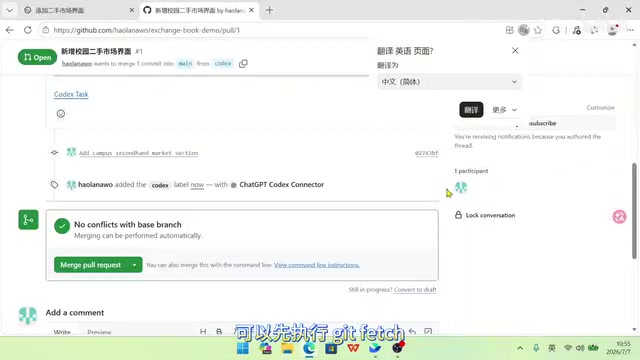
If you want to test the changes locally, run git fetch first, then use git checkout <branch-name> to pull the corresponding branch to your machine. Git is a distributed version control system and foundational infrastructure for modern software development. Core concepts include: commit (a snapshot of your code), branch (an independent line of development), merge, and PR/MR (Pull/Merge Request, a code review and merge request). git fetch retrieves updates from a remote repository without automatically merging them; git checkout switches branches or restores files. Code changes generated by AI tools should first be tested on an isolated branch, reviewed in the Diff view, and then merged into the main branch — this is standard code review practice.
Account Setup and Subscribing from China
Once installation is complete, you'll need a ChatGPT account with a Plus or Pro membership. While free accounts can now access Codex, the quota is extremely low — barely enough to complete any real tasks.
Registering an Account
Open the Codex client and click "Sign in with ChatGPT" — a browser window will automatically open to the OpenAI login page for registration. While domestic Chinese email addresses can work, using an overseas email is still recommended for security reasons. After registration, the browser will automatically redirect back to Codex to complete the login.
Subscribing via WeChat Pay
How can users in China complete a subscription by just scanning a WeChat QR code? The creator's recommended solution is WildAI — a well-established all-in-one subscription tool that supports WeChat Pay and can be used to subscribe to mainstream overseas AI services including ChatGPT Plus/Pro, Claude, Gemini, and xAI.
OpenAI's ChatGPT service comes in multiple tiers: Free (limited usage), Plus ($20/month, priority access to new features and GPT-4), and Pro ($200/month, unlimited use of advanced models like o1). The key difference between Plus/Pro membership and the API pay-as-you-go model is that membership is a fixed monthly fee with unlimited conversations, while the API charges per token (a unit of text) and requires you to manage your own quota. For heavy users, membership is generally the better deal. A token is the billing unit for LLMs — roughly 0.75 English words or 0.5 Chinese characters, with GPT-4 costing about $0.03 per 1K tokens.
The process is: register on WildAI → select ChatGPT Plus or Pro → choose a subscription duration (monthly top-ups are recommended) → scan to pay with WeChat. It typically activates within three minutes.
One thing to note: Codex also supports logging in via an OpenAI API Key, but since API access is pay-per-use and often lacks the latest models, it's not a great deal compared to a Plus/Pro membership.

If you trigger a secondary phone verification during registration due to network environment issues, don't panic — the creator has a detailed guide on receiving verification codes with a domestic Chinese phone number that you can refer to.
Core Features and Permission Modes
Once logged in, let's take a quick tour of the main features. At the top of the left sidebar are four function buttons: search conversation history, manage scheduled tasks, plugin and skill management, and more. In the center are two lists — Projects and Conversations. Use Projects for anything that involves generating files (PPT, Excel, Word, code, images); use Conversations for casual questions.
The input box supports natural language commands in Chinese: type @ to bring up a list for selecting plugins or specifying files, and type $ to trigger installed skills. The plus button in the bottom left lets you upload files. There's also a Plan Mode — when enabled, Codex will only discuss the approach with you without actually modifying any files, so you can lock in the plan before execution begins.
Three Permission Levels
Because Codex can directly modify files on your computer and run commands, it introduces the concept of "permission levels." File system access permissions for AI Agents are a critical security topic. A "sandbox" is an isolation mechanism that restricts a program to only accessing specified directories. Codex's three-tier permission model reflects a balance between security and convenience:
- Default (Safest): Codex can only operate within the current project folder. Connecting to the internet, running commands, and accessing external files all require your confirmation first. This is similar to a strict sandbox where every sensitive operation requires user approval.
- Auto-Review: Codex judges risk on its own — safe operations are executed directly, while risky ones prompt for confirmation. Smoother than the default. This introduces heuristic risk assessment where the AI decides whether an operation is safe.
- Full Access: Codex can operate on your computer without repeatedly asking. Most efficient, but highest risk. This is essentially sandbox-free — the risk of AI mistakes (like recursively deleting important files or executing malicious commands) is at its greatest.
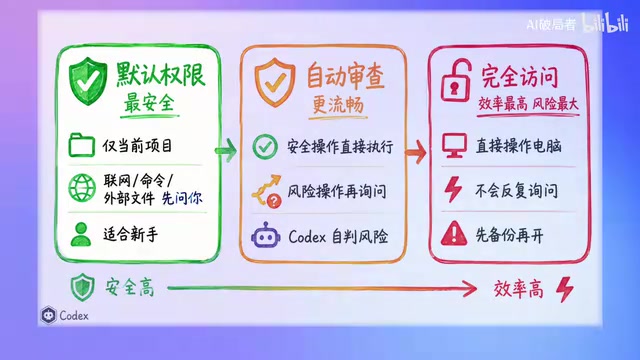
Similar permission controls are common in mobile apps (iOS/Android permission requests) and enterprise software (Role-Based Access Control, RBAC). Using Git version control as a "safety net" means that even if the AI makes a mistake, you can recover via git reset or git revert — a fault-tolerance mechanism unique to development environments. The creator's step-by-step recommendation is highly practical: use Default permissions for the first week, try Auto-Review in the second week, and only consider enabling Full Access once you're very familiar with the tool and have Git backups in place. This gradual escalation of permissions follows the Principle of Least Privilege and is a model example of AI safety practice.
Model Selection
The bottom right corner shows the current AI model and thinking intensity. Different intensity levels have different multipliers on token consumption and can be adjusted at any time. "Thinking intensity" or "reasoning depth" (such as the Chain of Thought in the o1 model) multiplies token consumption because the model performs multiple rounds of internal reasoning. GPT-5.5 is currently the strongest model and is recommended as the default — it performs best for complex code writing, refactoring, and debugging. GPT-5.4 covers the vast majority of programming scenarios. Smaller models are faster and better suited for simple tasks.
Conclusion: Starting Is What Matters Most
At this point, you have everything you need to know about downloading, registering, subscribing to, and using the basic features of Codex. The real key is hands-on practice — whether it's setting up a daily digest of industry news, batch-filling invoices into Excel, or building a website that queries external information, Codex can handle it.
The value of a tool only becomes clear through use. Rather than watching from the sidelines, pick a real project and start now — put the agent's execution power to work for you.
Related articles

WorkBuddy Beginner's Guide: How AI Agents Automate Office Tasks
WorkBuddy tutorial: learn how this desktop AI agent workbench automates files, organizes data, and generates documents, compared with LLMs and Codex, plus a beginner path and cost analysis.

Doubao Work in Practice: Three Modes That Let AI Actually Get Work Done
Doubao Work practical tutorial: from chat mode to Work Mode Lite and Pro, explaining the logic for choosing among three modes with real office task demonstrations. Even complete beginners can learn to use an AI agent to handle local files, organize materials, and generate documents.

AI Agent Runs the Entire GEO Database Mining Workflow with a Single Prompt
Based on a Bilibili creator's demo, this article explains how the WorkBuddy AI agent completes GEO database mining with a single prompt: automatically searching datasets, downloading and organizing data, batch correction, differential analysis, WGCNA, machine learning-based feature gene screening, and regulatory network construction, and generating a complete analysis report.