Codex Beginner's Step-by-Step Tutorial: Zero-Basics AI Programming in Practice

Using Codex as an example, this explains the difference between Agents and chatbots and provides a zero-basics hands-on workflow.
Based on a Bilibili creator's Codex tutorial, the article first clarifies the essential difference between Agents and chatbots: Doubao and DeepSeek are more like consultants offering advice, while Agents can call tools and independently complete complex tasks—they are employees who can take action. Agents rely on three major components: the brain (large model), memory, and tools, with tools being the most critical. Agents on the market fall into three categories: general-purpose Agents, specialized Agents, and building platforms; ordinary people seeking productivity gains should prioritize general-purpose Agents. The article then breaks down Codex's interface layout, plugin installation (Computer Use, Remotion, Higgs Field, etc.), the choice between Plan mode and Goal mode, three permission levels, and model selection strategy, and uses a hands-on demo of generating an MG animation from one sentence with the Higgs Field plugin to show the complete workflow loop. Finally, it offers five beginner pitfall tips.
Codex Beginner's Step-by-Step Tutorial: Zero-Basics AI Programming in Practice
AI tools are getting more and more competitive, but most people are still stuck at the chatbot stage of "ask a question, get an answer." What can really do work for you is an Agent. In the latest tutorial, a Bilibili creator explains the difference between Agents and ordinary AI tools very clearly: Doubao and DeepSeekAd are more like AI consultants, while an Agent is an employee who can take action on your behalf. This tutorial uses Codex as an example to walk through the complete process from installation to hands-on practice, and points out the pitfalls that 90% of beginners fall into.
What Exactly Is an Agent? How Is It Different from a Chatbot?
According to the Bilibili creator, an Agent is exactly what the word means—an entity with intelligence that can do work. It can think proactively, call tools on your computer, and independently complete complex tasks.
For example: you want to make a PPT from materials. With Doubao, you need to upload the materials one by one, and after Doubao finishes it on the server, you manually download it. An Agent is different: it reads the files itself, identifies file types, creates the PPT locally, and when it's done it notifies you and checks the result. This difference between a "consultant" and an "employee" is the starting point for understanding Agents.

An Agent can do work thanks to three key components: the brain (a large language model, responsible for understanding requirements, breaking down steps, and deciding what to do next), memory (remembering what you've said and which step the task has reached), and tools (operating browsers, folders, editing Excel/PPT, writing code). Tools are the most critical—with tools, an Agent can truly take action.
Tokens and the context window are foundational concepts for understanding an Agent's cost and capability boundaries. A token is the smallest unit of text a model processes; in Chinese, roughly one character equals about 1–2 tokens. An Agent's "memory" is not unlimited—it is constrained by the model's context window, that is, the upper limit on the total number of tokens the model can "see" at once in a single conversation. The more complex the task, the more files involved, and the longer the execution steps, the more context is consumed. Once the window is exceeded, earlier information is truncated or compressed, which is also why an Agent may "forget" the original requirements during long tasks. At the same time, the number of tokens directly determines invocation cost and response speed, so when the tutorial says "the better the results, the faster tokens are consumed," it is essentially making a trade-off among model intelligence, context usage, and cost.
Function Calling is the technical foundation that enables an Agent to turn "ideas" into "actions." A large model itself can only output text and cannot directly read or write files or click buttons. The Function Calling mechanism allows the model, when generating a response, to structurally declare "I want to call a certain tool, and these are the parameters," while an external program actually performs the operation and then passes the result back to the model to continue reasoning. An Agent's tool component is built precisely on this mechanism: Computer Use is essentially a packaged "operate the computer" function, and plugins are preset sets of tools. Understanding this makes it clear that whether plugins are fully installed directly determines the range of functions the model can choose to call, and therefore determines the upper limit of the Agent's capabilities.
There Are Three Types of Agents on the Market—Which One Should Ordinary People Choose?
The creator divides Agents into three categories:
- General-purpose Agents: Mostly products from big companies, such as Codex and other local desktop Agents, which can basically do anything once installed.
- Specialized Agents: Focused on a single high-frequency scenario, such as video editing, image editing, or e-commerce operations, ready to use out of the box with foolproof operation. The creator mentions that this type of Agent allows everyone to build one themselves, and calls 2026 the first year of Agents.
- Agent-building platforms: Agents built here have fixed workflows, with AI participating at key nodes.
For ordinary people who want to directly use AI to boost productivity, the creator recommends prioritizing general-purpose Agents.
Codex Hands-On: Interface, Plugins, and Conversation Modes
Codex is an AI Agent that can call various tools to complete your instructions. The interface is divided into left and right sides: the left is the capability area, where you can add various capabilities; the right is the workspace, where you issue instructions. To create a new project, just click the add button, choose a blank project, and enter a name.
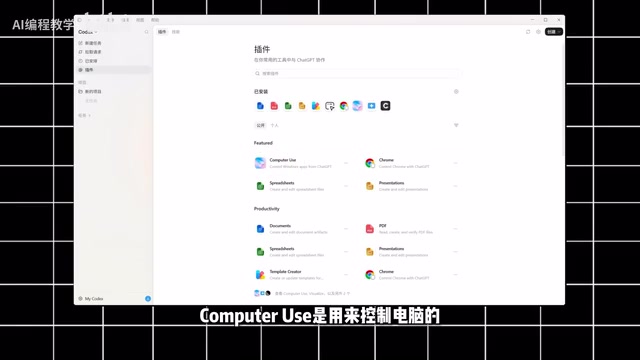
Before formal use, several settings determine efficiency. Regarding plugins, Computer Use is used to control the computer and can even operate CapCut to complete video editing, so it is recommended to install it first; Notion, Figma, and Versal are mainly used for product and website development; Remotion and Higgs Field are used for animation rendering and video generation respectively, so try to install them all.
There are two working modes in the lower-left corner of the conversation interface. Plan mode means the AI first figures out how to do it, breaks down the task, and lists the steps, suitable when you haven't thought through the specific approach yet; Goal mode means you directly give the final objective and acceptance criteria, and the AI keeps executing and continuously comparing against the goal until completion, suitable for complex tasks with clear objectives. Beginners generally just need to choose Plan mode.
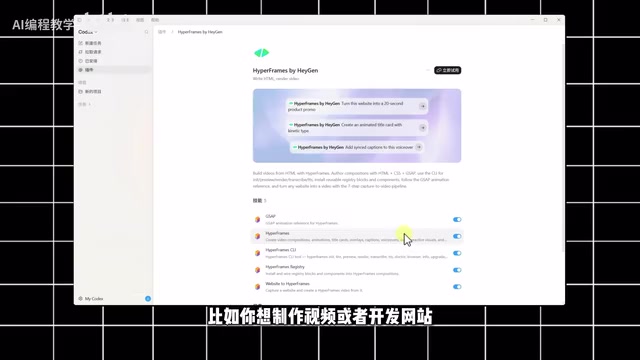
To call a plugin, simply click the plugin button to activate it. You can also upload images and documents as references. Permission settings are divided into three levels: default permissions, auto-review, and full access. The first two require your confirmation at every key node, while full access means most operations are completed automatically by the AI; beginners are advised to use default permissions. Model selection depends on intelligence level, model type, and working speed. The better the results, the faster tokens are consumed, so choose according to your needs.
Plan mode and Goal mode can be mapped to what the AI field often calls "Chain of Thought" and "goal-driven execution." Plan mode first has the model break the task into several steps and explicitly list them, which is equivalent to externalizing the reasoning process so people can check whether the direction is correct; it is suitable for scenarios where requirements are vague and human judgment is needed. Goal mode, after given acceptance criteria, lets the model autonomously loop through "execute—compare—correct," which is closer to the closed-loop control of an autonomous Agent; it is more efficient but also carries greater risk of deviation. Regardless of the mode, the permission level is a safety valve: default permissions and auto-review pause for confirmation before key operations, while full access skips confirmation. Once the model misjudges, it may cause irreversible file changes, so it is reasonable for beginners to start with conservative permissions.
Hands-On Demo: Generating an MG Animation from One Sentence
The creator did a hands-on test with the Higgs Field plugin. After adding the animation-making plugin, entering a prompt in the dialog box and submitting it, Codex began working automatically: analyzing requirements, splitting tasks, and executing step by step. Basically no operation was needed in the middle—just wait a few minutes. The creator rated the final MG animation as "not inferior at all to making it manually."
The value of this demo lies in showing the complete closed loop of an Agent workflow—prompt, plugin activation, automatic execution, and result delivery.
Beginner Pitfall Checklist
Based on the tutorial content, several easy-to-fall-into pitfalls are worth noting:
- Using a chatbot as an Agent: The capability boundaries of the two are completely different, so distinguish them first before choosing a tool.
- Not installing all plugins: Computer Use, Remotion, Higgs Field, and others each have their own roles; missing one means missing one capability.
- Turning on full access right away: Beginners should use default permissions and retain confirmation at key nodes for greater safety.
- Choosing the wrong mode: If your approach is unclear, choose Plan mode; if your goal is clear, choose Goal mode.
- Blindly chasing results with models: The better the results, the faster tokens are consumed, so match the model to task difficulty.
The tutorial finally mentions that more advanced玩法 will be updated later, including AI programming, automatically building websites, developing mini-programs, and office automation. For zero-basics users, getting this introductory process running first is more important than chasing new features.
Related articles

Gemini 4 Neon Leak: A Potential Strong Contender Against Opus 5.5
A Hacker News thread suggests Gemini 4 Neon looks like an Opus 5.5 competitor. This article unpacks the product positioning behind this community signal, shifts in the top-model competitive landscape, and what it means for developers' model selection strategy.

Claude Fable 5.2's Self-Authored Short Film 'Fable' Sparks Discussion
A short film 'Fable,' credited to Claude Fable 5.2 for script, visuals, and directing, appears on Hacker News. This article analyzes the significance of full-pipeline AI creation, community reactions, and what it means for content creators.

Anthropic IPO Pricing: A Signal of AI Giants Going Public
Anthropic's IPO pricing draws attention. This article analyzes its potential impact on AI industry valuation, commercialization paths, and the competitive landscape, and highlights public-market expectations and challenges for AI companies.