Codex Browser Use Hands-On: How Powerful Is GPT 5.5's AI Browser Automation Really?

Hands-on testing of GPT 5.5-powered Codex Browser Use for AI-driven browser automation, app testing, and cross-device control.
This article provides a comprehensive hands-on review of OpenAI Codex's Browser Use and Computer Use features, powered by GPT 5.5. It covers how AI can autonomously test web apps, automate browser workflows, organize desktop files, and even control iPhones via mirroring — while offering honest assessments of current limitations including reliability concerns and the paradox of AI testing its own code.
Codex Browser Use Hands-On: How Powerful Is GPT 5.5's AI Browser Automation Really?
When AI stops just writing code for you and starts opening browsers, clicking buttons, filling out forms, and hunting bugs like a real person — Codex's Browser Use feature is making that a reality. OpenAI's latest Codex desktop app, powered by GPT 5.5, packs browser automation, desktop control, and automated testing into a single platform. This article walks you through what it can actually do, how to use it, and where you should be cautious.
This article is based on an early access video by an overseas creator. Source: BiliBili
What Makes Codex, Powered by GPT 5.5, Deserve the "Super App" Title?
The term "super app" has been overused in the tech world, but Codex might actually earn it this time.
OpenAI's Codex app, powered by GPT 5.5, covers an impressively wide range of capabilities: data analysis, app development, game building, web development, browser control, and computer control — basically every development scenario you can think of.
The most telling indicator is a single number: GPT 5.5 scored 78.7% on the OS World Verified benchmark. This benchmark specifically measures whether AI can autonomously operate real computer environments — opening software, managing files, browsing the web. For context, the most advanced models in early 2024 typically couldn't even hit 20% on this test. In just over a year, capability has multiplied several times over.
But let's be realistic — there's still a 21.3% failure rate. In a real production environment, roughly one in five operations could go wrong, which wouldn't pass any QA standard. Still, the direction is right, and GPT 5.5 also delivers significantly higher token efficiency — completing the same tasks with fewer computational resources. That's the real killer feature, because it directly determines whether these AI Agents can move from expensive lab experiments into everyday developer workflows.
Browser Use Plugin: AI Writes Code, Then Tests Its Own Code — A Complete Loop
This is the most elegant design in the entire product.
OpenAI introduced Browser Use as a plugin within Codex, and what it does is straightforward: after the AI writes frontend code, it opens a browser itself and clicks through tests like a real user. It can see everything a user sees while simultaneously checking console logs and network logs, automatically fixing any issues it finds.

In traditional software development, there's a massive gap between writing code and testing it — developers have to switch mental modes after writing code and think about "how would a user interact with this?" Codex completely closes this loop: the same AI serves as both architect and quality inspector.
But there's a deep paradox worth noting — having the same AI both write and test code is essentially "grading your own homework." It might systematically overlook bugs in its own cognitive blind spots. True software quality assurance requires adversarial thinking, not self-consistent verification. This loop looks beautiful but might create a dangerous false sense of security.
Computer Use Speed Up 42%: AI GUI Operations Finally Match Human Speed
Due to the massive influx of users leveraging browser and computer control features, OpenAI made a major performance update: Computer Use running speed improved by 42%.
What does this mean? This is the first time a large language model can operate graphical interfaces at speeds comparable to a real person. All previous AI automation was stuck at a bottleneck: API-driven automation was fast but brittle (breaks when interfaces change), while GUI-driven automation was flexible but too slow to be practical. That bottleneck is now being broken.
Another noteworthy point is the pricing strategy: Codex is completely free, supporting both Windows and macOS. OpenAI is clearly using Codex as a user growth hook, feeding model iterations with massive amounts of real usage data. You think you're using a free tool, but you're actually doing free data labeling for OpenAI. This isn't charity — it's the smartest data flywheel strategy.
Step-by-Step Tutorial: How to Enable Browser Use in Codex
The process isn't complicated:
- Install and log in: Download the Codex desktop app, log in, and keep default permissions on the main panel
- Create a project: Create a new project first
- Install the plugin: Use the slash command (
/) or click the plus button, go to the Plugins panel, find the Browser Use plugin and install it - Enable the feature: Enable Browser Use through the
appcommand in the chat panel - Start using it: You can have it send emails, test checkout flows, open web pages, and more
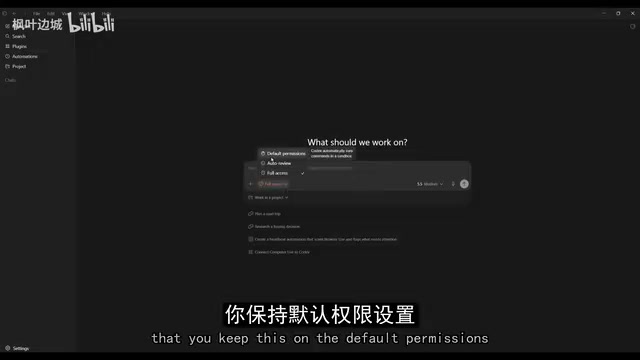
A practical tip: For simple tasks, set the intelligence level to Low to save your rate limit quota. However, there's a hidden risk — when developers habitually lower AI intelligence levels to save quota, they're trading quality for quantity. It doesn't matter for simple tasks, but once the habit forms, critical tasks might also get "downgraded."
Automated Workflows: Scheduled AI News Scraping to PDF Generation
Codex isn't just a one-off tool — it can set up automated tasks.
The demo case works like this: set up a daily automated task that uses Browser Use to scrape the latest AI topics, then generates a PDF news summary. The system automatically scrapes all sources and lists citations at the bottom of the page.
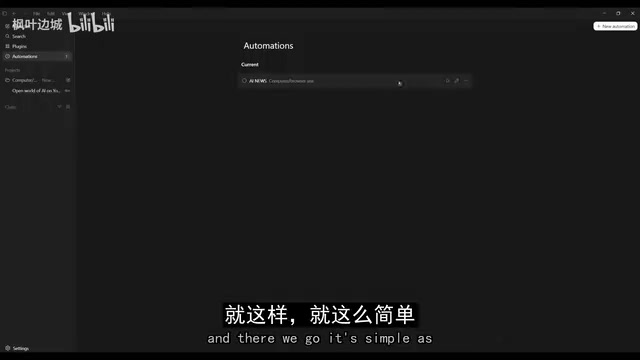
This case precisely hits the pain point of our information-anxiety era. But let's be honest: the real value of such automated workflows isn't in "being able to do it" but in "doing it reliably." What happens when webpage structures change? When source sites block scraping? When generated summaries hallucinate?
Demos are always perfect, but automated tasks in production environments need 99.9% reliability. The real test isn't the Day 1 wow factor, but whether it still runs stably on Day 30.
Using AI to Test AI-Built Apps: Notes App Hands-On
The creator used GPT 5.5 to generate a simple notes application, then used Browser Use to test user flows. The results are genuinely impressive:
- AI automatically interacts with all app components — adding new tasks, writing notes
- Completes full registration and login flows, clicking every button like a real user
- Catches bugs, console errors, and network errors
- The entire testing flow can be set to run automatically on a schedule
This is a genuine godsend for indie developers and small teams: previously you needed dedicated QA engineers for end-to-end testing, now AI can walk through entire user flows in minutes.
But there's an overlooked risk: AI testing paths are based on assumptions about "reasonable user behavior," while real users excel at doing unreasonable things. A three-year-old randomly tapping the screen might find more bugs than AI systematically testing a hundred times. AI testing is a supplement, not a replacement.
Game Testing Demo: Having AI Play Chess to Find Bugs
To demonstrate that Browser Use can test more complex applications, the creator built a chess game and had the AI play it to verify functionality.

You can prompt Browser Use to do specific things: capture console bugs, check for visual anomalies, verify whether specific features work correctly. AI can identify and fix issues in real-time, achieving "standby automatic bug fixing" — a genuinely exciting concept.
But honestly, chess is a system with completely deterministic rules, so of course AI can test it well. Real game testing needs to verify physics engine edge cases, multiplayer synchronization with network latency, and memory leaks under extreme operations — these are what keep game developers up at night. Demonstrating with the simplest scenario while implying it handles the most complex situations is a classic move in all AI product demos.
Computer Use: Having AI Organize Your Desktop Files
The Computer Use feature isn't limited to browsers — it can directly control the desktop. The demo case has AI organize a mess of thumbnail files on the desktop, and AI quickly renamed and organized all files numerically from 1-15.
Frankly, this is the most "using a sledgehammer to crack a nut" moment in the entire demo. A ten-line shell script could handle this, yet they deployed GPT 5.5-level AI for visual recognition and mouse clicking.
But OpenAI's real intent in showing this case isn't solving file organization — it's saying: "Look, our AI can operate everything on your computer." This is paving the way for more complex desktop automation scenarios — imagine AI operating Excel, Photoshop, or even legacy enterprise software without APIs. The real value lies there, not in renaming 15 files.
Cross-Device Control: Codex + iPhone Mirroring Bridges to Mobile
This might be the most forward-looking part of the entire video.
The creator combined Codex with Apple's iPhone Mirroring feature, letting GPT indirectly control iPhone apps through a Mac. Precision is slightly lower than native desktop operations (since it relies entirely on visual clicking and screen interpretation), but the results are surprisingly good.

Applicable scenarios include:
- Mobile app UX testing
- Social media auto-publishing
- Message management and email sending
- Mobile game testing
- iOS UI testing
When AI can operate seamlessly across browser, desktop, and mobile, the concept of "apps" itself gets redefined. Users no longer need to learn each app's interface — just tell the AI what you want to do.
But behind those words "slightly lower precision" lies an enormous engineering challenge: mobile touch precision requirements are far higher than desktop, and a single pixel of deviation can hit the wrong button. Plus, this approach relies entirely on Apple's iPhone Mirroring feature, building core capability on someone else's platform feature — Apple can change policies or restrict third-party access at any time.
Codex vs Claude Code: Should You Switch?
The creator strongly recommends switching from other tools to Codex, believing its usage limits are better than competitors like Claude Code. He also declared he wasn't sponsored by OpenAI.
Objectively speaking, Codex is doing something competitors haven't achieved: integrating coding, testing, browser control, and desktop control into a unified platform. Claude Code might be comparable in pure coding ability, but in the dimension of "full-stack automation," Codex is currently a step ahead.
However, the vision of "completing all tasks on a single platform" is itself a double-edged sword — it means putting all your eggs in OpenAI's basket. When the platform has issues, raises prices, or changes strategy, your entire workflow gets held hostage.
Final Thoughts
What we're witnessing isn't just a tool upgrade, but a fundamental paradigm shift in software development. AI has evolved from "helping you write code" to "writing code, testing code, fixing bugs, operating browsers, organizing files, and even controlling your phone."
But amid the excitement, there's a question every developer should seriously consider: When we hand both building and verification to the same AI, who verifies the AI itself?
The ultimate promise of AI Agents isn't making programmers obsolete, but making everyone a programmer. Until that day truly arrives, treating AI as a powerful assistant rather than a mindless replacement is probably the wisest stance.
Related articles
 Product Reviews
The Programmer's Desk Setup Guide: Building a Workspace That Feels Like Home
Discover how programmers build productive, comfortable workspaces. From multi-monitor setups to ergonomic design, explore the desk philosophy that drives focus and flow.
 Product Reviews
Qoder vs Cursor Real-World Comparison: Which $20/Month AI IDE Is Better?
Hands-on comparison of Qoder vs Cursor AI IDEs: Agent autonomy, human interaction count, and architecture decisions. Qoder needed only 2 interactions vs Cursor's 8.
 Product Reviews
Cursor Cloud Agent Demo: Eliminating Bottlenecks Across the Entire Software Development Lifecycle
Deep analysis of Cursor's Cloud Agent demo showing how cloud VMs, automated test artifacts, and a full-chain control plane systematically eliminate human bottlenecks across the software development lifecycle.