Codex + Claude Code Development in Practice: Master AI Programming with a 28-Episode Full Course

A 28-episode Bilibili course uses engineering thinking to systematically cover Codex and Claude Code from installation to enterprise deployment.
This 28-episode Codex + Claude Code Development in Practice course centers on engineering thinking, starting with Codex core capabilities and covering installation, CLI slash commands, agents.md architecture, code nullability governance, MCP protocol integration, enterprise application development, multi-agent collaboration, and plugin system integration. Using a Rog customer service system as a comprehensive case study, it helps developers build boundary awareness and integration methodology for AI programming assistants in enterprise scenarios—suitable for all levels.
AI programming assistants are reshaping the way developers work. A video series on Bilibili titled Codex + Claude Code Development in Practice: Full Course covers the complete path from environment setup to enterprise-grade project deployment across 28 episodes. The value of this course lies not only in teaching tool operations, but in its attempt to answer a key question: when AI programming assistants evolve from "toys" into "productivity tools," what kind of engineering mindset do developers need to build?
Codex Core Capabilities and Engineering Design
The course opens by focusing on breaking down Codex's core capabilities. Unlike the many tutorials on the market that stop at the "install and use" level, this course chooses to start from engineering design philosophy, discussing Codex's positioning and boundaries in real projects.
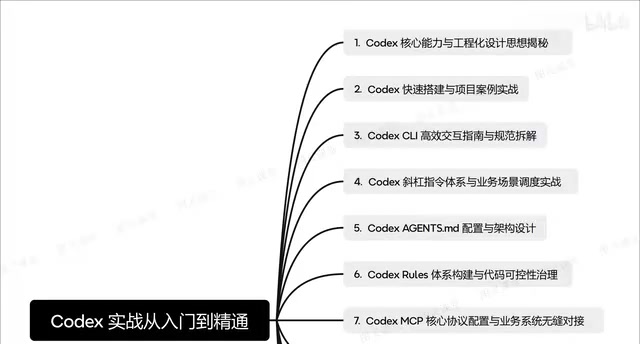
This angle is worth noting. Current discussions around AI programming tools tend to focus on "can it write code," while overlooking "how do we make the code AI writes controllable, maintainable, and integrable." By putting engineering thinking first, the course ensures that subsequent installation, configuration, and project practice are all built on a methodological foundation rather than being a mere tool operation manual.
From Installation to Practice: Project-Driven Learning
The second section moves into hands-on territory, covering Codex's quick installation and project setup. The course emphasizes building a complete project from scratch rather than demonstrating fragmented code snippets.
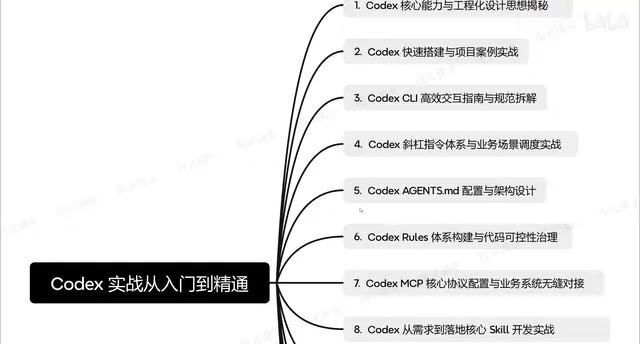
This project-driven teaching approach is especially important when learning AI tools. Many of Codex's capabilities—such as MCP protocol integration and multi-agent collaboration—only demonstrate their value within a complete project. Demonstrating a single feature in isolation makes it hard for learners to understand its actual role in the development workflow.
CLI Efficient Interaction and the Slash Command System
The third and fourth sections dive into the Codex CLI interaction guide and slash command system. The course not only introduces the commands themselves, but also discusses how to integrate commands with business scenarios to form reusable work patterns.
CLI interaction is the high-frequency entry point for using Codex. Mastering the systematic use of slash commands directly impacts development efficiency. The course's approach here is to embed command learning into specific business scenarios rather than listing a catalog of commands—the latter may look comprehensive, but learners struggle to build connections between commands and judge when to use them.
Slash Commands are a shortcut command mechanism beginning with / in CLI-based AI programming assistants, used to trigger specific operations or switch context modes. In Claude Code and Codex CLI, slash commands cover file operations, context management, model switching, task decomposition, and more. Unlike natural language prompts, slash commands have deterministic semantics—the same command triggers the same behavior every time, making them better suited for standardized workflows. Systematically mastering slash commands means developers can quickly invoke the right toolchain based on task type, rather than relying on lengthy natural language descriptions every time. Binding commands to business scenarios to form reusable command combinations is a practical path to improving AI programming efficiency.
agents.md Configuration and Code Nullability Governance
The fifth section discusses agents.md configuration and architecture design, while the sixth section focuses on building the Codex Lulus system and code nullability governance.
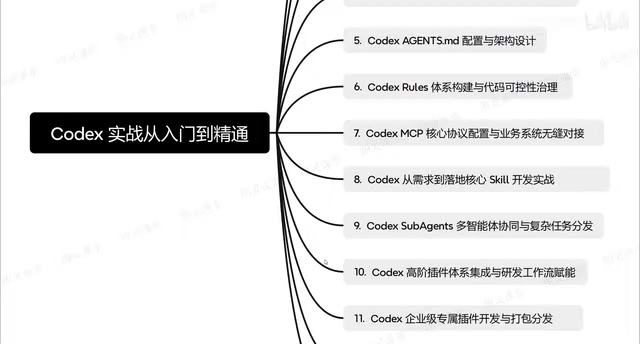
agents.md is the core configuration file for Codex, and the quality of its writing directly determines how the AI assistant behaves in a project. The course provides guidance at the architecture design level here, helping developers understand how to define AI responsibility boundaries and behavioral specifications through configuration files. Code nullability governance is an easily overlooked yet profoundly impactful topic—if AI-generated code lacks proper nullability design, it may introduce hard-to-troubleshoot issues at runtime.
Code nullability governance refers to the systematic strategies and practices for managing nullable types in code. In languages that support nullable type annotations—such as TypeScript, Kotlin, and Swift—whether a variable is allowed to be null directly affects runtime safety. AI-generated code often neglects nullability design—for example, directly accessing properties of objects that may be null, or failing to annotate nullable return types in function signatures. These issues are not easily exposed at compile time but can cause null pointer exceptions at runtime. The core of nullability governance lies in: ensuring AI-generated code is defensively designed at the type level through static analysis tools (such as TypeScript's strictNullChecks), code convention agreements, and AI configuration directives. Pre-defining nullability rules in agents.md can effectively constrain AI output quality and reduce later troubleshooting costs.
MCP Protocol Integration and Business System Connection
The seventh section explains Codex MCP core protocol configuration and how to modify business systems for seamless integration. MCP (Model Context Protocol) is the bridge connecting AI assistants with external tools and data. Mastering its configuration means Codex can connect to enterprise-owned systems rather than being limited to local code editing.
The course then demonstrates how to build enterprise-grade applications from requirements to deployment, as well as the implementation of Sabor Agents multi-agent collaboration and complex task distribution.
MCP (Model Context Protocol) is a protocol standard open-sourced by Anthropic in late 2024, aimed at unifying the interaction between AI models and external data sources and tools. Before MCP, developers had to write separate tool invocation interfaces for each AI assistant, resulting in extremely high adaptation costs across platforms. By defining standardized server-client communication specifications, MCP allows AI assistants to connect to databases, APIs, file systems, and other external resources in a plug-and-play manner. For Codex, MCP configuration means it can break through the boundaries of local code editing—directly reading enterprise internal API documentation, querying database schemas, and invoking internal microservices—thereby taking on a more complete role in real development workflows. Understanding MCP's architectural model is a key prerequisite for mastering Codex enterprise-grade integration.
Plugin System and Development Workflow Integration
The tenth and eleventh sections focus on advanced plugin integration and enterprise-specific plugin development. The course covers the complete pipeline from plugin development and scheduled execution to packaging and distribution.
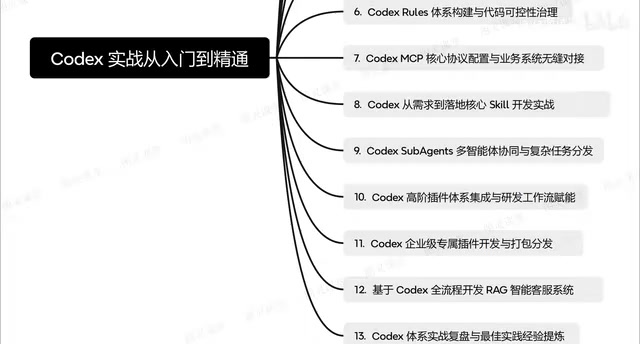
The plugin system is a key step for Codex moving from a general-purpose tool to enterprise customization. The course not only covers how to develop plugins, but also how to package them for external use—which has practical significance for team collaboration and tool accumulation. Integration with development workflows answers a real-world question: AI programming assistants should not be isolated tools, but should be embedded in developers' existing workflows.
Full-Process Practice and Best Practices Review
The course concludes with a comprehensive case study: building a Rog intelligent customer service system from scratch, tying together all the knowledge points covered earlier, followed by a project review and distillation of best practices.
This structure of "knowledge modules + comprehensive project + review summary" is better suited for learning AI programming tools than a linear listing of features. The capability boundaries and application methods of AI tools update extremely quickly—specific operational steps may become outdated soon, but engineering thinking and project deployment experience have a longer lifecycle.
Who This Course Is For
From the content structure, this 28-episode course covers the complete gradient from beginner installation to enterprise-grade applications. For developers just getting started with Codex and Claude Code, the first few sections can quickly establish a cognitive framework; for developers who already have experience but lack engineering practice, sections on agents.md architecture design, MCP protocol integration, and the plugin system provide advanced directions.
Competition among AI programming assistants is shifting from "whose model is stronger" to "whose toolchain is more complete and whose engineering capabilities are more solid." This course precisely addresses the learning needs of the latter dimension.
Multi-Agent Orchestration refers to an architectural pattern in which multiple AI agents with different responsibilities divide work and collaborate to accomplish a goal in complex tasks. In the context of Codex, Sabor Agents represents the engineering implementation of this approach: one agent handles requirements analysis, another handles code generation, and a third handles testing and verification. They distribute tasks and aggregate results through predefined protocols. The advantage of this architecture is that each agent can be optimized for a specific domain, avoiding the performance degradation that occurs when a single model switches between multiple tasks. The difficulty of multi-agent collaboration lies not in the capability of individual agents, but in task decomposition strategy, communication protocol design, and conflict resolution mechanisms. For enterprise-grade applications, this means AI programming assistants evolve from "solo combat" to "team collaboration," capable of undertaking more complex, longer-chain development tasks.
One-line Summary
This 28-episode Bilibili course uses engineering thinking as its thread to systematically cover the complete path of Codex and Claude Code from installation to enterprise-grade deployment.
Paragraph Summary
This 28-episode Codex + Claude Code Development in Practice: Full Course takes engineering thinking as its core thread, starting from breaking down Codex's core capabilities and then covering installation and setup, the CLI slash command system, agents.md architecture configuration, code nullability governance, MCP protocol integration, enterprise application development, multi-agent collaboration, and plugin system and development workflow integration. The course adopts project-driven teaching, using a Rog intelligent customer service system as a comprehensive hands-on case study to tie together all knowledge points, and concludes with a review and distillation of best practices. Its value lies not only in teaching tool operations, but in helping developers build boundary awareness and integration methodology for AI programming assistants in enterprise scenarios—suitable for developers at different stages from beginner to advanced.
Related articles

Chain of Thought Isn't Just for AI: How Humans Can Use CoT to Improve Thinking Quality
Chain of Thought isn't just a prompt trick for large models. Starting from a Hacker News discussion, this article analyzes why CoT works for human thinking too, breaks down actionable ways to transfer it, and highlights the key differences between human CoT and machine CoT.
Cloudflare Teams Up with OpenAI: Closi…
Cloudflare Teams Up with OpenAI: Closing the Loop from Vulnerability Discovery to Defense with AI
Cloudflare uses OpenAI Daybreak to investigate security vulnerabilities and generate reviewable remediation plans, while developers use Codex to boost coding efficiency and quality.

Orca Multi-Agent Orchestration in Practice: A Guide to Parallel Collaboration with Claude and Codex
Orca is Stable AI's free open-source agent workbench supporting 34 agents like Claude Code and Codex in parallel. Learn its Git worktree isolation, multi-model orchestration, and mobile management.