Codex Hands-On Tutorial: From Installation to Enterprise-Grade Applications

Codex turns codebases into interactive architecture diagrams and provides 18 Agent use cases to accelerate AI-driven development.
Codex is an AI coding tool rapidly gaining traction in the developer community. Its standout feature is transforming entire codebases into interactive architecture diagrams that clearly visualize module relationships and call chains, while also supporting direct jumps back to source code for verification. A comprehensive tutorial covers everything from installation to MCP service integration and enterprise-grade Skills setup, complemented by 18 real-world Agent use cases across different domains — offering a structured learning path for developers and teams looking to deeply embed AI into their development workflows.
Codex Is Becoming a Developer Productivity Powerhouse
From quirky experiments like using Codex to auto-reply to messages, to projects that have topped developer charts for days on end, Codex has been generating serious buzz in the developer community. As shared by content creators on Bilibili, the tool's core value lies in making complex projects transparent — like giving your codebase an X-ray, rendering the entire project structure in a single, clear view.
For developers inheriting unfamiliar code or maintaining legacy systems, understanding a project's overall architecture is often the most time-consuming part of the job. Codex aims to solve this pain point at its root, compressing what might take days of exploration into a single visual map.

Turning Your Project Into an Interactive Architecture Diagram
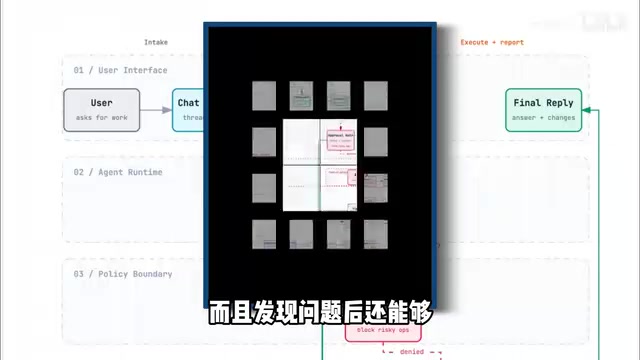
Codex's most talked-about capability is transforming an entire codebase into an interactive architecture diagram. Core modules, request flows, and call relationships are all clearly laid out — no more jumping between files to manually trace inter-module dependencies.
The real value here is reducing cognitive overhead. In a traditional workflow, understanding the call chain of a mid-to-large project means constantly switching between files. An architecture diagram makes those relationships immediately obvious. Whether you're a new hire getting up to speed quickly or a seasoned engineer hunting down cross-module bugs, this can dramatically cut down on the time spent orienting yourself.

Jump Back to Source Code for Verification
Visualization doesn't mean losing touch with the actual code. Codex lets you jump directly back to the original source when you spot something worth investigating, creating a two-way link between macro view and micro code. This is particularly important — the architecture diagram helps you find the right direction, while the source code lets you verify the details. Together, they prevent the information distortion that can come from relying solely on abstract diagrams.
A Complete Path from Installation to Enterprise Use
The tutorial covers the full Codex workflow — from basic installation to enterprise-level use cases — with the goal of making it accessible even for beginners. Key sections include:
- Environment setup: Package installation and deployment process
- Model switching: Flexible switching between underlying models based on task requirements
- MCP service integration: Connecting to Model Context Protocol services to extend tool capabilities
- Skills setup: Building custom skills to fit specific workflows
The tutorial is designed to be progressive — get the basics running first, then gradually move into customization and enterprise use. For teams looking to integrate AI coding tools into their real development workflows, model switching and MCP services are essential advanced capabilities.
MCP (Model Context Protocol) is an open protocol spearheaded by Anthropic, designed to establish a standardized communication interface between AI models and external tools or data sources. Think of it as the "USB port" of the AI world — whether it's database queries, file system access, or third-party API calls, anything packaged according to the MCP protocol can be invoked by the model in a unified way, without writing custom adapter logic for each tool. In the context of Codex, integrating MCP services means connecting code analysis capabilities with enterprise internal systems — such as CI/CD pipelines, issue trackers, and internal documentation — expanding the AI's contextual awareness from a single codebase to the entire development ecosystem. For teams with customization needs, MCP is the key technical enabler for "deeply embedding AI into the development workflow" rather than leaving it at the level of occasional suggestions.
18 Agent Use Cases Across Different Domains
Beyond the core tool tutorial, the author has also compiled 18 real-world Agent use cases spanning different industries. These examples cover multiple domain scenarios, letting developers "step directly into an Agent's shoes" and reference working implementations to quickly build their own intelligent agents.
The value of these use cases lies in providing reusable patterns. Rather than starting from scratch, referencing proven examples significantly reduces trial-and-error costs. For developers who want to explore AI Agent applications but aren't sure where to start, a case library like this is an excellent entry point.
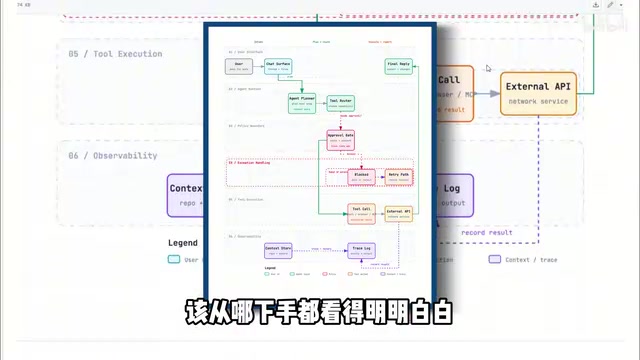
AI Agents differ from ordinary AI conversations in one fundamental way: autonomy and the ability to act. A typical AI model is "passively responsive" — you ask, it answers. An Agent, by contrast, can autonomously break down goals, plan steps, invoke tools, and adjust strategy based on intermediate results until a complex task is complete. In a software development context, a coding Agent can independently handle an entire workflow: read requirements → search relevant code → generate a patch → run tests → submit a PR — all without human intervention at each step. The 18 domain-specific use cases mean these Agent patterns have already been validated in real workflows across different industries, potentially covering areas like data processing, automated testing, documentation generation, and monitoring and alerting — giving developers a proven blueprint for building Agents from the ground up.
Who Should Try Codex
Overall, Codex is well-suited for several types of users: developers who need to quickly understand an unfamiliar codebase, teams looking to improve project maintenance efficiency, and beginners who want to systematically learn AI coding tools. It integrates project understanding, code verification, and agent construction into a single workflow, lowering the barrier to AI-assisted development.
That said, actual results will still depend on project complexity and use case. Architecture diagrams work best for well-structured projects, and whether visualization can fully reproduce the real logic of highly coupled, poorly organized legacy code remains to be verified in practice. Developers who are interested are encouraged to start with small projects, following the official documentation, and gradually evaluate how well it fits into their own workflow.
Related articles

AtomicRL: Atomic Reinforcement Learning Solves Long-Horizon Robotic Manipulation Challenges
AtomicRL introduces atomic reinforcement learning with Semantic-Aware Policy Optimization (SAPO) and Bottleneck-Adaptive Targeted Exploration (BATE) to solve credit assignment and subtask imbalance in VLA long-horizon robotic manipulation, outperforming PPO on LIBERO-LONG and CALVIN and improving real-world task performance by 21.3%.

Gaussian Mixture NPMLE Achieves Minimax Optimality: A New Breakthrough in Hellinger Distance
Recent research proves that the nonparametric maximum likelihood estimator (NPMLE) for Gaussian mixtures achieves the minimax optimal rate log(n)/n in squared Hellinger distance, with faster rates under compact support and empirical Bayes applications.

Quasipolynomial-Time Breakthrough for ℓ∞ Contractions: New Algorithm for Stochastic Games
The paper proposes a quasipolynomial-time algorithm for ℓ∞ contraction mappings, using a boosting argument to geometrically shrink the search region and deriving that simple stochastic games can be solved in quasipolynomial time, bringing new breakthroughs to algorithmic game theory and complexity theory.