Codex Hands-On Tutorial: Generating MG Animation with an AI Agent in One Sentence

A hands-on guide to using the Codex AI Agent to generate an MG animation with a single sentence.
This tutorial covers the complete Codex AI Agent workflow: from creating a project and configuring key plugins like Computer Use and Remotion, to choosing between Plan Mode and Goal Mode, setting permissions and models, and a hands-on demo of generating a professional-grade MG animation in just one sentence.
What Exactly Is Codex?
If you're only going to learn one AI tool, Codex deserves to be at the very top of your priority list. It's fundamentally different from the conversational AI we typically interact with—tools like ChatGPT and Claude are more like "smart advisors": you ask, they answer. Codex, on the other hand, is positioned much closer to a genuine AI employee (AI Agent).
Its core strength isn't in "answering" but in "executing." You give it a command, and it proactively calls various tools, breaks down the task, and step by step actually gets the job done. In other words, you're no longer the person staring at the screen doing manual operations—you're the "commander" who sets goals and reviews results.
This shift in role from "tool" to "employee" is precisely the core logic behind the current wave of AI Agents. This article, based on a beginner-friendly hands-on tutorial, walks through the complete Codex workflow—from creating a project and configuring plugins to actually generating an animation.
Interface and Projects: The Capability Zone + The Workspace
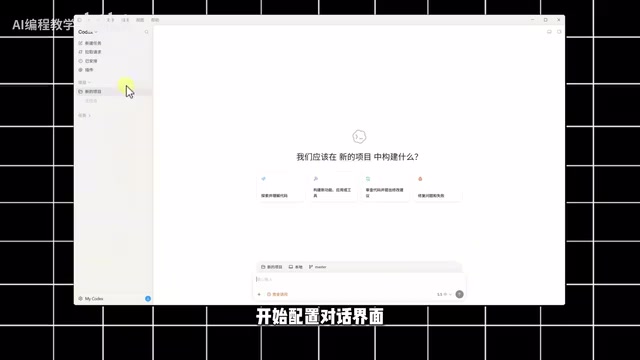
Codex's interface design is quite intuitive, divided into left and right sides:
- The left side is the Capability Zone: This is where you add various "capabilities" to Codex—essentially equipping this AI employee with its own toolbox.
- The right side is the Workspace: The core area where you issue commands and interact with the AI.
Creating a new project is simple: click the add button → select "Create Blank Project" → enter the project name. Once done, the newly created project will appear on the left.
It's worth noting that there are a few settings you must get right before you start using it—configuring them correctly can directly double your efficiency. This is a key step that many beginners tend to overlook, yet it directly determines your experience.
Plugin Configuration: Giving Your AI Employee "Hands and Feet"
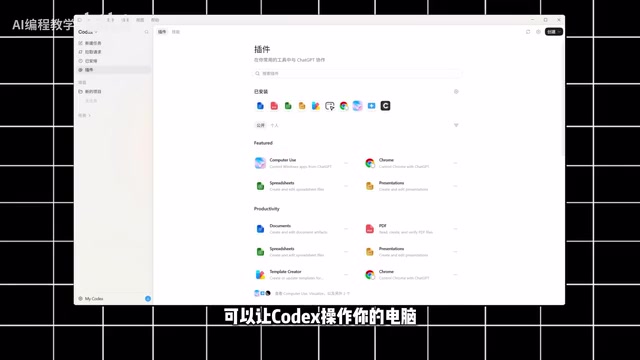
Plugins are the direct source of Codex's capabilities. The tutorial recommends focusing on installing the following types of plugins:
Recommended Core Plugins
- Computer Use: Lets Codex directly operate your computer—it can even call editing software to complete video editing. This is the most worthwhile plugin to install first, because it bridges the connection between the AI and your local environment.
- Notion, Figma, Verso: Mainly used for product design and website development scenarios.
- Remotion / Hexfield-type plugins: Used for animation rendering and video generation respectively—the stars of this MG animation demo.

The basic principle is: install every plugin you might need. Plugins determine which tools Codex can call for a specific task—the more you install, the broader the range of tasks it can cover. Once installation is complete, return to your project to enter the conversation configuration stage.
Conversation Configuration: How to Choose Between the Two Working Modes?
Click the bottom-left corner of the dialog box, and you'll see the two working modes Codex offers. This is key to understanding how the Agent works.
Plan Mode
In Plan Mode, the AI figures out how to do it first: it breaks down the task, lists the execution steps, and then proceeds step by step. If you haven't yet worked out the specific approach, Plan Mode is the safe choice. For most everyday scenarios, it's more than sufficient.
Goal Mode
Goal Mode is more "aggressive": you directly tell the AI the final goal and acceptance criteria, and it keeps executing and continuously comparing results until the task is complete. This mode is better suited for tasks with clear goals and complex processes.
In short, Plan Mode emphasizes the "process," while Goal Mode emphasizes the "result." Beginners are advised to start with Plan Mode, and then try Goal Mode once they're familiar with how the AI executes.
Permissions and Models: Balancing Safety and Efficiency
Three Permission Levels
Codex offers three permission levels, which essentially trade off between "safety" and "degree of automation":
- Default Permission: Requires manual confirmation at every key step—the safest option and the top choice for beginners.
- Auto Review: Also confirms at key steps, sitting somewhere in the middle.
- Full Access: Most operations are completed automatically by the AI—the most efficient, but requires enough trust in it.
Three Dimensions of Model Selection
Model selection mainly depends on three factors: intelligence level, model type, and working speed. There's a basic rule here—the better the results, the faster the token consumption usually is. So there's no need to blindly chase the most powerful model; choose based on task complexity to avoid unnecessary compute waste.
Additionally, when calling plugins, you can also upload images and documents as references, helping the AI understand your intent more precisely.
Hands-On Demo: Generating an MG Animation in One Sentence
Once the configuration is ready, it's time to put it to the test—having Codex create an MG (Motion Graphics) animation demo video.

The process is surprisingly simple:
- Add the animation-creation plugin (such as Remotion);
- Enter your prompt in the dialog box;
- Click submit and wait for the result.
What follows is the moment to witness the power of the AI Agent—it will automatically analyze the requirements, break down the tasks, and execute them step by step. The entire process requires almost no intervention from you; just wait a few minutes.
The final animation is every bit as good as something made by hand. For ordinary users without professional animation skills, this means the barrier to creation is dramatically lowered—one sentence gets you a near-professional-quality MG animation.
Final Thoughts: The Right Mindset for the Agent Era
The value of AI Agents like Codex isn't in replacing any specific piece of software, but in changing how humans collaborate with AI. You shift from being the executor to being the commander—handing repetitive, tedious operations over to the AI while focusing on defining goals and reviewing results.
For those who want to get up to speed quickly, here's a recommended starting path:
- First, fully configure your plugins (especially Computer Use);
- Start with Plan Mode + Default Permission to build trust in how the AI executes;
- Use small tasks (like generating MG animations) to run through the complete workflow, then gradually advance to more complex scenarios like website development and office automation.
As Agent capabilities continue to mature, AI programming, automated website building, mini-program development, and office automation will all become everyday operations within reach. "Completing a job with a single sentence" is moving from demo to reality.
Related articles

Disaster and Glory of the Apollo Program: The History We Must Revisit Before Returning to the Moon
From the fatal Apollo 1 fire to Apollo 8's daring lunar orbit to Apollo 11's successful landing—revisiting the disasters, fears, and compromises of the Apollo program and their lessons for today's return to the Moon.

Netflix Trust Exercise Turns Into Firing Trap: Where Are the Boundaries of Corporate Trust?
A Netflix employee was fired after sharing private info in a trust exercise. We analyze the risks of corporate trust exercises and how employees can protect themselves.

AMD CDNA5 Architecture Deep Dive: Technical Evolution and the AI Computing Competition Landscape
Deep analysis of AMD's CDNA5 architecture covering Chiplet packaging upgrades, HBM memory evolution, and low-precision compute optimization, examining how AMD challenges NVIDIA's AI chip dominance.