Codex in Practice: A Deep Dive into Core Capabilities and Engineering Design Philosophy

Codex has evolved from a code generator into a full-stack AI engineering partner built on spec-driven development, Agent loops, and context engineering.
This article systematically covers OpenAI Codex's core capabilities and engineering design philosophy. Codex supports three usage modes — App, CLI, and IDE plugin — and handles the full development lifecycle from code generation and comprehension to review, debugging, and automated development. Its standout features include multi-threaded parallel task processing and Git Worktree-based collaboration. On the engineering side, Codex replaces prompt engineering with Specification-Driven Development (SDD), uses AGENTS.md to constrain AI behavior, simulates human development workflows through an Agent task loop, and ensures code quality via three-layer context optimization: vector retrieval, AST awareness, and external tool integration.
OpenAI's Codex has long outgrown its identity as a simple AI coding assistant. This tool is evolving from a straightforward code generator into a full-stack engineering partner capable of handling end-to-end development tasks. Based on a comprehensive Codex hands-on tutorial, this article breaks down its core capabilities and underlying engineering design philosophy — helping developers build a holistic understanding of the tool.
Three Ways to Use Codex
Codex originally launched as a CLI-only tool, where early users would type codex in the terminal to enter the command-line interface. Through successive iterations, it has since evolved into three primary usage modes: the App client, the CLI, and IDE plugin integrations.
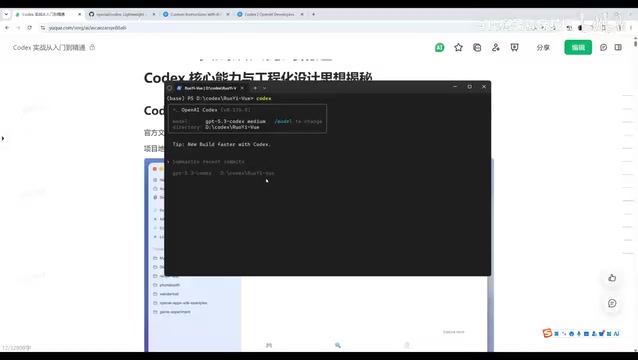
The plugin mode lets you install the Codex extension directly in Cursor or VS Code, integrating it seamlessly into your coding workflow. For scenarios where you need to both edit code and invoke Codex simultaneously, the plugin approach offers smoother context switching. The standalone App or CLI modes work just as well, though switching between windows adds a bit of friction. Each mode has its place, and developers can mix and match based on their preferences.
Core Capabilities: From Writing Code to Automated Development
In its foundational role as an AI coding tool, Codex is already remarkably capable. Code generation is the baseline — through conversation and slash commands, you can generate code or scaffold an entire project architecture.
Beyond generating code, Codex shines at code comprehension. When inheriting a legacy codebase or analyzing an unfamiliar open-source project, you can use Codex commands to read and understand the team's development logic and implementation details. Code review is also significantly streamlined — what used to require manually examining each commit diff in a PR and flagging vulnerabilities can now be handled by the built-in /review slash command, which quickly surfaces potential issues in uncommitted code or open PRs and suggests fixes.
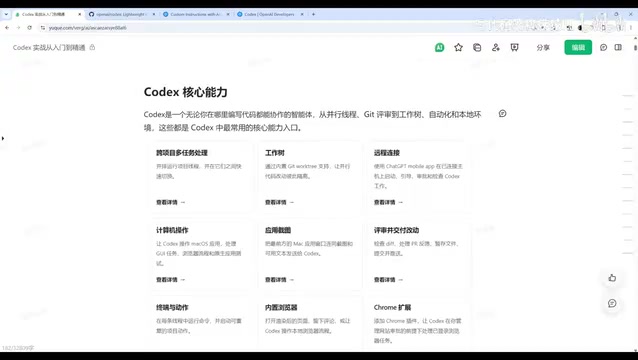
Online incident troubleshooting is another practical use case: feed Codex an error log with stack traces, and it can quickly identify the problematic code and propose targeted fixes. Automated development tasks represent one of the most frequently used scenarios — Codex can walk through the full cycle from requirements analysis and feature decomposition to core development, testing, and debugging.
Multi-Task and Parallel Development
One of Codex's most powerful features is its multi-threaded task processing. During a continuous session, it spins up multiple threads to complete tasks in parallel and merges the results. This means you can have it simultaneously work on multiple projects — for instance, analyzing details across three different projects and then consolidating the output into a single table. Even across multiple projects, it handles everything in parallel.

The built-in Git Worktree mechanism further enhances collaborative development. Traditional multi-developer workflows require branch isolation and eventual merging. With Worktree, you can attach multiple working directories to the same repository, each running in isolation, enabling parallel development without maintaining a sprawling branch hierarchy.
Codex also supports remote access — you can control Codex on your desktop remotely from your phone. On macOS, it can invoke applications, operate browsers, install Chrome extensions, take screenshots, perform image recognition, generate and edit images (via multimodal models), and even extend into video generation through the plugin system. The key insight is not to view these as isolated features, but to chain them into a complete, end-to-end workflow.
Git Worktree is a native Git feature that allows a single local repository to check out multiple working directories simultaneously. Each directory can independently reside on a different branch or commit state, while sharing the same object database — eliminating the need to clone the repository multiple times. Compared to the traditional approach of maintaining multiple clones for parallel development, Worktree saves disk space and naturally keeps all working directories in sync with the same remote. In Codex's multi-task scenarios, each parallel Agent thread can be bound to its own Worktree — ensuring code changes don't interfere with one another, while allowing results to be integrated via standard Git merge workflows once tasks are complete. This makes "one developer advancing multiple feature branches simultaneously" or "multiple AI Agents co-developing the same project" a manageable engineering practice, rather than something that depends on complex branching strategies.
Engineering Design Philosophy: From Prompt Engineering to Spec-Driven Development
The biggest difference between Codex and tools like Cursor lies in its underlying engineering philosophy. Several key principles are being put into practice in meaningful ways.
Specification Engineering Replaces Prompt Engineering
Developers used to rely on carefully crafted prompts to drive AI behavior, but natural language descriptions often lead to fuzzy task boundaries. Codex emphasizes specification-driven programming — what the industry calls SDD (Specification-Driven Development). The idea is to write the spec first: using AGENTS.md, skill documents, and other structured artifacts to define a "goal + boundaries + acceptance criteria" framework before asking AI to generate code. The quality improvement is significant.
The tutorial references an internal OpenAI case study based on Harness Engineering practices: a three-person team, working over roughly five to six months, generated over one million lines of code and shipped to production — with almost no human-written code, only human-defined constraints, standards, and goals. This is specification-driven development at its most powerful.
SDD (Specification-Driven Development) is a development methodology that explicitly documents requirements, boundary conditions, and acceptance criteria before any coding begins. Unlike traditional prompt engineering — which relies on developers describing tasks ad hoc in natural language, leaving room for AI misinterpretation — SDD requires establishing machine-readable, structured specifications first, then using those specs to constrain AI-generated behavior. AGENTS.md is the central file in the Codex ecosystem for capturing these specifications, defining architectural principles, code style conventions, module responsibility boundaries, and testing acceptance criteria. This approach is philosophically aligned with Design by Contract in software engineering: first clarify input constraints, expected outputs, and invariants — then talk about implementation. For AI systems, structured specifications make implicit knowledge explicit, drastically reducing rework caused by ambiguous interpretation. This is the fundamental reason a million-line codebase could ship with minimal human intervention.
Agent Task Loop Simulates Human Engineering Workflow
Codex no longer just generates code and stops there. Through an Agent loop mechanism, it simulates the development process of a human engineer. It first creates a plan, waits for engineer confirmation, and then proceeds to implementation. Authorization modes range from human-in-the-loop confirmation to fully autonomous execution.
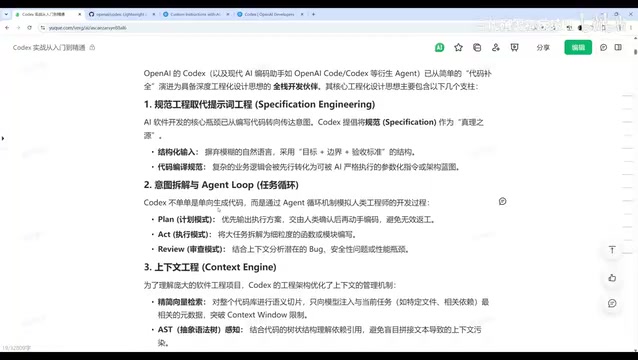
During execution, the Agent decomposes tasks down to individual functions and modules, performs rigorous review against the full context, and analyzes potential bugs, security issues, and performance bottlenecks. Because these validation passes run internally before output, the code users receive is largely ready to run as-is. This is the fundamental reason code quality from AI programming tools has improved so noticeably this year.
Three-Layer Context Engineering Optimization
Codex applies fine-grained context management across three layers. The first is streamlined vector retrieval: the codebase is semantically chunked, and only files and dependencies relevant to the current task are injected — rather than loading the entire project at once — preventing context overflow. The second is AST (Abstract Syntax Tree) awareness: by understanding the tree structure of code, Codex resolves dependency and reference relationships, eliminating the compilation errors and missing module issues that plagued early tools which didn't analyze dependencies. The third is external tool integration: in bypass mode, Codex can directly invoke compilers, debuggers, and package managers, automatically reading error logs, pinpointing root causes, and applying fixes when code fails.
An AST (Abstract Syntax Tree) is a tree-shaped data structure generated by a compiler after parsing source code. Each node represents a syntactic construct — such as a function definition, variable reference, or expression. Traditional text similarity retrieval cannot understand structural semantics: for example, if function A calls function B, a pure text match may miss that dependency entirely, causing the AI to modify A without knowing B's signature and generating uncompilable code. With AST awareness, Codex can trace dependency chains across related modules, ensuring that critical references aren't omitted when building context. This capability is especially critical for large monolithic projects, where implicit coupling between modules was the primary cause of "hallucinated fixes" in early AI coding tools. AST awareness fundamentally closes the semantic gap between the injected context and the actual code structure.
Building a Holistic Mental Model Is the Prerequisite for Using Codex Well
Understanding Codex's capability landscape and engineering philosophy is the foundation for using it effectively. Once you're clear on what's already integrated, you can proactively incorporate these features into your development workflow — rather than staying fixated on any single function. Specification-driven development, the Agent task loop, and context engineering together form the three pillars that set Codex apart from traditional AI coding assistants. With a grasp of this underlying logic, developers can truly unlock Codex's full potential for productivity.
Related articles

Black Forager Alexis Nelson: From Foraging to Publishing, Happy Snacking, Don't Die
Black Forager Alexis Nikole Nelson visits Talks at Google, sharing her journey from childhood plant walks with her mother to publishing the cookbook Happy Snacking, Don't Die!, revealing the racial and land history behind foraging's rise and fall in America.

How to Present Your Ideas Effectively: Three Types of Revelation Talks
Revelation talks are the most direct way to convey ideas. This article breaks down three types — Wonder Walk, Dynamic Demo, and DreamScape — with classic examples from David Gayo, Michael Pritchard, and Sylvia Earle.

Modern Web Guidance: Letting AI Write Native Declarative Dialog Popovers
Google's Modern Web Guidance makes AI coding assistants prefer native declarative dialog capabilities over repetitive JavaScript event listeners, measurably cutting boilerplate code.