Modern Web Guidance: Letting AI Write Native Declarative Dialog Popovers

Google's Modern Web Guidance makes AI coding assistants generate declarative native code instead of piling up event listeners.
Google's Modern Web Guidance project aims to make AI coding assistants prioritize native browser declarative APIs. Using a comment dialog as an example: without the guide, the agent generates four separate event listeners; with it, the agent retrieves guide entries, hits declarative dialogue pop-over control, and switches to attributes like command and commandfor, keeping only a closeby fallback. The guided version uses less code, reducing boilerplate and compatibility patches—though fallbacks remain essential.
Native browser capabilities are being rediscovered by AI coding assistants. Google's Modern Web Guidance project aims to make AI prioritize platform-native declarative APIs when generating code, rather than continuing to pile up familiar JavaScript event listeners.
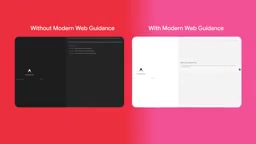
The Problem: AI Writes "Legacy Code" by Default
Most AI coding assistants today reflexively produce a set of event-listener logic when implementing interactions like popovers, drawers, and tooltips. Take the comment dialog demonstrated in this article: the agent on the left, without Modern Web Guidance enabled, placed a plain button in index.html and then generated four independent event listeners in JavaScript, each handling opening the dialog, closing it, and implementing the light dismiss behavior triggered by clicking the overlay.
This approach works, but it's verbose, highly repetitive, and typically leaves accessibility, focus management, and browser compatibility for the developer to handle manually. The browser platform has long offered a more concise declarative solution—the AI just doesn't know about it.
How Modern Web Guidance Intervenes in the Generation Flow
The core mechanism of Modern Web Guidance is mounting a "capability guide" onto the agent's reasoning process. There are two ways to enable it: turn it on directly in the anti-gravity environment, or install it into the coding agent you're using.
In the actual demo, the operator explicitly invokes the skill via a slash command, ensuring the agent retrieves the corresponding guide entry. The demo prompt is "implement this new feature," after which the agents on the left and right take different paths: the left agent reads the project directly, plans, and starts writing code; the right agent first searches Modern Web Guidance for dialogue-modal-related entries, hits a guide titled declarative dialogue pop-over control, and pulls it into the context window.
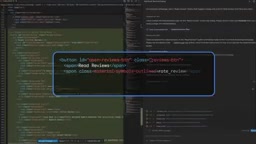
This step is the critical fork in the entire flow. Once the guide is hit, the agent's generation behavior shifts from "common patterns in its training data" to "patterns recommended by the platform."
The Context Retrieval Mechanism of AI Coding Assistants
Before writing code, mainstream coding agents typically follow a reasoning flow that includes: reading project files, planning implementation steps, retrieving available tools or knowledge bases, and only then outputting code. Modern Web Guidance intervenes at the "retrieval" stage—it mounts a structured, continuously maintained platform-capability guide as a skill the agent can call, and the agent only pulls it into the context window when a prompt or task semantic matches a guide entry.
This on-demand injection has two benefits: it avoids irrelevant knowledge crowding out the limited context budget, and it turns "use the platform-recommended pattern" into an explicit retrieval action rather than relying on the model stumbling onto it in its training data. Hitting the guide or not directly changes the agent's generation path: without a hit, it tends to reuse common patterns from training data (often large blocks of event listeners); with a hit, it shifts to a native, declarative implementation. Understanding this mechanism explains why the same prompt "implement this new feature" produces radically different code once the guide is installed.
Declarative Dialog: Replacing Event Listeners with Attributes
The code generated after enabling the guide differs in just two files.
On the HTML side, the button is no longer a bare element. It carries invoker command attributes tied to command, along with commandfor and a close value. These attributes directly tell the browser which dialog the button controls and whether the action is open or close, allowing the browser to safely handle the dismiss behavior.
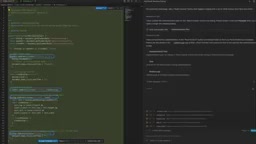
On the JavaScript side, the generated content reduces to a closeby fallback to keep functionality available in browsers that don't yet support the feature. Switching between modal and light dismiss no longer requires any additional event handlers.
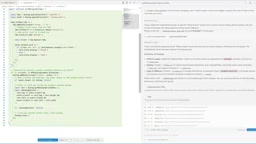
Both sides ultimately run with similar results, but the guided version runs less code. This orientation—less code, more reliance on the platform—is exactly the direction Modern Web Guidance is trying to push.
What Are invoker command Attributes?
HTML invoker command attributes (including command and commandfor) are the declarative control mechanism the browser platform provides for buttons (typically <button>). Developers don't need to hand-write JavaScript event listeners—they just declare commandfor="target-element-ID" on the button to specify the controlled element, and use values like command="show-modal", command="close", or command="toggle-popover" to describe the action to perform. The browser then automatically handles the behavior, with built-in focus management, accessible semantics, and necessary security checks.
For dialog scenarios, commandfor points to the <dialog>'s id, and command="close" means clicking that button closes the dialog. These attributes fold toggle logic that used to be scattered across scripts back into the markup itself, so when an AI agent generates code, guiding it to prefer invoker command can significantly reduce event binding, DOM queries, and state-synchronization code. Note that this feature is still rolling out gradually, with uneven support across mainstream browsers—which is why the article's example keeps a closeby fallback.
How light dismiss and closeby Work
light dismiss refers to the interaction pattern where a popover closes automatically when the user clicks outside the dialog (on the overlay) or presses the Esc key—native browser support for modal behavior. In the past, implementing this effect typically required listening for click events on document, checking whether the click target lies outside the dialog boundary, and then manually calling the close method.
The new HTML closeby attribute (for <dialog>) hands that judgment back to the browser: once closeby is declared, the browser automatically closes the dialog when the user clicks outside it or presses Esc, with no JavaScript required. It belongs to the same class of platform capabilities as closedby, used to uniformly control the popover's close triggers. Because browser coverage for closeby isn't yet complete, the fallback code generated in the article's example precisely detects whether the attribute is supported and reverts to the traditional event-listener approach when it isn't—striking a balance between progressive enhancement and usability.
What This Actually Means for Developers
The most valuable part of this demo isn't how to write a particular dialog—it's that it reveals a viable path for making AI output hew closer to platform best practices. The ceiling of an AI coding assistant largely depends on whether it can get the right context; training data is full of outdated or suboptimal patterns, and expecting the model to just "intuit" native APIs isn't realistic.
By attaching a continuously maintained guide, an agent can retrieve first and then write, handing repetitive boilerplate logic back to the browser. For teams maintaining large front-end projects, this means less custom event-management code, fewer compatibility patches, and implementations closer to the progressive-enhancement philosophy. Of course, the fallback mechanism still can't be omitted—the guide itself bakes detection of closeby support into the generated result, showing that "using native capabilities" and "ensuring usability" are not in conflict.
If you're using a coding agent for front-end tasks, it's worth installing this guide into your workflow and giving it a try. The installation entry point is at goo.gle.mwg.
Where Progressive Enhancement Fits in Modern Front-End Development
Progressive enhancement is a development strategy that starts from usable content and gradually layers on enhanced experiences: baseline functionality runs in as many browsers as possible, while advanced features take effect only in browsers that support them. The guided implementation in the article embodies this philosophy—declarative command / closeby provides a cleaner native path, while a fallback script is kept for browsers that don't support these attributes, ensuring the dialog can still be opened and closed.
This differs from the aggressive approach of "targeting only the latest browsers," and also from the old mindset of "relying entirely on polyfills to smooth over differences." The key is identifying which capabilities the platform can natively handle, which must be handled by the developer, and writing that boundary clearly into the code structure. When an AI agent is guided to prefer platform capabilities, the code it generates naturally hews closer to progressive enhancement—but only if the agent also understands the degradation strategy, otherwise it may leave gaps in compatibility. For teams maintaining large front-end projects, treating progressive enhancement as the default orientation rather than a post-hoc patch is the key to reducing long-term maintenance costs.
One-line Summary
Google's Modern Web Guidance makes AI coding assistants generate declarative native code instead of piling up event listeners.
Paragraph Summary
Google's Modern Web Guidance project aims to make AI coding assistants prioritize native browser declarative APIs when generating code. Using a comment dialog as an example: without the guide, the agent generates four independent event listeners to handle opening, closing, and click-to-dismiss; with it enabled, the agent first retrieves guide entries, hits declarative dialogue pop-over control, injects the guide into context, and switches to declaring behavior via attributes like command and commandfor—keeping only a closeby compatibility fallback in JavaScript. Both sides run similarly, but the guided version uses less code, embodying the "hand it back to the platform" orientation. The article argues the value of this path lies in reducing boilerplate code and compatibility patches, while fallbacks still can't be omitted.
Related articles

How Big Can Stars Really Get? The Physical Limits of the Largest Stars
Red supergiants are the largest stars by volume, with radii up to 2,000 times the Sun, engulfing the inner solar system. But there is no precise upper limit on stellar size—models predict up to 15,000 solar radii. The most massive blue stars are far smaller than red supergiants—biggest and heaviest are two different things.

Apple HomeView Smart Display Full Feature Breakdown: Wall-Mount or Desktop, $299
Apple launches HomeView, a $299 smart display with wall-mount and desktop options, 12MP camera for facial recognition, smart home control, music playback, and recipe step-by-step cooking. Full breakdown of watch faces, apps, privacy, and cooking integration.

Where Did the Promised New Studio Go? Craft Computing Answers After Five Years
Craft Computing's host responds to viewer questions: the new studio promised five years ago was shelved as construction costs soared from $30,000 to $75,000, and was replaced by a 168-square-foot garage conversion.