Codex Latest Update Breakdown: Hands-on with Apps, Plugins, and MCP

OpenAI Codex update: Integrating Skills, Apps, MCP, and Plugins into a four-layer AI coding capability system
OpenAI Codex introduces "Apps" and "Create Plugin" as two major new features, consolidating scattered Skills into complete application packages (like GitHub and Gmail), achieving deep integration with external services through OAuth authorization. It also supports MCP protocol configuration for external service connections and opens up plugin creation capabilities to build an open ecosystem. The four-layer architecture (Skills → Apps → MCP → Plugins) serves distinct roles, forming a complete AI programming assistant capability system.
Introduction
OpenAI's AI coding assistant Codex recently received a significant update, introducing two major feature modules: "Apps" and "Create Plugin." The vision behind this update is clear—consolidating previously scattered Skills into a more complete application ecosystem while integrating MCP (Model Context Protocol) capabilities, giving Codex its true "final form" with deep external service integration.
Based on hands-on testing, this article breaks down the three core changes in this Codex update: the Apps system, Plugin creation, and MCP configuration, helping you quickly understand how to make the most of these new features.
Apps: From Scattered Skills to Complete Capability Packages
One App, One Complete Skill Set
The most visible change in this update is the addition of "Skills" and "Apps" entries in the Codex sidebar. Apps are essentially bundles of multiple related Skills packaged together for unified installation and management.
In the capability extension architecture of AI assistants, the concept of Skills can be traced back to Microsoft Cortana and Amazon Alexa's skill store model. Skills are fundamentally atomic encapsulations of specific tasks, with each Skill containing three elements: trigger conditions, execution logic, and return format. The design approach of combining multiple Skills into Apps draws from the software engineering principles of "modularity" and "separation of concerns"—individual Skills remain lightweight and focused, while the application layer coordinates the collaboration of multiple Skills. The advantages of this layered architecture include: underlying Skills can be reused across multiple apps, reducing maintenance costs; and the integration logic at the application layer is transparent to users, lowering the barrier to entry. OpenAI accumulated extensive engineering experience with ChatGPT's plugin system, and Codex's four-layer architecture can be seen as the deep evolution of that experience in programming scenarios.
Take the GitHub app as an example—installing this single app gives you repository management, Issue operations, PR submissions, code pushing, revenue viewing, and a whole suite of capabilities. Compared to the previous approach of installing Skills one by one, the app model dramatically simplifies the configuration process, and since it's an officially provided integration solution, operation accuracy is also higher.
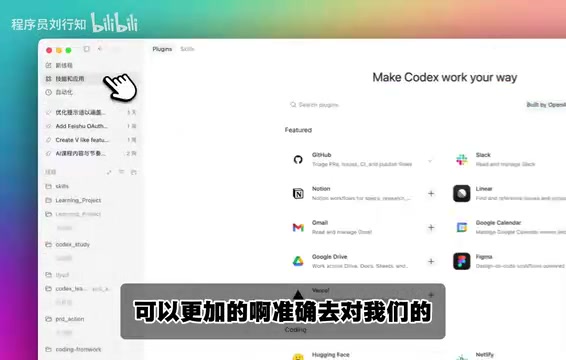
Besides GitHub, currently installable apps include commonly used services like Gmail. After installation, you can interact with these apps directly in the Codex conversation window—for example, typing "help me merge a PR" and Codex will precisely invoke the GitHub app to complete the operation.
Clear Category Management at a Glance
After installation, the Manage page displays a clear categorization system:
- Plugins: Independent feature extensions
- Apps: Integrated packages of multiple Skills
- MCP: Model Context Protocol connections
- Skills: Individual skill modules
Each category shows the specific number of installations—in testing, it displayed 36 Skills installed, 4 MCPs, etc. This structured management approach gives you a clear overview of your Codex capability landscape.
Installation and Authorization Process Explained
The app installation process is worth explaining. When you click to install an app, the system automatically pops up an OAuth authorization page, requiring you to link your online account on the corresponding platform.
OAuth (Open Authorization) is currently the most widely used authorization framework in internet applications, with OAuth 2.0 being the mainstream version. Its core design philosophy is "authorization, not authentication"—third-party applications (like Codex) don't need to obtain the user's credentials, but instead use access tokens issued by the resource server (like GitHub) to perform operations on behalf of the user. The entire flow includes: user clicks authorize → redirects to the resource server login page → user confirms authorization scope → resource server callbacks and issues a token → third-party application accesses resources with the token. For AI assistants like Codex, OAuth authorization not only protects user account security but also precisely controls the permission boundaries accessible to AI through the Scope mechanism—for example, allowing only repository reading or additionally permitting code commits.
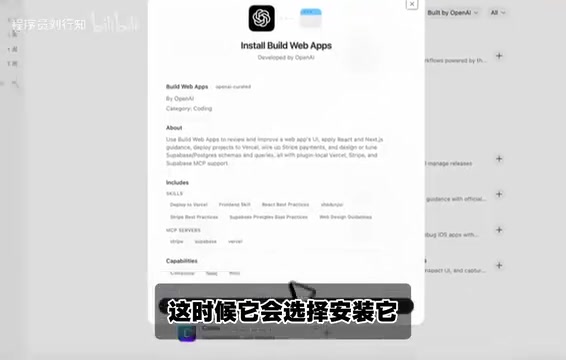
Using GitHub as an example, once authorization is complete, Codex gains access to your repositories and can automatically select all your GitHub repositories for operations. The entire flow is consistent with the everyday experience of using third-party login, with security guaranteed.
Create Plugin: An Open Extension Ecosystem
From User to Creator
Beyond installing ready-made apps, this update also opens up the "Create Plugin" feature. Previously, Codex only supported creating Skills; now users can create complete plugins for accessing external data sources or implementing custom functionality.
Codex provides dedicated Skills to assist with the plugin creation workflow, lowering the development barrier. The plugin marketplace is also clearly categorized by use case—for instance, the Coding category includes popular options like Hugging Face.
This means Codex is building an open plugin ecosystem—not only does the official team provide standardized apps, but the community and developers can also contribute their own plugins, creating a virtuous cycle. This ecosystem-building approach closely mirrors the successful paths of the VS Code extension marketplace and JetBrains plugin repository: attracting developer contributions through open extension interfaces, then leveraging the rich plugin ecosystem to drive user growth, ultimately forming a platform moat.
MCP Configuration: Opening Connection Channels to External Services
MCP Protocol: The New Standard for AI Tool Integration
MCP (Model Context Protocol) is a standardized protocol proposed and open-sourced by Anthropic in late 2024, designed to address the fragmentation of integration between AI models and external tools and data sources. Before MCP, every AI application needed to develop separate adaptation layers for different external services, with extremely high maintenance costs. MCP defines a unified client-server communication specification, enabling AI models to invoke file systems, databases, API services, and various other resources in a standardized way. The protocol uses JSON-RPC 2.0 as its underlying communication format and supports three core capabilities: tool invocation (Tools), resource reading (Resources), and prompt templates (Prompts). Currently, major AI vendors including OpenAI, Google, and Microsoft have announced MCP support, rapidly establishing it as the de facto standard in AI tool integration.
Two Main Configuration Methods
Codex provides complete MCP support, with detailed configuration methods listed in the "Learn More" documentation. There are primarily two approaches:

Method 1: Command-line Authorization
If you have your own MCP server, you can complete authorization login via the command line to associate the server with Codex.
Method 2: Configuration File
In Codex's configuration directory, create an mcp-server.json file to define the MCP server's execution commands and parameters. Once configured, Codex automatically loads these MCP services, and you can confirm the number and status of currently active MCPs in the interface.

Conversational Installation for Convenience
An even more convenient approach is to directly tell Codex in conversation to "help me install a certain MCP." Codex will automatically write the installation results to the configuration file and invoke the corresponding tools in the directory to enable the MCP. This method is very friendly for users unfamiliar with configuration files—just a few sentences gets it done. This "natural language-driven configuration" interaction paradigm also reflects the core trend of AI assistants evolving from "tools" to "agents"—users only need to express intent, and the underlying technical details are handled automatically by the AI.
Other Experience Improvements
Beyond the three core features above, this update also polished various details:
- Sorting functionality: Skills and app lists support multiple viewing modes including full expansion, subcategory filtering, and chronological sorting
- Finer categorization: The previous management interface was relatively rough; now the category hierarchy is much clearer
These seemingly minor changes can noticeably improve efficiency during frequent daily use.
Summary and Outlook: A Four-Layer Architecture Building the AI Programming Capability System
The core logic of this Codex update can be summarized in one sentence: Integrating Skills, MCP, and Plugins into a unified application ecosystem.
From an architectural perspective, Skills are the smallest capability units, multiple Skills combine into Apps, MCP handles connection channels to external services, and Create Plugin opens the gateway for collaborative ecosystem building. These four layers each serve their purpose, forming a complete AI programming assistant capability system. It's worth noting that this architectural design shares deep similarities with operating system layered models: Skills are like system calls (Syscalls), Apps are like applications, MCP is like the device driver layer, and the Plugin ecosystem corresponds to the app store—Codex is building a complete "software stack" centered around the AI programming assistant.
For developers, the recommended practice path is:
- Prioritize installing official apps to gain core capabilities like GitHub and Gmail
- Configure MCP as needed to connect proprietary services or third-party tools
- Create custom plugins to meet specialized business scenarios
This progressive extension approach ensures an out-of-the-box experience while preserving sufficient flexibility. As the plugin ecosystem gradually matures, Codex's capability boundaries as an AI programming assistant will continue to expand.
Key Takeaways
- Codex introduces the "Apps" concept, consolidating multiple Skills into complete application packages, simplifying installation and improving operation accuracy
Related articles
 Product Reviews
The Programmer's Desk Setup Guide: Building a Workspace That Feels Like Home
Discover how programmers build productive, comfortable workspaces. From multi-monitor setups to ergonomic design, explore the desk philosophy that drives focus and flow.
 Product Reviews
Qoder vs Cursor Real-World Comparison: Which $20/Month AI IDE Is Better?
Hands-on comparison of Qoder vs Cursor AI IDEs: Agent autonomy, human interaction count, and architecture decisions. Qoder needed only 2 interactions vs Cursor's 8.
 Product Reviews
Cursor Cloud Agent Demo: Eliminating Bottlenecks Across the Entire Software Development Lifecycle
Deep analysis of Cursor's Cloud Agent demo showing how cloud VMs, automated test artifacts, and a full-chain control plane systematically eliminate human bottlenecks across the software development lifecycle.