Codex Latest Version Feature Breakdown: How Good Are Pet Mode, Imported Agent Configs, and Computer Use Upgrades?

Codex's latest update adds pixel pets, 20% faster Computer Use, Agent config imports, and smarter memory.
OpenAI's Codex May 2025 update brings pixel pet companions with multiple states, a 20% faster Computer Use with multi-threaded parallelism, seamless Agent config imports from Cursor, sidebar branch conversations, compressed memory optimization, enhanced image recognition via GPT-4V/4o, and custom voice dictation dictionaries—blending productivity with personality.
Codex Latest Version Feature Breakdown: How Good Are Pet Mode, Imported Agent Configs, and Computer Use Upgrades?
Who would have thought that in 2025, a programmer's biggest productivity boost would come from a pixel pig? OpenAI's latest Codex version (updated May 2nd) packed in a bunch of new features all at once—pet mode, Computer Use performance leap, imported Agent configs, and more. Today let's unpack each one and see if they're really worth trying.
Codex Pet Mode: Your IDE Can Now Raise a Digital Pet
While other IDEs are competing on performance and models, Codex went and built a whole pet system. Under Settings → Appearance at the very bottom, you'll find a "Pets" option with several pet characters available, including the default Codex pet, a piglet, a water droplet, and more.
Pets have three states:
- Idle state: Sitting quietly on your screen looking cute
- Working state: When you assign a task, it "works" alongside you
- Moving state: Dragging it triggers a struggling animation
When a task is done, the pet gives you a checkmark to let you know it's finished—way more sincere than your boss's "good job." Isn't this the perfect metaphor for the working life? Idle when cute, hardworking when busy, struggling when dragged around. Codex really nailed the emotional support angle.

Three Steps to a Custom Pixel Pet: Easier Than Making Instant Noodles
Don't like the official pets? Make your own. Using Codex's built-in Pixel Art Skills tool, you can create a pixel-style piglet in three steps:
- Choose to create a custom pet
- The system auto-generates pixel art for five states: avatar, idle, moving, working, and sad
- Files are automatically saved in the corresponding pet folder within the Codex directory
That's right, the system even thoughtfully generates a "sad state"—I'm guessing that's the exclusive expression for when your code throws an error. At its core, a pet is just a few image assets. Your digital pet won't starve to death because it was never alive in the first place. But who cares? Cute is all that matters.
Computer Use: 20% Performance Boost with Multi-threaded Parallelism
This time, Codex's Computer Use capability got a real, tangible upgrade:
- 20% faster: Tasks that used to take a minute now finish in about 40 seconds
- Higher fault tolerance: Actions more closely mimic real human clicks, less likely to fail
- Multi-threaded parallelism: Supports running multiple agent threads simultaneously without interference
For example, you can have one thread log into QQ, another into WeChat, and a third into Google—all three running at the same time without affecting each other. We used to laugh at our bosses for not knowing how to use computers; soon they'll be laughing at us for not knowing how to use AI.

The description of higher fault tolerance and more human-like clicking gives you a subtly unsettling feeling—AI is learning how to pretend to be human.
Enhanced Image Recognition: From Nearsighted to Eagle-Eyed
Codex's image understanding plugin got upgraded too, using multimodal models like GPT-4V and GPT-4o under the hood for image recognition, with clearer and more accurate understanding across various image types.
In plain English: before, when you sent a screenshot to the AI, it would say "this looks like a button"; now it can say "this is a gray, disabled submit button that turns blue on hover." The improvement in recognition precision directly benefits Computer Use operations as well.

Sidebar Branch Conversations: "Side Quests" While Coding
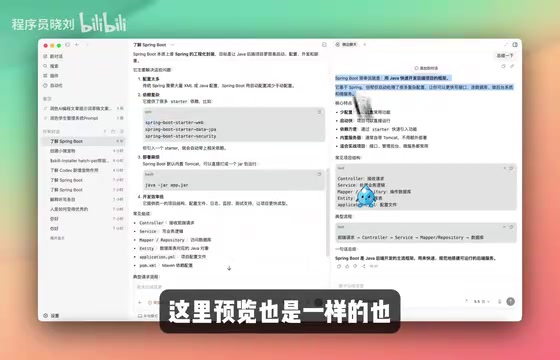
This feature truly understands programmers. Hold Shift to quickly open a sidebar and start a temporary branch conversation based on your current session.
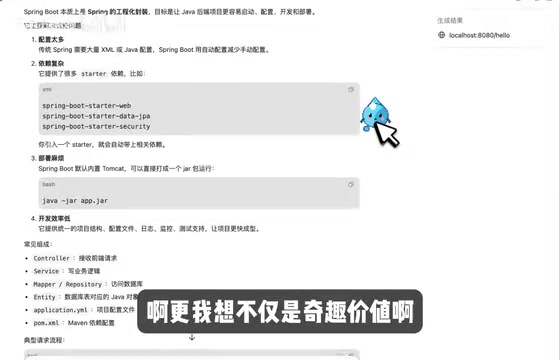
The use case is straightforward: you're chatting with AI about your main task when a new idea suddenly pops up, but you don't want to interrupt the current conversation—like when you're watching a movie and suddenly want to look up an actor's gossip but don't want to hit pause. Branch conversations automatically reference and summarize the original session content, support quick preview of HTML and other content, and the panel can be freely dragged and hidden.
Memory Optimization: From Goldfish Memory to Elephant Memory
Previously, Codex's memory mechanism reused threads—basically copying previous conversations over verbatim, making them long and space-consuming. The new version compresses sessions much more thoroughly, making the memory feature noticeably more usable.
Before, chatting with AI was like talking to someone with amnesia—every time you had to start with "hello, here's who I am and what we're doing." Now it can finally remember what you said last time—though in human social interactions, this feature is called "basic manners."
Import Agent Configs: Seamless Migration from Cursor, Switching Has Never Been Smoother
Codex now supports importing Agent configurations from other IDEs, such as Cursor's rules configuration files. After importing, Codex preserves the original IDE's rules and habits, essentially reusing your previous workflow.
This move is brutal. It's like a new hot pot restaurant telling you: "Bring your taste preferences from Haidilao, and we'll cook accordingly." Migration cost drops to zero, and Cursor users have never had a smoother defection path. The talent war between IDEs has evolved from "I'm better than you" to "you won't need to readjust."
Voice Recognition Dictionary Optimization: Finally Teaching AI to Pronounce Your Jargon
The last update might seem minor, but it's a key piece of the voice programming puzzle. Codex added a custom dictation dictionary feature where you can add frequently used technical terms (like "OpenClawAd").
Before, when you said "OpenClaw" into the mic, the AI would recognize it as "Open Claw" or even "Open Call"—fixing it every time was maddening. Now, after adding it to the dictionary, it recognizes correctly on the first try. That smoothness is as touching as finally teaching Siri to pronounce your name correctly.
Final Thoughts
The team officially named the pet feature "Pet Component"—what a serious name, as if saying "we're not messing around, this is a serious product feature." But you can't fool me—this is clearly a digital Tamagotchi for programmers. That said, a pet that displays real-time work status and can help run automated tasks is genuinely more useful than the succulent on your desk—at least you can't kill it by neglect.
When your IDE starts raising pets, you know the AI tool competition has evolved from "who's more capable" to "who's more adorable"—and the scariest part is, Codex wants to be both.
Related articles
 Product Reviews
The Programmer's Desk Setup Guide: Building a Workspace That Feels Like Home
Discover how programmers build productive, comfortable workspaces. From multi-monitor setups to ergonomic design, explore the desk philosophy that drives focus and flow.
 Product Reviews
Qoder vs Cursor Real-World Comparison: Which $20/Month AI IDE Is Better?
Hands-on comparison of Qoder vs Cursor AI IDEs: Agent autonomy, human interaction count, and architecture decisions. Qoder needed only 2 interactions vs Cursor's 8.
 Product Reviews
Cursor Cloud Agent Demo: Eliminating Bottlenecks Across the Entire Software Development Lifecycle
Deep analysis of Cursor's Cloud Agent demo showing how cloud VMs, automated test artifacts, and a full-chain control plane systematically eliminate human bottlenecks across the software development lifecycle.