Codex Linux Desktop Hands-On: An AI Programming Assistant More Beginner-Friendly Than CLI

Codex Linux Desktop offers a GUI alternative to CLI with local model support and scheduled tasks.
OpenAI's Codex Linux Desktop provides a beginner-friendly graphical interface that seamlessly inherits CLI configurations and sessions. It supports local model integration via Ollama for "Token Freedom," though testing revealed performance challenges with quantized models on multimodal tasks. Desktop-exclusive features include plugin management with MCP support, scheduled tasks, and full access controls.
Codex Desktop Officially Lands on Linux
OpenAI's Codex (the ChatGPT programming assistant) recently released a Linux desktop version, which is a noteworthy update for users who have long relied on command-line tools (CLI) for AI-assisted development. Previously, many developers primarily used Codex CLI for code generation, and the desktop version now offers a more intuitive way to interact.
According to hands-on testing shared by a Bilibili content creator, the desktop version is packaged with Electron, with an installer size of approximately 350MB. Electron is an open-source framework developed by GitHub that allows developers to build cross-platform desktop applications using web technologies (HTML, CSS, JavaScript). It bundles the Chromium browser engine and Node.js runtime together, which is why applications built with it tend to be larger in size. Well-known applications like VS Code, Slack, and Discord are all built on Electron. The advantage of this technology choice is the ability to quickly deliver a consistent cross-platform experience, though it's often criticized for high memory usage. Ubuntu-based users can download the DEB package (X86 architecture), while Fedora users can choose the RPM format. Notably, the content creator observed that the download link's domain didn't appear to be OpenAI's official primary domain, so users should verify the source authenticity before downloading. Since the service requires a VPN to access, download speeds may be slow — multi-threaded download tools like Motrix can help speed things up.
Desktop Version Is More Beginner-Friendly
An interesting perspective: from a learning standpoint, beginners may progress faster by choosing Codex Desktop over CLI. Compared to the numerous commands and configurations in CLI that require constant reference to documentation, the desktop version's graphical interface makes features immediately visible and understandable. The content creator admitted that even experienced users may not fully understand certain mechanisms in the Codex CLI official documentation (especially those related to the security sandbox), and the graphical interface lowers this cognitive barrier.
Seamless Inheritance of CLI Configuration and Sessions
After installation, a ChatGPT icon appears in the taskbar. The first launch requires patience during initialization. Here's a practical tip: there's no need to use tools like Proxychains to force acceleration — the desktop version works normally on its own.
The most pleasant surprise is its compatibility with the CLI environment. After installation, the desktop version automatically reads all chat histories and sessions from the user's previous Codex CLI usage. This particularly addresses a major CLI pain point — in the command line, multiple sessions are often named with UUID strings, making it difficult for users to identify which session corresponds to which project.
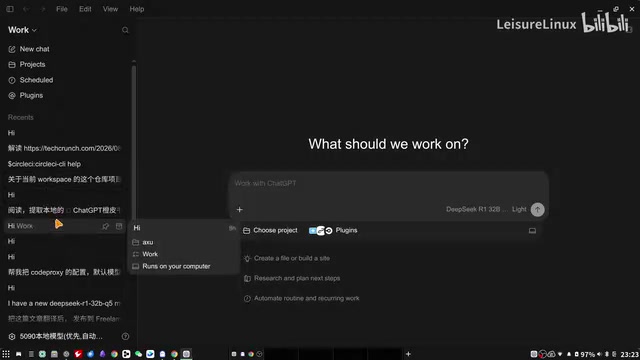
Likewise, the model list configured through the /model command in CLI appears identically in the desktop version. This means both cloud models and locally deployed models can be called directly from the graphical interface without repeating configuration.
Local Models and the "Token Freedom" Experiment
A major highlight of this hands-on test is the support for local models. The content creator used a locally deployed Qwen (Tongyi Qianwen) vision model via Ollama for image interpretation testing, attempting to achieve so-called "Token Freedom" — eliminating dependence on paid cloud API calls. Ollama is an open-source local large model runtime framework designed to let users download, run, and manage various open-source large language models as conveniently as managing Docker containers. It wraps the underlying llama.cpp inference engine, providing a clean command-line interface and REST API, with support for GPU acceleration via NVIDIA CUDA, Apple Metal, and more. Users need only a single command (e.g., ollama run qwen) to pull and run a model. Crucially, Ollama's API interface is compatible with OpenAI's Chat Completions format — this is the technical foundation that allows Codex Desktop to seamlessly call local models. You simply switch the API endpoint from OpenAI's cloud address to the local localhost:11434.
However, the test results were mixed. When using a local 32-bit model (DeepSeekAd distilled version/Q5 quantization), the image interpretation task responded slowly and even stalled without producing output. Here's an explanation of quantization: Quantization is a technique that compresses model parameters from high-precision floating-point numbers (such as FP16/BF16, 16 bits per parameter) to low-precision integers (such as 4-bit or 5-bit). The purpose is to drastically reduce the model's VRAM usage and computational requirements, enabling it to run on consumer-grade GPUs. Q4 means 4-bit quantization, Q5 means 5-bit quantization — higher numbers mean greater precision and performance closer to the original model, but also higher VRAM requirements. Quantization inevitably causes precision loss, which is especially noticeable in complex tasks like visual multimodal processing. The content creator compared it with a previously used Qwen 3.5 (Q4 quantized 35-bit) model and found the older model responded faster. This reflects a practical reality: even with a 5090-class GPU, local large models still require careful tuning for performance and response speed on visual multimodal tasks.
After ultimately switching to a paid cloud model (such as DeepSeek V4 Flash), the task was completed much more smoothly. This demonstrates that at the current stage, while local models are attractive cost-wise, they still lag behind cloud services in terms of experience stability — quantization precision and model selection both require repeated testing.
Desktop-Exclusive Features
Codex Desktop offers several exclusive features compared to CLI, which represent its core value:
Plugin and Skill Management
The desktop version includes a built-in Plugin management interface. For example, developers who frequently use GitHub can directly configure GitHub's MCP (Model Context Protocol) service. MCP is an open standard protocol proposed by Anthropic in late 2024, designed to establish a unified communication interface between AI models and external tools/data sources. In the MCP architecture, the AI application acts as a "client," while various external services (such as GitHub, databases, file systems) act as "servers," interacting through standardized JSON-RPC protocols. This is similar to how USB-C provides a unified interface for hardware devices — MCP provides a unified specification for the AI tool plugin ecosystem. The GitHub MCP service in Codex Desktop allows AI to directly read repository code, create Pull Requests, view Issues, and more, without users having to manually copy and paste context information. There are also reportedly well-reviewed extensions like Super Powers.

Various Skills (such as stock analysis) previously installed in environments like OpenCloud can also be managed here in a unified way. Note that some Skills may not be activated when called from CLI due to insufficient permissions.
Scheduled Tasks (Schedule Task)
A feature not widely known before is scheduled tasks. The content creator mentioned that according to official documentation, Codex was previously thought to lack cron-like scheduling capabilities, but the desktop version does provide a Schedule Task feature — an important addition for developers who need to periodically execute automated tasks. cron is the classic task scheduling tool in Unix/Linux systems, commonly used by developers for periodic backups, log cleanup, data synchronization, and other automated operations. With Codex Desktop introducing similar capabilities, users can set AI to automatically perform code reviews, report generation, data scraping, and other tasks at specific times, further expanding the automation boundaries of AI-assisted development.
Full Access and Personalization Settings
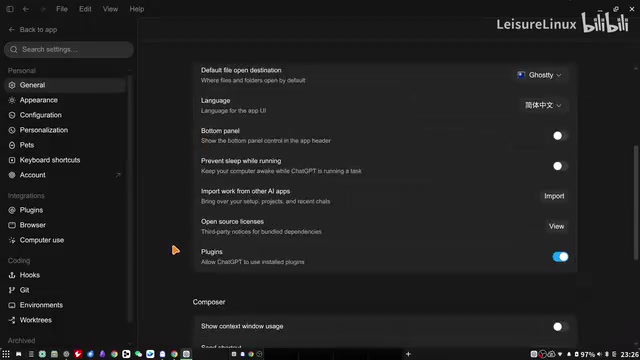
The "Full Access" toggle in settings deserves special attention. Without enabling it, AI runs in a sandbox environment where many operations (such as opening a browser) are restricted. A sandbox is a security isolation mechanism that separates a program's execution environment from the host system, preventing malicious or accidental operations from affecting the user's actual file system, network, and system configuration. In Codex's context, AI-generated code may include file read/write operations, network requests, or even system command calls — the sandbox mechanism ensures these operations execute in a controlled environment. Codex CLI defaults to using container-based or chroot-based sandboxes to limit code execution scope. The "Full Access" toggle in the desktop version is essentially a trade-off between security and functional completeness — disabling the sandbox allows AI to directly access system resources, making it more powerful but also riskier. Users should remain cautious about AI operations. Additionally, the interface provides Personalization settings, development-related Hook configurations, and other options missing from CLI.
Chinese Interface Support
The desktop version already offers a Chinese interface (set in Settings > Interface > Language), though the content creator noticed some header text at the top still displays in English — localization isn't completely thorough yet. In actual use, you only need to ask the model to respond in Chinese when prompting, and models typically return Chinese content without issues.

Conclusion: Is Codex Desktop Worth Trying?
The release of Codex Linux Desktop provides a more user-friendly entry point for AI-assisted programming. Its seamless CLI configuration inheritance, visual session and skill management, local model support, and new scheduled task capabilities make it a tool worth trying for both beginners and advanced users.
However, hands-on testing also exposed practical challenges: local model performance tuning remains a time-consuming learning process, and quantization schemes and model selection significantly impact the experience. For users seeking stability, paid cloud models remain the more reliable choice for now. As hardware and the local inference ecosystem mature, the vision of "Token Freedom" may gradually become reality.
Related articles

Chain of Thought Isn't Just for AI: How Humans Can Use CoT to Improve Thinking Quality
Chain of Thought isn't just a prompt trick for large models. Starting from a Hacker News discussion, this article analyzes why CoT works for human thinking too, breaks down actionable ways to transfer it, and highlights the key differences between human CoT and machine CoT.
Cloudflare Teams Up with OpenAI: Closi…
Cloudflare Teams Up with OpenAI: Closing the Loop from Vulnerability Discovery to Defense with AI
Cloudflare uses OpenAI Daybreak to investigate security vulnerabilities and generate reviewable remediation plans, while developers use Codex to boost coding efficiency and quality.

Orca Multi-Agent Orchestration in Practice: A Guide to Parallel Collaboration with Claude and Codex
Orca is Stable AI's free open-source agent workbench supporting 34 agents like Claude Code and Codex in parallel. Learn its Git worktree isolation, multi-model orchestration, and mobile management.