Codex + Obsidian + Zotero: An AI-Powered Automated Paper Reading Workflow

A Zotero + Codex + Obsidian trio that connects close reading and conversational retrieval of papers into an automated workflow.
The article introduces a paper management and retrieval system shared by a Bilibili creator, using three tools each with a distinct role: Zotero manages references and PDFs, Codex calls GPT for close reading and summarization, and Obsidian stores structured notes and supports retrieval. They're connected via two Codex Skills and an Obsidian close-reading template. The Front Matter fields (year, journal, research task, method, dataset) determine retrieval effectiveness — the more detailed, the easier DataView retrieval becomes. Three Skills handle metadata fetching, full-text reading, and note generation; after installing DataView to auto-generate an index page, you can ask questions directly to the paper library in Codex and get sourced conclusions. The article also notes boundaries: it suits researchers with existing paper collections who need literature reviews, and accuracy depends on template quality and full-text verification, so verification habits are recommended.
The more papers you save, the less you can remember about which one said what when it's actually time to write a literature review — this is a daily struggle for many researchers. A Bilibili creator shared their own paper management and retrieval system, built around three tools each doing their own job: Zotero manages references and PDFs, Codex calls GPT to read papers and write summaries, and Obsidian stores notes and supports later retrieval. Once the three are connected, you can talk directly to your own paper library and have AI draw conclusions and summaries based on the papers it has read.
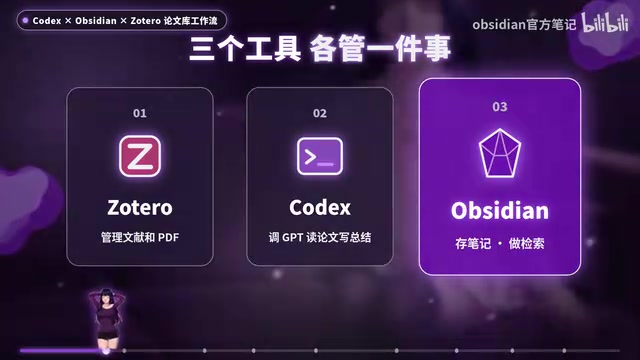
Division of labor: Zotero manages references, Codex reads papers, Obsidian stores notes
This workflow breaks paper processing into three main parts: preparation, paper processing, and retrieval/conversation. Zotero handles reference management and PDF storage, Codex handles calling GPT to do close reading and summarization, and Obsidian handles note archiving and retrieval. The three are connected through two Codex Skills and a set of Obsidian close-reading templates.
According to the creator, preparation takes two steps. First, download two skills from GitHub — Zotero Analytical Workflow Skills, which exports papers from Zotero into Obsidian and generates close-reading notes, and Research the Jouvel Literature Retrieval, which handles subsequent searching within the paper library. After cloning the repository into Codex's Skills folder, Codex can recognize and invoke them.
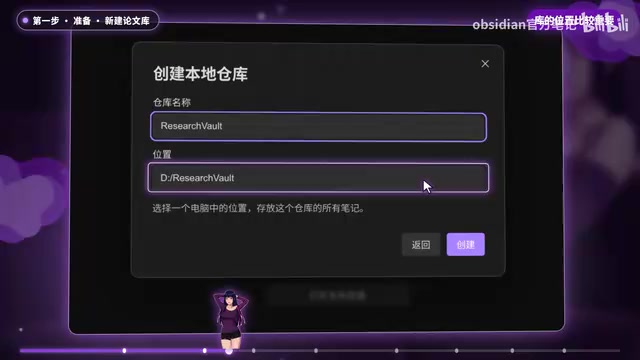
The second step is to create a dedicated vault in Obsidian for papers, which the creator named Research Vault. The location of this vault matters, because the paper library will be built here later. The vault mainly holds two things: all paper notes, and the close-reading template used when processing papers.
What is a Codex Skill
A Skill is an invocable capability module in Codex (OpenAI's coding agent), essentially a set of preset instructions, scripts, and workflow definitions. After a user clones a Skill repository into Codex's Skills folder, Codex can recognize and invoke the corresponding capability in conversation, completing multi-step tasks according to preset steps. This workflow relies on two Skills to codify two types of operations — "export paper → read full text → apply template to write notes" and "search within the note library" — so that a single phrase like "close-read this one" can trigger the entire pipeline without manually describing the steps each time.
Obsidian and Front Matter
Obsidian is a note-taking tool based on local Markdown files, where each note is a .md file. Front Matter refers to the YAML metadata block at the top of a file, wrapped by ---, which can hold structured fields such as year, journal, and method. Its value lies in separating the unstructured note body from machine-readable tags. Plugins like DataView build indexes and filter and aggregate notes by field precisely by parsing Front Matter, so the more standardized the property fields are filled in, the more precise retrieval becomes.
The close-reading template is key to retrieval effectiveness
The close-reading template determines how each paper will be organized, and the analytical framework inside can be swapped for content in your own research area. The most important part is the note property section (Front Matter) at the top of the template, which contains retrieval-friendly settings such as year, journal, research task, method, and dataset. The creator specifically notes that the more detailed these settings are, the easier it is to use DataView for retrieval later.
The logic behind this design: the output of AI close reading is not a free-form reading reflection, but a structured note. The property fields act as searchable tags for each paper, so retrieval doesn't have to rely on fuzzy full-text matching but can pinpoint items by field. The level of detail in the template directly determines the queryability of the paper library.
Processing papers: three Skills work in relay to complete close reading
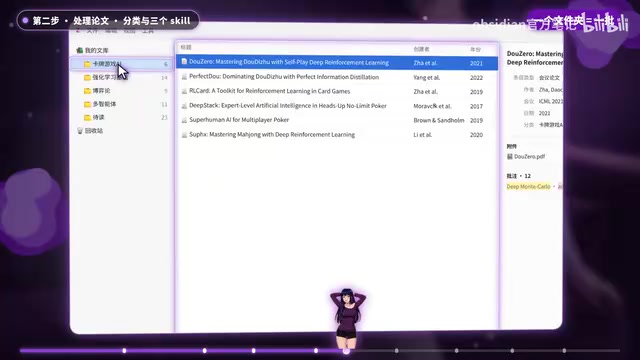
When processing papers, the creator tends to first organize folders by topic in Zotero and process one folder at a time. On the Codex side, the Zotero Analytical Workflow Skills are used, which include three Skills: Collection Manager schedules the entire process, Retata Factor fetches metadata and annotations for each paper, and Analytical Writer writes the close-reading notes according to the template.
In practice, to close-read a paper in Zotero, just say "close-read this one" in Codex. Codex will process it step by step following the entire workflow: fetch metadata, read the full text, apply the template, write notes. The creator mentions that Codex's thinking process is a bit long, and the video was edited. After processing is complete, open Obsidian and you'll see those papers organized into the vault.
Retrieval and conversation: build an index with DataView, ask questions to the paper library
After all papers are processed, the next step is retrieval in Obsidian, which requires installing a plugin called DataView. If it's not installed yet, first disable Safe Mode in settings, then open the community plugin marketplace and search for DataView to install. Once installed, confirm it's enabled — it will extract the property section of each paper note and automatically generate an index page.

Once all of the above is done, you can open the paper library folder in Codex and talk to it. The question the creator demonstrated was "What machine learning methods are there for card games?" Codex first locates relevant papers from the notes, then returns to the full text to verify when needed, and quickly gives a conclusion. According to the creator, every conclusion can be traced to specific paper content, and the accuracy is basically trustworthy.
The value of this step is turning "flipping through papers" into "asking the paper library." In traditional literature review writing, researchers need to reread abstracts and conclusions one by one; with this workflow, AI first does a preliminary screening based on structured notes, then checks the full text as needed — essentially front-loading the material-gathering work for a first draft of a literature review.
How the DataView plugin works
DataView is a community plugin for Obsidian that queries and renders Front Matter in notes as database fields. It supports SQL-like query syntax (such as filtering by year or method fields, or listing all papers under a certain journal) and dynamically generates results in notes as tables, lists, and other formats. In this workflow, it plays the role of the "index layer": aggregating the property sections scattered across close-reading notes into a browsable, filterable index page, giving the paper library structured query capabilities without relying on full-text keyword matching. Installing community plugins requires first disabling Safe Mode (Restricted Mode) in settings, which is Obsidian's default protection mechanism for third-party plugins.
Boundaries of this workflow
From the creator's demonstration, the core contribution of this trio is connecting paper management, close-reading notes, and retrieval Q&A into a single pipeline, with two Skills plus one close-reading template as all the glue. It suits researchers who already have a considerable accumulation of papers and need to write literature reviews or conduct literature reviews.
It's worth noting that the accuracy of retrieval conclusions depends on the quality of the property fields in the close-reading template and on Codex's step of checking the full text. The creator's verification method was to spot-check the correspondence between conclusions and paper content, which also suggests users should maintain a habit of verifying AI-generated conclusions rather than accepting them directly.
In summary: Zotero manages references, Obsidian stores notes, and Codex reads the paper library and helps write conclusions. For researchers troubled by "papers they can't finish reading," this combination offers a reproducible automated path.
One-line Summary
A Zotero + Codex + Obsidian trio that strings together close reading and conversational retrieval of papers into an automated workflow.
Paragraph Summary
The article introduces a paper management and retrieval system shared by a Bilibili creator, centered on three tools each doing their own job: Zotero manages references and PDFs, Codex calls GPT to complete close reading and summarization, and Obsidian stores structured notes and supports retrieval. The three are connected through two Codex Skills and a set of Obsidian close-reading templates. The Front Matter property fields in the close-reading template (year, journal, research task, method, dataset) determine retrieval effectiveness — the more detailed they are, the easier DataView retrieval becomes. When processing papers, three Skills work in relay to complete metadata fetching, full-text reading, and note generation; in the retrieval stage, installing the DataView plugin automatically generates an index page, after which you can directly ask questions to the paper library in Codex and get conclusions with sources. The article also notes its boundaries: it suits researchers who already have a paper accumulation and need to write literature reviews, and conclusion accuracy depends on template quality and full-text verification, so it's advisable to maintain a habit of checking.
Related articles

Replit at Web Summit Lisbon: AI Coding Platform Accelerates European Expansion
Replit participated in Web Summit Lisbon 2026 Day 1 as Replit Live. This article examines its transition from an online IDE to an AI app-building platform and analyzes its European market opportunities and compliance challenges.

Codex Integrates with Zotero: Batch Literature Review and Deep-Read Tools Tested
Hands-on testing of two new Codex functions for Zotero: batch literature reviews by collection and screening key papers for deep reading. Covers comparison tables, citation verification, the three-layer method and experiment analysis, plus a complete workflow.

The Overlooked Truth: Doctors Once Believed Black People Couldn't Get Diabetes
A century ago, American doctors widely believed Black people couldn't get diabetes, which was labeled a "luxury disease." Vox's Khalil Explains traces this history and reveals Black patients still face a ~20% gap in access to GLP-1 drugs.