Codex Personal AI Knowledge Base System Setup Guide: From Zero to Automated Output

Build a personal AI knowledge base using Codex CLI to connect Obsidian, Notion, and Feishu for automated output.
This guide walks through building a personal AI knowledge base system using Codex CLI as the central brain, connecting tools like Obsidian, Notion, Feishu, and Tencent IMA. Covering three stages — environment setup, cross-platform data flow integration, and automated content production — it provides a practical framework for turning scattered information into structured, publishable content while addressing challenges like removing AI-generated writing artifacts.
Why You Need an AI Knowledge Base System
Everyone's talking about boosting productivity with AI, but when it comes to actually putting it into practice, problems pile up: tools won't install, environments won't configure, and data is scattered everywhere without structure. As Bilibili creator Teacher Hailang points out in his course, "Everyone is using AI, and it feels like a waste if we don't — but even after adopting AI, it doesn't seem to produce much of anything." You end up spending half the day tinkering and only gaining a heap of anxiety.
This is exactly the core pain point that building a personal AI knowledge base system aims to solve. Rather than chasing an endless stream of new tools, it's better to build a complete data pipeline from information collection and organization to content generation, turning AI into a genuine productivity tool instead of yet another burden.

Teacher Hailang's 14-lesson course offers a fairly systematic solution. The core idea is to use Codex CLI AI as the brain, connecting platforms like Obsidian, Notion, and Feishu (Lark) to ultimately achieve automated content production. This "tool integration + hands-on implementation" approach fills a gap left by most online tutorials that are either too hardcore or only cover a single piece of software.
The Three-Layer Architecture of a Codex Knowledge Base System
The entire system can be broken down into three progressive stages, each logically clear and building upon the last.
Stage One: Setting Up the Codex Runtime Environment
This is the "brain" of the entire knowledge base system. First, you need to install the Codex CLI command-line tool and set up the runtime environment. Next, configure the Codex client and supporting design tools — these serve as the interface between you and the AI. Finally, familiarize yourself with Codex's core functional modules.
Codex CLI is a command-line AI programming assistant released by OpenAI. It allows users to interact with large language models directly through the terminal, performing tasks like code generation, file operations, and automation script writing. Unlike the traditional ChatGPT web interface, the CLI (Command Line Interface) format means users can embed AI capabilities into OS-level workflows, enabling batch processing and automation through Shell scripts, pipe commands, and more. The core advantage of this approach is programmability — instead of repeatedly copying and pasting conversation content, you can write an instruction template once and call it repeatedly, dramatically reducing the cost of repetitive labor.
What deserves particular attention is Codex's memory system, common commands, and Skill extensions. Understanding these mechanisms is key to unlocking advanced usage later on — the power of a command-line AI lies not in conversation, but in its ability to be orchestrated into reusable automated workflows. The memory system refers to Codex's ability to maintain context across multiple interactions, remembering user preferences, project structures, and frequently used commands set in previous sessions. Skill extensions allow users to package complex, commonly used operations into one-click callable skill packs. For beginners, this stage serves as both the barrier and the foundation.
Stage Two: Connecting the Knowledge Base and Data Flow
This is the core stage of the system, comprising five lessons with the goal of making information truly "flow."

Here's how the tools divide their responsibilities:
-
Obsidian: Serves as the knowledge management hub, paired with Markdown syntax and commonly used plugins, responsible for local information storage and processing. Obsidian is a knowledge management tool based on local Markdown files, with bidirectional linking and knowledge graph functionality as its standout features — it connects discrete note nodes into a network structure. Markdown, as a lightweight markup language, uses plain text formatting with simple symbols to achieve layout, and virtually all tech platforms support its rendering. Obsidian's local storage approach means user data stays entirely in the user's hands, independent of cloud services — highly attractive for privacy-conscious users who care about data sovereignty. Its plugin ecosystem is remarkably rich, with the community having developed over 1,500 plugins covering calendar management, kanban views, database queries, automated workflows, and much more.
-
Notion: Used for generating structured content like blog posts, video scripts, and study flashcards. Notion is an all-in-one collaboration platform that merges documents, databases, project management, and wikis. Its innovative Block editing model allows users to combine different content modules — text, tables, kanban boards, calendars — like building blocks. For content creators, Notion's database functionality is especially powerful — you can set status labels, publish dates, category attributes, and other structured fields for each piece of content, enabling assembly-line content management. Notion also provides a robust API, allowing third-party tools to automatically write to or read from Notion databases, laying the technical groundwork for cross-platform automation.
-
Feishu (Lark): Serves as the hub for team collaboration and document processing.
-
Tencent IMA Knowledge Base: Ideal for building private data repositories, with its biggest advantage being integration with WeChat and other Tencent ecosystem tools. Tencent IMA (Intelligent Mind Assistant) is an AI knowledge management product launched by Tencent, positioned to help users build privatized knowledge bases. A private data repository means users can upload personal documents, notes, chat logs, and other data to a dedicated space, where the AI performs Q&A and content generation based on this private data rather than general internet corpus. IMA's differentiating advantage lies in its deep integration with WeChat, WeCom, Tencent Docs, and other Tencent ecosystem products — information fragments from WeChat group chats, saved articles, and transferred files can all be conveniently imported into the IMA knowledge base. For Chinese users who rely on WeChat as their primary information hub, this significantly reduces the friction cost of data collection.
The most valuable part of this stage is the cross-platform integration — connecting Obsidian to Notion, then syncing Notion with Feishu. Once the three tools are linked, data truly begins to flow. For users who generate massive amounts of information fragments in WeChat daily, the data interface provided by IMA is especially practical.

From Tools to Output: Codex Automation in Practice
Stage Three: Content Production Through Codex and Obsidian Collaboration
The first two stages addressed "tools" and "data channels." The third stage is where value is truly realized. The key action here is connecting Codex to Obsidian to directly manage and build the knowledge base.
By pairing Clipper-type plugins for rapid daily material capture with Codex for automatic information organization, categorization, and processing, users can even set up scheduled workflows that run automatically. Clipper-type plugins are browser-based web content clipping tools, with typical examples including Obsidian Web Clipper and Notion Web Clipper. They work by capturing the HTML content of the current webpage through a browser extension, automatically converting it to Markdown or rich text format, and saving it to the designated knowledge base tool. Advanced Clippers also support selective clipping, automatic tagging, and metadata extraction (author, publish date, URL, etc.). In an AI knowledge base system, the Clipper acts as the "intake valve" for information collection — it determines which external information enters your personal knowledge system and serves as the first critical node in the entire data pipeline. This "set it once, produce continuously" model is the core appeal of AI automation.
AI Content Generation and De-AI-ification Techniques
One particularly hands-on segment of the course involves using AI to generate "personal-style podcast scripts" and testing their viability.
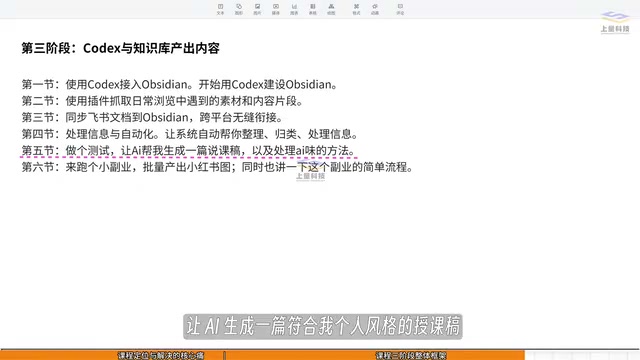
This touches on a universal challenge in AI content creation: How do you make AI output sound like something you would actually say, and how do you deal with the persistent "AI flavor" in the content? The so-called "AI flavor" refers to the formulaic characteristics commonly found in AI-generated content: overuse of parallel sentence structures, preference for "first/second/finally" progressive frameworks, frequent appearance of filler phrases like "it's worth noting" and "undeniably," and an overly neutral tone lacking personal warmth. Technical approaches to removing AI flavor typically work on several levels: first, injecting personal writing samples (such as past articles or speech transcripts) into prompts so the model learns and mimics specific word choices and phrasing habits; second, setting negative constraints that explicitly prohibit the model from using certain sentence patterns or vocabulary; third, employing multi-round rewriting strategies — having the AI generate a first draft, then using targeted instructions for style-specific refinement. A more advanced approach involves Fine-tuning the base model on personal corpus data, fundamentally altering the model's output distribution.
This is the most practical — and most easily overlooked — issue in current AI writing applications. What truly determines content quality is often not how powerful the model is, but whether you can effectively inject personal corpus and style characteristics into the generation process.
Finally, the course demonstrates a lightweight side-hustle scenario: batch-producing Xiaohongshu (Little Red Book) image-text posts for affiliate marketing. This showcases the possibility of extending a knowledge base system from a personal efficiency tool to a monetization tool.
A Rational Perspective: Systems Thinking Over Quick-Fix Tricks
To the author's credit, there's no hype about "master it in three days and blow up your social media feed." He states plainly: "Take action, think, iterate, and walk steadily in the right direction — you'll keep getting better. That's enough."
This pragmatic attitude deserves recognition. Building an AI knowledge base system is fundamentally a systems engineering project. Its value lies not in the flashiness of any single tool, but in the end-to-end connectivity of the entire data pipeline and long-term iteration.
For users looking to get started, here are three guiding principles:
-
Get it running before you optimize: Don't aim for perfection from the start — get the minimum closed loop working first. In software engineering, this approach is known as the MVP (Minimum Viable Product) methodology — validate the core logic with the fewest possible features, then gradually add functionality and refine details as the system runs.
-
Prioritize data flow: Tools are means to an end; what really matters is data collection, movement, and reuse. An effective personal knowledge system should work like a hydraulic engineering project — ensuring information flows smoothly from sources (browsers, WeChat, podcasts, etc.) into the reservoir (knowledge base), and then gets distributed on demand to various output channels (blogs, social media, podcast scripts, etc.).
-
Iterate continuously: AI tools update extremely fast. Maintaining a learning and adaptive mindset matters far more than any one-time configuration.
Overall, this Codex-centered solution that integrates mainstream knowledge base tools provides a clear and viable path for users who want to build a personal AI productivity system. Its greatest insight is this: rather than agonizing over which tool to use, think about how to make these tools work together in true service of your content production and knowledge management.
Related articles

Chain of Thought Isn't Just for AI: How Humans Can Use CoT to Improve Thinking Quality
Chain of Thought isn't just a prompt trick for large models. Starting from a Hacker News discussion, this article analyzes why CoT works for human thinking too, breaks down actionable ways to transfer it, and highlights the key differences between human CoT and machine CoT.
Cloudflare Teams Up with OpenAI: Closi…
Cloudflare Teams Up with OpenAI: Closing the Loop from Vulnerability Discovery to Defense with AI
Cloudflare uses OpenAI Daybreak to investigate security vulnerabilities and generate reviewable remediation plans, while developers use Codex to boost coding efficiency and quality.

Orca Multi-Agent Orchestration in Practice: A Guide to Parallel Collaboration with Claude and Codex
Orca is Stable AI's free open-source agent workbench supporting 34 agents like Claude Code and Codex in parallel. Learn its Git worktree isolation, multi-model orchestration, and mobile management.