Codex Remote Connection Explained: Control Your Mac to Write Code from Your Phone

OpenAI Codex lets you remotely control your Mac to execute coding tasks from your phone
OpenAI Codex desktop app introduces a remote connection feature that lets users invoke Codex on their Mac through the ChatGPT mobile app after enabling the feature and keeping the device awake. Using a hybrid local execution + remote control architecture, it balances security and convenience while reflecting the trend of AI programming tools extending from desktop to mobile.
Overview
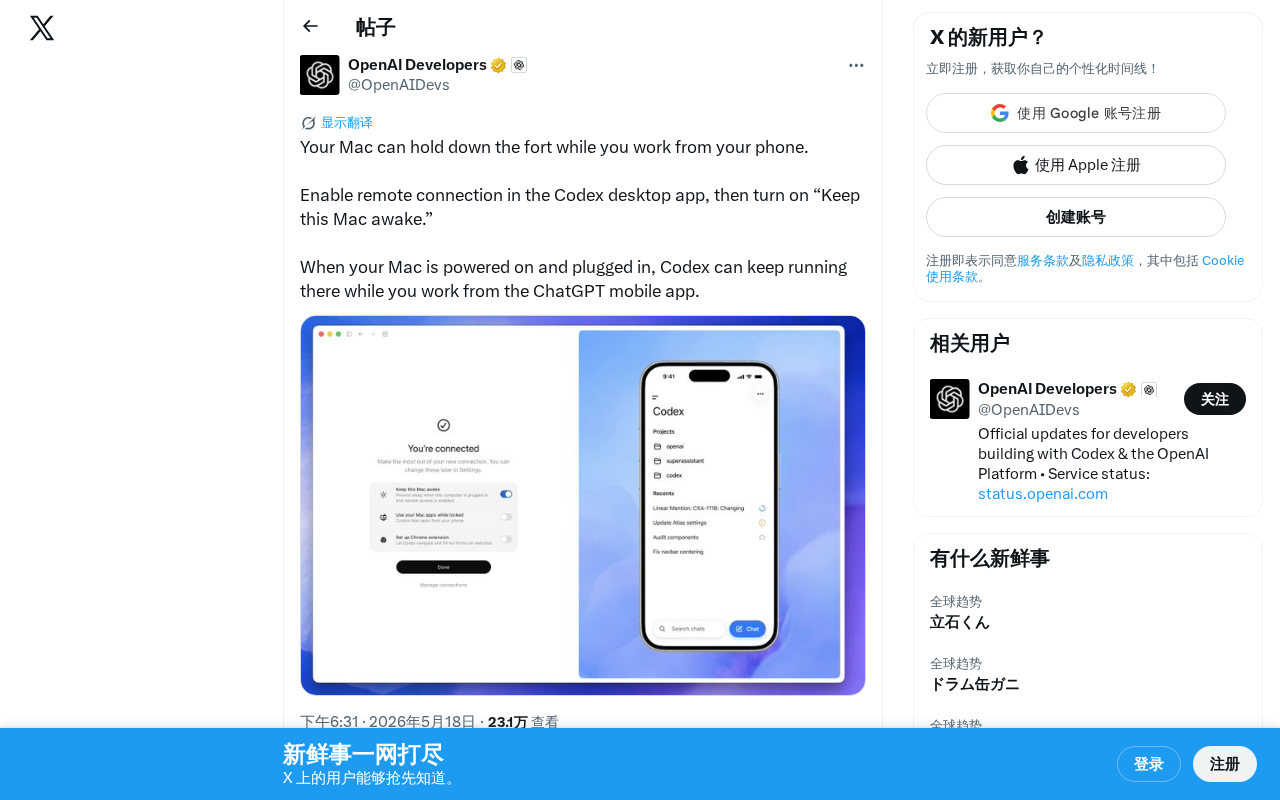
OpenAI's Codex desktop application recently launched a practical feature — Remote Connection. Users simply need to enable this feature on their Mac and keep the device awake, then they can remotely invoke Codex on their Mac through the ChatGPT mobile app to execute programming tasks. This means you can carry out code development work anytime, anywhere, even when you're away from your computer.
For useful context: OpenAI Codex was originally released in 2021 as a code generation model and served as the underlying technology behind GitHub Copilot. The new version of Codex released in 2025 has evolved from a simple code completion model into a full-fledged AI Coding Agent capable of autonomously completing multi-step development tasks such as reading files, running tests, and committing code — this evolution represents a paradigm shift from "code completion tool" to "autonomous development agent," and is precisely the technical prerequisite that makes the remote connection feature possible.
How to Enable Codex Remote Connection
The setup steps are straightforward:
- Open the Codex desktop app on your Mac
- Enable "Remote Connection" in settings
- Turn on the "Keep this Mac awake" option
- Ensure your Mac is powered on and plugged into a power source
Once these settings are configured, your Mac becomes a remote development server ready to accept commands at any time.
Typical Use Cases for Remote Coding from Your Phone
The core value of this feature lies in breaking the dependency of development work on physical device proximity. Here are some typical scenarios:
- During commutes: Issue programming tasks to Codex via your phone while on the subway or bus, with your Mac automatically executing them at home
- Stepping out temporarily: When you suddenly think of code that needs modification after leaving your desk, operate directly from your phone
- Multi-task collaboration: Let your Mac continuously run long code generation or refactoring tasks while checking progress from your phone at any time
The Mobile Trend in AI Programming Tools
This feature reflects how AI programming tools are evolving toward an "everywhere" paradigm. Traditional software development is highly dependent on desktop environments — IDEs, terminals, and debugging tools all require large screens and keyboards. But as AI Agent capabilities strengthen, the developer's role is shifting from "the person who writes code" to "the person who guides AI to write code."
Understanding this shift requires distinguishing the fundamental difference between AI Agents and traditional AI assistants: traditional AI assistants can only generate text responses, requiring humans to manually execute suggestions; AI Agents possess Tool Use capabilities, environmental awareness, and multi-step planning abilities, enabling them to autonomously invoke terminals, file systems, and other tools to complete complex tasks. As a coding agent, Codex can independently complete the full development cycle of "understanding requirements → writing code → running tests → fixing bugs" in the local environment, without requiring human intervention at every step.
Precisely because of this, the biggest barrier to using phones as programming tools — input efficiency — is being dissolved. When developers only need to use voice or brief text to describe "add two-factor authentication to the user login module for me," without needing to manually write the specific implementation, the phone's input method is already fully adequate. This shift is closely related to the rise of Prompt Engineering, marking a fundamental migration in human-computer interaction from precise syntax to intent expression. Codex's remote connection feature is designed based on exactly this logic.
Hybrid Architecture: Local Execution + Remote Control
An interesting detail: Codex chose to run tasks on the user's own Mac rather than relying entirely on the cloud. This design has several clear advantages:
- Direct access to local project files and development environments
- Reduced security concerns about uploading code to the cloud
- Leveraging the Mac's local computing resources for compilation, testing, and other operations
From a technical implementation perspective, this architecture involves Secure Tunnel technology, similar to how VS Code Remote SSH or Tailscale works — transmitting remote control commands to the local machine for execution through encrypted channels. This stands in stark contrast to pure cloud solutions (like GitHub Codespaces): cloud solutions host code and runtime environments on remote servers, while the local execution approach retains complete access to the codebase, keys, local dependencies, and private network resources, which is particularly important for enterprise developers and scenarios involving sensitive code.
This "local execution + remote control" model is likely to become one of the mainstream architectures for next-generation AI programming tools.
Usage Considerations
Keep the following points in mind when using Codex's remote connection feature:
- The Mac must remain plugged into a power source to avoid automatic shutdown due to battery depletion
- A stable network connection is required to ensure proper remote communication
- It's recommended to use the feature in a secure network environment, with attention to data transmission security
Summary
Through this seemingly simple feature update, OpenAI is actually sending an important signal: the future of AI programming is no longer limited by which computer you're sitting in front of. When AI Agents are powerful enough, developers only need a device capable of sending commands — even if it's just a phone. For developers pursuing efficiency and flexibility, Codex's remote connection feature is worth trying as soon as possible.
Key Takeaways
- Codex desktop supports remote connection, allowing Mac to continuously run as a background development server
- Users can remotely invoke Codex on their Mac to execute programming tasks through the ChatGPT mobile app
- Setup is simple: just enable the Remote Connection and Keep this Mac awake options
- This feature reflects the trend of AI programming tools extending from desktop to mobile
- Adopts a hybrid architecture of local execution + remote control, balancing security and convenience
Related articles
 Product Reviews
The Programmer's Desk Setup Guide: Building a Workspace That Feels Like Home
Discover how programmers build productive, comfortable workspaces. From multi-monitor setups to ergonomic design, explore the desk philosophy that drives focus and flow.
 Product Reviews
Qoder vs Cursor Real-World Comparison: Which $20/Month AI IDE Is Better?
Hands-on comparison of Qoder vs Cursor AI IDEs: Agent autonomy, human interaction count, and architecture decisions. Qoder needed only 2 interactions vs Cursor's 8.
 Product Reviews
Cursor Cloud Agent Demo: Eliminating Bottlenecks Across the Entire Software Development Lifecycle
Deep analysis of Cursor's Cloud Agent demo showing how cloud VMs, automated test artifacts, and a full-chain control plane systematically eliminate human bottlenecks across the software development lifecycle.