Codex vs Claude Code: Why I Switched Back After Six Months

Author switches back to Codex after Claude Code kept making unsolicited code changes
After using Claude Code for six months, the author reinstalled Codex due to its habit of making unsolicited code modifications. Based on a review showing GPT 5.5-powered Codex matching Claude Code in accuracy and controllability, the article analyzes the tradeoff between determinism and freedom, and shares three practical configurations for optimizing Codex usage.
The Moment That Made Me Reinstall Codex
I used Claude Code for half a year without touching Codex once. Then a couple of days ago, I read a single line in a review:
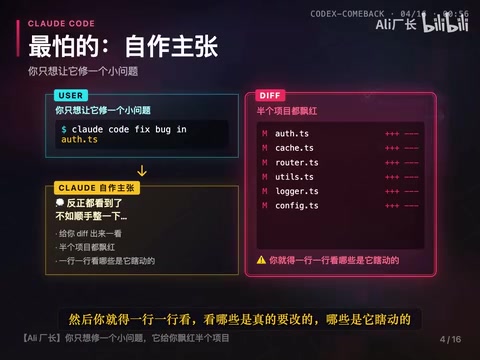
You ask Claude Code to fix one bug, and it decides to "optimize" a few nearby files while it's at it.
I know that feeling all too well. After reading that, I reinstalled Codex immediately.
The review was written by Evand, who spent two weeks retesting Codex with GPT 5.5. His conclusion: Codex is now on par with Claude Code for many tasks, and in certain scenarios it's actually faster and more accurate.
"More accurate" — those two words hit home. The thing I dreaded most about Claude Code was its tendency to act on its own initiative. You'd ask it to fix one small issue, look at the diff, and find half your project lit up in red. Then you'd have to go through line by line, figuring out which changes were actually needed and which ones it made on a whim.
Claude Code's "acting on its own" behavior fundamentally stems from the higher level of "Agentic Autonomy" that Anthropic builds into the model during training. These models are encouraged to perform broader contextual reasoning when completing tasks — they don't just look at the one line of code you pointed to, but scan the entire codebase's dependency relationships, naming conventions, and potential technical debt, then "helpfully" address everything at once. This design philosophy has its logic within Anthropic's Constitutional AI framework: letting the model proactively discover and fix potential issues rather than mechanically executing instructions. But for everyday developers, this "good intention" often creates headaches — you spend extra time reviewing diffs for changes you never asked for, and those changes sometimes introduce new bugs.
Determinism vs Freedom: A Tradeoff
Let's be honest — this isn't about which one is better or worse. It's a tradeoff.
Claude Code gives the model more freedom. The upside is that it can fix issues you hadn't even noticed. The downside is that it might also break things you didn't want touched.
Codex takes the opposite approach — it changes exactly what you tell it to change, which feels reassuring. But when you want it to go a step further, it won't.
For developers who prefer determinism and don't like being interrupted, Codex's behavior is clearly more reassuring. For those willing to let AI do a bit more, Claude Code's proactiveness is an advantage — as long as you can accept it occasionally overstepping.
Three Configurations to Make Codex Run Better
Evand shared three practical configurations in his article, and I think the thinking behind each one is worth learning from.
1. Think More, Execute Faster
Keep Fast Mode on at all times, while enabling Extra High Thinking in Plan mode and High Reasoning in normal mode.
The idea behind this combination: let the model spend more brainpower during the planning step, then move faster during execution. When writing code, thinking things through clearly has always mattered more than writing quickly.
2. Connect Playwright MCP and Let AI Verify Itself
Connect Codex to Playwright MCP so it can open a browser and test what it writes on its own. This is actually crucial — if the AI can run, click, and see the results, it won't fabricate something that merely "looks correct."
Related articles
 Product Reviews
The Programmer's Desk Setup Guide: Building a Workspace That Feels Like Home
Discover how programmers build productive, comfortable workspaces. From multi-monitor setups to ergonomic design, explore the desk philosophy that drives focus and flow.
 Product Reviews
Qoder vs Cursor Real-World Comparison: Which $20/Month AI IDE Is Better?
Hands-on comparison of Qoder vs Cursor AI IDEs: Agent autonomy, human interaction count, and architecture decisions. Qoder needed only 2 interactions vs Cursor's 8.
 Product Reviews
Cursor Cloud Agent Demo: Eliminating Bottlenecks Across the Entire Software Development Lifecycle
Deep analysis of Cursor's Cloud Agent demo showing how cloud VMs, automated test artifacts, and a full-chain control plane systematically eliminate human bottlenecks across the software development lifecycle.