Codex vs. Computer Use: How These Two AI Tools Divide the Work

Codex and Computer Use target different worlds and should be divided by task object and API availability.
The article addresses whether Computer Use can take on development tasks like Codex. The answer is no, since they were designed for different worlds. Codex and Cursor are Code Agents that process code, project files, and terminals via APIs, far outperforming desktop tools at coding tasks but unable to see the desktop or click buttons. Computer Use specializes in on-screen operations, such as entering data in financial software, clicking browser buttons for testing, and moving data between internal systems without APIs. The criterion is task object and API availability: code tasks go to Code Agents, interface tasks go to Computer Use. The mature approach is to combine them — Codex for programming, Computer Use for execution in real desktop environments.
Core Question: Can Computer Use Take on Jobs Like Codex?
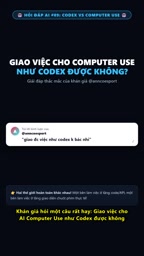
A viewer raised a very practical question: since AI can already write code automatically, can you just hand a task to Computer Use and have it complete development work the way Codex does? According to a response from a YouTube channel in a short video, the answer is no — these two tools were designed from the start for completely different worlds. Understanding their boundaries is far more valuable than forcing one tool to handle everything.
Codex Is a Code Agent — It Works with Code and the Terminal
Codex and Cursor belong to the same category: Code Agents. They interact directly with code, project files, and the terminal through APIs, and their working material is text-level software assets. For tasks like writing functions, fixing bugs, and refactoring source code, Codex's efficiency and accuracy far surpass general-purpose desktop automation tools. The original video put it vividly — the speed and precision on code tasks is an order-of-magnitude difference. That's also why the developer community generally treats Code Agents as their daily workhorse rather than using them for interface clicking.
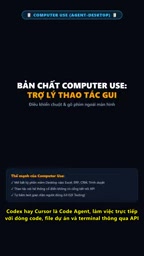
Its limitations are equally clear: Codex cannot see the desktop, cannot click buttons, and cannot read third-party software interfaces that lack an API. Once a task leaves the code repository, its capabilities end.
Code Agent is a class of AI agents purpose-built for software development tasks. Its core characteristic is that it operates directly on code repositories, project file systems, and command-line terminals through APIs or local interfaces, rather than relying on a graphical interface. Unlike general-purpose chatbots, Code Agents typically have tool-calling capabilities such as reading and writing files, executing shell commands, running tests, and viewing diffs, enabling them to complete multi-step tasks in real engineering environments. Representative products include OpenAI Codex, Cursor's Agent mode, and Claude Code. Because their working material is pure-text software assets, Code Agents can precisely parse syntax structures, trace dependency relationships, and read error messages to self-correct when something fails — making them far more efficient and accurate on programming tasks than desktop automation tools that simulate clicks.
Computer Use Fills Exactly the "On-Screen Work" Gap
The capability boundary of AI computer use lies on the other side: simulating human operations on the desktop. Opening financial software to enter data, launching a browser and clicking through interface buttons one by one for testing, copying numbers from Excel into an internal system with no open API — Codex can't do these things, but only computer use can take them on.

The key criterion here is "whether there's an API." Systems with APIs are more stable and faster to call programmatically; legacy internal systems without APIs, desktop clients, and interface workflows that require visual confirmation can only be handled by tools like computer use that "look at the screen and move the mouse." Many companies' real workflows get stuck precisely at this kind of step, which explains why demand for desktop automation has never gone away.
Computer Use is a capability that enables AI models to perceive screen content through screenshots and simulate mouse and keyboard operations to complete tasks. It was first systematically presented by Anthropic when Claude Computer Use launched in 2024. Its technical approach is typically: the model receives screen screenshots, outputs action instructions such as coordinate clicks, text input, and scrolling, and loops until the task is complete. Compared with programmatic calls that rely on APIs, Computer Use's advantage is that it can operate any software with a graphical interface — including legacy systems with no open interfaces, desktop clients, and workflows requiring visual judgment. The cost is slower speed, stability affected by interface changes, and a relatively higher error rate since every step requires visual understanding.
How Engineers Actually Work: Use Both Together
The original video's conclusion is clear: the common practice among engineers today is to combine the two. Use Codex for the programming part — writing scripts, modifying code, building automation logic; use computer use for the execution part — putting what's been written into a real desktop environment to run. According to the channel, this "Codex writes, computer use runs" division of labor is a relatively mature practice today.

The logic behind this division isn't complicated: give code tasks to the Agent that understands code, give interface tasks to the Agent that understands interfaces, and let each stay in its area of strength — the overall workflow actually runs more smoothly. Forcing one tool to cross boundaries usually leads to problems in environmental perception or operational precision.
How to Decide Which One to Use
Before assigning work to AI, ask two questions. First, is the object of this task a code file or a software interface? Second, does the target system have a callable API? If the object is code and the system has an interface, go with a Code Agent; if the object is an interface and the system has no API, go with computer use. If both questions are involved, split it into two stages and assign each to the appropriate tool.
This decision method works for individual developers and small teams alike. A tool's capability boundary isn't a defect — it's the basis for division of labor. What really affects efficiency is often not how powerful the tool itself is, but whether the task has been assigned to the right one.
What tasks are you currently hesitating over who to give them to? Run them through the two questions above first — the answer usually emerges.
API (Application Programming Interface) is an agreed-upon programmatic channel between software systems. The caller sends a request in a fixed format and receives a structured response, without going through a graphical interface. For AI agents, having an API means data can be read and written directly, stably, and at high speed, unaffected by interface layout changes; without an API, you can only fall back to simulating human eyes and hands. Many internal systems in enterprise environments were built long ago and don't provide APIs — or have interfaces with restricted permissions. This is precisely the real-world soil in which desktop automation tools have long existed. When deciding which path a task should take, "whether the target system provides a callable API" often determines tool choice more than "whether the task itself is hard."
One-line Summary
Codex and Computer Use target different worlds and should be divided by task object and API availability.
Paragraph Summary
The article responds to a common question: can Computer Use take on development tasks like Codex? The answer is no, because the two were designed from the start for different worlds. Codex and Cursor are Code Agents that directly process code, project files, and terminals through APIs, far outperforming general desktop tools at writing functions, fixing bugs, and refactoring source code — but they can't see the desktop or click buttons. Computer Use specializes in on-screen operations, suitable for opening financial software to enter data, clicking browser buttons for testing, and moving data between internal systems with no API. The criterion is the task object and whether there's an API: code tasks go to Code Agents, interface tasks go to Computer Use. The mature approach among engineers is to combine them — Codex handles programming, Computer Use handles execution in a real desktop environment.
Related articles

GPT-Image 2.6 Dual Release: A Double Upgrade in Speed and Precision
OpenAI releases GPT-Image 2.6 with Flare for faster generation and Sunburst for complex prompts and dense infographics. API adds markup editing, SVG, and GIF support.

Robert Caro: How to Get Insiders to Talk and Uncover the Hidden Logic of Johnson's Money Politics
Pulitzer winner Robert Caro shares how he interviewed John Connally, revealing how pressing on Johnson's funding annotations got insiders to explain political money logic.

Showing This Video to Someone in 2014: The Stunning Evolution of AI Video
From the viral Reddit post "Show this AI video to someone from 2014," we look back at a decade of AI video generation's leap from academic research to indistinguishable reality, analyzing the cognitive impact and trust challenges amid the flood of synthetic content.