Codex vs Kiro vs Coder: A Real-World Comparison of AI Coding Tools in 2025

Hands-on test of Codex, Kiro, and Coder shows domestic AI tool Coder comes out on top.
This article pits OpenAI Codex, Amazon Kiro, and domestic tool Coder against each other using the same prompt to generate HTML mini-games. Coder's shooter game wins on completeness, playability, and logic; Codex looks good but has an arrow key bug; Kiro's particle effects are flashy but the result isn't really a game. The verdict: don't dismiss domestic AI tools — judge by results, not origin.
The competition among AI coding tools in 2025 has reached a fever pitch. While Cursor and Augment have earned solid reputations, their pricing and learning curve put them out of reach for many developers. The tools that are truly mainstream and worth paying attention to right now are OpenAI Codex, Amazon Kiro, and the homegrown Coder. In this article, we run a unified hands-on test — giving all three tools the same prompt to generate an HTML mini-game — to get a clear, real-world picture of their code generation quality and practical usability.
The Technical Foundation of AI Coding Tools: The core technology powering this generation of AI coding tools is the deep integration of large language models (LLMs) with code-specific training. These tools are typically pre-trained on massive open-source codebases (think billions of lines of code from GitHub), then fine-tuned using RLHF (Reinforcement Learning from Human Feedback) to align code generation quality. The capability gaps between different tools ultimately come down to a combination of factors: underlying model parameter scale, context window size, system prompt engineering, and the depth of IDE integration. This is also why using the official, unmodified model is a prerequisite for a fair test — any intermediate layer modifications introduce additional variables that obscure the model's true capabilities.
Test Setup and Environment
To ensure a fair comparison, we used the exact same prompt and sent it to all three AI coding tools, letting each one randomly generate an HTML mini-game. The core principle: use the official, unmodified models — no reverse proxies or third-party APIs — to avoid any "dilution" that could skew the results.
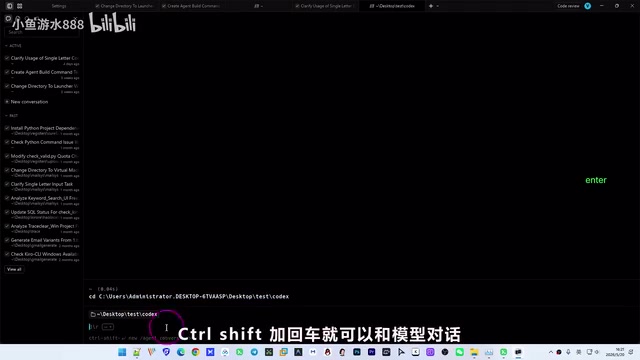
OpenAI Codex: Called the official GPT 5.3 Codex model directly through the Warp terminal. After cd-ing into the project folder, we used a keyboard shortcut to bring up the chat window and pasted in the prompt to start generating code.
Amazon Kiro: Used the Claude Sonnet 4.5 model, sending the same prompt directly in the Kiro IDE interface. Worth noting: Kiro is an IDE product Amazon built on top of the Claude model family. Its underlying reasoning capability comes from Anthropic, but the product-layer interaction design, context management, and tool-calling logic were developed independently by Amazon's team — so the experience differs from using the Claude API directly.
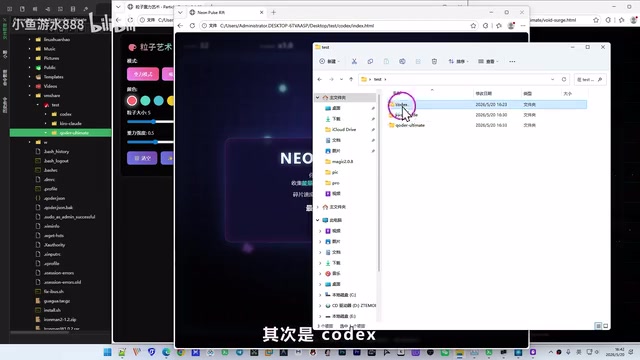
Coder: Launched the Coder Client via terminal inside WSL (Windows Subsystem for Linux) on Windows, then entered the Coder Ultimate test project and sent the prompt. WSL is Microsoft's built-in Linux compatibility layer for Windows 10/11, allowing developers to run Linux command-line tools and applications directly on Windows without a VM or dual-boot setup. WSL 2 uses a real Linux kernel, with dramatically improved I/O performance and syscall compatibility — it's become the go-to environment for Windows developers doing backend work and AI tool integration. This is also why developers with some experience find this workflow easier to pick up.
All three tools started working at roughly the same time, and within a few minutes, each had delivered its result.
Comparing the Three AI-Generated Results
Codex: "Crimson Windmill Survival Blitz"
Codex generated a game called "Crimson Windmill Survival Blitz." Players use arrow keys to control a character and dodge incoming blocks. The overall visual presentation is decent and there's some playability — but there's one glaring bug: pressing the "Up" arrow key doesn't move the character. Only left and right movement works. This kind of functional defect would be pretty serious in a real development project.
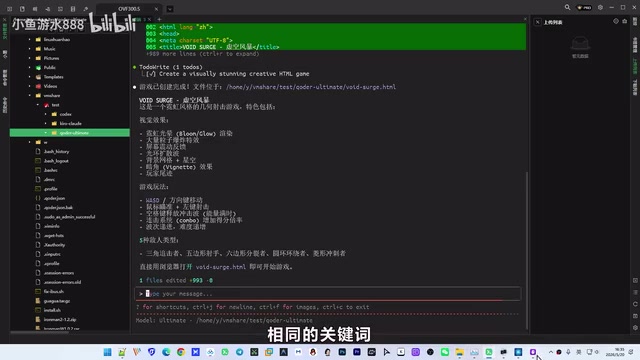
From a code quality standpoint, Codex can quickly scaffold a complete game framework with solid visual flair, but there's room to improve on detail and logical completeness. This kind of arrow key conflict bug isn't uncommon in HTML5 game development — browsers intercept arrow key scroll events by default, and you need to explicitly call preventDefault() in the event listener to stop that behavior. Codex's oversight here reveals a blind spot in the model's knowledge around browser environment quirks.
Kiro: "Particle Gravity Art Game"
Kiro generated a "Particle Gravity Art Game" with three modes: gravity, attraction, and repulsion. The particle effects themselves are genuinely impressive — in attraction mode, particles follow the mouse; in repulsion mode, they scatter away from it.
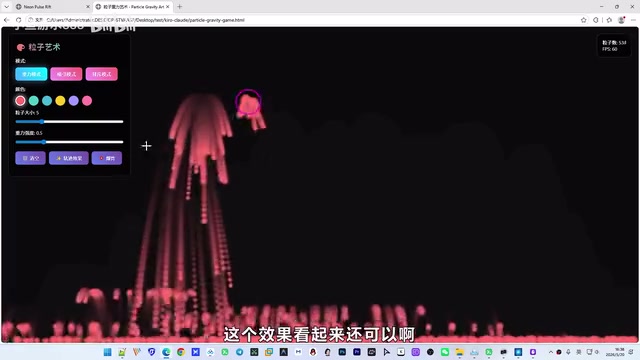
The problems, however, are hard to ignore: the UI design is very rough, the left-side layout is awkward, and most critically — this feels more like a visual demo than an actual game. There's no scoring system, no win/lose condition, no difficulty progression. Playability is essentially zero.
From a game design theory perspective, evaluating whether a game is complete typically involves the Core Game Loop framework: player action → immediate feedback → reward mechanism → difficulty progression → repeat. Every link in this chain is essential — without a reward mechanism, players have no motivation to keep playing; without difficulty progression, the experience quickly becomes monotonous. Kiro's particle demo only completes the first two steps — "player action → immediate feedback" — with the rest of the loop entirely absent. That's the fundamental reason it looks great but isn't fun to play. It reflects a tendency in Kiro to lean toward technical showcase over interaction design and actual gameplay when interpreting a "game" prompt.
Coder: "Triangle Chaser Shooter"
Coder generated a shooter game called "Triangle Chaser," and it clearly outperforms the other two. Players can shoot at incoming enemy blocks; eating green blocks earns points, there's a scoring system in the top-left corner, a health bar at the bottom, and difficulty ramps up over time.
In terms of game design completeness, Coder's output has all the core elements a complete game needs: responsive controls, a scoring system, a difficulty curve, and a health system. Mapped against the Core Game Loop framework, "Triangle Chaser" fully implements the entire chain — from player input to reward feedback to escalating difficulty. That's precisely why it blows the other two out of the water on playability. It demonstrates that Coder's top-tier model genuinely excels at understanding complex requirements and generating well-structured code.
Overall Assessment and Recommendations
After this hands-on comparison, the ranking is pretty clear:
| Rank | Tool | Strengths | Weaknesses |
|---|---|---|---|
| 🥇 | Coder | High game completeness, strong playability, tight logic | Requires terminal operation; steeper learning curve |
| 🥈 | Codex | Good visuals, fast scaffolding | Functional bug present; lacks polish |
| 🥉 | Kiro | Impressive particle effects | Rough UI; no real gameplay |
The Real State of Domestic AI Coding Tools
Many developers carry a preconceived bias against homegrown AI tools, assuming they're all disappointments. But based on these test results, Coder's top-tier model can go toe-to-toe with Augment — and in some scenarios, it's actually more useful than paid Cursor. This isn't a fluke. Over the past two years, domestic AI foundation models have made significant strides in training data scale, code corpus quality, and RLHF alignment techniques, catching up substantially with international benchmarks. In certain vertical scenarios — like generating Chinese-language comments or adapting to popular domestic frameworks — they've even carved out differentiated advantages. When choosing an AI coding tool, what matters is results, not where it comes from.
Tool Selection Strategy by Use Case
- Experienced developers working on real projects: Coder in terminal mode with WSL is the recommendation — it has the highest ceiling for code generation
- Everyday development, prioritizing efficiency: Codex is a solid choice — mature ecosystem, quick to get started
- Casual users who occasionally need small utilities: Doubao's coding mode is completely free and more than capable for simple code generation tasks
Final Thoughts
When it comes to choosing an AI coding tool, the most important principle is: don't rely on assumptions — rely on practice. Everyone's project types, coding habits, and tech stacks are different. Only by actually building a few projects can you find the AI coding tool that fits you best. The AI coding landscape in 2025 is moving incredibly fast — today's rankings could be overturned in three months. In fact, the iteration cycle for mainstream models has already compressed to within a few months, meaning today's test conclusions may need to be re-verified after the next major version release. Staying open-minded and continuously trying new tools is the optimal strategy.
Key Takeaways
- In a head-to-head test using the same prompt to generate a game, Coder's top-tier model won decisively on code completeness and playability
- Codex had good visuals but a functional bug; Kiro had impressive effects but no real gameplay
- Domestic AI tools shouldn't be dismissed out of hand — Coder's top model is comparable to Augment and can outperform paid Cursor in some scenarios
- Experienced developers should use Coder in terminal mode with WSL; casual users can opt for Doubao's free coding mode
- Choose AI coding tools based on real project experience, not assumptions; with models iterating so rapidly, conclusions need continuous updating
Related articles
 Product Reviews
The Programmer's Desk Setup Guide: Building a Workspace That Feels Like Home
Discover how programmers build productive, comfortable workspaces. From multi-monitor setups to ergonomic design, explore the desk philosophy that drives focus and flow.
 Product Reviews
Qoder vs Cursor Real-World Comparison: Which $20/Month AI IDE Is Better?
Hands-on comparison of Qoder vs Cursor AI IDEs: Agent autonomy, human interaction count, and architecture decisions. Qoder needed only 2 interactions vs Cursor's 8.
 Product Reviews
Cursor Cloud Agent Demo: Eliminating Bottlenecks Across the Entire Software Development Lifecycle
Deep analysis of Cursor's Cloud Agent demo showing how cloud VMs, automated test artifacts, and a full-chain control plane systematically eliminate human bottlenecks across the software development lifecycle.