Codex + WX-CLI: Build a WeChat Group AI Secretary That Auto-Summarizes Chats

Build a zero-code WeChat group AI management bot using OpenAI Codex and WX-CLI.
This article explains how to use OpenAI Codex and the open-source tool WX-CLI to build a WeChat group AI management bot without writing a single line of code. The bot automatically monitors group chats, filters messages by keyword, summarizes them with AI, and delivers scheduled digests. The entire process — environment assessment, tool installation, validation, customization, and deployment — is handled by Codex, showcasing a new paradigm of natural-language-driven AI development.
Codex + WX-CLI: Build a WeChat Group AI Secretary That Auto-Summarizes Chats
Still scrolling through 999+ unread WeChat messages one by one? Imagine having an AI secretary that automatically monitors your group chats, extracts key information, and pushes you a summary on a schedule — saving you at least 30 minutes every day.
This article walks through a complete real-world project: using OpenAI Codex + the open-source tool WX-CLI to build a WeChat group AI management bot — with zero manual coding. Environment detection, tool installation, code writing, feature validation, and final deployment are all handled by Codex.
Core Idea: Let AI Be Your Development Team
At its heart, this project builds an AI Agent with a straightforward workflow: read WeChat group messages → filter by keywords → AI summarizes and categorizes → sends you a scheduled notification.
What is an AI Agent? An AI Agent is an AI system capable of perceiving its environment, autonomously planning, and executing multi-step tasks — distinct from a standard LLM that simply answers a single question. Its core architecture consists of four modules: a perception layer (acquiring input data), a planning layer (breaking tasks into steps), an execution layer (calling tools or APIs), and a memory layer (maintaining context state). In this WeChat bot project, the perception layer corresponds to WX-CLI reading messages, the planning layer to keyword filtering logic, the execution layer to calling the OpenAI API to generate summaries, and the memory layer to the message queue maintained by the scheduling script. This architecture enables AI to handle complex tasks that require multiple rounds of operations.
But the real takeaway isn't the bot itself — it's the development paradigm behind it. You no longer need to write code yourself. Instead, you give Codex instructions in plain language and let it handle everything from environment detection to final deployment. This approach can be applied to virtually any similar AI project.
About OpenAI Codex: Codex is an AI system from OpenAI fine-tuned specifically for code generation tasks on top of the GPT model series — and was the underlying engine behind early versions of GitHub Copilot. The next-generation Codex launched in 2025 (based on the o3 model) has been further upgraded into a cloud-based programming assistant with full Agent capabilities. It can autonomously execute terminal commands, read and write files, install dependencies, and run tests inside a sandbox environment, enabling true end-to-end automation from requirement description to code deployment.
The entire setup process is broken into five phases: environment assessment, tool installation, feature validation, requirement customization, and scheduled deployment.
Step 1: Environment Assessment — Let Codex Run a Feasibility Analysis
Create a project folder in Codex (e.g., WXAI-agent), then tell it that the open-source tool you want to use is WX-CLI.
What is WX-CLI? WX-CLI is an open-source command-line tool that reads messages and automates operations via the WeChat desktop client. Under the hood, it works by hooking into WeChat's local database (an SQLite-format MSG database) to read chat history, or by listening to the local message queue for real-time message capture — rather than using any official API. This approach runs entirely locally; data never passes through third-party servers, keeping privacy risks relatively contained. That said, tools like this depend on a specific version of the WeChat client and may need re-adaptation after WeChat updates. Be sure to carefully evaluate compliance risks before use.
Here's a key principle: don't let Codex install the tool right away — have it run an environment assessment first. Specifically, ask Codex to check:
- Whether the current OS environment is compatible
- Whether WX-CLI's source code can run on your machine
- Whether the WeChat desktop client can interact with the system
- Whether there are any permission or dependency issues
Codex will automatically analyze your local environment and the source code, generate a detailed feedback list, and provide a complete solution. You simply confirm whether the plan looks reasonable before deciding to proceed. This step is essentially having AI do a feasibility analysis upfront — preventing headaches down the line.
Step 2: Tool Installation and Permission Configuration
Once you've confirmed the plan looks good, instruct Codex to proceed with installation. It will download and install WX-CLI locally using a minimal validation module.
During installation, Codex may detect permission issues — for example, certain system directories may require manual authorization. Rather than getting stuck, it will write the exact terminal commands you need. Just copy them into your terminal and run them once.
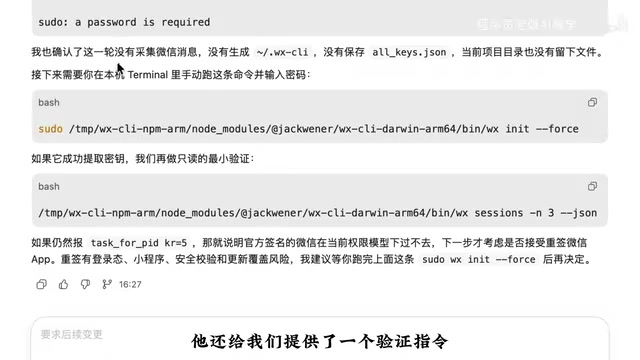
Open your terminal, paste the authorization commands Codex provides, enter your login password, and wait for initialization to complete. Codex will then provide a verification command — if running it successfully outputs your group chat messages, WX-CLI is configured correctly.
Step 3: Layer-by-Layer Validation — Ensuring Messages Are Read Correctly
Once installation is complete, don't rush into building features. Have Codex run multiple rounds of validation:
- Readability validation: Confirm that group chat messages, private messages, and group member info can all be read normally
- Real-time validation: Confirm whether the latest WeChat messages can be captured in real time
- Privacy redaction validation: Ensure that sensitive information about group members is not exposed during the validation process
Codex will quickly execute each round and return its findings. If any step fails, it will automatically suggest a fix. This "small steps, layered validation" approach is a best practice in professional development — it dramatically reduces the cost of debugging later.
Step 4: Customize Your AI Agent Requirements
Once validation passes, you reach the most critical phase — telling Codex exactly what you want this AI Agent to do.
Your prompt should include the following key details:
- Which group chats to monitor: can be one group or multiple
- Which keywords to watch for: e.g., "AI", "tools", "deals", "issues"
- What output structure you want: which messages are relevant to you, which need priority attention, which can wait
- Privacy and security requirements: redaction rules, what content should not be displayed
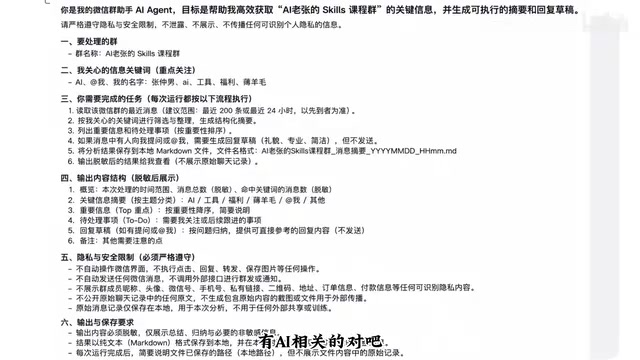
Important note: Requirements vary significantly by use case. A course group might need to surface questions from students; a resource-sharing group might need all links and files catalogued; a work group might need action items extracted. Always tailor the prompt to your actual scenario rather than copying a template verbatim.
Based on your requirements, Codex will automatically locate the relevant group chats, filter the related messages, and organize the output in the structure you specified.

As you can see from the output, the AI Agent cleanly categorizes messages into "Relevant to Me", "Priority", and "Review Later" — giving you a clear, actionable summary at a glance.
Related articles
 Tutorials
ChatGPT Plus Subscription Guide: Are GPT-5.5, image-2, and Codex Worth the Upgrade?
A detailed look at ChatGPT Plus features — GPT-5.5, image-2, and Codex — with a Plus vs Pro comparison and a complete step-by-step subscription guide for users outside the US.
 Tutorials
Harness AI Engineering in Practice: Using Claude Code to Master Enterprise-Level E-Commerce Development
Deep dive into Harness AI Engineering: master enterprise e-commerce development with Claude Code using the Rules, Skills, Wiki, and Changes framework.
 Tutorials
Cursor + Codex Dual-IDE Collaboration: A Practical Methodology for Open-Source Project Customization
A complete methodology for open-source project customization based on real-world experience, detailing the Cursor+Codex dual-IDE workflow, seven-stage process, MVP validation, and AI source code reading techniques.