ComfyUI LLM Assistant 2.0: An All-in-One Multimodal Local Deployment Solution

ComfyUI LLM Assistant 2.0 delivers conflict-free multimodal AI capabilities for local deployment.
ComfyUI LLM Assistant 2.0 is a major plugin update that integrates real-time translation, OCR text extraction, multimodal dialogue, audio/video understanding, and speech synthesis into one unified, locally deployed toolbox. Built on Google's Gemma model and Alibaba's Qwen, it resolves Python dependency conflicts that plague ComfyUI users, offering beginner-friendly installation and offline-capable, Chinese-friendly AI assistance for creators.
A Major Upgrade for ComfyUI Creators
For long-time ComfyUI creators, dependency conflicts between plugins and tedious model deployment have always been persistent headaches. ComfyUI is a node-based workflow GUI for Stable Diffusion, and its open architecture has attracted a large community of developers contributing Custom Nodes. However, these plugins typically depend on different versions of Python libraries — for example, Plugin A requires transformers 4.35 while Plugin B needs transformers 4.40 — and when they coexist in the same Python virtual environment, version conflicts arise. In mild cases, certain features break; in severe cases, the entire ComfyUI fails to launch. This problem, known in the community as "Dependency Hell," is a long-standing engineering challenge in the Python ecosystem.
Recently, a Bilibili content creator released a major update to their self-developed AI plugin, "LLM Assistant 2.0," integrating real-time translation, image prompt reversal, OCR text extraction, multimodal dialogue, audio understanding, video understanding, and more into a unified ComfyUI plugin system.
More importantly, the author emphasizes that the core of this update isn't just feature stacking — it's about resolving the long-standing dependency conflicts between different models. For users plagued by the "install one plugin, break the whole environment" problem, this may be the most practical improvement of all. This article outlines the key capabilities and real-world performance of this update.
Real-Time Voice Translation: Multilingual Support via ComfyUI Local Inference
The first highlight is the real-time translation feature. It can translate the user's voice input into a target language in real time, supporting mutual translation across multiple languages. In the demo, the author spoke Chinese and requested English output, and the system instantly generated the corresponding English text.
Several usage details are worth noting: the first use involves some model loading time, and the first few translations are slower before gradually speeding up. Overall performance is strongly correlated with GPU capability; enabling recording simultaneously slightly slows response speed. Additionally, the plugin provides a "continuous text filling" mechanism to fully record the entire conversation, making it convenient for later review or organizing meeting and interview content.
The value of this type of local real-time translation lies in privacy and offline availability. Local inference means the model runs directly on the user's own hardware (CPU/GPU), with all data processing completed on the local machine without passing through any external servers. In contrast, cloud API mode (such as calling OpenAI or Google Cloud interfaces) requires uploading user input data to the service provider's servers for processing. For highly sensitive biometric information like voice data, local inference has inherent advantages in data sovereignty and privacy compliance, making it especially suitable for enterprise internal meeting transcription, medical voice-to-text conversion, and other application scenarios with strict data security requirements.
A Multimodal Node Matrix Based on Gemma
This update introduces Google's Gemma (referred to in the video as "Gemma 3 series") model, and splits it into multiple functional nodes to form a complete multimodal understanding system.
Gemma is a lightweight large language model series open-sourced by Google DeepMind in 2024, built on the technical foundation of the Gemini model. The Gemma 3 series further enhances multimodal capabilities, supporting understanding and generation across text, images, audio, and video. Compared to open-source models of similar scale, Gemma 3 has a clear advantage in parameter efficiency — its smaller model configurations (such as the 4B and 12B parameter versions) can run on consumer-grade GPUs, making it ideal for local deployment scenarios. This is a key reason why the plugin chose Gemma as its core inference model.
Image Understanding and OCR Text Extraction
The image understanding node includes multiple modes: prompt reversal, image content description, one-sentence summary, image text extraction, and custom questioning. The OCR extraction feature deserves special mention: the author noted that a community member previously wanted to build an image text extraction tool, but early results were unsatisfactory. Now, this feature can record virtually all text in an image with near-complete accuracy.
This leap is closely related to how multimodal large models have revolutionized OCR technology. Traditional OCR relies on specially trained text detection and recognition models (such as Tesseract, PaddleOCR, etc.), which work well on neatly formatted documents but often struggle with complex backgrounds, handwriting, or artistic fonts. The emergence of multimodal large models changed the game — instead of merely "recognizing characters," the model "understands the semantics within an image," enabling accurate extraction even when text is embedded in complex scenes. This explains why the Gemma-based OCR node represents a qualitative leap over earlier standalone OCR tools.
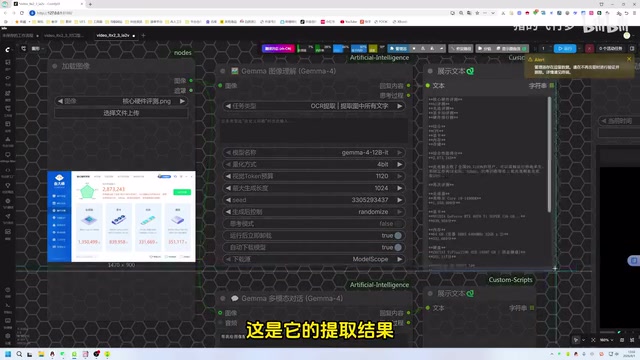
For creators who need to batch-extract text from screenshots, posters, or document images, this capability can significantly boost efficiency.
Multimodal Dialogue and Content Creation
The multimodal dialogue node supports image and audio input, with built-in presets including general assistant, creative writer, code expert, anime girl persona, briefing assistant, and more. Custom presets can also be defined in the backend code.
The author demonstrated a typical use case: generating a story for a Tibetan-themed image, where the model produced narrative fragments in three different styles — mythical fantasy, ethereal and heartwarming, and a gritty philosophical tone. The author believes this type of tool is perfect for writing captions for Xiaohongshu (Little Red Book) posts, quickly generating multi-style copy for selection.
ComfyUI Video and Audio Understanding Capabilities Explained
Video Understanding: Pure Visual Interpretation
The video understanding node can provide detailed descriptions of video content. The author demonstrated a video of "a younger sister taking care of a child" (the original video had no background information), and the plugin, based on pure visual understanding, described it as "a heartwarming clip of a young mother engaging in indoor activities with her child" — an accurate interpretation given solely visual cues without any textual context.
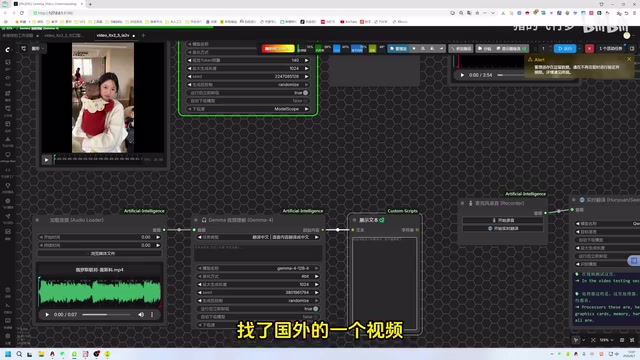
It's important to note that the author warns this visual understanding model does not support Chinese input — entering Chinese will return garbled text, so English interaction is required in practice. This limitation is related to the training data distribution of the Gemma model. Although Gemma supports multiple languages, its visual understanding module has relatively weaker Chinese instruction-following capability, and English interaction yields more stable output quality.
Audio Understanding: Precise Timeline Annotation
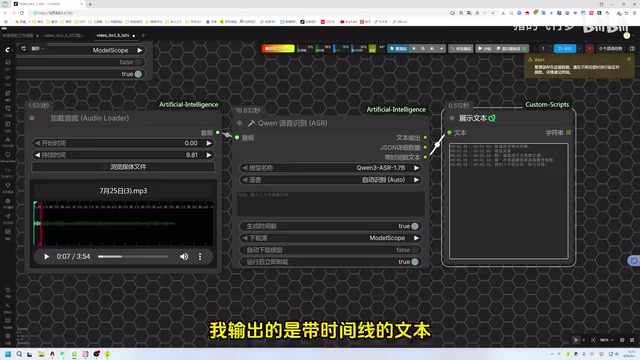
The audio understanding node integrates previously independently developed speech recognition functionality, supporting multiple languages. The author specifically mentioned optimization of timeline precision — earlier versions had timestamp issues, but accuracy is now quite precise. For example, when inputting a song, it can output lyrics with accurate timelines and automatically exclude pauses. This is highly practical for users working on subtitles, song lyric recognition, or audio transcription.
Timestamp precision is critical for audio and video content creation. Accurate timeline annotation means users can directly import recognition results into subtitle editing tools (such as SRT format) without manually aligning each line — a step that typically accounts for most of the time spent in traditional subtitle production workflows.
Text Translation, Smart Dialogue, and Speech Synthesis Nodes
Beyond the multimodal capabilities described above, the plugin also retains and optimizes a series of text-based nodes.
Text Translation Node: Solving the Chinese Prompt Pain Point
Unlike real-time voice translation, the text translation node is designed for text input translation scenarios. The author highlights its key value within the ComfyUI ecosystem: most image and video generation models in ComfyUI don't support Chinese prompts. The translation node converts Chinese to English and applies prompt optimization, resulting in significantly higher-quality English prompts.
This pain point stems from the fact that the Text Encoders of mainstream AI generation models (such as Stable Diffusion XL, FLUX, etc.) are primarily trained on English corpora, giving them limited semantic parsing ability for Chinese prompts. Directly inputting Chinese prompts often leads to generated results that deviate significantly from expectations, while high-quality translated and optimized English prompts can more precisely guide the model toward ideal image generation.
Smart Dialogue Node
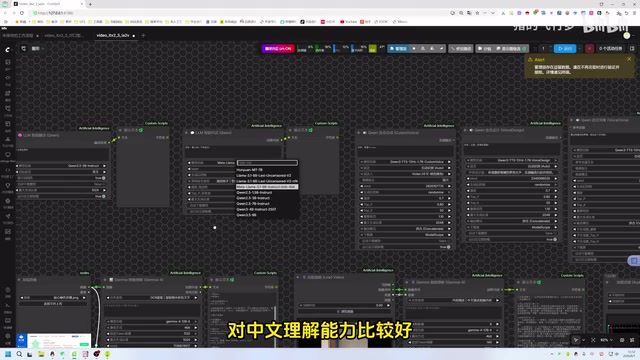
The smart dialogue node supports text-only interaction, but its advantages are small model size and fast generation speed. It performs particularly well in Chinese comprehension when paired with the Qwen model, and also includes multiple built-in presets.
Qwen (通义千问Ad) is an open-source large language model series from Alibaba Cloud, ranking among the top tier of open-source models for Chinese understanding and generation. This is thanks to the large volume of high-quality Chinese corpus in its training data, as well as specialized optimization for Chinese grammar, idioms, homophones, and other unique linguistic features. Within ComfyUI's Chinese user ecosystem, the Qwen model can more accurately understand the semantic nuances of Chinese prompts and generate more natural-sounding Chinese content, which is why the plugin author recommends it as the preferred model for smart dialogue and speech synthesis nodes.
Speech Synthesis and Voice Cloning
The plugin also includes Qwen's speech synthesis node (text-to-speech, supporting multiple languages and voice tones), a voice design node (for designing different character voices to read text), and a voice cloning node. The voice cloning node has an auto-download toggle — when enabled, it automatically downloads the model to the corresponding folder during runtime, lowering the deployment barrier for beginners.
Voice Cloning refers to using a small number of speech samples from a target speaker to enable a TTS (Text-to-Speech) system to generate speech with that speaker's vocal characteristics. Modern voice cloning technology typically uses zero-shot or few-shot learning, requiring only 3-10 seconds of reference audio to extract a Speaker Embedding, which is then injected as a condition into the speech synthesis model. This technology has broad applications in content creation, such as voicing virtual characters and multilingual video localization, but it also raises ethical risks related to Deepfakes. Users should be mindful of compliance and ethical boundaries.
Conflict-Free Installation: Beginner-Friendly Engineering Optimization
The most emphasized value of this update, according to the author, isn't any single feature — it's the engineering-level integration.
Experienced ComfyUI users know that various plugins frequently conflict due to different Python dependency versions, causing environments to repeatedly break. In Python's package management system, only one version of a library can exist within the same virtual environment, and different plugins may have completely incompatible version requirements for the same library. Common solutions include creating isolated environments with conda, containerized deployment with Docker, etc., but these approaches have a high barrier for regular users. The author states that this update merges multiple model capabilities into a single plugin, optimizes inter-model dependencies, and unifies underlying library versions, achieving install-and-use functionality with zero conflicts — which is especially beginner-friendly.
Multiple installation methods are available: installation via Git, copying the address for launcher-based installation, or one-click automatic installation of "LLM Assistant 2.0" through the author's curated "Design Picks" section. After installation, simply restart the launcher to start using it.
Summary: The Value of a Local Multimodal Toolbox for ComfyUI
Based on the demonstrations, this plugin's approach is to consolidate previously scattered capabilities — translation, OCR, multimodal understanding, speech synthesis, and more — into a unified, conflict-free local toolbox. Its positioning is clear: providing ComfyUI creators with an all-in-one, offline-capable, Chinese-friendly AI assistance suite.
This "all-in-one bundle" integration approach is becoming a trend in the AI tool ecosystem. As open-source model capabilities rapidly improve, a single model often can't cover all scenarios. Packaging multiple specialized models into a unified system and solving interoperability issues is the critical link connecting "model capabilities" to "user experience."
Of course, as a self-developed project from a single content creator, its stability and model performance boundaries (such as the visual model not supporting Chinese) still need real-world verification. The author also previewed that the next episode will introduce the "FangFeiYa" plugin development assistant for low-code plugin development and optimization. For users who prioritize local deployment and workflow efficiency, this type of integrated ComfyUI plugin is worth exploring and trying out.
Key Takeaways
Related articles

Chain of Thought Isn't Just for AI: How Humans Can Use CoT to Improve Thinking Quality
Chain of Thought isn't just a prompt trick for large models. Starting from a Hacker News discussion, this article analyzes why CoT works for human thinking too, breaks down actionable ways to transfer it, and highlights the key differences between human CoT and machine CoT.
Cloudflare Teams Up with OpenAI: Closi…
Cloudflare Teams Up with OpenAI: Closing the Loop from Vulnerability Discovery to Defense with AI
Cloudflare uses OpenAI Daybreak to investigate security vulnerabilities and generate reviewable remediation plans, while developers use Codex to boost coding efficiency and quality.

Orca Multi-Agent Orchestration in Practice: A Guide to Parallel Collaboration with Claude and Codex
Orca is Stable AI's free open-source agent workbench supporting 34 agents like Claude Code and Codex in parallel. Learn its Git worktree isolation, multi-model orchestration, and mobile management.