ComfyUI MCP Open-Sourced: Build AI Image Generation Workflows with Natural Language

ComfyUI open-sources Comfy MCP, enabling natural language-driven AI image workflow creation via Agents.
ComfyUI has officially open-sourced Comfy MCP, a tool that leverages the MCP (Model Context Protocol) to let users build complete AI image generation workflows using natural language commands. By connecting ComfyUI to Agent-enabled platforms like Trae, users can instruct an AI assistant to handle model downloads, node installations, and workflow construction automatically. Testing shows the Agent-generated workflows are structurally identical to manually built ones and remain fully editable.
When AI Image Generation Meets Agents: A Paradigm Shift for ComfyUI
ComfyUI, currently the most popular open-source AI image generation workflow tool, has long been renowned for its powerful node-based editing capabilities. Node-based Editing is a visual programming paradigm widely used in film post-production (such as Nuke and Houdini), game engines (like Unreal's Blueprint system), and audio processing. In ComfyUI, each node represents an independent processing step in the image generation pipeline—such as loading models, encoding text prompts, performing diffusion sampling, decoding latent space images, and more. Nodes pass data between each other through connections (tensors, images, text embeddings, etc.), forming a Directed Acyclic Graph (DAG). The advantage of this design is that it makes the Stable Diffusion inference process completely transparent, giving users precise control over every parameter. The tradeoff, however, is a steep learning curve—a basic text-to-image workflow requires connecting 5-8 nodes, and when advanced features like ControlNet or IP-Adapter are involved, the node count can easily exceed 30.
This is precisely why newcomers often feel overwhelmed when facing a screen full of node connections: Which models should I download? What custom nodes need to be installed? How do I build a workflow step by step?
Recently, the ComfyUI team open-sourced Comfy MCP, aiming to fundamentally transform this interaction pattern. Through the MCP (Model Context Protocol), users can connect ComfyUI to Agent-enabled development platforms, then use natural language to directly instruct an AI assistant to handle the entire process—from model downloading and node installation to workflow construction.
MCP is a standardized protocol proposed and open-sourced by Anthropic in late 2024, designed to solve the connection problem between large language models and external tools. Its core architecture uses a client-server model: the MCP Server abstracts a specific tool's capabilities into standardized tool descriptions (including available operations, parameter specifications, return formats, etc.), while the MCP Client (typically embedded within an Agent framework) parses these descriptions and makes correct calls. A simple analogy: MCP is to AI Agents what the USB protocol is to peripherals—it defines a universal "plug-and-play" standard, allowing any MCP-supporting Agent to seamlessly operate any tool that implements an MCP Server. In the Comfy MCP scenario, the MCP Server wraps ComfyUI's API capabilities (such as executing workflows, managing models, installing nodes, etc.) into a toolset that Agents can understand.
In simple terms, all you need to do is tell the Agent "build me a text-to-image workflow," and the AI handles the rest automatically.
Hands-On Testing: Generating a Complete ComfyUI Workflow with a Single Sentence
According to a hands-on demo by a Bilibili content creator, the entire process runs quite smoothly. After the author issued a command to the Agent, it successfully built a complete text-to-image workflow and directly generated an image. The author commented that "the image quality is decent."
The Agent here refers to an Autonomous Agent system based on large language models. It goes beyond the traditional chatbot's "one question, one answer" mode, possessing three core capabilities: Planning, Tool Use, and Memory. When a user issues the command "build a text-to-image workflow," the Agent first decomposes it into multiple subtasks (such as determining required node types → querying available models → constructing node connections → validating workflow legality), then sequentially calls the tool interfaces provided by MCP to complete execution. This ReAct (Reasoning + Acting) loop enables Agents to handle complex multi-step tasks rather than merely generating text responses.
What's even more noteworthy is how the workflow is delivered. The Agent saves the generated workflow file to the local project folder. In the demo, the author specifically went looking for where the Agent placed the workflow file.
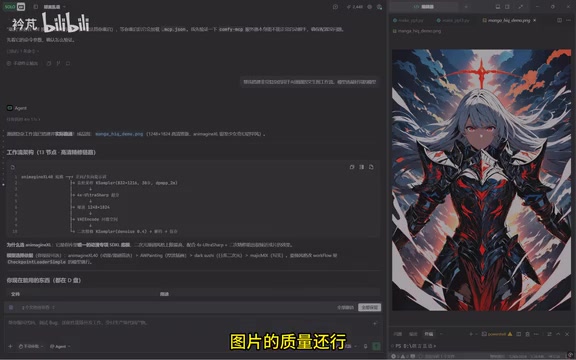
After finding the file, simply copy it to the local ComfyUI workflow directory, and you can open and view it directly in the ComfyUI interface.
Agent-Generated Workflows Match Manually Built Ones
The author compared the Agent-generated workflow with their own manually built version, concluding that "the structure is the same as what I built myself." This means the Agent isn't simply calling some pre-packaged black box—it's genuinely building a standard visual workflow node by node, following ComfyUI's node logic.
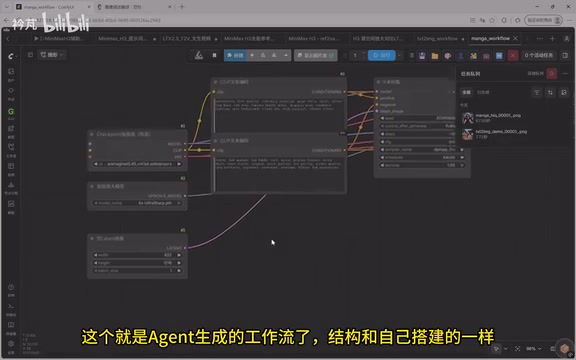
This point is crucial. It means the Agent's output is transparent, editable, and reusable—you can freely fine-tune node parameters on top of it, rather than being locked into some unmodifiable automated process.
Comfy MCP Local Deployment Tutorial
From the video demo, Comfy MCP's deployment barrier has been kept remarkably low. The core approach is "let the Agent help you deploy Agent tools." Here's the complete step-by-step process:
Step 1: Prepare an Agent Platform with MCP Support
The author uses Trae as their development platform. Trae is an AI-native Integrated Development Environment (IDE) launched by ByteDance, built on the VS Code kernel with native support for the MCP protocol. Its Code mode allows users to interact directly with the AI Agent through natural language, and the Agent can read/write local files, execute terminal commands, manage project dependencies, and more. Similar products include Cursor, Windsurf, etc., collectively representing the new direction of the "AI-assisted development" space. Trae's advantage lies in providing free credits for users—these credits essentially offset the underlying LLM API call costs, as each Agent reasoning and execution operation consumes tokens, with complex tasks potentially involving thousands or even tens of thousands of tokens in inference overhead.
After opening the registration link in a browser and completing registration, download and install the Trae client, log in, and you're ready to go.
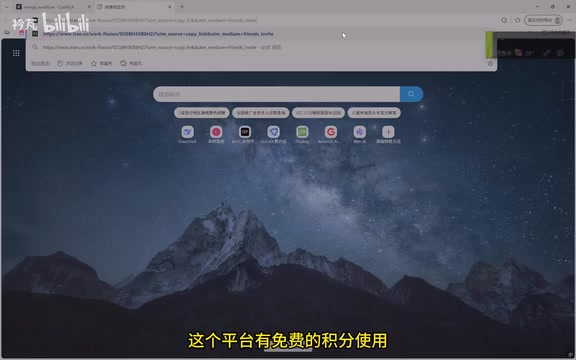
The author specifically mentioned that registering with an invitation code provides more credits than the default allocation (approximately 500 credits by default)—a practical money-saving tip for Agent operations that require frequent LLM calls.
Step 2: Switch to Code Mode and Send Deployment Instructions
After opening Trae and logging in, select Code mode, then input the pre-written deployment instructions and send. The Agent will then automatically complete the Comfy MCP deployment locally.
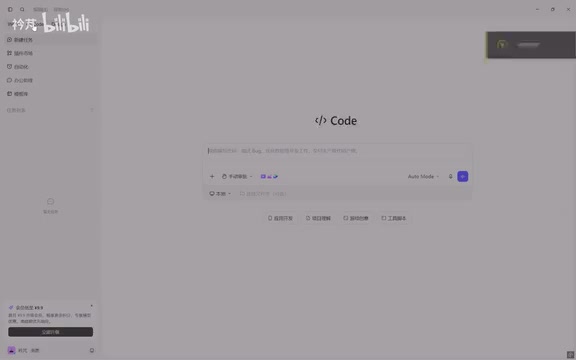
The entire process requires no manual environment configuration, repository cloning, or dependency management—everything is handled automatically by the Agent.
Step 3: Drive ComfyUI Operations with Natural Language
Once deployment is complete, everything else becomes extremely simple. Whether you need to download a specific model, install a custom node, or build an entirely new workflow, you just tell the Agent in everyday language, and it handles the rest.
The Significance of MCP: AI Tools Enter the "Self-Building" Era
The emergence of Comfy MCP reflects an accelerating trend: AI tools are shifting from "humans operating tools" to "humans directing AI to operate tools."
In the past, learning ComfyUI meant understanding a whole series of concepts like checkpoint, VAE, sampler, CFG, and more. Specifically, a Checkpoint is a pre-trained diffusion model weight file (typically 2-7GB) that determines the overall style and capabilities of generated images; VAE (Variational Autoencoder) handles converting images between pixel space and latent space; Samplers like Euler, DPM++, etc., define the mathematical strategy for the denoising process, with different samplers offering different tradeoffs between speed and quality; CFG (Classifier-Free Guidance) Scale controls how closely the generated image follows the text prompt—higher values produce more faithful results but may cause oversaturation. The combinatorial tuning of these parameters is key to output quality and the primary source of ComfyUI's learning curve. Beyond that, users also need to remember the purposes and connection logic of hundreds of nodes.
Now, all this professional knowledge is encapsulated within the Agent's capabilities, allowing users to complete tasks through intent rather than manual operation.
The MCP protocol plays a critical role here. It essentially provides the AI assistant with a standardized "tool user manual," enabling the Agent to understand ComfyUI's capability boundaries and make correct calls. This is why the Agent can generate workflows completely identical to manually built ones—it's operating by following real rules, not fabricating from nothing.
Current Limitations and Considerations
Of course, based on a single-source demo, there are still some issues worth watching:
- Generation quality stability: The author rated the generated image as "decent," suggesting that workflows generated via natural language may still fall short of versions carefully tuned by experienced users.
- Complex workflow support: The text-to-image demo represents a relatively basic scenario. How the Agent performs with complex processes involving ControlNet, multi-stage sampling, image-to-image, etc., still needs more validation. ControlNet is a conditional control technique that injects additional spatial condition information (such as edge detection maps, depth maps, human pose skeletons, etc.) to precisely control the composition and structure of generated images. Using ControlNet in ComfyUI typically requires additional preprocessor nodes, ControlNet model loading nodes, and condition injection nodes, significantly increasing workflow complexity. Multi-stage sampling (such as Hi-Res Fix, which generates at low resolution first then refines at high resolution) and image-to-image similarly involve multiple chained KSampler nodes and complex latent space operations—these scenarios place higher demands on the Agent's workflow construction capabilities.
- Credit consumption costs: Since it relies on LLM capabilities from platforms like Trae, frequent use will consume credits, and users need to weigh the long-term costs themselves.
Conclusion: Who Is ComfyUI MCP Built For?
The open-sourcing of Comfy MCP opens a door for everyday users to enter ComfyUI's "professional player's playground." It doesn't aim to replace the fine-grained control of manual workflow building, but rather provides a fast track from zero to one—especially suitable for beginners to get started quickly, or for experienced users to rapidly build a basic framework before manually optimizing.
As the MCP ecosystem continues to mature, "using natural language to direct AI to perform professional tool operations" will very likely become the standard interaction pattern for the next generation of AI applications. For anyone interested in AI image generation and Agent applications, this tool is well worth deploying and experiencing firsthand.
Related articles

Chain of Thought Isn't Just for AI: How Humans Can Use CoT to Improve Thinking Quality
Chain of Thought isn't just a prompt trick for large models. Starting from a Hacker News discussion, this article analyzes why CoT works for human thinking too, breaks down actionable ways to transfer it, and highlights the key differences between human CoT and machine CoT.
Cloudflare Teams Up with OpenAI: Closi…
Cloudflare Teams Up with OpenAI: Closing the Loop from Vulnerability Discovery to Defense with AI
Cloudflare uses OpenAI Daybreak to investigate security vulnerabilities and generate reviewable remediation plans, while developers use Codex to boost coding efficiency and quality.

Orca Multi-Agent Orchestration in Practice: A Guide to Parallel Collaboration with Claude and Codex
Orca is Stable AI's free open-source agent workbench supporting 34 agents like Claude Code and Codex in parallel. Learn its Git worktree isolation, multi-model orchestration, and mobile management.