Complete Beginner's Guide to Claude Code: Build a Real App in an Afternoon — No Coding Experience Required

Non-programmers can use Claude Code and the BITE framework to build a real, working app in a single afternoon.
Written by self-described non-programmer theMITmonk, this tutorial argues that anyone can build a real, working application in hours using Claude Code and plain language. Starting with a 25-minute focus timer, it introduces the BITE framework — Brief, Implement, Test, Evolve — then walks through building a personal relationship manager called Orbit end-to-end. Key tips include asking AI to plan before coding, defining what the first version won't do, declaring yourself non-technical to avoid jargon, and using high-reasoning models for planning while using cheaper models for execution.
From "Can't Write Code" to "Built a Real App"
For a long time, most people assumed software development had a sky-high barrier to entry — something only tech geeks could pull off. Claude Code is turning that assumption on its head. In this comprehensive beginner's tutorial, theMITmonk makes a bold claim: even if you've never written a single line of code, you can go from a blank screen to a fully working application in a single afternoon.
The author is upfront about not being a programmer himself. He compares Claude Code to a "world-class interpreter" — imagine you have an important business meeting in Beijing tomorrow, but you don't speak a word of Mandarin. With a top-tier interpreter by your side, you can sit down, hold a real conversation, negotiate, and sign the deal without ever touching the language yourself. Programming languages like Python and JavaScript are like that foreign tongue to beginners; Claude Code is the interpreter. You express what you need in plain English, and it handles the rest.
The author draws a clear distinction between three tools: Claude Chat helps you think, Claude's collaboration tools help you execute, and Claude Code helps you build. The heart of this tutorial is a simple four-step system — once you understand it, you can build almost anything.
Your First Build: A 25-Minute Focus Timer
Open the Claude desktop app. At the top, you can toggle between Chat and Code — select Code (the universal code icon is hard to miss). Terms like repositories and GitHub? Completely ignorable for your first build.
Pick a folder to store your project, then type a single plain-language request: "Build me a beautiful 25-minute focus timer with start, pause, reset, and a progress ring." Hand it off to Claude Code — it figures out what's needed, creates the files, writes the code, assembles the components, and within minutes, a real, working app is born.
Open it up: a clean timer interface, start/pause/reset buttons, all there. This is the moment many people experience their first "Wait — I made this?" feeling. The author highlights the first major mindset shift when using Claude Code: you don't need to manage the code, you only need to manage the outcome. Don't like how it looks? Keep making requests in plain language and it'll change.
That said, the author admits the timer was deliberately simple. The real value shows up when you try to build something more complex.
The BITE Framework: Plan Like a Director, Don't Swallow the Whole Watermelon at Once
The best way to build software is to start by not thinking about software. The author uses a brilliant Hollywood analogy: imagine you're the director of a $200 million blockbuster, the entire crew is waiting outside, and you're frantically rewriting the script on a napkin — reportedly what happened on the set of Joker: Folie à Deux. Contrast that with Mad Max: Fury Road, where director George Miller's team storyboarded roughly 3,000 frames to map out every scene and stunt before filming began, producing one of the most chaotic yet meticulously planned action films ever made.
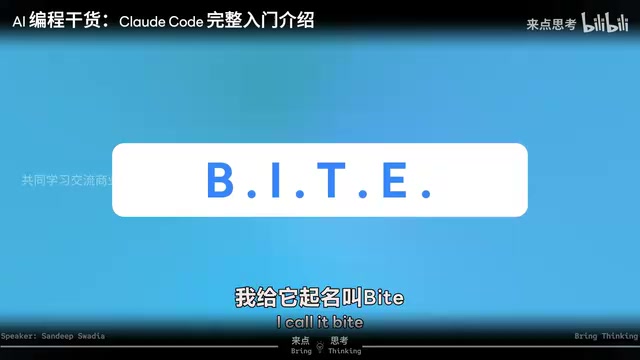
So before picking up any vibe coding tool, plan first, start small, test, and improve. The author calls this system BITE — take it one bite at a time, don't swallow the whole watermelon:
- B - Briefing: What are you building? For whom? Why?
- I - Implement: Build the smallest working version first.
- T - Test: Actually use it — see where it breaks and how it could improve.
- E - Evolve: Good products evolve over time. So do good builders.
Building Orbit in Practice: A Personal Relationship Manager in Four Steps
The author applied the BITE framework to build a real tool — a personal relationship manager called Orbit, designed to track his connections with the people who matter most: mentors, collaborators, former colleagues.
B: Write a Solid Brief
AI builds faster than any human team, but precisely because it's so fast, it needs a lot of directional guidance. A good brief answers four questions: Who is this for? What problem are we solving? What does the first version need to do? And just as importantly — what are we NOT doing in this version?
A few key details from the author's prompt to Claude Code are worth noting: he explicitly asked it to "make a plan first, ask me any important questions you're missing before writing any code"; he specified a visual style (professional, minimal, Apple-inspired, muted color palette); and he set clear boundaries (no email or LinkedIn integrations for now). The most telling line: "I'm not technical — don't ask me to approve or review any technical commands. Make all technical decisions yourself. Only ask me in plain English what this app should do."
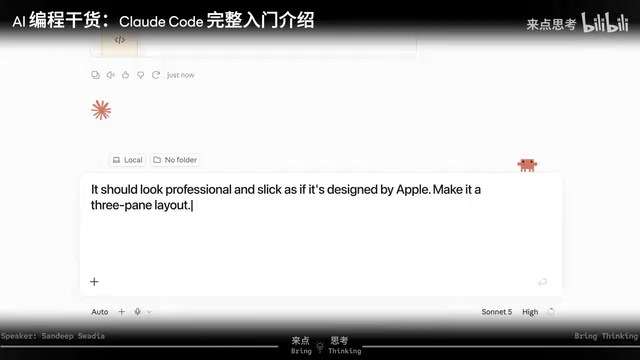
Claude responded with a series of questions about what the app should do — not which programming language to use or how to design the database. You decide what it should do; it decides how to build it. After reviewing the plan, the author caught one missing detail: a three-column layout — a category sidebar on the left, a contact list in the middle, and a profile panel that opens on the right when you click someone.
I: Implement the Minimum Viable Version
The biggest mistake is trying to build every feature at once. After approving the plan, Claude Code got to work — creating and editing files, running commands, installing dependencies. If your account supports auto mode, you can enable it so Claude works continuously without requesting permission at every step; just slow down to review anything sensitive.
This particular build took roughly 10 to 15 minutes — Claude wrote all the JavaScript, self-checked, self-built the database, and delivered a first version. Search worked, the three-column layout was in place, left-side categories were accurate. A genuinely usable Orbit v1.
This introduces the core concept of an MVP (Minimum Viable Product): the smallest version of something you can put in front of users that actually solves their problem. With an MVP in hand, you can observe how people use it, where it breaks, and what they like — that feedback tells you what to build next.
The author also shares a practical tip: use the most powerful reasoning model for planning, and a cheaper, faster model for implementation — like hiring a senior consultant to set the strategy, then having a junior team member do the legwork.
MVP (Minimum Viable Product) is a concept from Lean Startup methodology, systematically laid out by Eric Ries in The Lean Startup. The core logic: rather than spending months crafting a "perfect" version, ship the simplest version that genuinely solves the core problem, then use real user feedback to decide what comes next. MVP doesn't mean rough or low-quality — it means "minimum scope but independently usable." It must complete one thing end-to-end. For personal tools, the test is even simpler: would you use it every day? If the answer is no, it's not truly functional yet — keep iterating, rather than piling on more features.
T: Test and Make It More Insightful
A working first version is just the beginning. Actually using it reveals what's missing. In Orbit, all the names, data, and dates were there — but there were no clear, actionable insights. So the author went back to the prompt: add three cards at the top showing how many contacts need attention, how many have "gone cold," and how many need follow-up this week. Minutes later, a dashboard appeared.
Then another gap surfaced: no way to log how and when you reached out to someone. Another prompt: add a "Log Contact" button to each person's profile, with options to select the method (email/phone/text/coffee), pick a date, and add notes. Claude Code went back, revised the code, rebuilt parts of the component, and when tested — it worked. At this point, it was no longer a spreadsheet. It was a personal relationship management system.
E: Evolve — and Let Yourself Evolve Too
The final step isn't just about evolving what you built — it's about growing alongside it. The author cites an Anthropic study of roughly 400,000 real AI coding sessions: people who had never coded before achieved success rates nearly equal to trained engineers, and managers scored slightly higher than software engineers.

The author notes this is a survey, not rigorous research — but it points to something interesting: the entire skill of vibe coding ultimately comes down to knowing what you want and describing it clearly to your "AI programmer." The best people managers become the best AI managers.
Personal CRM (Personal Relationship Manager) is a category of lightweight contact-tracking tools. Unlike enterprise CRMs like Salesforce, they focus on maintaining personal social relationships. The core needs are simple: record when you last contacted someone, through what channel, and what you discussed — and get a nudge when a relationship starts going cold. While dedicated tools like Clay and Monica exist, they often come with feature bloat or don't fit personal workflows perfectly. This is precisely the kind of thing that makes sense to build yourself: clear requirements, simple data structure, low stability demands — an ideal starter project for AI-assisted development.
Vibe coding is a term coined by OpenAI co-founder Andrej Karpathy in early 2025, describing a style of development where developers rely entirely on AI to generate code and rarely read or review the underlying code directly. The developer acts more like a "feeling-driven" product director — describing desired outcomes, accepting or rejecting AI output, and converging on a goal through iterative conversation. The term took off quickly because it accurately captured what large numbers of non-technical users were already doing spontaneously. Critics worry that vibe coding produces unmaintainable code with security risks; proponents argue it dramatically lowers the bar for personal tools and prototypes, compressing the idea-to-product cycle from weeks to hours. Both perspectives have merit — the key is context. Internal tools and personal projects have fundamentally different code quality requirements than production systems serving the general public.
Three Directions to Evolve
From here, you can grow in three directions:
- Evolve the app into a system: Reuse the code to build a side-project CRM, a tracker for your kid's soccer team, or a personal goals dashboard.
- Go a little deeper: Learn about APIs, how to connect apps, how to use GitHub, what those Python libraries are actually doing. When you're stuck, open Claude Chat and ask it to explain things "like I'm 10 years old."
- Learn some coding even if your career has nothing to do with software: Because software building is one of the areas where AI will advance fastest over the coming years, and the people with the right tools will create real magic.
The world still needs great software engineers to understand complex systems, architecture, and security. But this entirely new way of building and managing your digital life is coming at a hundred miles an hour. The author's advice is simple and powerful: spend a weekend tinkering with Claude Code, Lovable, or Replit. The real goal is to get comfortable with building, breaking, and rebuilding. Make a bad version first — because that's the only way you figure out how to make the best one.
Related articles

JobRunner MCP Server: AI Agents Can Now Fix Failed Java Jobs
JobRunner launches an open-source MCP server enabling AI agents to view cluster status, diagnose failures, and recover Java jobs—incident response from any cloud coding environment or existing agent.

MLAI Digital Launches 9 Security Agents: MCP Server Safeguards the Full Lifecycle of Agentic AI
MLAI Digital launches Security MCP Server with nine built-in specialized security agents covering vulnerability discovery, attack simulation, prompt injection detection, API and infrastructure assessment, and accelerated remediation—embedding security validation across the full Agentic AI lifecycle from development to production.

Running Isaac Lab on H100 GPUs: Exploring Better Approaches
Exploring optimization methods for running Isaac Lab on NVIDIA H100 GPUs, including MIG configuration, mixed precision, TensorRT acceleration, and community experience to improve robotics simulation and reinforcement learning efficiency.