Complete Grok Bot Tutorial: Building an AI Team That Works While You Sleep

Grok Bot lets you build an AI team that autonomously operates computers and collaborates 24/7.
Grok Bot is xAI's AI agent platform where each bot runs on its own Linux cloud computer — users can watch it in real time as it places Amazon orders, fills out documents, or chats with customer service. Bots collaborate autonomously, with a Chief of Staff coordinating other agents, while scheduled Routines turn AI from a passive responder into an always-on automated system. Account connections work via direct authorization or MCP tools like Composio and Zapier. Note that all bots share one cloud computer and login state; permission isolation is the user's responsibility. Pricing starts around $100/month, with free inclusion for Cursor, Super Grok, or Teams subscribers.
What Exactly Is Grok Bot
Grok Bot is an AI agent platform from xAI aimed at everyday users. Its biggest difference from typical chatbots is this: it's not a single conversation window — it lets you assemble an "AI team" that's on call 24 hours a day. Tech content creator Charlie Chang repeatedly emphasizes a core feeling throughout his complete tutorial: using Grok Bot feels like talking to coworkers who are genuinely willing to work overtime, and each "coworker" has their own dedicated computer and browser — you can watch them execute tasks on screen in real time.
This design philosophy lowers the barrier to entry. You don't need to understand complex workflow configurations. Just give instructions the way you'd talk to a real person, and the bots will learn your preferences over time, building workflows tailored to you.
To get started, visit x.ai/bot to download the desktop app. Note that this isn't a free product — you'll need at least a starter subscription. Charlie himself uses the Grok Plus plan at $100/month, with the main difference between tiers being usage limits. If you already hold a qualifying Cursor, Super Grok, or Teams plan, Grok Bot is included at no extra cost.
Building Your First AI Teammate from Scratch
Charlie recommends that beginners create an "Executive Assistant" as their first bot. The process is extremely simple: click the plus icon → Create New Bot → name it → write a short description → and start chatting right away.
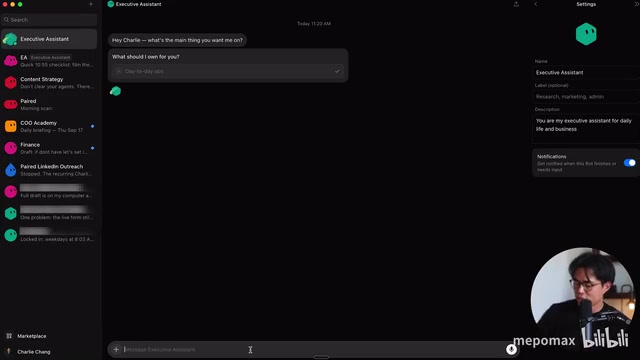
The key concept here is "establishing ownership." Grok Bot will proactively ask what domain it should be responsible for. You can tell it to handle "daily operations" and describe the role in plain language — something like "You're my executive assistant; help me handle all kinds of miscellaneous tasks." As you use it more, it gradually remembers your habits and may even proactively build routine workflows for you.
In the settings page (click your name in the bottom-left corner), you can review usage and billing. One thing worth noting: since each bot actually runs on a dedicated Linux cloud computer, you occasionally need to manually update that "computer." If a bot gets stuck, you can also reset the system — though Charlie doesn't recommend doing this frequently.
Connecting Accounts So Your AI Can Actually Get Things Done
To have your AI teammate handle real tasks, the first step is connecting your various accounts. Grok Bot offers two methods: either say "connect my Gmail account" directly in the chat and log in to authorize, or connect accounts in bulk via MCP tools — Charlie recommends using Composio or Zapier.
Each approach suits different situations. If you only have a handful of accounts, connecting directly in the chat is fine. If you have a large number of logins to integrate, configuring everything at once through Composio is far more efficient. One key platform characteristic: all bots share the same Linux computer, the same files, browser, and login state — but each has its own workspace.
MCP (Model Context Protocol) is an open protocol standard proposed by Anthropic in late 2024, designed to give AI models a unified way to access external tools. Think of it as the "USB port" of the AI world — whether it's a calendar, email, database, or third-party SaaS service, as long as it implements the MCP protocol, AI can call these tools in a standardized way without needing custom integration logic for each service. Composio and Zapier are essentially managed MCP implementations — they package the connection logic for hundreds of commonly used services so users only need to authorize once and let AI agents handle the rest. The difference from traditional API integration is that MCP follows an "AI initiates the call" model rather than "user manually triggers an automation," which lets AI agents decide in real time during a conversation whether and how to use external tools.
Independent Screens: AI Operates a Computer Just Like a Human
Grok Bot's most distinctive feature is that each team member has their own screen. Click the screen icon to pull up its desktop and watch in real time what it's doing.
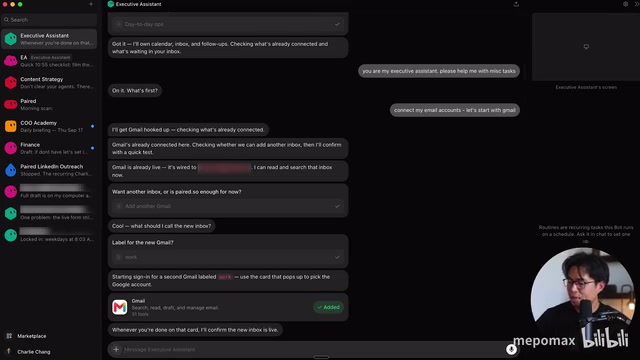
You can open Chrome, log into Gmail, and have the bot complete real operations on that computer. Charlie shared his own hands-on examples: he had Grok Bot place orders on Amazon, download and fill out various documents, and even communicate with customer service chatbots on his behalf — he simply told the bot what he wanted to say and what outcome he wanted.
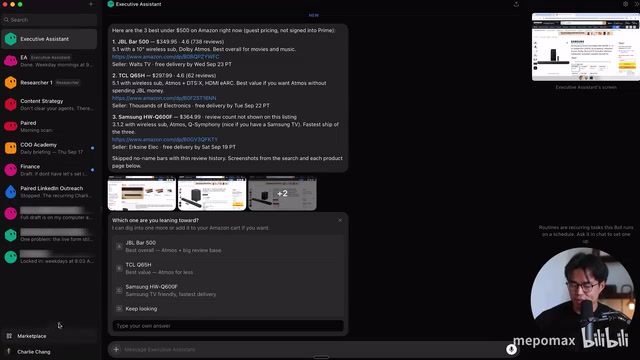
In a live demo, he gave his assistant the task: "Find me the three best soundbars under $500, and I usually shop on Amazon." The bot immediately searched Amazon and filtered for highly rated products. If given login access, it could complete the purchase directly. Charlie admits the bot executes more slowly than a human, but it does get the job done.
There's also a "Teach" button in the top right that lets you personally walk through a task once — the bot watches and learns. This is a direct way to make it smarter over time.
Grok Bot's screen operation capability falls under the "Computer Use" category — one of the most significant breakthroughs in AI agent research over the past year or two. Unlike calling structured APIs, Computer Use lets AI perceive the screen visually, move a mouse, click buttons, and type text — operating any graphical interface software, including legacy systems with no open API. Anthropic's Claude 3.5 Sonnet was the first to release a public preview of this capability in 2024, and other platforms have followed since. The tradeoff is slow execution speed (each step requires a screenshot, interpretation, and decision), and relatively low fault tolerance — UI changes or CAPTCHAs can interrupt the flow. The "slower than a human" Charlie mentioned is an inherent limitation of this technology at its current stage, not a Grok Bot-specific problem.
Multi-Bot Collaboration and Scheduled Routines
As workflows grow more complex, Charlie recommends assigning each bot a clearly defined role. In addition to the executive assistant, he's set up a "Chief of Staff" to coordinate other bots and created dedicated researcher bots.
One feature that impressed him is that bots can communicate with each other autonomously. When the executive assistant needs something from the researcher, it proactively messages the researcher, who replies once the work is done. Charlie says he often sees his bots chatting with each other — "it really does feel like a team working together."
Another key capability is scheduled Routines. You can say "check my Slack and email every morning at 9 AM, then send me a report," and the bot will generate a routine that runs automatically on schedule. Charlie emphasizes this is the core of making AI work like a real employee around the clock — it transforms AI from passive responder into an always-on automated system. You can even ask your assistant "what routines do you think I should set up" and let it proactively make recommendations.
In his actual business, his bot lineup includes: a finance bot that handles invoice collection, client communication, QuickBooks integration, and financial report generation; a newsletter bot that logs into the Beehive platform to draft content; a content strategy bot; multiple research bots; a LinkedIn outreach bot; and more.
The "Chief of Staff" role design reflects a classic orchestration pattern in Multi-Agent Systems. In this architecture, an "Orchestrator" typically breaks down tasks, assigns them to specialized sub-agents, and consolidates results. Grok Bot makes this abstract concept concrete using familiar workplace hierarchy, lowering the cognitive barrier. The ability for bots to communicate autonomously implies some form of asynchronous message queue under the hood — when the researcher bot hasn't finished yet, the executive assistant doesn't block and wait; it continues handling other tasks, and the researcher proactively sends back results when done. This non-blocking collaboration model is an important evolution of AI agent systems compared to traditional RPA (Robotic Process Automation) tools, enabling parallel processing of multiple long-running tasks.
The Marketplace, Group Chats, and Shared Computer Caveats
Grok Bot has a built-in Marketplace where you can import bots created by others. For example, Dr. Eggbot will help you design high-quality bots by asking you questions.
The Marketplace also serves as an entry point for connecting plugins — Gmail, Google Drive, Google Calendar, Slack, Notion, and more can all be authorized with one click. Charlie specifically mentions being able to connect a password manager, but the platform is designed so that passwords are never directly exposed to the bots themselves, making the overall process reasonably secure.
The Group Chat feature is useful for scenarios that require multiple bots to participate simultaneously. For example, you might pull your executive assistant, finance bot, and COO bot into a group and ask: "Do we have any outstanding invoices? If so, let's coordinate on how to pay them." Charlie notes the main value of group chats is "visibility" — normally you can't see the private conversations between bots, but group chat surfaces all collaborative messages in one place.
On the technical architecture side, there's one thing to always keep in mind: all bots share the same cloud computer, files, browser, and login state. Once one bot is logged into your email, every other bot can access it too. You can instruct certain bots not to perform specific actions or access certain accounts, but that's handled at the configuration level for now.
Is It Worth Using?
Setting aside the standalone screen feature, the rest of the Grok Bot experience is similar to other AI platforms: you can ask all kinds of questions, do research, and use it as a tutor or advisor. The real difference lies in the layout and interaction model — it makes you feel like you're managing a team, and the fact that each member has their own computer means it can complete real operational tasks that other platforms simply can't.
Charlie's conclusion is fairly direct: many tasks that previously required hiring someone can now be handed off to Grok Bot. For individual users and small-to-medium businesses, this genuinely offers a new approach to replacing some repetitive human labor at a lower cost. That said, it still has obvious limitations — execution speed is slower than a human, and the shared-computer design means users need to stay mindful of permission boundaries themselves.
Related articles

ChatGPT Space Launches: Team Collaboration and New Pages Features Explained
ChatGPT Space is OpenAI's new team collaboration feature with Pages, real-time collaboration, and Slack/Google Drive sync. We break down its privacy design, multi-platform integration, and the full workflow from conversation to document.

Migrating Apache Spark UDFs to GPU Acceleration with AI Agents
NVIDIA developer blog explains how AI Agents rewrite Apache Spark UDFs for GPU acceleration, covering migration criteria, agent rewriting and verification workflows, plus pitfalls like result consistency and CPU-GPU transfer overhead.

Zed Editor v0.40.4-rc2 Released: Usage Credits Now Available Without Upgrading
Zed editor releases v0.40.4-rc2, allowing users to use usage credits for AI features without upgrading to a paid plan, lowering the trial barrier.