Complete Guide: Local Deployment of Qwen3 Coding Model with Ollama + Cline

Run top-tier coding AI locally for free using Ollama + VSCode + Cline on your own GPU.
This guide walks through a local AI coding setup using Ollama, VSCode, and Cline, letting developers run open-source coding models entirely on their own hardware — no API costs, no token limits, no data leaving the machine. The key hardware threshold is VRAM: 24GB+ supports large quantized Qwen3 models that rival top closed-source alternatives, while 8–12GB users fall back to lighter options. Setup involves pointing Cline's API provider to Ollama, tuning the context window, and enabling VSCode folder trust. Real-world demos include a 3D Earth visualization and Flappy Bird clone built in minutes, with optional MCP workflow support and uncensored model variants for maximum flexibility.
Why Running a Coding Model Locally Is Worth It
Running a coding model on your own machine once seemed nearly impossible — either you didn't have enough VRAM, or open-source models were too weak to produce anything meaningful. But based on hands-on demonstrations, a modern gaming PC with a high-end GPU can now run open-source models that approach — and in some coding benchmarks even surpass — top closed-source models.
The core value proposition is straightforward: 100% free, no token limits, and fully local data. For developers who constantly hit API rate limits and don't want to upload code to third-party servers, local deployment is a genuinely compelling option. The setup is simpler than you'd expect — most developers can get everything running in under 15 minutes.
One note: model names and benchmark scores referenced in the original video are sometimes inconsistent (terms like "Qwen3.8" and "27B" appear interchangeably). Always refer to the official model page for accurate information.
The Three-Tool Stack: Ollama + VSCode + Cline
The entire local deployment setup relies on three tools with clearly defined roles:
- Ollama: The local model runtime engine — handles downloading, loading, and inference. Install it from ollama.com just like any other application.
- VSCode: Your code editor and workspace UI for viewing and managing project files. Think of it as a self-hosted alternative to Cursor-style coding environments.
- Cline: An AI coding plugin for VSCode (sometimes misheard as "Slime" or "Client"). Search for "Cline" in the Extensions marketplace to install it. It connects your local model to the editor and enables agent-style automated coding.
Once installed, open Cline's settings and switch the API Provider to Ollama — you'll immediately see all locally downloaded models available. You can also configure the context window size here. An RTX 5090 can handle 64K context, but if you have limited VRAM, dropping to around 32K is recommended for stability.
Cline is an open-source AI coding agent plugin. Unlike autocomplete tools such as GitHub Copilot, it works in a task-driven manner: you describe a goal in natural language, and Cline autonomously plans steps, reads and writes files, and executes terminal commands until the task is complete. Every action is transparent and requires your confirmation. Cline's architecture supports any OpenAI API-compatible backend — which is exactly why it integrates seamlessly with Ollama. Ollama spins up a local HTTP server that exposes an OpenAI-compatible API, so Cline simply sends requests to localhost:11434.
Matching Models to Your Hardware: 24GB VRAM Is the Dividing Line
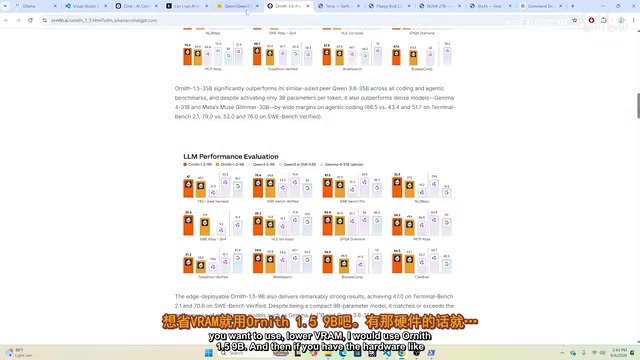
Choosing the right model means being realistic about your hardware. You can use tools like "Kneron AI" to check which models your GPU can handle. Here's the general decision framework:
24–36GB VRAM: Run Large Quantized Models
If your GPU has 24 to 36GB of VRAM, you can run larger quantized versions of the Qwen3 series (often referred to as "Q variants"). This tier delivers the strongest performance, closest to top closed-source models, and is the primary recommendation in this guide.
8–12GB VRAM: Fall Back to Smaller Models
For laptops or desktops with only 8 to 12GB of VRAM, smaller lightweight models are your best bet. Coding benchmark scores will be lower and performance somewhat slower, but it's the most practical option for limited hardware.
Downloading models is simple: navigate to the model's page, copy the provided command, and run it in PowerShell (Windows) or Terminal (Mac). Larger quantized models are roughly 17–20GB in size. Once downloaded, they're immediately available in Ollama.
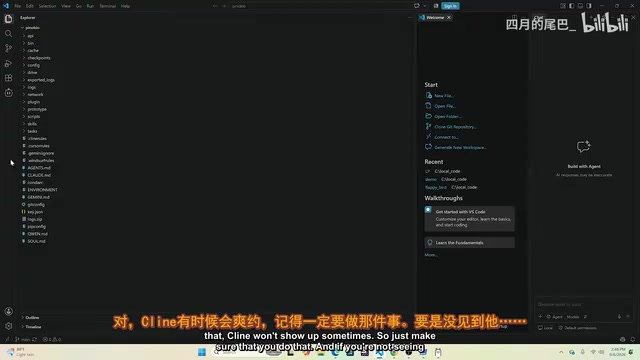
One common pitfall: when you open a project folder in VSCode, you may see a "Restricted Mode" warning. This is VSCode's security mechanism for protecting your code. You'll need to manually confirm trust via Manage → Trust this folder. Cline connection failures are often traced back to this setting being overlooked.
Quantization is the key technology that makes large models run on consumer GPUs. Model weights are typically stored as 16-bit or 32-bit floats; quantization compresses them to 4-bit, 5-bit, or 8-bit integers, reducing VRAM usage to 1/4 to 1/2 of the original. For example, "Q4_K_M" means 4-bit quantization with a specific algorithm variant (K_M) that balances compression ratio against accuracy loss. Qwen3's quantized versions in GGUF format use this technique to fit multi-billion parameter models onto standard gaming GPUs. The trade-off: inference speed and output quality degrade slightly compared to full-precision models — though the larger the model and the higher the quantization bit-width, the smaller the quality loss.
Real-World Results: Flappy Bird and 3D Earth Demos
With everything configured, a few live demo projects were built to showcase what local models can do:
- 3D Earth Visualization: Generated in a single pass, with toggleable day/night views, aurora effects, and adjustable rotation speed, cloud cover, atmosphere, and city lights. Built in roughly three minutes.
- Flappy Bird Clone: A fully playable recreation of the classic game, completed quickly and running smoothly.
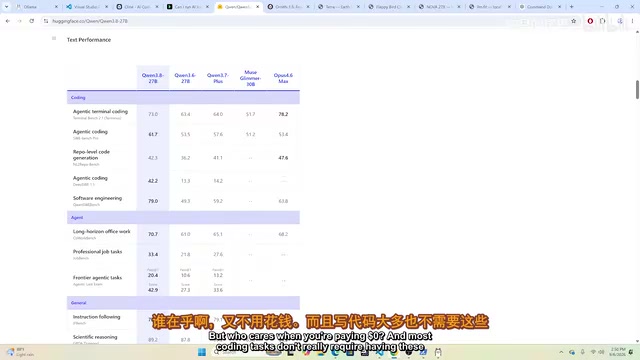
On performance benchmarks, Qwen3's coding model reportedly scores around 61.7 on SWE-Bench Pro, compared to 53.4 for a referenced closed-source model (note: naming and numbers in the original video are inconsistent — treat these as directional). The key takeaway: coding capabilities that required paid APIs and constant token management just six months ago can now run freely on local hardware.
Local open-source models do lag behind frontier closed-source models by a few months, and visual design polish can still be improved. But for the vast majority of everyday coding tasks, that gap is increasingly irrelevant.
MCP Integration and Uncensored Models
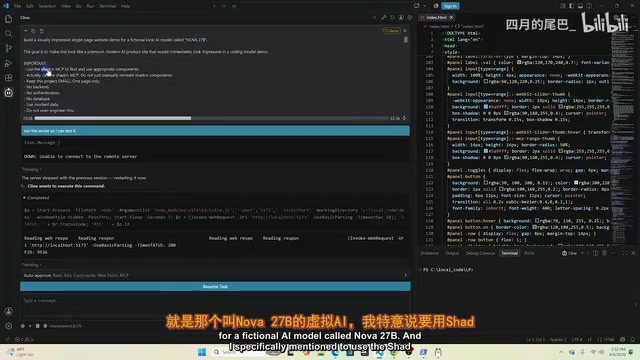
Another major highlight of Cline is its support for MCP (Model Context Protocol). You can freely add free or paid MCP services in the configuration panel, and even with a local open-source model, you can run complete MCP workflows. Using a prompt asking the model to "build a visually striking single-page landing page with ShadCN," the result was a polished output — completely free, with zero token consumption.
The later part of the setup also covers a more advanced use case: uncensored model variants obtained via Open Router can also be run locally with Ollama. These models "almost never refuse coding requests" and, since everything runs locally, no data is sent to any cloud provider — making them extremely privacy-friendly.
This is the most tangible value of local deployment: whether it's cost, usage limits, or data privacy, running models locally gives developers far greater control. That said, using uncensored models comes with its own compliance responsibilities that users should consider independently.
MCP (Model Context Protocol) is an open protocol released by Anthropic in late 2024, designed to standardize how AI models interact with external tools and data sources. Think of it like a USB standard: before MCP, every AI application needed custom integration code for every external tool. MCP defines a universal "plug" standard — tool developers implement an MCP server once, and any MCP-compatible AI client (like Cline) can call it directly. Common MCP services include web search, database queries, file system operations, and GitHub API access. In local model setups, MCP is especially valuable — it allows relatively limited local models to leverage external tools to accomplish tasks that would otherwise be beyond their capabilities.
Summary
The Ollama + VSCode + Cline stack offers developers with mid-to-high-end GPUs a completely free, unlimited, and privacy-preserving local AI coding environment. Hardware remains the primary constraint — 24GB+ of VRAM is needed for a near-top-tier experience, while 8–12GB limits you to lighter models. For developers tired of API rate limits and subscription fees, this is absolutely worth trying.
Related articles

Chain of Thought Isn't Just for AI: How Humans Can Use CoT to Improve Thinking Quality
Chain of Thought isn't just a prompt trick for large models. Starting from a Hacker News discussion, this article analyzes why CoT works for human thinking too, breaks down actionable ways to transfer it, and highlights the key differences between human CoT and machine CoT.
Cloudflare Teams Up with OpenAI: Closi…
Cloudflare Teams Up with OpenAI: Closing the Loop from Vulnerability Discovery to Defense with AI
Cloudflare uses OpenAI Daybreak to investigate security vulnerabilities and generate reviewable remediation plans, while developers use Codex to boost coding efficiency and quality.

Orca Multi-Agent Orchestration in Practice: A Guide to Parallel Collaboration with Claude and Codex
Orca is Stable AI's free open-source agent workbench supporting 34 agents like Claude Code and Codex in parallel. Learn its Git worktree isolation, multi-model orchestration, and mobile management.