Complete Guide to Building an AI Knowledge Base with Codex: From Installation to Automation

A 14-lesson system for building an AI knowledge base using Codex, Obsidian, Notion, and Feishu.
This article introduces a 14-lesson Codex knowledge base course designed to help beginners systematically build a personal AI knowledge base from scratch. The course covers three phases: deploying the Codex CLI and client, connecting Obsidian, Notion, Feishu, and Tencent IMA into a unified data pipeline, and demonstrating six automation scenarios including information capture, scheduled processing, style-matched podcast script generation, and batch Xiaohongshu content creation. The course's value lies in its actionable system framework rather than quick-win promises, while honestly acknowledging the learning curve of multi-tool configuration.
Why Use Codex to Build a Personal Knowledge Base
Many people want to use AI to boost productivity, but they always get stuck in the first few steps: tools won't install, the environment won't configure properly, and data is scattered across multiple platforms with no coherent system. After all that tinkering, AI hasn't helped at all — it's just added another layer of anxiety: "Everyone's using AI, and I feel like I'm missing out, but even when I do use it, I'm not getting much out of it."
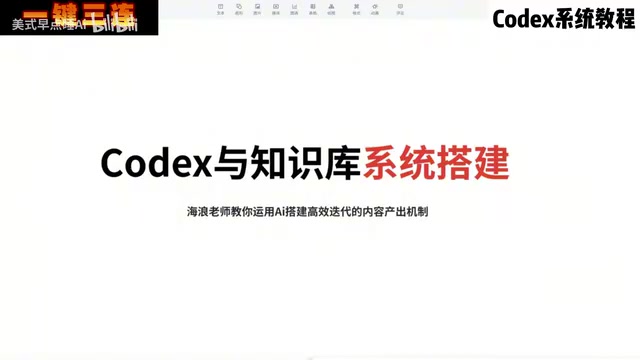
This is exactly the core pain point that Bilibili creator Hailang set out to address with his Codex knowledge base course. After spending three months looking at the problem from a complete beginner's perspective and going through countless online tutorials, he identified a common issue: existing content is either too technical, or it only covers a single tool — almost no one teaches how to chain tools together for real-world use. So he distilled everything into a 14-lesson systematic course with a clear goal: start from zero, get the tools installed, connect your data, and produce tangible output.
What Codex Is and Its Role in the System
In this setup, Codex is positioned as the "brain" of the entire knowledge base system. It's an AI tool that operates through a command-line interface and client interaction, handling automated tasks like information extraction, batch processing, and content generation.
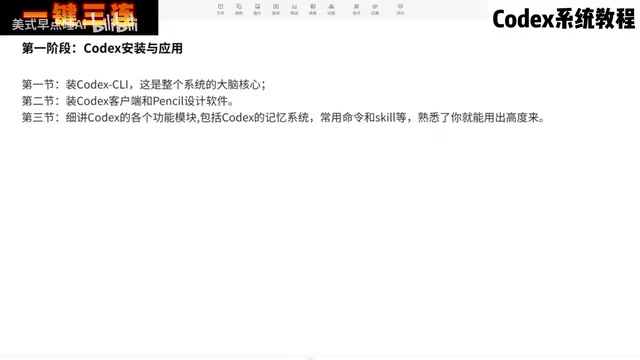
The first phase of the course focuses entirely on deploying Codex across three lessons:
- Setting up the environment: Installing the Codex CLI and laying the foundation for it to run
- Installing the client: The client serves as the user interface for interacting with Codex, used alongside auxiliary design tools like Pencil
- Deep-dive into features: An in-depth look at Codex's memory system, common commands, and Skill modules
The memory system is particularly important — it determines whether the AI can "remember" your preferences and context over time, which is the foundation for personalized output.
Codex is an AI model launched by OpenAI, designed for code and task automation. Its command-line interface (CLI) allows users to issue instructions directly from the terminal, driving the AI to perform operations like reading and writing files, retrieving information, and executing scripts — all without manual interaction in a browser. Unlike conversational tools such as ChatGPT, Codex CLI excels at "hands-on" work within a local file system — it can directly access your folders, call external APIs, and batch-process documents. This is the fundamental reason it can serve as the "brain" of a knowledge base. The CLI (Command Line Interface) may feel unfamiliar to users without a programming background, but the core logic isn't complicated: the user inputs natural language instructions, and Codex translates them into concrete operational steps and executes them. Understanding this helps you assess the implementation path and boundaries of the various "automated tasks" covered in the course.
Connecting Obsidian, Notion, and Feishu into a Unified Data Pipeline
The second phase of the course focuses on the knowledge base and data flows — arguably the most valuable part of the entire system: making information actually move. A single tool has limited capability; only by connecting multiple platforms can data flow freely and value multiply.
How the Core Tools Are Divided
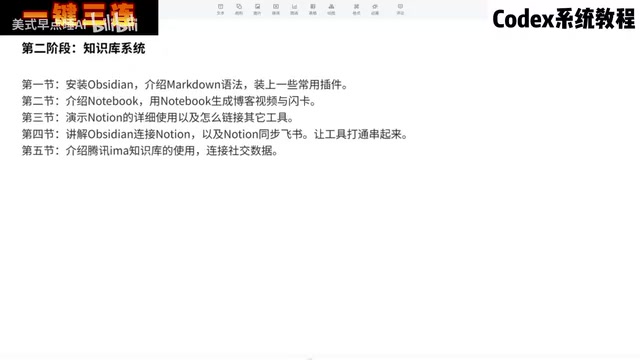
This phase spans five lessons and covers four mainstream tools, each with a clear role:
- Obsidian: The knowledge management hub, responsible for capturing and processing information using Markdown syntax and common plugins
- Notion: Used for generating structured content like blog posts, video scripts, and study flashcards
- Feishu: Handles cross-platform document collaboration, forming a data pipeline when connected to Obsidian and Notion
- Tencent IMA Knowledge Base: Serves as a data warehouse, with the advantage of integrating WeChat and other Tencent ecosystem tools to provide a unified entry point for large volumes of everyday information
Obsidian is a knowledge management application built on local Markdown files. All notes are stored as plain text on the user's own device — no cloud server dependency, with full data ownership. Its core strengths lie in backlinks and graph view, which weave fragmented notes into a visual knowledge network. Markdown is a lightweight markup language that uses simple symbols like # for headings and ** for bold text — it's supported by virtually all major note-taking and content platforms, making it the "universal format" for cross-tool data exchange. In this setup, Obsidian serves as the local knowledge repository, and its native Markdown support is precisely what allows Codex to read and write its files directly, without any additional format conversion layer.
Why Cross-Platform Integration Matters
The elegance of this design lies in its division of labor: Obsidian for local knowledge accumulation, Notion for content production, Feishu for collaborative flow, and IMA as the information intake point. Once the data pipelines between these tools are connected, the fragmented information users generate every day can automatically feed into the system — no longer scattered across different places.
Automated Output: From Information Extraction to Content Generation
The third phase is where the system is put into practical use — and where the "save your effort" value really shows. Once the tools and data pipelines are in place, Codex can take over repetitive work.
Six Real-World Automation Scenarios
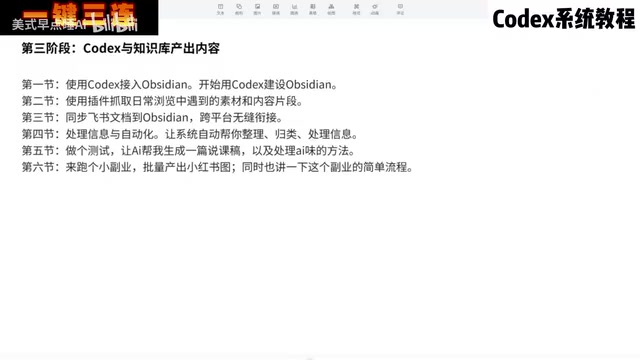
The course demonstrates six types of automated tasks using Codex and Obsidian together:
- Connecting to Obsidian: Using Codex to directly control the building and maintenance of the knowledge base
- Information capture: Quickly grabbing content snippets encountered during daily browsing using plugins
- Cross-platform sync: Copying Feishu documents into Obsidian for seamless integration
- Automated processing: Having the system automatically organize and categorize information, with the option to set scheduled workflows that run daily
- Style-matched generation: Having the AI generate a podcast script that matches your personal voice, testing its usability and addressing the "AI aftertaste" problem
- Monetization use case: Batch-generating Xiaohongshu (Little Red Book) image-and-text posts, demonstrating a simple product-promotion workflow
The "generate a podcast script in your personal style" segment is worth highlighting. It not only tests the quality of AI-generated content but also specifically discusses how to reduce that robotic AI feel — which is exactly the most criticized pain point in AI content creation today.
"AI aftertaste" refers to a cluster of stylistic traits commonly found in AI-generated content: highly symmetrical sentence structures, a tendency toward formal and written language, overuse of connective phrases like "in summary" and "it's worth noting," and a lack of personal, conversational expression or emotional variation. Such text may be technically impeccable, yet readers often spot the machine's fingerprints immediately, undermining the authenticity and shareability of the content. Common approaches to reduce this AI feel include: providing large amounts of your own past writing as style samples in the prompt, asking the model to use first-person conversational narration, manually polishing key passages after generation, and deliberately preserving a few grammatical "imperfections." This issue is particularly acute in content formats that require a strong personal voice — such as podcast scripts and social media copy — and remains one of the most active areas of research and practice in AI content creation today.
The Value and Limitations of This Methodology
At the end of the course, Hailang takes a refreshingly pragmatic stance: he doesn't promise that "you'll have a complete workflow running in three days and immediately impress your social circle." Instead, he emphasizes a gradual process of acting, reflecting, and iterating — "if you're genuinely moving in the right direction, things will keep getting better."
This framing deserves credit. Compared to many AI courses that hype overnight success, the core value of this 14-lesson series lies in providing a practical, actionable system framework: from command-line installation, to multi-platform data integration, to automated batch output — each step building on the last.
That said, it's worth being realistic: this kind of workflow involves configuring and connecting multiple tools including Obsidian, Notion, Feishu, and IMA, which still carries a meaningful learning curve for complete beginners. The stability of cross-platform syncing and the reliability of Codex's automation pipelines also require repeated troubleshooting in real-world use. A truly "fully automated knowledge base" is more like a goal you continuously optimize toward, not a ready-to-use product you get straight out of the box.
For users who want to use AI tools systematically and build a personal content production pipeline, this approach provides a clear roadmap. But it comes back to that timeless piece of advice — just start, and iterate as you go.
Related articles

How Big Can Stars Really Get? The Physical Limits of the Largest Stars
Red supergiants are the largest stars by volume, with radii up to 2,000 times the Sun, engulfing the inner solar system. But there is no precise upper limit on stellar size—models predict up to 15,000 solar radii. The most massive blue stars are far smaller than red supergiants—biggest and heaviest are two different things.

Apple HomeView Smart Display Full Feature Breakdown: Wall-Mount or Desktop, $299
Apple launches HomeView, a $299 smart display with wall-mount and desktop options, 12MP camera for facial recognition, smart home control, music playback, and recipe step-by-step cooking. Full breakdown of watch faces, apps, privacy, and cooking integration.

Where Did the Promised New Studio Go? Craft Computing Answers After Five Years
Craft Computing's host responds to viewer questions: the new studio promised five years ago was shelved as construction costs soared from $30,000 to $75,000, and was replaced by a 168-square-foot garage conversion.