Complete Guide to Deploying LLMs Locally on Mac: Ollama Integration with AI Coding Tools
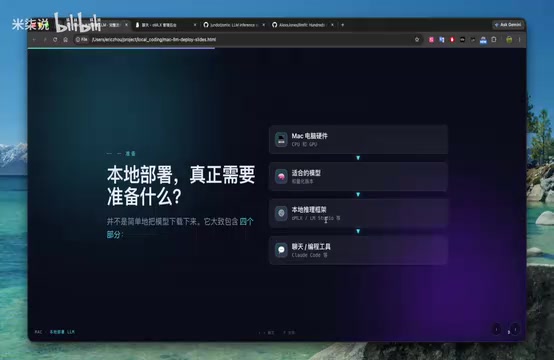
Step-by-step guide to running local LLMs on Mac with Ollama for free AI-assisted coding.
This guide walks through deploying large language models locally on Mac using Ollama — from hardware assessment and model selection (including Qwen 35B-A3B MoE models) to framework configuration and AI coding tool integration. It includes real-world benchmarks, memory optimization tips, and practical advice for privacy-conscious developers seeking free, offline AI coding assistance.
As AI coding tools become increasingly popular, deploying large language models locally on a Mac and integrating them with development tools has become a hot topic among developers. This article provides a comprehensive walkthrough for deploying LLMs on a Mac, enabling AI-assisted programming without needing an API Key.
Why Deploy LLMs Locally
The core advantages of local LLM deployment are data privacy and cost control. When working with sensitive code or confidential content, a local model keeps your data entirely on your machine. For heavy usage scenarios, local deployment also eliminates ongoing API call expenses. While performance may not match commercial models like GPT-4 or Claude 3.5 Sonnet, it's more than sufficient for everyday coding assistance, documentation writing, and similar tasks.
Four Key Steps to Deploy LLMs Locally on Mac
Hardware Assessment: Know Your Mac's Capabilities
Before deployment, you need to evaluate your Mac's hardware specs. Key parameters include:
- RAM: At least 16GB recommended; 32GB or more is ideal
- GPU Cores: The number of GPU cores in Apple Silicon chips directly affects inference speed
- Storage: Model files typically require anywhere from a few GB to tens of GB
For example, a Mac with 36GB of RAM and a 30-core GPU can smoothly run mid-sized quantized models. You can use tools like LMSYS to evaluate device compatibility — it recommends suitable models based on your hardware configuration.
Model Selection: Finding the Right LLM for You
Choosing a model requires balancing performance, memory usage, and practical effectiveness. Here are four categories of models well-suited for Mac deployment:
Qwen 35B-A3B: This is a MoE (Mixture of Experts) architecture model. Although total parameters are 35B, only 3B are active at any time. This means runtime memory usage is equivalent to a 3B model while retaining the capabilities of a much larger one. The 3-bit quantized version further reduces memory requirements.
26B-A4B Series: Similar architecture with 4B active parameters, suitable for devices with slightly more RAM.
GPT-OSS 20B: An open-source expert model from OpenAI that performs well on code generation tasks.
Custom Fine-tuned Models: The Hugging Face community offers task-specific fine-tuned versions, such as 4.6-bit quantized models focused on code reasoning.
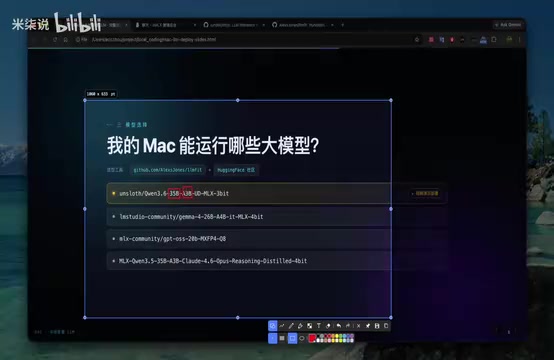
Understanding the MoE architecture is crucial: in 35B-A3B, 35B is the total parameter count, and A3B means "Active 3B" — only 3B parameters are actually working during inference, while the remaining 32B serve as an "expert pool" called upon as needed. This dramatically reduces memory pressure, allowing Macs to run seemingly massive models.
Ollama Deployment Framework: The Best Choice for Apple Silicon
The choice of inference framework directly impacts performance. For Macs with Apple Silicon chips, Ollama is the optimal choice:
- Native MLX Support: MLX is Apple's official AI inference framework, and Ollama is deeply optimized for it, fully leveraging hardware acceleration
- Memory Management: Supports caching non-hot data to SSD, with automatic scheduling when memory runs low
- Ease of Use: Simple installation with one-command startup
- Active Community: Already has 18.5K stars on GitHub with comprehensive documentation
Installation command:
brew install ollama
Running a model:
ollama run qwen:35b-a3b-q3
Once the model is loaded, you can monitor runtime status, memory usage, and token generation speed in real time through the settings interface. Tests show that running the Qwen 35B-A3B model on a Mac with 36GB of RAM uses approximately 27–30GB of memory, with token generation speeds reaching 53 tokens/second.
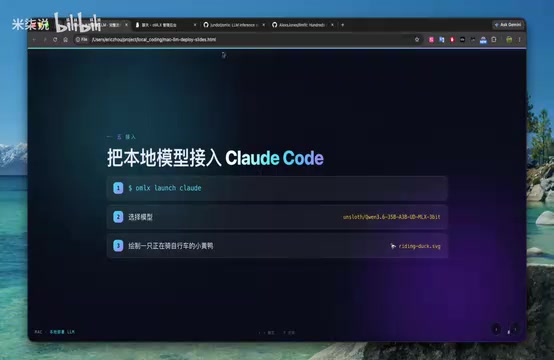
Integrating with AI Coding Tools: Streamlining Your Dev Workflow
Connecting your local model to AI coding tools can significantly boost development efficiency. Configuration steps:
- Start the model in Ollama and enable the API service
- Add a custom LLM endpoint in your coding tool's settings
- Point it to the local address (typically
http://localhost:11434) - Select the loaded model name
Once configured, you can call the local model directly from your code editor for code generation, refactoring, debugging, and more.
Hands-On Test: Generating an SVG Rubber Duck Riding a Bicycle
To test real-world model performance, we had four different models tackle the same task: draw an SVG image of a rubber duck riding a bicycle.
Qwen 35B-A3B Performance: Generated a relatively complete SVG structure with clear bicycle outlines, a recognizable duck shape, and harmonious color tones. Generation took about 4 minutes at 53 tokens/second.
26B-A4B Performance: Less detailed than the 35B version — handlebars and seat structures were simplified — but the overall result was usable.
GPT-OSS 20B Performance: Performed poorly on the SVG task, failing to fully render the bicycle and duck.
Custom Fine-tuned Model: Graphic generation was unsatisfactory, with unclear tire and body structures.
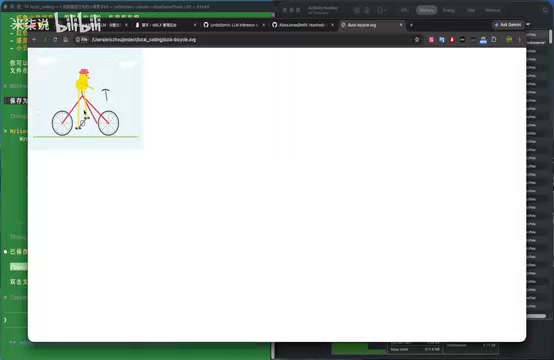
Test conclusion: Qwen 35B-A3B delivers the best overall performance. While it doesn't match GPT-4 or Claude 3.5, it's perfectly viable as a free local solution.
Performance Optimization Tips
- Close Background Apps: Browsers and screen recording software consume significant memory — close them during deployment
- Choose the Right Quantization: 4-bit quantization strikes the best balance between performance and accuracy; 3-bit further reduces memory usage
- Leverage SSD Caching: Ollama automatically offloads memory overflow to SSD — make sure you have enough free SSD space
- Initial Load Warm-up: The first run will be slower; subsequent calls are noticeably faster
Use Cases and Limitations
Best Suited For:
- Writing documentation, comments, test cases, and other auxiliary code
- Everyday scripting and utility development
- Code refactoring and optimization suggestions
- Development assistance on privacy-sensitive projects
Limitations:
- Complex algorithm and architecture design capabilities fall short of commercial models
- Generation speed is constrained by hardware
- Context windows are typically smaller
Conclusion
Deploying LLMs locally on a Mac and integrating them with AI coding tools is a worthwhile technical endeavor. While the results can't rival top-tier commercial models, local deployment offers unique advantages in data privacy, cost control, and offline availability. With proper hardware assessment, model selection, and framework configuration, even a Mac with 36GB of RAM can smoothly run mid-sized large language models to meet everyday development needs.
For developers who prioritize privacy or want to reduce AI usage costs, local LLM deployment is a direction well worth exploring.
Related articles
AI Buzz Weekly: GPT-6.5 Leak, New Claude Model, and MiniMax's Cost-Effectiveness
This week's AI buzz roundup: suspected GPT-6.5 leak, Microsoft configs showing GPT-6.1 Tera, Anthropic's new model that can identify entire classes of bugs, disappointing early Gemini 4 Carbon results, and MiniMax M3.1 Flash beating Claude Opus 5 and GPT-5.6 Sol in benchmarks at extremely low cost.

AI Briefing: Gemini 4 Carbon Released, Ant Open-Sources Ling-3.1
AI Briefing: Google releases Gemini 4 Carbon qubit model, claiming to surpass Opus 5.5 with half-price tokens; Ant open-sources Ling-3.1-1019 for real-task Personal Agents; domestic AI drug discovery succeeds in 18 of 19 projects, hitting all 6 GPCR targets; zero-revenue company valued at $20B raises another $1B; Sichuan convenience store robot sales fail.

Old-School Classifiers Still Beat Jev: Embeddings + sklearn Cuts Error by 37%
Voyage AI engineers found that an old-school approach using open-source embedding models plus sklearn classifiers is cheaper and cuts error by 37% versus the popular decision model Jev. Discussing whether traditional methods are undervalued when labeled data exists, and the boundaries between zero-shot and supervised learning.