Complete Guide to Deploying LLMs Locally on RobotCore Mini: From Ollama Installation to Web Interface Setup

Step-by-step guide to running local LLMs on RobotCore Mini with Ollama and a Flask Web backend.
This guide walks through deploying a large language model locally on RobotCore Mini using Ollama — from installation and model pulling to command-line verification and setting up a Flask-based Web backend for LAN-wide access. It highlights the privacy, cost, and offline advantages of edge AI deployment, with practical tips on model quantization and hardware trade-offs.
Can Edge Devices Really Run Large Language Models?
As large language models (LLMs) continue to gain widespread adoption, more and more developers are asking the same question: is it possible to deploy LLMs locally on small edge computing devices, completely breaking free from reliance on cloud services? In response to this demand, many users have reached out to the RobotCore Mini team with exactly that question: can this device actually run large models?
This article draws on a real hands-on demonstration by a Bilibili content creator to walk through the complete workflow of deploying a local LLM on RobotCore Mini using Ollama, and then setting up a Web backend for API access. For developers and enthusiasts who want to run AI models in local or LAN environments, this is a practical reference worth bookmarking.
Background: Edge Computing and Local LLM Deployment
Edge computing is a computing architecture that pushes data processing capabilities closer to the data source. Unlike traditional cloud computing, which concentrates compute power in remote data centers, edge devices handle inference tasks locally — dramatically reducing network latency and strengthening data sovereignty. With the continued improvement in energy efficiency of Arm-architecture chips and the maturation of model quantization techniques, large language models that once required tens of gigabytes of VRAM can now run inference on embedded devices with just a few gigabytes of memory through INT4/INT8 quantization. This has transformed "running large models on the edge" from a theoretical concept into a practical engineering reality.
Step 1: Install Ollama and Pull a Model
The core tool for the entire local deployment workflow is Ollama — an open-source framework specifically designed for running large language models locally. It dramatically simplifies the process of downloading, managing, and running inference on models, allowing users to get an LLM running on a local device without complex environment setup.
How Ollama works under the hood: Ollama is built on top of llama.cpp, and its core advantage lies in packaging model weights, runtime configuration, and the inference engine into a unified Modelfile format. Developers don't need to manually configure CUDA environments or untangle complex dependency chains. Ollama has built-in native support for the GGUF (GPT-Generated Unified Format) quantization format — developed by the llama.cpp project — which runs efficiently in CPU/GPU hybrid inference mode and is particularly well-suited for memory-constrained edge devices. Ollama also provides an OpenAI-compatible REST API, enabling seamless integration with existing ecosystem tools and significantly lowering migration costs.
On RobotCore Mini, the first step is installing Ollama. Following the official tutorial step by step, the installation process is straightforward.
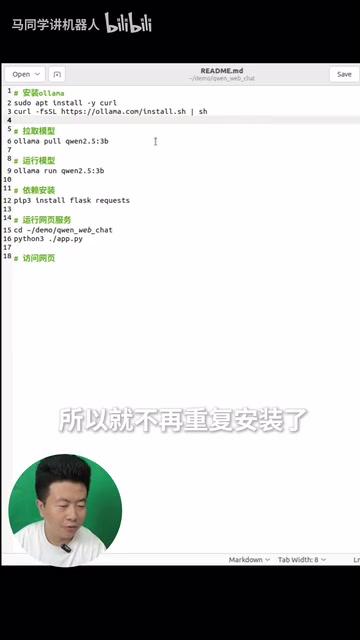
Once installed, use Ollama to pull your target model. The system will download the corresponding weight files from the model repository to your local device. Once the model is pulled, the device is ready for standalone inference — all subsequent conversations and API calls happen locally, with no internet connection to cloud services required.
Model Selection: Quantization and Lightweight Deployment
The core challenge of running LLMs on edge devices is the VRAM and memory bottleneck. Take a mainstream 7B parameter model as an example: it requires roughly 14GB of memory at FP16 precision, but after Q4_K_M quantization, only about 4GB is needed — with performance loss typically within an acceptable range (perplexity increase of roughly 5–10%). Quantization works by compressing 32-bit or 16-bit floating-point weights into 4-bit or 8-bit integer representations, trading a small amount of precision for dramatic improvements in memory usage and inference speed. Beyond quantization, knowledge distillation and sparsification are also important techniques for lightweight deployment. Model families like Qwen2.5 and Gemma3 have all released 1B–3B quantized versions optimized for edge scenarios, making them the top choices for deployment on resource-constrained devices.
Step 2: Verify the Model via Command Line
After the model is pulled, the most direct way to verify it is to launch the model from the command line. The terminal presents an input prompt where you can interact with the model directly.
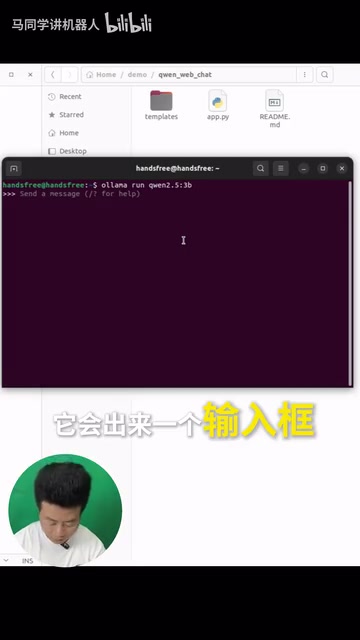
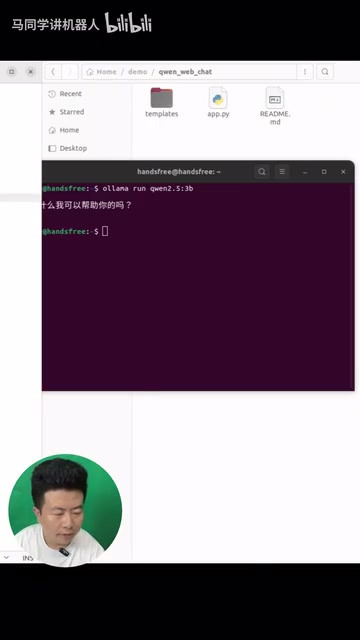
In the test, the creator typed a simple "你好" (hello), and the model immediately responded with a complete reply. While this verification step is lightweight, it's highly meaningful: it directly proves that edge devices like the RobotCore Mini can independently handle large model inference tasks and enable localized natural language interaction. Once testing is done, Ctrl+D exits the interactive interface.
The Value of Command-Line Verification
Command-line interaction is the fastest way to validate a deployment — it quickly confirms whether the model has loaded correctly and whether inference is running smoothly. For developers, it's also the first checkpoint for troubleshooting deployment issues. If the conversation works in the command line, it means the underlying runtime environment is ready, and you can confidently move on to building the application layer. Command-line testing is also a practical window for evaluating inference speed: by watching the token-by-token output rate, you can roughly gauge whether the current hardware configuration matches the chosen model size, providing a reference point for subsequent parameter tuning.
Step 3: Build a Web Backend to Expose the API
Relying solely on command-line interaction isn't practical enough for most use cases. To make the local LLM service more accessible, the team developed a Web backend that calls the API provided by Ollama.
Web backend architecture: The backend is built on the Python Flask framework and calls Ollama's locally-hosted REST API (default port 11434) via HTTP requests. Ollama provides two core endpoints: /api/generate for single-turn text generation, and /api/chat for multi-turn conversation management. Both support streaming responses via Server-Sent Events, which is what produces the character-by-character output effect in the frontend. The Flask middleware layer handles cross-origin request processing, session management, and static file serving, so other devices on the LAN can access the AI service directly through a browser without installing any client software.
Before running the Web service, install the required dependencies. Once dependencies are ready, run python3 app.py to start the service.
Once the service starts, the terminal outputs the access URL. On the local machine, you can open the Web interface directly via the local address.
LAN Access: Deploy Once, Use from Anywhere
The key advantage of the Web backend is multi-device access over the LAN. Any phone, tablet, or computer on the same network can open the Web interface and call the model service simply by entering device IP + port 5000 in a browser.

This means a single RobotCore Mini can act as a local AI service node for the entire LAN, shared across multiple endpoint devices. In the test, the creator typed a question asking to introduce a topic, and the Web interface streamed the model's complete response character by character — fluid and intuitive.
Security Note: When exposing a Web service on a LAN, it's recommended to configure access controls — such as HTTP Basic Auth or IP whitelisting — to prevent unauthorized devices on the network from abusing the AI service. This step is especially important in office networks or semi-public environments.
Key Advantages of Local LLM Deployment
This hands-on test demonstrates that RobotCore Mini, combined with Ollama and a Web backend, can build a complete local LLM deployment solution. Compared to cloud-based API calls, local deployment offers several clear advantages:
- Data Privacy Protection: All inference happens locally — sensitive data never needs to be uploaded to the cloud. In enterprise and healthcare contexts, regulations like GDPR and HIPAA explicitly prohibit sensitive data from leaving jurisdiction or being sent to third-party servers. For individual users, local inference fundamentally eliminates the risk of conversations being used for model training or content moderation.
- Network Independence: No internet connection required. Works in offline or poor-connectivity environments — ideal for factories, field operations, ships, and other network-limited scenarios.
- Long-Term Cost Efficiency: No per-call cloud API fees. A one-time hardware investment becomes more cost-effective over time, especially for high-frequency usage scenarios.
- Flexible LAN Sharing: A single device can serve multiple endpoints through the Web backend, making it an efficient deployment option and a private AI knowledge base node for small teams.
Of course, edge devices have inherent compute limitations — the model size, inference speed, and concurrency they can handle are all constrained by hardware. Choosing an appropriately-sized lightweight model and balancing response speed with generation quality are critical trade-offs to consider in real deployments. Edge devices like RobotCore Mini are typically best suited for Q4-quantized 1B–7B parameter models, which can deliver a reasonably smooth interactive experience in single-user, low-concurrency scenarios.
Summary
This hands-on test of local LLM deployment on RobotCore Mini clearly demonstrates the feasibility of running large models on small edge devices. From Ollama installation and model pulling, to command-line verification and Web backend setup, the entire workflow is clear and reproducible — providing a practical path for developers interested in private AI deployment.
As model lightweighting technology continues to evolve — with improved quantization algorithms, more efficient inference kernels, and a growing number of small-parameter foundation models optimized for edge scenarios — the application space for running large models on edge devices will continue to expand. From home smart assistants and private knowledge base Q&A, to offline decision support in industrial settings, the potential of local AI is only just beginning to unfold. If you're interested in hands-on tests with specific models or scenarios, stay tuned for upcoming content.
Key Takeaways
Related articles

AI Buzz Weekly: GPT-6.5 Leak, New Claude Model, and MiniMax's Cost-Effectiveness
This week's AI buzz roundup: suspected GPT-6.5 leak, Microsoft configs showing GPT-6.1 Tera, Anthropic's new model that can identify entire classes of bugs, disappointing early Gemini 4 Carbon results, and MiniMax M3.1 Flash beating Claude Opus 5 and GPT-5.6 Sol in benchmarks at extremely low cost.

AI Briefing: Gemini 4 Carbon Released, Ant Open-Sources Ling-3.1
AI Briefing: Google releases Gemini 4 Carbon qubit model, claiming to surpass Opus 5.5 with half-price tokens; Ant open-sources Ling-3.1-1019 for real-task Personal Agents; domestic AI drug discovery succeeds in 18 of 19 projects, hitting all 6 GPCR targets; zero-revenue company valued at $20B raises another $1B; Sichuan convenience store robot sales fail.
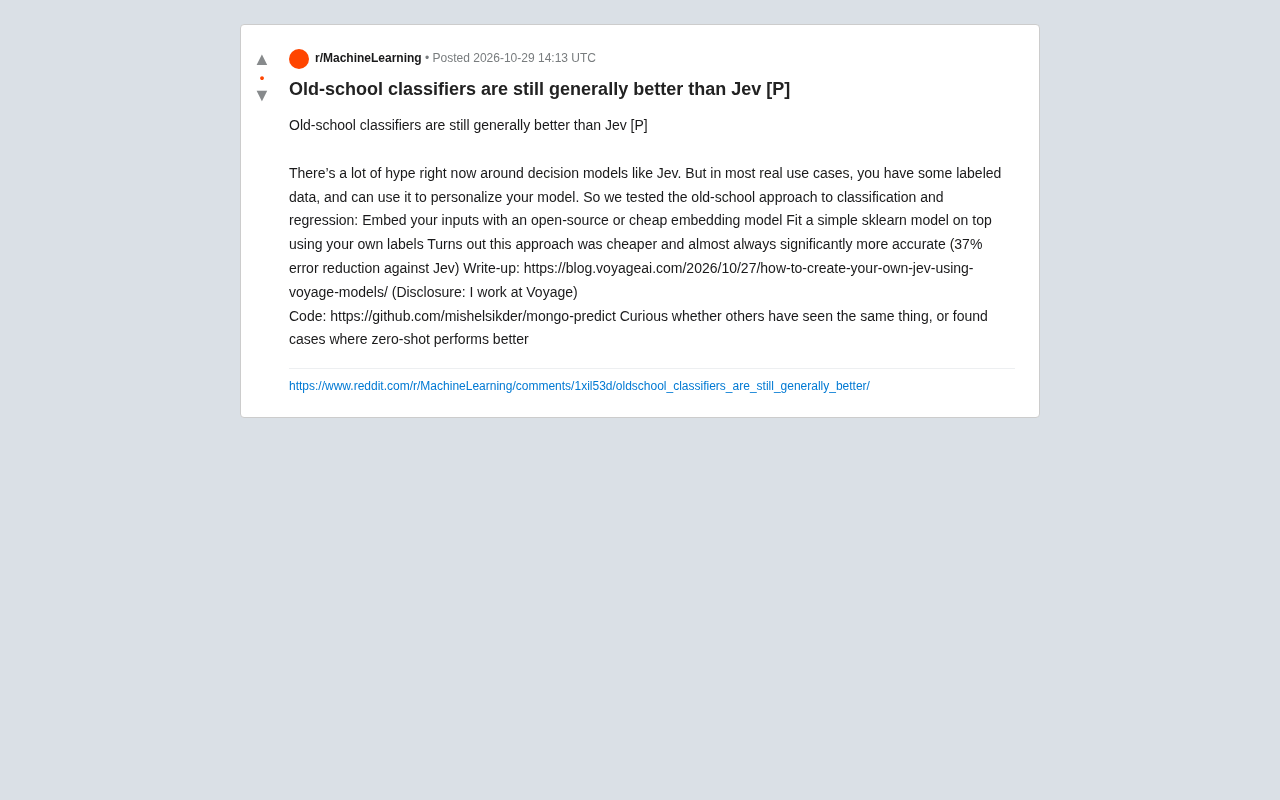
Old-School Classifiers Still Beat Jev: Embeddings + sklearn Cuts Error by 37%
Voyage AI engineers found that an old-school approach using open-source embedding models plus sklearn classifiers is cheaper and cuts error by 37% versus the popular decision model Jev. Discussing whether traditional methods are undervalued when labeled data exists, and the boundaries between zero-shot and supervised learning.