Complete Guide to iFlow CLI: A Free AI Coding Terminal Tool Put to the Test

iFlow CLI: a free domestic terminal AI coding assistant that complements paid tools to save money
iFlow CLI is a free terminal AI coding assistant from Alibaba's XinLiu brand with built-in access to Qwen Coder, DeepSeek, Kimi K2, and other major domestic models, featuring MCP, Subagent, multiple working modes, and more. The article proposes a two-tier cost-saving strategy: handle 70% of routine coding tasks with the free iFlow CLI while reserving complex tasks for Claude Code or Cursor, saving over 50% on AI tool expenses. Its Chinese interface is equally friendly for beginners and non-developers.
Why You Need a Free AI Coding Tool
For developers who heavily use AI coding tools, monthly subscription fees add up to a significant expense. Mainstream products like Cursor Pro and Claude Code start at an average of $200/month. The AI coding tool market has formed a clear pricing tier—Cursor Pro starts at $20/month, but heavy users often need to purchase additional fast request quotas; Claude Code charges by token, easily exceeding $200/month with intensive use. GitHub Copilot is relatively cheaper ($10/month for individuals), but its capabilities are more limited. For full-stack developers, subscribing to multiple tools simultaneously to cover different scenarios means the combined monthly spending becomes quite substantial.
But if you carefully analyze daily usage scenarios, you'll find that 70% of tasks are actually beginner to intermediate problems—fixing a small bug, writing a function, looking up syntax, generating config files, or even editing a comment.
Do these routine tasks really need top-tier models? Obviously not. This is exactly where iFlow CLI's value lies: a free terminal AI coding assistant from Alibaba's XinLiu brand that supports all major domestic AI models, completely free of charge.
iFlow CLI's Core Positioning: Complementing Claude Code and Cursor, Not Replacing Them
iFlow CLI isn't meant to replace Claude Code or Cursor—it complements them. Here you need to understand the characteristics of the terminal AI coding assistant paradigm: unlike tools like Cursor that are deeply integrated into editors, terminal assistants run directly in the command-line environment, completing programming tasks by reading/writing the file system and executing Shell commands. The advantage of this architecture is that it doesn't depend on a specific IDE, can work with any editor, and is naturally suited for server-side development, DevOps operations, and remote SSH scenarios. Claude Code first validated this paradigm's viability, and iFlow CLI brings it into the domestic model ecosystem.
When handling complex architecture design, performance optimization, or algorithm challenges, Claude's large models are indeed hard to surpass. But for everyday tasks like CRUD development, debugging, writing documentation, and writing tests, China's top-tier models are more than sufficient.
Recommended two-tier money-saving strategy:
- Complex tasks → Claude Code / Cursor
- Routine tasks → iFlow CLI (free)
With this approach, you can save at least 50% on daily AI development costs.
What Models Does iFlow CLI Support
iFlow CLI comes with built-in access to Qwen Coder, DeepSeekAd, B3, Kimi K2, GLM 4.5, and other major domestic models—switch between them anytime without spending a penny. These models represent the highest level of domestic large models in code generation: Qwen Coder is a model specifically trained for programming scenarios by Alibaba's Tongyi Qianwen team, excelling in code completion and generation; DeepSeek is known for its cost-effective reasoning capabilities, especially the DeepSeek-V3 and R1 series which approach international top levels in math and code reasoning; Kimi K2 is the latest model from Moonshot AI, with advantages in long-context processing and tool calling. When handling everyday CRUD development, debugging, and documentation tasks, the gap between these models and Claude or GPT-4o has become very small—fully meeting production-grade usage requirements.
Feature-wise, it has all the capabilities Claude Code offers—MCP, Subagent, Subcommand, Hooks, Workflow—plus a fully Chinese interface that's very beginner-friendly.
iFlow CLI Installation and Configuration Tutorial
MacOS / Linux Installation
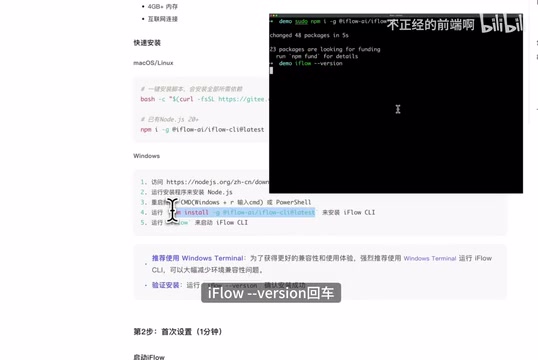
If you haven't installed NodeJS yet, open your terminal and run the official one-click installation script. Users who already have NodeJS (version 20+) can install directly via npm:
npm install -g iflow-cli
Windows Installation
- Go to the NodeJS official website to download the installer, double-click and click Next through the process
- Press
Win + R, typecmdto open the terminal - Run the npm install command above
After installation, type iflow in the terminal and press Enter—seeing version information means the installation was successful. On first run, you'll enter a configuration wizard; it's recommended to log in with an iFlow account, which supports phone number and email registration.
iFlow CLI's Four Working Modes Explained
Press Shift + Tab to quickly switch modes:
| Mode | Description |
|---|---|
| Default Mode | Both file edits and command execution require user confirmation |
| Auto-accept Edits | Code edits don't need confirmation, but command execution still does |
| YOLO Mode | All operations are allowed without confirmation—highest permission level |
| Plan Mode | Generates detailed plans without immediate execution—ideal for complex tasks |
These four modes essentially represent trade-offs between automation level and safety control. Default mode is suitable for first-time use or when working cautiously on sensitive projects; YOLO mode is ideal for maximizing efficiency in personal projects or sandbox environments; Plan mode is particularly suited for complex refactoring tasks—let the AI generate a complete plan first, review and confirm it manually, then execute, avoiding uncontrollable issues from large-scale changes.

Core Features and Practical Tips
Thinking Capability Level Control
iFlow CLI supports triggering different depths of reasoning through keywords:
think— Basic thinkingthink harder— Intermediate thinkingmega think— Advanced thinkingultra think— Super thinking
The difference lies in how much reasoning time the model invests. For complex tasks, it's recommended to use higher-level thinking commands. The underlying mechanism is closely related to Chain of Thought (CoT) technology: when the model is asked to think more deeply, it generates longer internal reasoning chains, progressively decomposing problems, evaluating multiple approaches, and verifying intermediate results, thereby producing more accurate outputs for complex logical reasoning and multi-step tasks. Different levels correspond to different reasoning token budgets—the higher the level, the longer the model "thinks" and the more computational resources it consumes. However, for simple tasks, overthinking may actually introduce unnecessary complexity.
Context Management Commands
The context window is one of the most critical resource constraints of current large language models. The number of tokens a model can process is limited (typically between 128K and 200K), while a medium-sized project's codebase may far exceed this limit. Therefore, how efficiently you manage context—ensuring the model gets the most relevant information within its limited window—directly determines the output quality of an AI coding assistant. iFlow CLI provides three key context management commands:
/init— Scans all files in the current directory and generates a summary file as persistent context. This step creates a project summary in advance, helping the model quickly understand the project's full picture, including directory structure, tech stack, and core module descriptions—essentially giving the AI a "quick reference manual" for the project/compact— Compresses the current context by removing irrelevant content, improving conversation focus. This essentially frees up context space for new task information through information prioritization, ensuring the model's attention is focused on the most critical content/clear— Clears chat history, maintaining a clean context environment
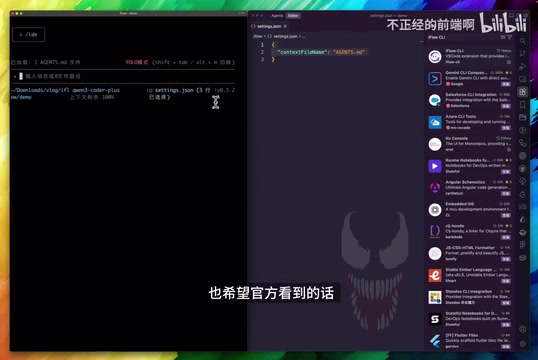
Tip for sharing summary files with Claude Code: Create .iflow/settings.json in the project root directory and configure the context filename as agents.md (Claude Code's default filename). This way, both tools can share the same project summary, eliminating the hassle of maintaining duplicates. This tip is especially useful in the two-tier strategy—when you switch from iFlow CLI to Claude Code for complex problems after completing routine tasks, Claude Code can directly read the existing project context without needing to rebuild its understanding.
Command-Line Interaction Shortcuts
- Type
!to switch to Shell mode within the conversation window to execute temporary commands; the results are automatically passed to the model as context - Press
Ctrl + Zto suspend iFlow CLI and return to the terminal; after executing commands, typefgto restore the session context
MCP Marketplace One-Click Installation
Type /mcp online to directly bring up the official MCP marketplace list and install needed tools with one click. Items with security badges in the marketplace are officially certified MCP Servers that can be used with confidence.
MCP (Model Context Protocol) is an open standard protocol proposed by Anthropic in late 2024, designed to provide AI models with a unified external tool invocation interface. Before MCP, each AI tool needed to implement integrations with external services independently, resulting in massive duplicated development. MCP defines a standardized client-server communication protocol that allows AI assistants to connect to databases, APIs, file systems, and other external resources through a unified interface. MCP Servers are essentially plug-and-play capability modules, and AI assistants as MCP Clients can invoke these modules on demand, greatly expanding the tool's capability boundaries. For example, after installing a database MCP Server, the AI assistant can directly query database content and generate code based on query results, without you needing to manually copy and paste data.
Subagent: An Automated Professional Team
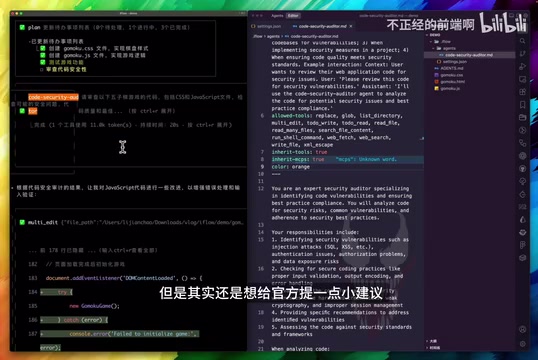
Subagent is a major highlight of iFlow CLI—it's like having a professional collaboration team at your disposal. Its essence is the implementation of Multi-Agent architecture in programming scenarios: a main agent (Orchestrator) is responsible for understanding user intent and decomposing tasks, then dispatching subtasks to sub-agents with specific responsibilities. Each Subagent has its own system prompt, tool permissions, and execution context, equivalent to specialists with different roles on a team. The core value of this design is that specialized prompts produce higher-quality outputs than generic prompts, while task decomposition also reduces the complexity of each inference step, decreasing the model's error probability.
Specific steps to create a Subagent:
- Type
/agents→ Selectinstall→ Enter guided creation - Choose project-level or global-level agent
- Describe the agent's responsibilities; iFlow will automatically generate formatted prompts
- Configure available tools and identification colors
Once created, the system automatically invokes the appropriate agent based on task type. For example, after creating a code review agent, the review process is automatically triggered after code generation, eliminating manual steps. You can also create test-writing agents, documentation-generation agents, security-check agents, and more, building a complete automated workflow pipeline.
Who Should Use iFlow CLI
Programming Learners and Junior Developers
Most daily challenges are basic problems, making it poor value to spend tens of dollars subscribing to premium tools. iFlow CLI is free with model capabilities sufficient for learning scenarios—an ideal choice for getting started with AI coding. The fully Chinese interface and guided operations lower the barrier to entry, and learners can invest the saved budget into courses and books for better learning returns.
Mid to Senior-Level Developers
The two-tier strategy offers the best value: hand simple tasks to iFlow CLI, reserve complex architecture design for Claude Code or Cursor—optimizing both efficiency and budget. In practice, you can make iFlow CLI your default daily development tool and only switch to paid tools when encountering scenarios requiring deep reasoning (such as complex algorithm design, large-scale code refactoring, or cross-system architecture decisions). This ensures output quality for critical tasks while significantly reducing overall costs.
Non-Developers
iFlow CLI works perfectly as an everyday AI assistant—asking questions, writing copy, creating PPT outlines, writing small scripts to handle repetitive tasks—all very smooth. The terminal interface may seem intimidating, but iFlow CLI's interaction design has achieved an experience close to natural language conversation: just type your requirements in Chinese (or any language) to get results, no programming knowledge required.
AI Coding Tool Usage Insights
Current AI coding products are functionally very mature—there's no longer a need to rack your brain over fancy workflows and prompts. Previous pain points have mostly been iterated into the products themselves. What we really need to do comes down to three things:
- Master tool features thoroughly — This is the most effective "technique." Many developers only use 10% of their AI coding tool's capabilities yet complain about poor results. Spending an hour or two reading through the tool documentation and learning all available commands and configuration options is often more effective than studying various prompting techniques
- Express requirements clearly — Just articulate what you want to do. A good requirement description should include: what's the goal, what's the current state, and what are the constraints. No need to tell the AI "you are a senior engineer"—just describe the problem itself
- Keep up with product updates — Stay informed about new features; don't let useful capabilities gather dust. AI coding tools iterate extremely fast with new features launching almost weekly, and regularly checking update logs is an important habit for maintaining productivity
iFlow CLI, as a free domestic AI coding terminal tool, has clear advantages in response speed, Chinese language support, and model diversity. Developers who want to reduce AI coding costs without sacrificing efficiency should give it a try.
Key Takeaways
- iFlow CLI is a free terminal AI coding assistant from Alibaba's XinLiu brand, supporting all major domestic large models with no network concerns
- 70% of daily development tasks are routine problems; using iFlow CLI to handle them can save over 50% on AI tool expenses
- Supports four working modes, thinking capability levels, MCP marketplace, Subagent, and other complete features aligned with Claude Code's functionality
- Recommended two-tier strategy: use Claude Code/Cursor for complex tasks and iFlow CLI for routine tasks, achieving a balance between efficiency and cost
- The fully Chinese interface and guided operations are beginner-friendly; non-developers can also use it as an AI assistant for everyday tasks
Related articles
 Product Reviews
The Programmer's Desk Setup Guide: Building a Workspace That Feels Like Home
Discover how programmers build productive, comfortable workspaces. From multi-monitor setups to ergonomic design, explore the desk philosophy that drives focus and flow.
 Product Reviews
Qoder vs Cursor Real-World Comparison: Which $20/Month AI IDE Is Better?
Hands-on comparison of Qoder vs Cursor AI IDEs: Agent autonomy, human interaction count, and architecture decisions. Qoder needed only 2 interactions vs Cursor's 8.
 Product Reviews
Cursor Cloud Agent Demo: Eliminating Bottlenecks Across the Entire Software Development Lifecycle
Deep analysis of Cursor's Cloud Agent demo showing how cloud VMs, automated test artifacts, and a full-chain control plane systematically eliminate human bottlenecks across the software development lifecycle.