Complete Guide to Locally Deploying Stable Diffusion: Free Unlimited AI Image Generation

Step-by-step guide to locally deploying Stable Diffusion for free, unlimited AI image generation.
This guide walks through locally deploying a Stable Diffusion all-in-one package, covering hardware requirements (minimum GTX 1060), installation steps, workflow capabilities including AI comics and video remixing, and model management tips. It provides an honest comparison with paid tools like Midjourney, helping creators decide whether local deployment suits their needs.
Why Local Deployment of AI Image Generation Tools Is Becoming a Trend
As AI image generation tools become more widespread, an increasing number of creators are focusing on a core question: how to break free from paid subscriptions, credit limits, and queuing delays. Cloud-based paid tools like Midjourney and DALL·E are convenient, but monthly fees, generation limits, and content moderation remain persistent pain points for creators. Take Midjourney as an example — its basic plan costs around $10/month, with the premium plan at $30/month, each tier corresponding to different generation counts and concurrency limits. DALL·E 3 is offered through ChatGPT Plus ($20/month) or via API with per-token billing. The content moderation mechanisms on these platforms typically rely on NSFW detection models and keyword filtering systems that automatically block generation requests involving sensitive content. While this ensures safety, it also restricts certain legitimate artistic creation scenarios.
This article draws on hands-on experience shared by a Bilibili creator to explain how to locally deploy the open-source Stable Diffusion for truly "zero-cost, unrestricted" AI creation. Stable Diffusion is an open-source Latent Diffusion Model released by Stability AI in 2022. Unlike traditional diffusion models that denoise directly in pixel space, it performs the diffusion process in a low-dimensional Latent Space — an architectural innovation that enables it to run on consumer-grade GPUs rather than requiring data-center-level compute. The model was trained on the LAION-5B dataset, using a U-Net architecture as the denoising backbone network, paired with a CLIP text encoder to achieve text-to-image semantic mapping. Its open-source nature has spawned a massive community ecosystem, including numerous extension technologies like LoRA fine-tuning and ControlNet for controllable generation. It's worth noting that the tool discussed in this article is essentially a Stable Diffusion all-in-one package, not a "new model" as some clickbait titles claim — readers should approach marketing language with a critical eye.
Three Core Advantages of Locally Deploying Stable Diffusion
Compared to cloud-based paid tools, locally deploying Stable Diffusion offers clear advantages. First is the cost advantage: once configured, it's completely free — no monthly fees, annual fees, or credit consumption. Second is the freedom advantage: running locally means no platform censorship restrictions, giving you more creative space. Third is the efficiency advantage: no queuing required, and you can batch-generate images as long as your hardware allows.
According to the creator, the all-in-one package has relatively modest hardware requirements — a GTX 1060 graphics card is the minimum needed to run it, which is a low barrier for most users. The GTX 1060 is a Pascal-architecture GPU released by NVIDIA in 2016, featuring 6GB of GDDR5 VRAM. Stable Diffusion's VRAM requirements are directly tied to the resolution and sampling steps of generated images: generating 512×512 images typically requires 4-6GB of VRAM, while generating at 1024×1024 or using SDXL models calls for 8GB or more. All-in-one packages usually come pre-configured with VRAM optimization techniques like xFormers or the --medvram parameter, which reduce peak VRAM usage through attention mechanism optimization and chunked computation, enabling lower-end GPUs to run the software. However, note that GPU performance directly affects generation speed — a GTX 1060 might take 30-60 seconds per image, while an RTX 4090 might need only 2-3 seconds.
What the Stable Diffusion All-in-One Package Can Do: Practical Use Cases
The power of Stable Diffusion lies in its rich workflow ecosystem. The all-in-one package reportedly includes over 500 built-in workflows covering a variety of creative needs. The "workflows" mentioned here primarily refer to node-based workflows in ComfyUI. ComfyUI is a node-graph-based graphical interface for Stable Diffusion where users connect different functional nodes (such as model loading, text encoding, samplers, image post-processing, etc.) to build complete image generation pipelines. Unlike the "form-filling" interaction style of another popular interface, Automatic1111 WebUI, ComfyUI's node-based design is more flexible, supporting complex conditional branching and multi-stage generation processes. Community-shared workflow files (in JSON format) can be directly imported and reused — this is the technical foundation that allows the all-in-one package to include hundreds of pre-built workflows.

AI Comic Creation
For content creators, AI comics are a popular application. Users can import novel text into a workflow and have AI automatically generate corresponding comic panels or video frames. This approach dramatically lowers the barrier to comic creation, enabling writers without drawing skills to visualize their written works.
Video Remixing and Character Replacement
Another high-frequency use case is video remixing. Through character replacement workflows, users can swap characters in videos with designated figures, enabling creative mashups and derivative works. These applications are in high demand on short-video platforms and serve as a monetization channel for many creators.
A reminder: derivative works involving film and television materials carry copyright risks. Confirm the licensing status of relevant materials before any commercial use.
Complete Stable Diffusion Installation and Deployment Process
The greatest value of the all-in-one package is lowering the deployment barrier — users don't need to manually configure Python environments, install dependency libraries, or handle complex command-line operations. A native Stable Diffusion installation requires setting up a Python 3.10+ runtime environment, installing the PyTorch deep learning framework (which must match the CUDA version for GPU acceleration), and dozens of Python dependencies (such as transformers, diffusers, safetensors, etc.). CUDA is NVIDIA's parallel computing platform, and PyTorch calls CUDA to accelerate tensor operations on the GPU. Version compatibility is the most common source of issues — for example, PyTorch 2.x may require CUDA 11.8 or 12.1, while different versions of xFormers have strict PyTorch version requirements. The all-in-one package pre-compiles and bundles these dependencies using a built-in Python virtual environment, fundamentally avoiding dependency conflict issues.
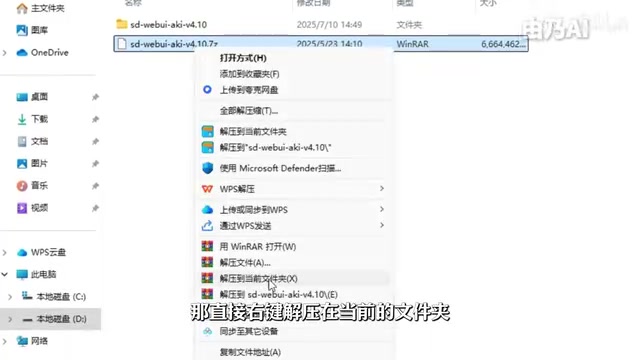
Step 1: Extract the Installation Package (Use English-Only Paths)
After downloading the all-in-one package, right-click and select "Extract to current folder." There's a critical note here: the extraction path must be entirely in English — never include Chinese characters. Chinese paths causing program errors is a classic issue in the Python ecosystem on Windows. The root cause lies in file path encoding: Windows defaults to GBK/GB2312 encoding for Chinese paths, while Python and many open-source libraries internally assume paths are in UTF-8 or pure ASCII encoding. When these are inconsistent, operations like file reading and module importing fail with UnicodeDecodeError or FileNotFoundError due to encoding parsing failures. Additionally, some underlying C/C++ libraries (such as certain ONNX Runtime components) simply don't support non-ASCII path characters. This isn't unique to Stable Diffusion — virtually all Python-based AI tools on Windows recommend using pure English paths.
Step 2: Launch the Launcher
After extraction, no additional software installation is needed. Find the launcher program with the pink icon and double-click to open the launcher interface. Version information is displayed in the lower-left corner of the launcher, making it easy to confirm your current version.
Step 3: One-Click Launch and Initial Environment Setup
After clicking the "One-Click Launch" button, the program needs a few minutes to complete the environment setup since this is the first launch. The system will automatically complete the necessary initialization configuration during this step — just wait patiently.
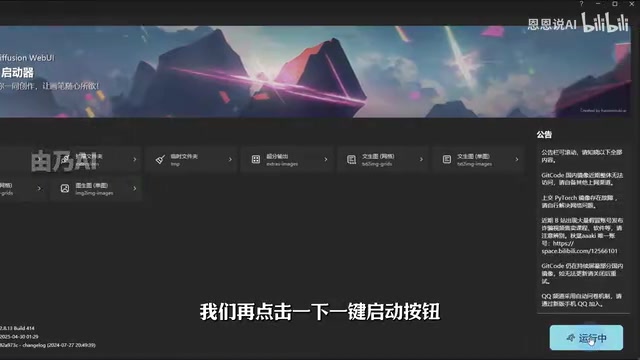
Once deployment is complete, you can enter the Stable Diffusion operation interface (typically a WebUI or ComfyUI interface).
Model Management: The Key to Improving AI Image Quality
Completing the basic deployment is just the first step. As the creator explains, a Stable Diffusion installation with only a base model is like an "unfinished apartment" — it can't reach its true potential. Models are what determine generation quality and style.
"Models" in the Stable Diffusion community typically include several types: Checkpoints (usually 2-7GB) determine the base art style and capabilities; LoRA (Low-Rank Adaptation, usually 10-200MB) is a lightweight fine-tuning technique that injects low-rank matrices into the attention layers of pre-trained models to learn specific styles or characters without retraining the entire model; there's also VAE (Variational Autoencoder, controlling color representation), Textual Inversion (text inversion embeddings that learn new concepts with just a few tokens), and more. Models are primarily hosted on platforms like Civitai and Hugging Face, with Civitai alone having accumulated hundreds of thousands of community models covering nearly every visual style from photorealistic to various anime art styles.

Chinese Annotations and Preview Images: No More Blind Model Selection
A common pain point with native Stable Diffusion model management is that model names are often strings of English codes, making it hard for users to intuitively distinguish each model's style characteristics. One practical improvement in this all-in-one package is the addition of Chinese annotations and preview images for commonly used models, allowing users to see model sample images and Chinese names directly in the interface.
This improvement may seem simple, but it significantly enhances the user experience. For beginners, being able to visually select models in their desired style eliminates the time cost of repeated trial and error.
Model Selection Recommendations
Different creative needs call for different models. Realistic styles, anime styles, and illustration styles each have dedicated models. It's recommended that users master 2-3 core models based on their primary creative direction first, then gradually expand their model library. For example, commonly used Checkpoints for realistic portraits include Realistic Vision and majicMIX realistic, while the anime direction features classics like the Anything series and Counterfeit. Pairing these with style-matched LoRAs can further fine-tune details and character consistency.
A Balanced Perspective: Value and Limitations of the Stable Diffusion All-in-One Package
Finally, an objective evaluation of this type of all-in-one package is needed. Its core value lies in lowering the barrier — simplifying what would otherwise require some technical knowledge into a "extract and use" process, enabling ordinary users to quickly get started with Stable Diffusion.
But we should stay rational: claims of "destroying paid AI tools" are mostly marketing rhetoric. Stable Diffusion itself is an excellent open-source model, but in terms of ease of use, generation stability, and certain advanced features, it has its own strengths and weaknesses compared to top commercial products. For example, Midjourney still holds a clear advantage in prompt understanding tolerance and aesthetic consistency — users can get high-quality results with short natural language descriptions, while Stable Diffusion often requires more refined Prompt Engineering and parameter tuning to achieve comparable results. Local deployment also means users must bear hardware costs and maintenance responsibilities, including GPU purchases, model updates, plugin compatibility troubleshooting, and other ongoing investments.
For creators who pursue creative freedom, have adequate hardware, and are willing to invest in learning, locally deploying Stable Diffusion is indeed an extremely cost-effective choice. For casual users who only need to generate images occasionally, cloud-based tools may actually be less hassle.
Key Takeaways
Related articles

Chain of Thought Isn't Just for AI: How Humans Can Use CoT to Improve Thinking Quality
Chain of Thought isn't just a prompt trick for large models. Starting from a Hacker News discussion, this article analyzes why CoT works for human thinking too, breaks down actionable ways to transfer it, and highlights the key differences between human CoT and machine CoT.
Cloudflare Teams Up with OpenAI: Closi…
Cloudflare Teams Up with OpenAI: Closing the Loop from Vulnerability Discovery to Defense with AI
Cloudflare uses OpenAI Daybreak to investigate security vulnerabilities and generate reviewable remediation plans, while developers use Codex to boost coding efficiency and quality.

Orca Multi-Agent Orchestration in Practice: A Guide to Parallel Collaboration with Claude and Codex
Orca is Stable AI's free open-source agent workbench supporting 34 agents like Claude Code and Codex in parallel. Learn its Git worktree isolation, multi-model orchestration, and mobile management.