Connecting Claude Code to Chinese AI Models: DeepSeek, Qwen, and GLM Configuration Guide

Configure Claude Code to use DeepSeek, Qwen, or GLM with just three environment variables.
This guide shows how to route Claude Code's API requests to Chinese platforms — DeepSeek, Alibaba Qwen, and Zhipu GLM — by configuring three environment variables: ANTHROPIC_BASE_URL, ANTHROPIC_AUTH_TOKEN, and ANTHROPIC_MODEL. It covers platform-specific setup details, common pitfalls like DeepSeek's [1M] model suffix, and introduces CC Switch for one-click multi-platform profile management.
The official Anthropic API can be frustratingly unreliable in China — a pain point many developers know all too well. Fortunately, Claude Code's underlying protocol is open: by routing requests to a domestic platform that implements an Anthropic-compatible interface, you can seamlessly use models like DeepSeek, Alibaba's Qwen, and Zhipu's GLM. This guide walks through the setup for all three platforms and introduces CC Switch, a tool that lets you switch between configurations with a single click.
The Core Logic: Three Environment Variables Are All You Need
Regardless of which platform you're connecting to, the configuration pattern for Claude Code is consistent. Three environment variables do the heavy lifting:
- ANTHROPIC_BASE_URL: Specifies the API gateway address, redirecting requests from Anthropic's servers to your chosen platform.
- ANTHROPIC_AUTH_TOKEN: Your API key, used for authentication.
- ANTHROPIC_MODEL: Sets the default primary model.
Beyond this core trio, you can also fine-tune model mappings — assigning different models to the Opus, Sonnet, and Haiku tiers respectively. Use a lighter model for simple agent tasks, and set CLAUDE_CODE_EFFORT_LEVEL to Max to ensure the model runs at full capacity.
The prep work is straightforward: go to your chosen platform's console, register and complete identity verification, create an API key, and you're ready to start. There are two main ways to apply configuration — set environment variables directly, or write them into a settings.json file located in the .claude directory under your home folder.
Anthropic-compatible interfaces are proxy layers implemented by third-party platforms that mirror the request/response format of Anthropic's official API. As long as ANTHROPIC_BASE_URL points to an endpoint that supports this format, Claude Code can transparently call entirely different underlying models without any modification. This is similar to how OpenAI-compatible interfaces have become widespread in the industry — if the response structure matches, the client can't tell the difference on the backend. The reason all three Chinese platforms can integrate with Claude Code is precisely because they've each implemented this compatibility layer, wrapping models like DeepSeekAd-V4, Qwen3, and GLM into a format that Claude clients can recognize.
CLAUDE_CODE_EFFORT_LEVEL is a reasoning intensity parameter specific to Claude Code. When set to Max, the model engages deeper chain-of-thought processing, which is ideal for complex code generation and debugging tasks — at the cost of longer response times and higher token consumption. When connecting to capable domestic models, this parameter can significantly improve output quality.
DeepSeek: Set Environment Variables via PowerShell
Of the three platforms, DeepSeek is best configured through environment variables. In PowerShell, set ANTHROPIC_BASE_URL to https://api.deepseek.com/anthropic, replace ANTHROPIC_AUTH_TOKEN with your DeepSeek API key, and set ANTHROPIC_MODEL to DeepSeek-V4-Pro.
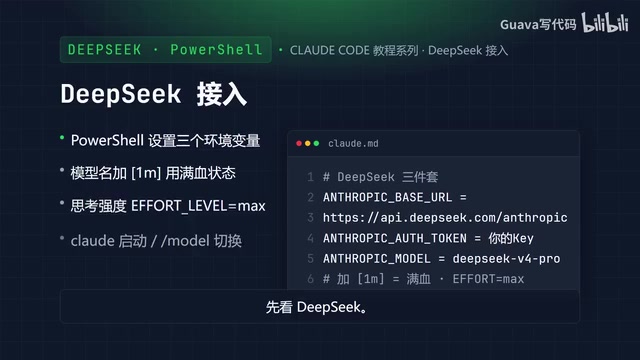
Two common pitfalls to watch out for: the model name needs the [1M] suffix to indicate context length, and remember to set the reasoning effort to Max to unlock the model's full capability.
Once configured, navigate to your project directory and run claude to start. You can also specify the model at launch with claude --model deepseek-v4-pro, or switch models within an interactive session by typing /model. Typing /model also displays the list of currently supported models.
Qwen and GLM: settings.json Is the Cleaner Option
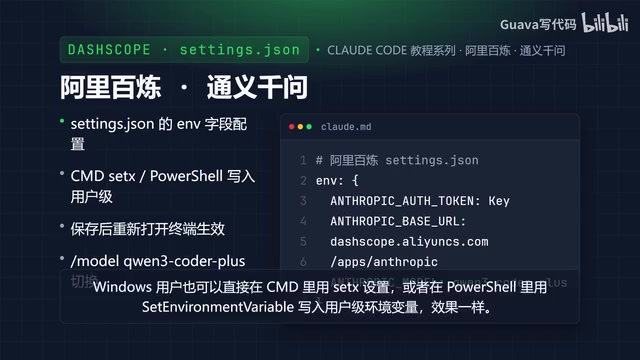
For Alibaba's Qwen via the Alibaba Cloud Bailian platform, the configuration file approach is recommended. Open the .claude folder in your home directory, edit settings.json, and add your ANTHROPIC_AUTH_TOKEN (your API key), ANTHROPIC_BASE_URL (https://dashscope.aliyuncs.com/apps/anthropic), and ANTHROPIC_MODEL (qwen3-coder-plus) under the env field. Save the file and reopen your terminal for the changes to take effect.
Windows users can alternatively use set in CMD or write user-level environment variables in PowerShell — the result is the same. To switch models mid-session, type /model qwen3-coder-plus in the conversation.
Zhipu GLM follows the same settings.json pattern under the env field: set ANTHROPIC_AUTH_TOKEN to your API key and ANTHROPIC_BASE_URL to https://open.bigmodel.cn/api/anthropic. You can also extend the API timeout (e.g., to 3,000,000 milliseconds) and set an environment variable to disable unnecessary traffic, reducing unwanted data transmission. Once configured, run claude, then type /status to confirm the active model. If it's not correct, use /config to switch.
CC Switch: One-Click Multi-Platform Switching
When you're juggling multiple platforms, constantly editing configuration files becomes a chore. CC Switch is a third-party tool worth recommending — it supports Windows, macOS, and Linux, and serves as a companion manager for Claude Code, Codex, and Gemini CLI. Think of it as a smart organizer for your development toolkit.
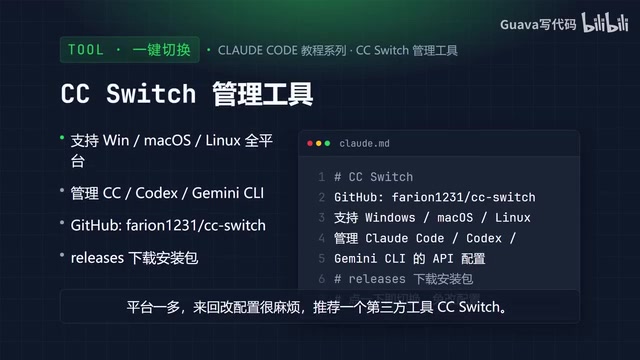
Installation is simple: search for firon1231/ccswitch on GitHub (verify the exact repo name), then download the installer for your platform from the Releases page. Once installed, switching between API configurations across different platforms is just a click away — no more manual environment variable editing. For more detailed usage instructions, refer to dedicated CC Switch articles available online.
From a technical standpoint, CC Switch is essentially a configuration file manager. It stores multiple sets of environment variable combinations (BASE_URL + AUTH_TOKEN + MODEL) as named "profiles" and uses atomic operations to swap the active variable set when you switch, syncing changes to your shell config or system environment variables so Claude Code automatically loads the target platform's settings on next launch. For teams that use different models across different projects, this approach eliminates the typos and missing fields that come with manual config file editing.
Quick Reference and Configuration Patterns
Key details for all three platforms at a glance:
| Platform | Gateway URL | Default Model | Recommended Method |
|---|---|---|---|
| DeepSeek | api.deepseek.com/anthropic | DeepSeek-V4-Pro [1M] | Environment variables |
| Alibaba Bailian | dashscope.aliyuncs.com/.../anthropic | qwen3-coder-plus | settings.json |
| Zhipu | open.bigmodel.cn/api/anthropic | GLM series | settings.json |
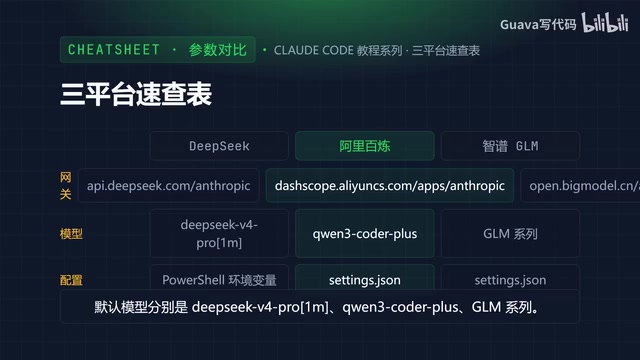
The whole process comes down to one simple rule: get your API key from the platform console, configure the URL + Token + Model trio, launch Claude, and verify with /status or /model. If you're managing multiple platforms, CC Switch handles it all in one click.
The next installment will take a deeper dive into DeepSeek's configuration options and explore more advanced usage patterns.
Related articles

How Big Can Stars Really Get? The Physical Limits of the Largest Stars
Red supergiants are the largest stars by volume, with radii up to 2,000 times the Sun, engulfing the inner solar system. But there is no precise upper limit on stellar size—models predict up to 15,000 solar radii. The most massive blue stars are far smaller than red supergiants—biggest and heaviest are two different things.

Apple HomeView Smart Display Full Feature Breakdown: Wall-Mount or Desktop, $299
Apple launches HomeView, a $299 smart display with wall-mount and desktop options, 12MP camera for facial recognition, smart home control, music playback, and recipe step-by-step cooking. Full breakdown of watch faces, apps, privacy, and cooking integration.

Where Did the Promised New Studio Go? Craft Computing Answers After Five Years
Craft Computing's host responds to viewer questions: the new studio promised five years ago was shelved as construction costs soared from $30,000 to $75,000, and was replaced by a 168-square-foot garage conversion.