Connecting to a Web Fetch Server with MCP: Letting AI Scrape Webpages Without a Browser

Use MCP to scrape webpages without a browser, converting HTML to Markdown and validating output with Pydantic.
This article explains how to use the Model Context Protocol (MCP) to scrape web content in an Agentic AI system without relying on a full browser. The workflow covers five key steps: launching a Fetch server via stdio, initializing the session and dynamically discovering tools, calling the Fetch tool with a URL allowlist and length limit, joining returned text blocks with error interception, and validating the content into a structured object using Pydantic. Setting the `raw` parameter to false automatically converts HTML to Markdown, reducing noise for the language model. The caller ultimately receives a predictable result containing status, content or error message, and character count.
Why We Need a Standardized Web Scraping Channel
Webpages are designed for humans, but applications need reliable, structured data. When we want a large language model to access web content, a core question emerges: can we let the model read webpages consistently without spinning up a full browser? The Model Context Protocol (MCP) was created precisely to solve this kind of connectivity problem.
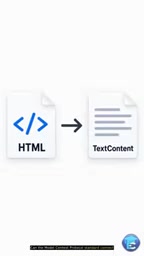
This lesson (Stage 27, Lesson 2 of the Agentic AI course) focuses on a concrete implementation: connecting to a Web Fetch server via MCP, enabling an agent to scrape webpages in a standardized way and convert messy HTML into Markdown that models can more easily process. Compared to relying on full browser automation, this approach is lighter, more controllable, and far easier to keep stable in production.
MCP (Model Context Protocol) is an open standard proposed by Anthropic in late 2024, designed to define a unified interface specification for interactions between large language models and external tools and data sources. The core idea is analogous to USB for hardware peripherals: regardless of the underlying implementation, as long as both sides follow the same protocol, a model can discover and invoke capabilities in a consistent way — whether that's a file system, a database, or the web scraping service covered here. MCP uses JSON-RPC 2.0 as its message format and supports two transport layers: stdio (standard input/output) and HTTP+SSE. The former is suited for local inter-process communication; the latter for cross-network deployments. This layered design decouples the protocol itself from the specific runtime environment, allowing developers to use stdio during local development and switch to HTTP in production without changing any business logic.
Starting the Fetch Server and Initializing a Session
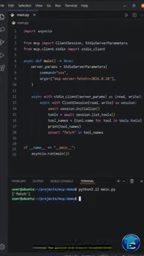
The entire workflow begins by launching the Fetch service through Studio, using standard input/output (stdio) as the communication channel. This is one of the most common local transport methods in MCP: the client and server exchange JSON-RPC messages over standard I/O pipes, with no additional network port configuration required.
After establishing the session, a critical step is to initialize the session first, then inspect the list of tools the server has advertised, and only then call a specific tool. This order matters — it reflects MCP's self-describing nature: the client doesn't need to hardcode what the server can do; instead, it dynamically discovers available capabilities at runtime. This design gives agents much greater adaptability.
Calling the Fetch Tool: Engineering Details in the Parameters
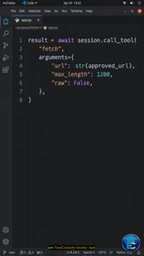
When actually initiating a scrape, calling the Fetch tool requires a few key parameters:
- Approved URL: Requests are only made to permitted addresses, forming a basic security boundary.
- Length limit: Controls the number of characters returned, preventing excessively long pages from overflowing the model's context window.
rawset to false: This is a particularly useful option. With raw mode disabled, the server converts raw HTML into Markdown, stripping away tag noise and preserving structured text content — Markdown is far more model-friendly than bare HTML for downstream processing.
These parameters may seem simple, but they address the three most common pain points in web scraping: security, capacity, and readability.
Handling the Response: Joining, Validating, and Catching Errors
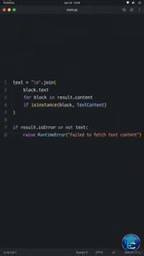
The content returned by the server typically consists of multiple text content blocks that need to be joined into a complete text.
But joining is just the first step. What truly reflects engineering rigor is intercepting error conditions: if the tool returns an error, or if the output is empty, it should be rejected outright rather than passing incomplete data downstream. This "fail fast" approach effectively prevents downstream logic from continuing to operate on invalid data.
Using Pydantic for Structured Validation
Once the text is retrieved, Pydantic is used to validate and map it into a predefined data record. Pydantic's role is to transform "a potentially messy chunk of text" into "a type-safe, clearly fielded structured object."
After this validation layer, the caller ultimately receives a predictable result: containing a clear status, content or error message, and character count. Regardless of whether the scrape succeeded or failed, the caller always gets a structurally consistent response — this greatly simplifies error handling and downstream orchestration logic.
Pydantic is a widely used data validation library in the Python ecosystem. Its core mechanism is declaring data models through type annotations and automatically performing type conversion and validity checks at runtime. Compared to manually writing if/else validation logic, Pydantic's advantage is that the moment data doesn't conform to the expected schema, it immediately raises an exception with detailed field path information, rather than silently passing along bad data. In agentic systems, LLM outputs are inherently non-deterministic — the same prompt may produce text with slightly different formats across different runs. Forcing model outputs through a Pydantic model acts as a contract layer between the model's "free-form output" and deterministic downstream logic, and is one of the mainstream practices in the industry for handling structured LLM output. The widespread adoption of the FastAPI framework has further accelerated Pydantic's prevalence in production-grade Python services.
The Engineering Value of This Workflow
Looking at the key takeaways from this lesson together, it actually demonstrates a general-purpose pattern for building reliable agentic tools:
- Standardized connectivity — replace brittle custom integrations with MCP and stdio;
- Runtime discovery — inspect tools before calling them to maintain flexibility;
- Parameterized constraints — enforce safety and control through URL allowlists and length limits;
- Format conversion — transform HTML to Markdown so data is model-friendly;
- Strict validation — use Pydantic to ensure output structure is predictable.
For developers building Agentic AI systems, this pattern of "lightweight scraping + strict validation" is better suited for scaled deployment than invoking a full browser directly. It transforms webpages — an unstructured resource "designed for humans" — into a reliable data stream "designed for applications," with MCP serving as the standardized bridge between the two.
Related articles

Why Does the Tesla Roadster Need to Fly? A Deep Dive into Musk's Wild Demo
Tesla's Roadster launch showed wall-climbing, upside-down driving, and flying stunts—but The Vergecast notes the demo car may lack a battery, the Rocket version is invite-only and not street-legal, and the website terms don't guarantee delivery. After nine years of delays, why does this car still need to exist?

AI Is Not a Replacement: Human-AI Collaboration Through the Lens of Factory Root Cause Analysis
Starting from factory root cause analysis, this article explains how AI accelerates evidence chain construction rather than replacing human experts, exploring the pragmatic implementation logic and business value of 'AI supporting people rather than replacing them.'

AI Agent Decision Auditing: Building an Evidence Chain in Regulated Workflows
Starting from a Reddit discussion, this article analyzes three core issues in AI agent decision auditing within regulated workflows: what fields audit records should contain, how to handle feedback latency for erroneous decisions, and how to continuously calibrate LLM judge consistency with human judgment.