Context Engineering Revealed: Four AI Agent Pitfalls and How to Fix Them

Larger context windows make models less reliable; the fix for all four failure modes is to discard information.
A study of 18 frontier models found that larger context windows reduce reliability—a phenomenon called "context rot," rooted in every token competing for a limited attention budget. The article identifies four failure modes: context poisoning, distraction, confusion, and clash, with corresponding fixes of verify, compact, curate, and prune. The shared essence is actively discarding information: agents do better on long tasks by holding less, cleaner context.
Introduction: Why Do Agents Become Less Reliable as They Get More Information?
AI agent context windows have expanded from a few thousand tokens to the million-token scale, which in theory should make them capable of handling more complex long-running tasks. Yet reality tells the opposite story. According to content shared by IBM Technology on Bilibili, a study of 18 frontier models found that reliability declines across all models as the context window grows. The researchers named this phenomenon "context rot"—the more tokens in the window, the less reliably the model can use any of that information.
This is precisely the problem that context engineering aims to solve: deciding, at every step of an agent's run, which information should actually enter the context window. The video outlines four typical context failure modes and arrives at a counterintuitive conclusion—the core of every fix is to actively discard information.

Context window refers to the total number of tokens a language model can "see" at once in a single inference call, including the input prompt, conversation history, tool results, and the output the model is about to generate. It is determined by the model's attention mechanism: the model computes attention weights for every token in the window and generates the next token based on them. Early models had windows of mostly 4K–32K tokens, while today's mainstream models have expanded to 128K, 200K, and even the million-token scale. A distinction must be drawn between "window capacity" and "effective capacity": how many tokens a window can hold does not equal how reliably the model can use each of them. The industry's common "needle in a haystack" test only proves that a model can retrieve an isolated fact from a long text; it does not reflect real-world performance when multiple pieces of information intertwine and reasoning is required. This is exactly why "context rot" is so easily overlooked.
What Is Actually Inside the Context Window?
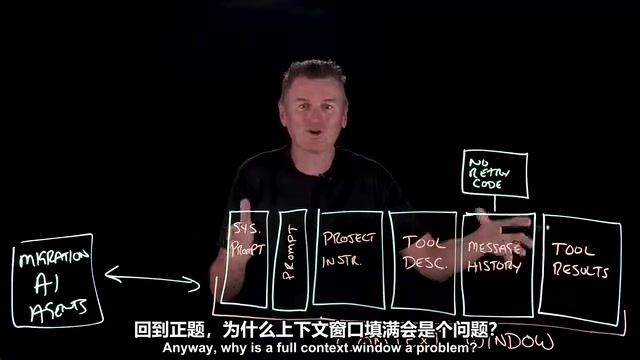
Take a "codebase database migration" agent as an example. The composition of the window looks roughly like this:
- System prompt: the basic instructions for the agent's operation, usually at the very front of the window.
- Task prompt: possibly just a few lines describing what specifically needs to be done.
- Project description: such as an agents.md file, explaining how the project is built.
- Tool definitions: a description of every tool the agent can call.
- Message history: the run log of each step the agent takes, which becomes enormous after an hour of running.
- Tool results: file contents, test output, error logs, schema dumps, and so on—often the largest portion by far.
You may not have noticed that the task description occupies only the first few lines of the window, while the vast majority of the rest is "byproduct" the agent has piled up on its own during the run. A typical example: the agent writes itself a note claiming that "the new driver automatically retries failed connections, so the old retry code can be deleted"—and that note later turns out to be completely wrong.
Why Does Filling the Context Window Become a Problem?
The model does not look up information in its context the way a database retrieves rows. Every token in the window competes for a limited "attention budget." The window may hold a million tokens, but the attention spread across those tokens is finite. This is the starting point for understanding all context failure modes.
The Four Context Failure Modes
Pitfall 1: Context Poisoning
An error enters the context window and is subsequently treated as fact. The "driver retries automatically" note mentioned earlier is a textbook case: the agent misread information in the driver documentation and wrote down a wrong conclusion. To the model, its own note looks like "ground truth," so it begins deleting the retry code file by file—code that should have been kept. Once an error is cemented, it continuously contaminates subsequent decisions.
The key difference between context poisoning and the other three failure modes is "irreversibility." Distraction, confusion, and clash mostly ease as the window refreshes or information is pruned, but poisoning occurs when erroneous information is written back into the context as a premise, forming a self-reinforcing loop: the model makes deletion decisions based on the wrong note, and the deletion results enter the window as new "evidence," further confirming the original judgment. Such errors are extremely hard for the model to detect on its own, because models tend to trust text they previously generated (a form of "self-consistency bias"). Common triggers in practice include misreading documentation, truncated or malformed tool returns, and over-generalization of error messages by the model. Beyond the "verify before writing" approach mentioned in the article, defensive strategies include annotating key conclusions with their source and confidence level, setting up human confirmation for high-risk operations, and periodically cross-checking assertions in the context against external sources of truth.
Pitfall 2: Context Distraction
A language model is fundamentally a pattern-continuation machine. When the context accumulates an hour of its own operational history, that history becomes the strongest pattern—stronger than the reasoning ability acquired during training. The model no longer asks "what does the task need next?" but instead tends to repeat what it has already done, spinning in place.
Pitfall 3: Context Confusion
The more tools an agent is connected to, the harder it becomes to choose the right one—regardless of whether a tool is actually used, its definition occupies window space. The video cites a benchmark: on the same task, the model failed when given 46 tools, but succeeded when given only 19. This is the cost of "tool sprawl."
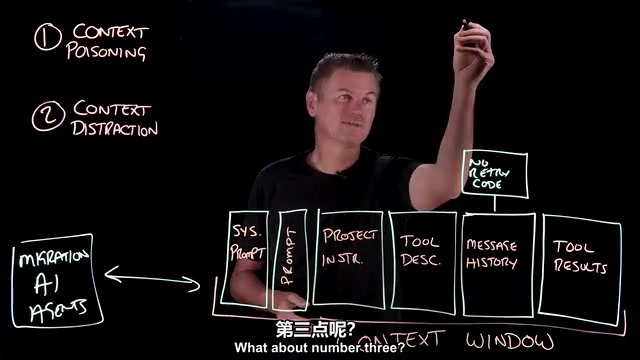
Pitfall 4: Context Clash
Contradictory information appears within the window. The agent later discovers that the retry never happened, realizes the note was wrong, and writes the correction into the message history. The result is that both the old and new versions exist in the window at the same time, presenting conflicting information, and the model is forced to make judgments amid the contradiction.
Four Fixes: Learning to "Throw Things Away"
Verify: Countering Context Poisoning
Verify conclusions before they are written into the context, checking them against reality. A single simple connection test would have stopped the agent from writing the erroneous "no retry code needed" note.
Compact: Countering Context Distraction
When history grows too long, perform compaction: discard the full log and restart from a summary. But compaction is lossy—a summary of a summary drifts gradually, like a copy of a copy. So as much as possible, move detailed information out of the window and into permanent files, pulling it back only when truly needed.
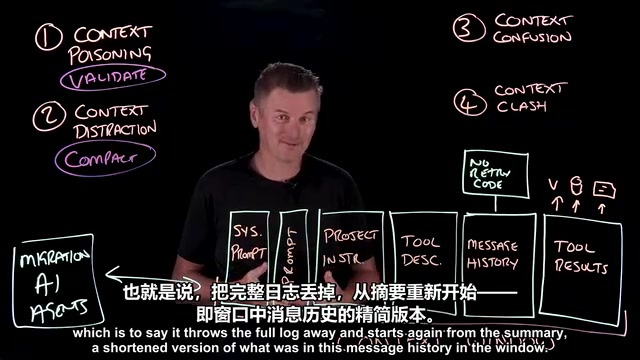
Compaction borrows ideas from databases and operating systems: when active data exceeds capacity, cold data is serialized to external storage, keeping only an index or summary. In the agent context, common implementations include rolling summaries (periodically summarizing early message history into a short text), hierarchical memory (writing details to files or vector stores, with only pointers kept in the window), and "checkpoint restart" (restating the current task state in a new window). Note that a summary is itself a model generation and introduces new risk of distortion, so summaries should preserve verifiable hard information (file paths, error codes, confirmed conclusions) as much as possible and compress away narrative content. Some coding agents in the industry adopt a hybrid "summary + external files" strategy to keep window usage low during long tasks.
Curate: Countering Context Confusion
A database migration task does not need 46 tools—give it only the handful the task actually requires, and fetch the rest on demand. This is a curation problem, not a capability problem.
Tool sprawl refers to the phenomenon in which the number of tools an agent can call keeps expanding as features grow. Every tool's name, description, and parameter schema consume window tokens, and semantic overlap between similar tools significantly raises the difficulty of selection. This is analogous to the "interface segregation principle" in software engineering: rather than providing one all-encompassing interface, expose the minimal necessary set for the current task. Common engineering practices include dynamically loading subsets of tools by task phase, using a "tool router" layer to do coarse filtering before exposing specific tools, and wrapping calls to low-frequency tools into a single generic execution entry point. What all these approaches have in common is that they move the "cost of choice" out of model reasoning and hand it to deterministic code logic.
Prune: Countering Context Clash
When information is superseded, delete the old version outright rather than letting both versions coexist. Better yet, open a completely new window and restate only the task's current, corrected state, leaving all the old, contaminated content behind.
The Core Insight: Less Is More
The four failure modes and four fixes can be remembered as follows:
| Failure Mode | Symptom | Fix |
|---|---|---|
| Context Poisoning | Erroneous conclusions treated as fact | Verify |
| Context Distraction | Historical patterns overpower task reasoning | Compact |
| Context Confusion | Too many tools, hard to choose | Curate |
| Context Clash | Contradictory information within the window | Prune |
The essence of every fix is actively discarding information. Agents perform better on long-running tasks not by stuffing in more context, but by holding less of it. This conclusion has direct practical significance for developers building AI agents: context engineering is not about "how much can fit," but about "what should stay."
One-line Summary
The larger the context window, the less reliable the model becomes—and the remedy for all four failure modes is to actively discard information.
Paragraph Summary
The article points out that a study of 18 frontier models found that the larger the context window, the lower the model's reliability—a phenomenon called "context rot." The root cause is that every token in the window competes for a limited attention budget, and the model does not retrieve information as precisely as a database. Using a codebase migration agent as an example, the article lays out how the window is crowded out by run logs and tool results, and identifies four failure modes: context poisoning (errors treated as fact), context distraction (historical patterns overpowering task reasoning), context confusion (too many tools making selection difficult), and context clash (old and new information contradicting each other). The corresponding fixes are verify, compact, curate, and prune—all of which, at their core, actively discard information. The article closes with a counterintuitive conclusion: agents perform better on long-running tasks not by stuffing in more context, but by holding less, cleaner context.
Related articles

Chain of Thought Isn't Just for AI: How Humans Can Use CoT to Improve Thinking Quality
Chain of Thought isn't just a prompt trick for large models. Starting from a Hacker News discussion, this article analyzes why CoT works for human thinking too, breaks down actionable ways to transfer it, and highlights the key differences between human CoT and machine CoT.
Cloudflare Teams Up with OpenAI: Closi…
Cloudflare Teams Up with OpenAI: Closing the Loop from Vulnerability Discovery to Defense with AI
Cloudflare uses OpenAI Daybreak to investigate security vulnerabilities and generate reviewable remediation plans, while developers use Codex to boost coding efficiency and quality.

Orca Multi-Agent Orchestration in Practice: A Guide to Parallel Collaboration with Claude and Codex
Orca is Stable AI's free open-source agent workbench supporting 34 agents like Claude Code and Codex in parallel. Learn its Git worktree isolation, multi-model orchestration, and mobile management.