Context Mode Tested: Is the 98% AI Agent Context Reduction Real or Hype?

Context Mode compresses context via sandboxing plus retrieval — impressive traction, but the 98% claim lacks independent verification.
Context Mode is a context compression tool integrated as an MCP Server into 18 AI Agents, using sandboxed execution plus local retrieval so raw output never enters the model directly — its official example compresses 315 KB to 5.4 KB. It hit 28,000+ stars in under 8 months, but the claimed 98% reduction has no third-party verification: self-tests average 96%, worst case 13%, while users perceive only 30%-40%. It suits heavy tasks and switched to the Elastic License in March.
Context Mode Tested: Is the 98% AI Agent Context Reduction Real or Hype?
AI Agents suddenly "losing their memory" mid-task is a shared experience for many Claude Code and Cursor users. The root cause usually isn't the model — it's a stuffed context window. A GitHub project called Context Mode claims it can cut the data entering the model by 98%, and it racked up 28,000+ stars in under 8 months. Does that number hold up?
What Context Mode Actually Does
Context Mode is an MCP Server that hooks into Claude Code, Codex, Cursor, Gemini CLI, and other tools. According to its Readme, it's compatible with a total of 18 Agents.
Its core design can be summed up in one line: don't let raw output enter the model directly.
Here's the flow — commands execute in a sandbox first, and only the final result is returned to the Agent. The bulk of intermediate data is written to a local search database that the Agent can query on demand. The official example: 315 KB of context compressed to 5.4 KB. Session duration also stretched from roughly 30 minutes to as long as 3 hours.

This approach essentially swaps "dumping everything in" for "retrieval on demand," which is the right direction for scenarios involving large logs, browser snapshots, and analysis of big files.
MCP (Model Context Protocol) is a protocol Anthropic launched and open-sourced in late 2024 to standardize how AI models connect to external tools and data sources. Before that, every Agent product (Claude Code, Cursor, Codex, etc.) had to write a separate adapter layer for each tool, resulting in a heavily fragmented ecosystem. MCP abstracts this into a unified Server-Client structure: tool providers implement an MCP Server that exposes various "tools" and "resources," and any MCP-compatible Agent can call them directly. Context Mode is released precisely as an MCP Server, which is the fundamental reason it's compatible with 18 Agents at once — write once, use everywhere.
Hooks are interception points reserved in the Agent's execution flow, such as "before tool call," "after tool return," and "at session start." By registering Hooks, Context Mode intercepts tool output at the very moment it's about to enter the context, rewrites it, and then lets it through — achieving "raw output never enters the model." You can think of it this way: MCP determines who can call it, and Hooks determine where in the pipeline it can intervene.
Community Traction: The Numbers Really Are Impressive
Looking at the growth curve, Context Mode is no small-time project. 28,000+ stars, nearly 2,000 forks, 111 contributors, and over 600,000 NPM downloads. It scored 570 points on Hacker News, climbed back to #4 on GitHub Trending this week, and picked up nearly 1,000 stars in a single day.
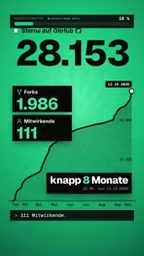
These numbers say at least one thing: context bloat is a real pain point, not a manufactured need. When a tool attracts this much attention in such a short time, it usually means it hit on a universal problem.
Does the 98% Figure Hold Up to Scrutiny?
The 98% reduction the project claims currently has no independent third-party verification.
Its own benchmark averages 96%, with a worst case of just 13%. Meanwhile, users' perceived results generally land between 30% and 40% — not a small gap from the marketing message.
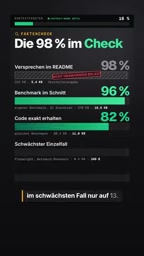
This set of numbers deserves to be broken down. The 96% average is very likely inflated by extreme scenarios: a few-hundred-KB log file compressed to a few KB naturally produces a stunning single-run reduction. But many everyday development tasks are medium-sized or even small, where compression headroom is limited and the perceived gain naturally sits closer to 30%-40%. The four figures — 98%, 96%, 13%, 30-40% — aren't contradictory; they describe a distribution across different scenarios.
Why is the gap between benchmark and perceived data so large? The key is in how "compression rate" is defined. Compression rate is typically calculated as (original context − compressed context) / original context, a ratio-type metric that's extremely sensitive to outliers. A 315 KB log compressed to 5.4 KB is a 98.3% reduction in a single run — enough to substantially raise the overall average. Meanwhile, everyday tasks may only have a few KB of context, and after compression there's still a few hundred bytes of fixed overhead, so the ratio naturally lands at 30%-40%. This is the same statistical phenomenon as averages being dominated by a few extreme values.
When looking at marketing numbers like these, what matters more is the median and quantile distribution, not the mean. The project's own "worst case 13%" actually reveals the lower edge of the real distribution. For users, the criterion shouldn't be "can it compress to 98%" but "where does my typical task fall in the distribution."
User Feedback: Real Efficiency Gains, Real Costs
Positive feedback centers on two things: token consumption drops noticeably, and most users don't perceive a decline in output quality. One person mentioned a large analysis dropping from 45 minutes to 5 minutes.
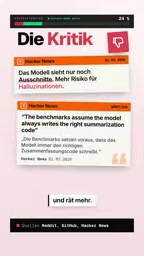
Criticism is equally specific. Under some configurations, the tool itself burns around 15,000 tokens per request — for small tasks, that overhead may directly cancel out the savings. Other users report the model speculates more, since it only sees fragments.
This exposes Context Mode's fundamental trade-off: the context efficiency you gain comes at the cost of "the model not seeing the whole picture." For tasks that require global reasoning, that price may not be worth it.
Why does "the model not seeing the whole picture" lead to more speculation? It relates to an inherent flaw of retrieval augmentation. When an Agent only gets fragments rather than the full output, its grasp of the global structure weakens: where a variable is defined, who calls a function, which part of a log is the actual root cause — these cross-fragment inferences must be pieced together through multiple retrievals. If retrieval doesn't hit accurately, the model fills in the blanks with "plausible-looking" content, showing up as more hallucination.
Worse, errors accumulate: one misread fragment can send subsequent retrieval in the wrong direction, producing a final answer that reads smoothly but is actually off. This problem is especially pronounced in tasks requiring global reasoning (refactoring, cross-file debugging, architecture analysis), and nearly imperceptible in local tasks like "find the error in one log line." This also explains why user feedback is polarized: light users just feel they saved tokens, while heavy analytical users complain the model became "smart but forgetful." When evaluating, it's best to test by task type separately rather than relying on overall satisfaction.
License Change Worth Noting
Since March, Context Mode has switched from a traditional open-source license to the Elastic License. This means it can be freely used, but commercial distribution and hosted services are restricted. If you plan to integrate it into a commercial product, read the terms carefully.
Elastic License 2.0 (ELv2) is not an OSI-approved open-source license. It lets you freely use, modify, and distribute the source code, but sets two core restrictions: you may not provide the software to third parties as a hosted or managed service, and you may not circumvent its license key functionality. In other words, internal use or integration into non-sold products is fine, but building a SaaS on top of it to sell to customers crosses the line.
Switching from traditional open-source licenses like Apache/MIT to ELv2 is a common path for many infrastructure projects in recent years: start with a permissive license to gain growth and community contributions, then tighten the terms once the product matures and commercialization pressure rises. For a project with 28,000+ stars, this kind of switch directly affects downstream commercial integrators and cloud vendors. If you're just an individual developer, it matters little; if you're evaluating it for a company product, have legal review the terms before integration — especially the boundary around what counts as a "hosted service."
When It's Worth Using
Context Mode's applicable boundaries are fairly clear:
- Good fit: tasks where context naturally bloats — huge logs, browser snapshots, large codebase analysis
- Not a great fit: small-scale, short-session everyday coding tasks, where the tool's own token overhead may outweigh benefits
- Test first: the project ships with a stats command, so you can quantify compression in your own actual workflow instead of taking the marketing numbers at face value
An interesting detail: the AI Agent that produced this review video runs on Context Mode itself. The tooling team using their own product at least shows basic confidence in it, but it also means the review perspective carries a natural bias.
The final verdict is simple — context compression is the right direction, the specific 98% figure needs an asterisk, and whether it works for you depends on how "big" your tasks are.
One-line Summary
Context Mode compresses context via sandboxing plus retrieval — impressive traction, but the 98% claim lacks independent verification.
Paragraph Summary
Context Mode is a context compression tool integrated as an MCP Server into 18 AI Agents, using sandboxed execution plus local retrieval so raw output never enters the model's context directly — its official example compresses 315 KB to 5.4 KB. In under 8 months it hit 28,000+ stars, 600K NPM downloads, and 570 HN points, showing context bloat is a real pain point. But the claimed 98% reduction has no third-party verification: self-tests average 96% with a worst case of 13%, while users perceive only 30%-40% — the gap comes from extreme samples inflating the average. It suits heavy tasks like huge logs and browser snapshots, while small tasks may be canceled out by the tool's own ~15,000 tokens per request. Since March, the project switched to the Elastic License, so commercial integration warrants attention to the terms.
Related articles

JobRunner MCP Server: AI Agents Can Now Fix Failed Java Jobs
JobRunner launches an open-source MCP server enabling AI agents to view cluster status, diagnose failures, and recover Java jobs—incident response from any cloud coding environment or existing agent.

MLAI Digital Launches 9 Security Agents: MCP Server Safeguards the Full Lifecycle of Agentic AI
MLAI Digital launches Security MCP Server with nine built-in specialized security agents covering vulnerability discovery, attack simulation, prompt injection detection, API and infrastructure assessment, and accelerated remediation—embedding security validation across the full Agentic AI lifecycle from development to production.

Running Isaac Lab on H100 GPUs: Exploring Better Approaches
Exploring optimization methods for running Isaac Lab on NVIDIA H100 GPUs, including MIG configuration, mixed precision, TensorRT acceleration, and community experience to improve robotics simulation and reinforcement learning efficiency.