Continue Open-Source AI Coding Assistant: Complete Setup Guide for a Free Copilot Alternative

A complete setup guide for Continue, the open-source AI coding assistant that serves as a free Copilot alternative.
Continue is an open-source VS Code extension that replicates Copilot's core features — autocomplete, AI chat, and inline editing — while letting you connect any AI model via your own API keys. This guide covers installation, free Gemini API configuration, a 90-second Todo app demo, and a detailed comparison with GitHub Copilot, helping budget-conscious developers achieve zero-cost AI-assisted coding.
GitHub Copilot's free era is over — it now starts at $10/month minimum, and if you want access to smarter models, you're looking at $39/month. For individual developers and students, that subscription cost isn't trivial. An open-source VS Code extension called Continue is becoming the go-to "zero-cost alternative" to Copilot for a growing number of developers.
This article is based on a hands-on demo by a Bilibili content creator, covering Continue's core capabilities, setup process, and real-world usage experience to help you decide whether it's worth replacing your current paid solution.
What Is Continue: An Open-Source Coding Assistant Not Locked to Any Model
Continue is an open-source AI coding agent developed by the Continue.dev team, with millions of downloads on the VS Code extension marketplace. Its features closely mirror Copilot: autocomplete, AI chat, and multi-file editing are all included. Being open-source, you can clearly see exactly what changes it makes to your code — a critical advantage for developers who value code controllability.
The key difference from Copilot is model decoupling. Copilot locks you into a single model ecosystem, while Continue uses a "Bring Your Own Key (BYOK)" approach, allowing you to freely connect any model you want — Claude, Gemini, GPT, or even open-source models running locally.
Model Decoupling is a software architecture design philosophy that completely separates application-layer logic from the underlying AI model implementation. In Copilot's traditional architecture, the IDE plugin is tightly coupled with OpenAI's model service — you can't choose to have Copilot call Claude or Gemini to generate code. The BYOK (Bring Your Own Key) model breaks this binding: users obtain API keys from various model providers themselves, and Continue serves as a middleware layer responsible for formatting code context and sending it to the user-specified model endpoint. The engineering significance of this architecture is that when a particular model performs better for a specific programming language or task, developers can switch instantly without replacing their entire development toolchain.
In other words, Continue itself is free — you only pay for the models you call behind the scenes. Since many providers currently offer completely free API quotas (such as Google Gemini), the entire solution can truly achieve zero subscription cost.
Three-Minute Setup: Using Gemini's Free API as an Example
The configuration process is extremely lightweight with virtually no barriers to entry.
Step 1: Install the Continue Extension
Open VS Code, click the extensions icon in the left sidebar (Windows shortcut Ctrl+Shift+X, Mac Cmd+Shift+X), type "Continue" in the search bar, find the open-source version published by Continue.dev, and click install. After installation, a "brain" icon will appear in the left sidebar — click it to open the Continue panel.

Step 2: Connect to Gemini's Free Model
On first use, Continue will ask you to select a model provider. The demo chose Google Gemini for a simple reason: it's completely free and doesn't require a credit card.
Google significantly expanded free API access to its Gemini model family in 2024. Through API keys obtained from Google AI Studio (formerly MakerSuite), developers can get a free quota of 15 requests per minute (RPM) and 1,500 requests per day without binding a credit card. The Gemini Flash series is a lightweight model optimized by Google for low-latency scenarios, with inference speeds approximately 3-5x faster than standard Gemini Pro, though with some trade-offs in complex reasoning and long-context understanding. For scenarios like code completion that require fast responses, the Flash series is often the more practical choice. It's worth noting that data on the free tier may be used by Google for model improvement, which differs from the data isolation policies of paid API tiers.
After selecting Google Gemini from the provider list, you can further choose a specific model — select the Gemini Flash series for faster response times, or standard Gemini for higher generation quality. Both are currently covered under the free quota. Paste in your free API key, click "Connect," and configuration is complete.
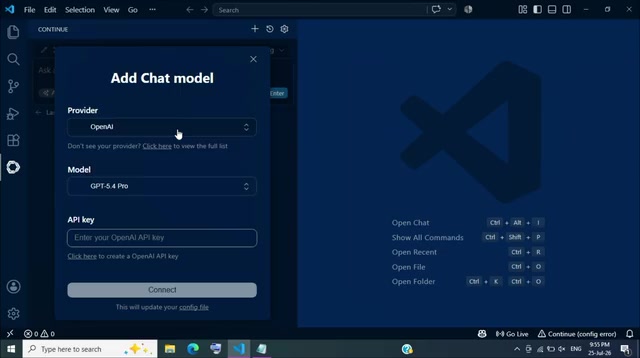
Obtaining the Gemini API key itself takes only about two minutes and is a one-time operation. At this point, your VS Code now has an AI coding assistant powered by a free model.
Real-World Test: Generating a Complete Todo App in 90 Seconds with Natural Language
To verify Continue's actual effectiveness, the content creator used it to build a Todo App that runs in a browser from a single HTML file.
From Natural Language Description to Runnable Code
After creating an empty index.html file, they opened the Continue chat panel and described the desired features and styling in plain English — including adding, completing, deleting, and clearing all tasks, plus a dark, minimalist interface design. Not a single line of code was written manually throughout the entire process.
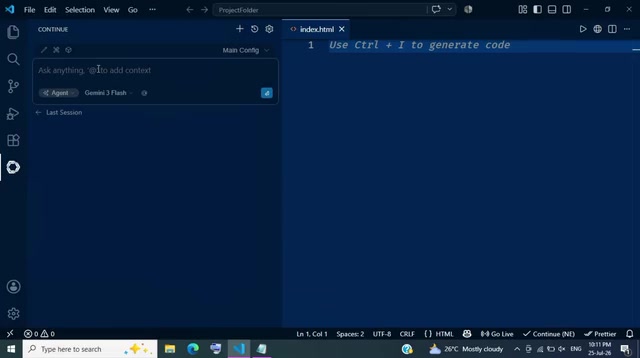
After pressing Enter, Continue output the complete HTML structure, CSS styles, and JavaScript logic in a single response. Click "Accept," and the code is written directly into index.html.
Verifying the Result
Opening the file with Live Server or VS Code's built-in browser, the app rendered immediately: dark interface, clean layout. Testing confirmed that adding tasks appeared in the list in real-time, clicking tasks marked them as complete (strikethrough), the delete button permanently removed entries, and "Clear All" reset the entire list.
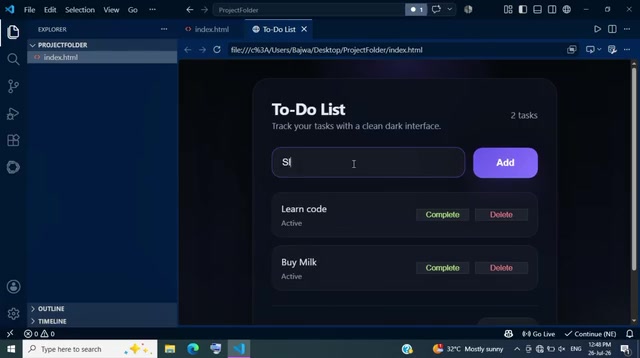
A fully functional todo app, from description to running — approximately 90 seconds, using only natural language with no manual code writing required.
Inline Editing: An Engineering Workflow Where AI Proposes and Humans Review
Where Continue truly demonstrates its "engineering value" is its Inline Edit capability.
Suppose you want to adjust the app's appearance without manually modifying code. Simply select all the code in the editor, press Ctrl+I to open the inline edit prompt, and describe your desired changes in one sentence. Continue updates the corresponding CSS and highlights the modified sections in green, making it easy to review each change before deciding whether to accept it. Click accept, refresh the browser, and the interface transforms instantly while the functional logic remains unchanged.
The essence of inline editing is presenting AI-generated code changes in a Git-style Diff view within the editor. Green highlighting indicates additions, red indicates deletions, and developers can review and choose to accept or reject changes hunk by hunk. This pattern borrows from Code Review best practices — requiring human confirmation before merging code. By contrast, GitHub Copilot's standard autocomplete uses a "gray ghost text" mode where pressing Tab accepts everything wholesale, making it easy for developers to inadvertently introduce code that doesn't comply with project standards or has security vulnerabilities. Continue's inline editing downgrades AI from "autopilot" to "assisted driving," with developers always maintaining ultimate control over the codebase.
This "AI proposes, humans review" workflow is more aligned with engineering practices than black-box autocomplete — you always understand the context and rationale behind every change.
Continue vs. Copilot: Advantages and Considerations
On the advantages side, Continue's value goes beyond just being "free":
- Free model switching: Flexibly balance speed and quality based on the task, without being locked to a single model
- Open-source transparency: Open code ensures long-term availability and transparent control
- Controllable data flow: BYOK mode lets you decide which service provider your code data is sent to
- Local model support: Can run with local AI models where code never leaves your machine, suitable for privacy-sensitive or offline development scenarios
Regarding local model support, Continue can connect to open-source large language models running on the developer's own machine through local inference frameworks like Ollama and LM Studio. Common choices include CodeLlama, DeepSeekAd Coder, StarCoder2, and other models specifically trained for code generation. The hardware threshold for local execution is typically: 7B parameter models require at least 8GB of GPU VRAM (e.g., RTX 3060), while 13B models need 16GB or more. The core advantage of local models is that data never leaves the machine — for enterprise developers working with proprietary code, financial systems, or medical data, this is a hard compliance requirement. The downside is that local models typically produce lower-quality code generation compared to cloud-based closed-source models like Claude or GPT-4, requiring developers to make trade-offs between privacy and quality.
Points to note: The "completely free" aspect relies on third-party free API quotas. Free quotas from Gemini and others have rate and usage limits — if provider policies change or your usage increases, costs may still arise. This is a different cost structure from Copilot's fixed subscription and is better suited for light to moderate usage scenarios.
Specifically, free API quota limitations manifest across three dimensions: requests per minute (RPM), daily request totals (RPD), and tokens per minute throughput (TPM). Taking Gemini's free tier as an example, 15 requests per minute means that if you frequently trigger autocomplete (which typically sends a request on every keystroke), you can easily hit the rate limit. When this happens, Continue returns empty responses or delays, noticeably degrading the experience. Compared to Copilot's $10/month fixed subscription, the latter is essentially an "all-you-can-eat buffet" model — no extra charges regardless of how many calls you make. Therefore, the Continue + free API approach is better suited for light to moderate developers who code no more than 2-3 hours per day; for full-time programmers coding intensively 8 hours a day, a paid API or Copilot subscription may actually offer better value.
Summary: Who Should Use Continue as a Copilot Replacement
In the context of Copilot's full transition to paid plans, Continue offers a pragmatic alternative path: centered on open-source principles, model freedom, and natural language programming, combined with free API quotas to achieve a near-zero-cost AI-assisted development experience.
If you fall into any of these developer categories, Continue is worth serious evaluation:
- Budget-conscious individual developers and students: Save at least $10/month in subscription fees
- Teams looking to escape single-vendor lock-in: Freely choose the AI model best suited for each task
- Privacy-conscious developers: Support for local models keeps data on your machine
From installation to running your first project, the entire process takes less than five minutes with virtually zero trial-and-error cost. Rather than debating whether it's worth trying, just go ahead and experience it firsthand.
Related articles

Chain of Thought Isn't Just for AI: How Humans Can Use CoT to Improve Thinking Quality
Chain of Thought isn't just a prompt trick for large models. Starting from a Hacker News discussion, this article analyzes why CoT works for human thinking too, breaks down actionable ways to transfer it, and highlights the key differences between human CoT and machine CoT.
Cloudflare Teams Up with OpenAI: Closi…
Cloudflare Teams Up with OpenAI: Closing the Loop from Vulnerability Discovery to Defense with AI
Cloudflare uses OpenAI Daybreak to investigate security vulnerabilities and generate reviewable remediation plans, while developers use Codex to boost coding efficiency and quality.

Orca Multi-Agent Orchestration in Practice: A Guide to Parallel Collaboration with Claude and Codex
Orca is Stable AI's free open-source agent workbench supporting 34 agents like Claude Code and Codex in parallel. Learn its Git worktree isolation, multi-model orchestration, and mobile management.