Copy Dance Moves with AI: A Practical Guide to Swapping Characters and Styles While Keeping the Original Choreography

Use AI motion transfer to apply any dance choreography to new characters and art styles in minutes.
This article walks through a simple AI-powered workflow for "dance replication": extracting skeletal motion data from a source video and applying it to a new character and visual style — no animation required. The process uses the Flova expert skill module and requires three inputs: a character reference image, a dance video, and a depth video, plus descriptive keywords. The depth video is the most overlooked yet critical asset, as it reduces limb misalignment and clipping artifacts. While the workflow dramatically lowers the barrier to video creation, output quality depends heavily on asset quality and prompt precision — and commercial use may carry copyright risks.
The Core Idea Behind AI Dance Replication
Short video platforms are flooded with the same dance routine reimagined by different characters in different visual styles. The underlying principle is straightforward — preserve the original motion data while swapping out the character and visual aesthetic. This technique has taken off because it compresses what used to require motion capture, skeletal rigging, and frame-by-frame rendering into just a few simple steps.
As demonstrated by a Bilibili creator, the entire production process runs through a single expert skill connector. Users just need to prepare their assets and write a description — the AI model handles all the analysis and generation automatically. This "upload assets, wait for output" workflow is a textbook example of how AI video tools are lowering the barrier to entry for creators.
Academically, this technology is typically referred to as "Motion Transfer" or "Pose-driven Video Generation." The core logic is to abstract human movement into appearance-agnostic skeletal sequences or pose heatmaps, then inject that motion signal into the image generation process for a new character. Early foundational work like DensePose and OpenPose handled skeletal keypoint extraction, while more recent conditioning mechanisms like ControlNet have made the "pose condition → image generation" pipeline much more reliable. Tools like Flova build on this foundation to deliver a complete, user-friendly pipeline.
Step-by-Step Breakdown
Step 1: Open the Expert Skill Connector
After launching the software, locate the "Expert Skill Connector" in the left panel. Type Flova into the search bar and select the "Flova 拉片大师" skill module. This step essentially loads a specialized toolchain optimized for dance motion extraction and transfer.
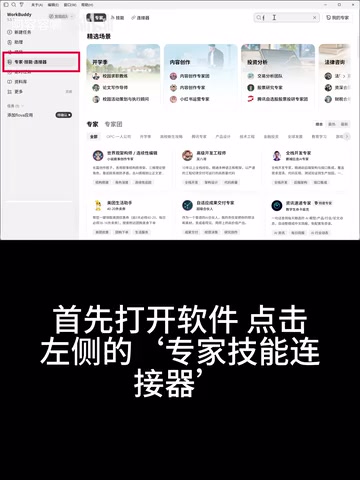
Step 2: Prepare and Upload Three Types of Assets
Once the skill is loaded, you need to provide three key inputs:
- Character reference image: Determines who appears in the final video — can be any character or art style you want;
- Dance video: The source footage that provides the original choreography;
- Pre-extracted depth video: Contains spatial depth information, helping the AI more accurately reconstruct the 3D posture of the body movements.
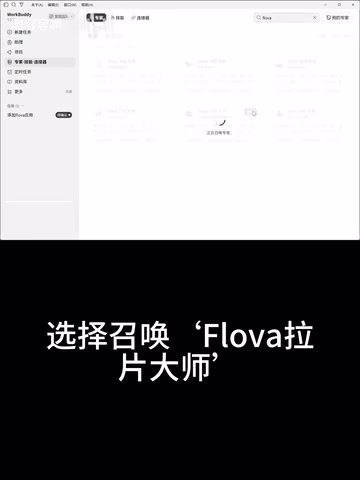
The depth video is an easy-to-overlook but critical part of this pipeline. Compared to using a regular video alone, depth information significantly improves structural consistency during motion transfer — reducing common issues like limb misalignment and mesh clipping.
What is a depth video and how do you get one? There are typically two ways to obtain one: (1) run a regular video through a dedicated depth estimation model (such as open-source tools like MiDaS or Depth Anything) to generate a grayscale depth map for each frame; or (2) use AI video tools that have built-in depth extraction features to convert a regular dance video directly. In a depth map, pixel brightness represents relative distance from the camera — brighter means closer, darker means farther. With this additional spatial information, the AI can more accurately infer the actual 3D position of each joint, rather than guessing limb hierarchy from 2D pixels alone. This is especially important for complex movements like crossed arms or body rotations.
Step 3: Add Descriptive Keywords
Along with your assets, include descriptive keywords that further constrain the art style, scene, and character traits. The precision of your prompt directly impacts the quality of the output — this is what separates a tool that "kind of works" from one that truly delivers.
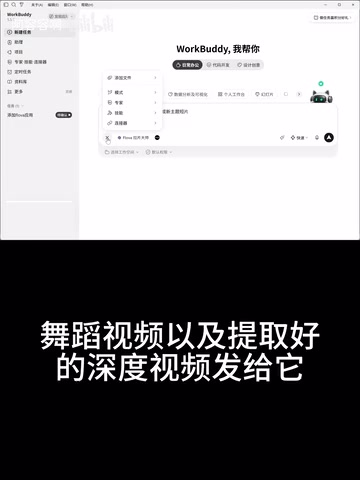
Step 4: Wait for the Output
Once you submit your assets and keywords, the model will handle all the analysis and processing on its own. No manual intervention needed — just wait for the render to complete and your video will be ready.
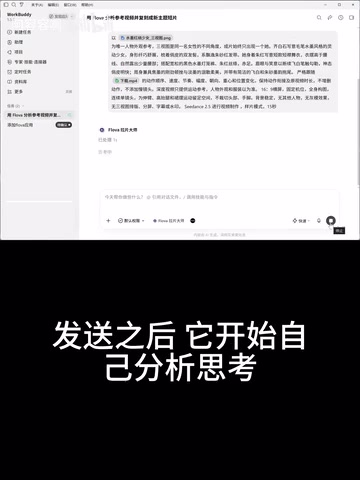
The Value and Limitations of This Approach
From a content production standpoint, motion reuse offers exceptional cost-efficiency. A carefully designed or trending dance routine can be transferred to different characters repeatedly, quickly generating multiple versions of content — making it especially well-suited for creators who chase trends or produce fan-made derivative works.
That said, it's worth being realistic about the limitations. The quality of motion transfer is highly dependent on input asset quality — the clarity of the reference image, the accuracy of the depth video, and the completeness of the prompt all matter. Any weak link will leave artifacts in the final output. Additionally, directly reusing someone else's original choreography can raise copyright and originality concerns when used commercially or distributed at scale — creators should be mindful of compliance risks.
Final Thoughts
This "swap the character, swap the style, keep the moves" workflow represents one direction in which AI video generation tools are becoming more accessible: wrapping professional motion capture and style transfer capabilities into a simple, upload-based interface. For everyday users, the key to getting real results from these tools lies in understanding what each type of asset contributes and in refining your prompts. The original creator has posted their specific prompts in the comments — interested readers are welcome to grab them and start experimenting.
Related articles

Chain of Thought Isn't Just for AI: How Humans Can Use CoT to Improve Thinking Quality
Chain of Thought isn't just a prompt trick for large models. Starting from a Hacker News discussion, this article analyzes why CoT works for human thinking too, breaks down actionable ways to transfer it, and highlights the key differences between human CoT and machine CoT.
Cloudflare Teams Up with OpenAI: Closi…
Cloudflare Teams Up with OpenAI: Closing the Loop from Vulnerability Discovery to Defense with AI
Cloudflare uses OpenAI Daybreak to investigate security vulnerabilities and generate reviewable remediation plans, while developers use Codex to boost coding efficiency and quality.

Orca Multi-Agent Orchestration in Practice: A Guide to Parallel Collaboration with Claude and Codex
Orca is Stable AI's free open-source agent workbench supporting 34 agents like Claude Code and Codex in parallel. Learn its Git worktree isolation, multi-model orchestration, and mobile management.