Coze 3.0 Agent Building Complete Guide: A Hands-On Tutorial for Absolute Beginners

A complete beginner's guide to building AI agents on Coze 3.0, from one-click auto-generation to enterprise-grade workflows.
This article introduces the approach behind a Coze platform AI agent-building tutorial. Coze 3.0 offers two paths: automatic building generates agents, workflows, or skills from a single description — ideal for quick validation of simple needs; manual building targets complex business scenarios, with branch workflow logic, multi-turn conversation configuration, and knowledge base optimization as the key factors that elevate an agent from demo-ready to production-ready. The tutorial covers real-world use cases across e-commerce, digital humans, education, finance, and law, while emphasizing that the true learning goal is not just mastering Coze, but developing a transferable AI product mindset and structured application methodology.
AI tools are evolving faster than most people can keep up with — new buzzwords and platforms emerge daily, leaving many feeling anxious about falling behind while unsure where to even start. This tutorial on building AI agents with the Coze platform aims to provide a complete path from zero to one. No programming background required, no need to be a seasoned industry expert. The core goal is to transform AI from a simple chat tool into an advanced assistant capable of completing complex tasks with a single click.
Two Ways to Build on Coze 3.0
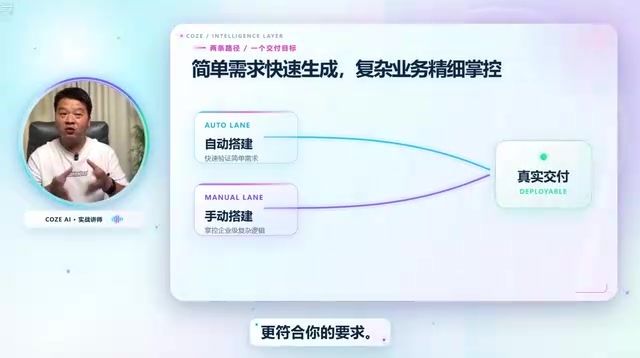
Coze currently supports two building paths — automatic and manual — and understanding both is key to grasping the platform's full capabilities.
Automatic building is one of Coze 3.0's standout features, essentially a "describe it and generate it" approach. Simply describe what you need, and the platform automatically generates the corresponding agent, workflow, or skill. For example, entering "Build me an agent that automatically generates promotional images from uploaded product photos" in agent mode will trigger the system to complete the build automatically. Upload a product image, wait a moment, and the result is ready.
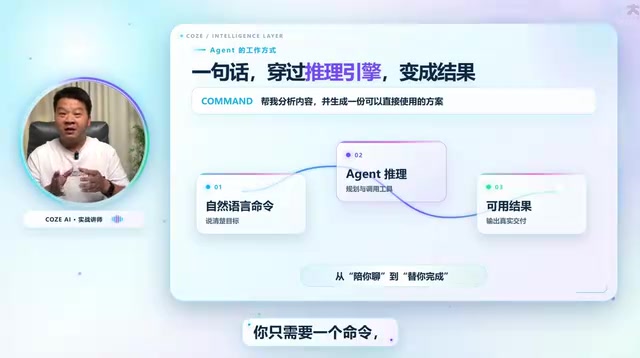
Workflow mode works the same way. The tutorial demonstrates a workflow where "inputting a poem's name automatically generates a poetry learning card" — complete with a contextually appropriate image and clean layout. Once created, drop a poem in and a beautifully formatted learning card is produced automatically. Skill mode supports this interaction too: for instance, "automatically generate viral Xiaohongshu copy and cover image from a given topic." Enter a parenting education theme after setup, and both the content and cover image are generated together.

It's worth noting that automatically generated results may not be perfect at first — that's completely normal. Automatic building is designed for quickly addressing relatively simple, standardized needs. Gradual refinement through parameter adjustments and prompt optimization is what brings the output closer to the ideal result.
Coze is a one-stop AI agent development platform launched by ByteDance, available in both a domestic version (coze.cn) and an international version (coze.com). The platform's core product architecture has three layers: Agents (Bots) serve as the user-facing conversational interface that handles specific business logic; Workflows are visual orchestration tools that chain multiple AI nodes into automated pipelines; and Skills (Plugins/Skills) are functional modules that extend an agent's specific capabilities — such as web search, image generation, and data queries. The relationship between the three can be understood as: skills are the components, workflows are the assembly line, and agents are the final product delivered to users. Understanding how these three layers divide responsibility is a prerequisite for evaluating the platform's capability boundaries.
Manual Building: For Complex Tasks and Enterprise-Grade Scenarios
When requirements become more complex or enterprise-grade agents are needed, automatic building falls short — and manual building takes center stage.
The value of manual building lies in precise control over workflow logic — including the logical breakdown of conditional branch workflows, multi-turn conversation configuration, and knowledge base optimization. These are precisely the factors that determine whether an agent is merely "usable" or genuinely "good." Branch logic dictates how the agent makes decisions given different inputs; multi-turn conversation configuration affects the coherence of interactions; and knowledge base optimization directly impacts the accuracy and professionalism of responses.
Based on the tutorial roadmap, manual building covers a wide range of real-world deployment scenarios: in the digital human space, inputting a script can automatically generate a talking-head short video; in the comics and animation industry, a brief description can produce a short comic strip; in e-commerce, uploading a clothing image can generate high-quality product promotion images or even promotional videos; and for content creators, the focus is on deconstructing the underlying logic behind viral short videos.
Knowledge Bases are the key mechanism enabling agents to answer domain-specific questions, and are fundamentally an application of Retrieval-Augmented Generation (RAG) technology. When users upload documents, FAQs, product manuals, and other private data to a knowledge base, the agent first retrieves relevant passages from that knowledge base before generating a response with the large language model. This mechanism addresses the limitation of general-purpose LLMs having no access to an organization's proprietary information. Knowledge base quality directly affects response accuracy. Optimization typically focuses on document chunking strategy (chunk size), metadata annotation, and the weighting balance between vector search and keyword search. For enterprise scenarios, knowledge base optimization often delivers greater improvements in real-world usability than prompt tuning alone.
Real-World Applications Across Multiple Industries
A clear emphasis of this tutorial series is grounding agent capabilities in concrete industry applications rather than keeping things at the demo level.
The education sector includes use cases such as essay grading assistants, idiom learning cards, and teaching aid tools. Agents and workflows for professional fields like finance, accounting, and law are also covered. Additionally, Coze 3.0 introduces the concept of local devices and cloud devices, with the goal of making it a full-scenario AI productivity assistant rather than limiting its use to a single web interface.
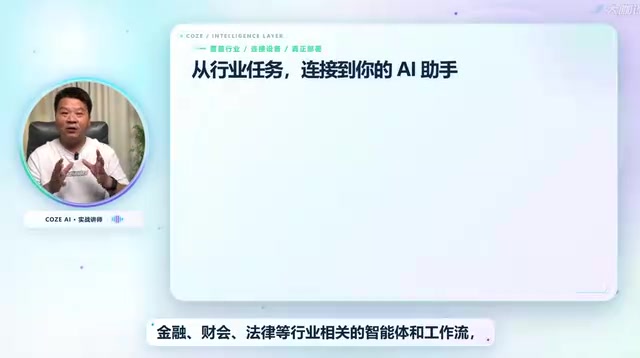
The breadth of industry coverage reflects Coze's positioning as a general-purpose agent development platform — one that attempts to apply a unified methodology to diverse industry needs. This also explains why the tutorial repeatedly emphasizes "applying learned principles to new situations": once the underlying logic is mastered, users can theoretically transfer the same building approach to their own industry.
Product Thinking Matters More Than Technical Skills
A point the tutorial author repeatedly emphasizes is worth highlighting: the core value of this entire course isn't just teaching you "how to use Coze" — it's about building an AI product mindset and a structured methodology for application.
This perspective is well-founded. Tools will iterate, platforms will change, but the ability to break down a vague requirement into a structured workflow — and the judgment to know which steps should involve AI versus human intervention — are transferable, long-term assets. Learning Coze is just the starting point; the real goal is mastering a general methodology for deploying AI across platforms.
For absolute beginners, the learning path is clear: start with automatic building to develop intuitive understanding and grasp the differences between agents, workflows, and skills; then move into manual building to explore branch logic, multi-turn conversation configuration, and knowledge base optimization; ultimately, build AI tools independently that fit your own business needs.
Conditional Branch Workflows are the core capability that separates "toy-grade" from "production-grade" agents in manual building. They allow a workflow to follow different processing paths based on different conditions — for example, whether the user input is an image or text, whether the question is a pre-sales inquiry or a post-sales complaint, or whether the detected sentiment is positive or negative. Each scenario can invoke a different combination of nodes. A workflow without branch logic can only handle linear, single-type tasks. With branching added, an agent can respond to the variable inputs that real-world business situations demand. Multi-turn conversation configuration addresses the "context memory" problem — determining how many rounds of conversation history the agent retains during a continuous dialogue, which is especially critical for customer service and tutoring scenarios.
Summary
This tutorial series takes a platform-introduction approach, gradually progressing from complex workflows and industry applications to the underlying methodology. Its practical value ultimately depends on whether subsequent lessons can thoroughly explain key concepts like "knowledge base optimization" and "conditional branch workflows" — these are the dividing lines between a toy-grade agent and a production-ready tool. For anyone looking to get started with AI agent building, the low-barrier path that Coze provides is genuinely a solid place to begin.
Related articles

Felix Rieseberg Personal Homepage
Felix Rieseberg's personal homepage sparks attention on Hacker News. This article covers the Slack engineer's technical background, the rise and fall of nativefier, and the value of a developer homepage as a tech calling card.

@ai-sdk/vue 3.0.306 Patch Release Syncs with [email protected] Update
@ai-sdk/vue 3.0.306 released, synced with [email protected]. A routine patch release for the Vercel AI SDK ecosystem with no public API changes; the Vue adapter layer stays version-aligned with the core package.

Gemini 4 Argon API Launches: The Era of Million-Token Output Begins
Google launches Gemini 4 Argon with sparse MoE architecture, up to 1M output tokens, and a 68.90% Vals Index score, available across API, AI Studio, and the Gemini app.