Coze 3.0 Beginner's Guide: Build Your First AI Agent from Scratch — No Code Required

Build your first AI agent on Coze 3.0 with zero code — a complete walkthrough from prompt to publish.
This guide covers ByteDance's Coze 3.0 platform, walking through its core capabilities in agent development and AI app building. Using a "Compliment Bot" as a hands-on example, it breaks down every step: creating an agent, writing structured prompts (role, skills, examples, constraints), configuring plugins, and publishing. It also clarifies when to choose Coze vs. the open-source Dify for private or enterprise deployments.
ByteDance's Coze is one of the most widely used AI application development platforms in China. Its defining feature is a configuration-driven approach that lets users with no programming background build agents, workflows, and other AI applications through a visual interface with simple clicks and settings. This guide is based on a Bilibili tutorial series and walks through Coze 3.0's core capabilities and hands-on workflow, helping you get your first AI agent up and running from zero.
What You Can Build on Coze: Agents and AI Applications
Coze is a development platform built around visual design and orchestration tools, enabling rapid creation of large-model-powered AI projects through zero-code or low-code workflows. Once built, you can publish your creations directly to social media platforms and messaging apps, or integrate them into real business systems via API/SDK.
Coze covers two main directions:
Agents: Your Virtual AI Employees
An Agent can be thought of as a "proxy" or "virtual employee" — a role you recruit to handle all kinds of tasks. It can serve as an intelligent customer service rep, English tutor, virtual companion, or personal assistant, handling document analysis, emotional support, and other routine work. Tasks that once required large teams of people can increasingly be delegated to agents, significantly cutting labor costs and boosting efficiency.
From a technical standpoint, what sets an Agent apart from a standard chatbot is its ability to autonomously plan and call tools. Traditional conversational models can only generate text responses based on input. An agent, however, can break a complex goal into subtasks and sequentially invoke different tools (search engines, databases, external APIs, etc.) to complete each step, then consolidate the results. This architecture is commonly known as the ReAct (Reasoning + Acting) framework: the model reasons about what to do next, executes the corresponding action, observes the result, and reasons again. Coze's workflow nodes are essentially a visual abstraction of this process — users can orchestrate agent behavior through drag-and-drop without needing to understand the underlying logic.
AI Application Development: Building AI Products Like Mini-Apps
The second direction is AI application development, similar in concept to building mini-programs. You can create AI-powered search tools, translation services, dietary trackers, and more using APIs. One example mentioned in the tutorial is a viral diet-tracking app from abroad that used AI to collect and analyze users' daily calorie intake, exercise habits, and eating patterns to generate health assessments — the kind of app that's relatively straightforward to build on Coze.
Coze's Core Strengths and Platform Selection Advice
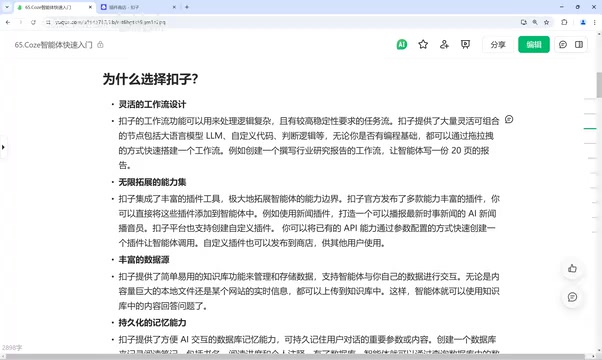
Coze has been well-established in the Chinese market for some time. Its core strengths include:
- Rich workflow design capabilities: Supports drag-and-drop orchestration, abstracting each step of a task into a "node." Nodes connected in sequence form a workflow. For a travel planning agent, for example, you might break the workflow into nodes like "search attraction info → draft itinerary → book hotel → contact guide," triggered in order based on conditions.
- Powerful plugin ecosystem: Comes with a large library of built-in plugins for web search, news reading, and more. The Bing Search plugin, for instance, allows agents to break through the static knowledge cutoff of LLMs by fetching real-time information.
- Rich data sources (knowledge bases): Can store FAQ content for customer service agents, user behavior patterns, and other data for downstream user profiling.
- Persistent memory: Saves conversation history using a database, giving agents "memory" across multiple sessions — useful for tracking reading progress, personal notes, and more.
You may not have considered the platform selection question. If you're building public-facing consumer applications, Coze is more than sufficient. But if you need private deployment or enterprise-level customization, the tutorial recommends the open-source platform Dify (dify.ai) instead. The two serve different use cases: Coze excels at rapid development and public distribution; Dify is better suited for flexible, customizable self-hosted deployments.
Dify is an open-source LLM application development framework with its core code hosted on GitHub, supporting local or private cloud deployment. Unlike Coze's SaaS model, Dify lets organizations run the entire system on their own servers — data never touches a third party. This makes it ideal for industries with strict data compliance and security requirements (healthcare, finance, government). Dify also provides a visual workflow editor and supports multiple inference backends including OpenAI, Anthropic, and locally deployed open-source models. The key criteria for platform selection come down to three questions: Can your data leave your infrastructure or go to the cloud? Do you need deep customization of system behavior? Does your team have basic DevOps capabilities? When all three point toward "no, yes, yes," Dify's flexibility advantage truly comes into its own.
Hands-On Tutorial: Building a Compliment Bot with Coze
Let's walk through the complete agent-building workflow using a "Compliment Bot" (a warm encouragement assistant) as a practical example.
Step 1: Create Your Agent
After logging into the Coze platform, click the "+" button in the top-left corner → Create Agent. There are two creation methods: manually entering a name and description from scratch, or using AI-assisted creation. The latter calls a generation endpoint to automatically complete the configuration based on a description you provide — much more beginner-friendly.

Step 2: Write a High-Quality Prompt
The prompt is the soul of your agent. It's recommended to write it in Markdown format, as LLMs have stronger semantic comprehension of Markdown syntax. A well-structured prompt typically includes four components:
- Role definition: Clearly define the agent's identity, e.g., "A positivity-filled compliment and encouragement bot that always uses warm language to praise and uplift people."
- Skills: Define the agent's capabilities. For example, Skill 1: "Identify user strengths and offer genuine praise"; Skill 2: "Provide encouragement and suggestions when users face difficulties"; Skill 3: "Call Bing Search to answer professional questions outside the agent's knowledge base."
- Output examples: Provide formatted sample responses so the LLM follows a specific structure, reducing randomness and hallucination.
- Constraints: Define answer boundaries, e.g., "Only output praise and encouragement, refuse negative assessments, and always follow the specified format."
Paste the prompt into the creation field and click "Generate." Coze will automatically handle the logic configuration, skill setup, and even icon generation. Since the system intelligently fills in a great deal of content, this step takes a moment — but it saves a significant amount of manual configuration.

Prompt engineering is currently the most direct lever for improving LLM output quality. LLMs are fundamentally probability-based text prediction systems — the structure and phrasing of your prompt significantly influences the model's "attention allocation" and output direction. Writing prompts in Markdown isn't just about readability: headings, lists, and code blocks appear extensively in training data, giving the model stronger semantic awareness of these structures and making it better at recognizing logical boundaries like "role," "skills," and "constraints." Including output examples (few-shot examples) is an effective way to reduce hallucination and control formatting — the model learns the expected output pattern from the examples rather than generating freely. Constraint clauses effectively define the model's decision space, reducing the chance it "overreaches" in edge cases.
Step 3: Refine Prompts and Configure Plugins
After generation, you'll enter the agent editing page. On the left side you'll find the prompt and skills area — you'll notice the AI has built on your input and added further enhancements. If the result isn't quite right, use the "Auto-Optimize Prompt" feature to iterate until the output meets your expectations.
On the right side are plugins, workflows, and other configuration options. Note that AI-assisted creation doesn't always auto-attach the plugins you need. The Bing Search plugin, for example, may need to be added manually to ensure the agent automatically calls the search engine when asked questions outside its knowledge base (such as "What is Maslow's hierarchy of needs?").

This is where the agent's differentiated routing logic comes into play: for different types of questions, the agent automatically routes to different skills. Praise- and encouragement-related questions go to Skill 1 or Skill 2; professional questions outside that scope trigger Skill 3, which calls the search plugin. This design broadens the application's coverage and makes it more robust.
Step 4: Polish the Experience and Publish
To improve user experience, you can also add an opening message, suggested questions, and a background image. An opening message guides first-time users and sets expectations for what they can ask. A background image makes the chat interface more visually appealing.
Once configured, click "Publish" to distribute your agent to the Coze Store, the Doubao platform, or authorize it to connect with WeChat Mini Programs (requires configuring the corresponding API keys). After publishing, you can copy the agent's link and share it with anyone.
Summary: The Key Path to Building a Coze Agent
Coze's core value lies in packaging LLM capabilities into deployable AI applications through a low-barrier, configuration-driven approach. The key path is straightforward:
- Understand the platform's scope — agent development and AI application development are the two main directions;
- Write a strong prompt — use Markdown format with four elements: role, skills, examples, and constraints (tools like DeepSeekAd can help generate these);
- Build quickly — use AI-assisted creation to generate a draft, then manually configure skills and plugins;
- Polish and publish — enhance the experience with an opening message and background image, then publish with one click after testing.
Once you've completed this flow end-to-end, you've officially gotten started. For developers and founders who want to quickly validate AI product ideas without getting bogged down in code, Coze is undeniably an efficient starting point. And when your use case evolves toward enterprise-grade private deployment, the open-source Dify becomes a compelling next step to consider.
Related articles

Vibe Coding Full-Stack in Practice: AI Programming from Beginner to Enterprise Deployment
From Cursor to Claude Code, this Bilibili AI programming course uses four progressive projects to cover full-stack development, open-source secondary development, and team collaboration. The article analyzes the shock to frontend roles, the efficiency shift from 50 people to 5, and the methodology required for enterprise-grade projects.

David Blaine's Global Quest for Real Magic: From South Africa to Japan and India
David Blaine travels to South Africa, Japan, and India in his Do Not Attempt special, documenting Spinning drivers, black mamba rescuers, iaijutsu masters, and ascetics—exploring the boundary between magic and real human极限 challenges.

Is a Touchscreen MacBook Coming? Vergecast Reveals Apple Executive's Response
Vergecast podcast reveals a conversation between a reporter and Apple executive John Ternus about a touchscreen MacBook and Apple Pencil support. Ternus says iPad is the best device for a stylus, while the reporter bets MacBook will eventually support Apple Pencil.