Coze Agent Tutorial for Beginners: Complete Guide to Building Your AI Super Assistant from Scratch

A zero-to-deployment Coze agent tutorial focused on AI product thinking and real-world industry use cases.
This Coze platform tutorial series is designed for complete beginners, helping everyday users upgrade AI from a chat tool to a powerful assistant that automates complex tasks. It covers both automatic (one-prompt) and manual agent building, with hands-on walkthroughs across e-commerce, education, digital humans, and finance. Coze 3.0's local and cloud device modes further expand its practical range. The course's key differentiator is its emphasis on cross-platform AI product thinking and structured methodology — not just technical how-tos.
Why Everyone Should Learn to Build AI Agents
AI tools are evolving faster than ever, with new buzzwords and platforms emerging constantly — and many people feel overwhelmed before they even start. This tutorial series for the Coze platform is designed specifically for complete beginners. No coding experience required, no domain expertise needed. The core goal is to help everyday users transform AI from a simple chat tool into a powerful assistant capable of completing complex tasks with a single click.
The focus here isn't just on operational skills — it's about developing an "AI product mindset" and a structured methodology for applying AI. In other words, once you finish this course, you won't just know how to use Coze. You'll be able to adapt what you've learned and build AI toolchains tailored to your own industry.
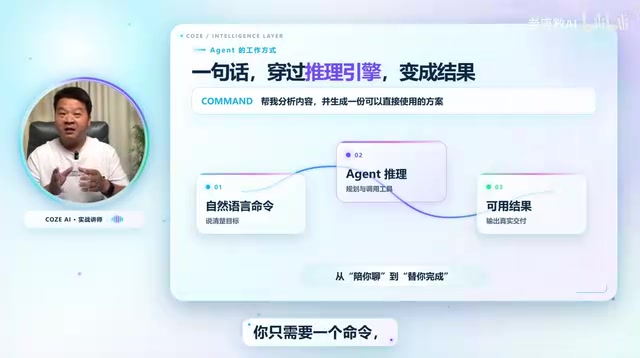
Two Ways to Build: Automatic vs. Manual
Coze currently supports two modes of agent creation — automatic and manual — covering everything from beginner to advanced use cases.
Automatic Building: Generate an Agent with One Sentence
One of the standout features of Coze 3.0 is the ability to generate agents, workflows, or skills from a single natural-language prompt. Here are a few examples demonstrated in practice:
- Agent: Type "Build me an agent that automatically generates promotional images when I upload a product photo" — the system handles the setup, and you can start uploading product images right away.
- Workflow: Type "Build me a workflow that automatically generates poetry study cards when I input a poem title" — with a request for thematic visuals and clean layouts — and beautiful study cards are produced instantly.
- Skill: Type "Create a skill that generates viral Xiaohongshu (Little Red Book) copy and cover images from a given topic" — input a parenting education theme and both the written content and cover image are generated together.

The advantage of automatic building is its extremely low barrier to entry — it's ideal for quickly validating ideas. The downside is that one-prompt results can be imprecise at first and may require further tuning. The tutorial includes dedicated guidance on refining auto-generated agents to better meet your specific needs.
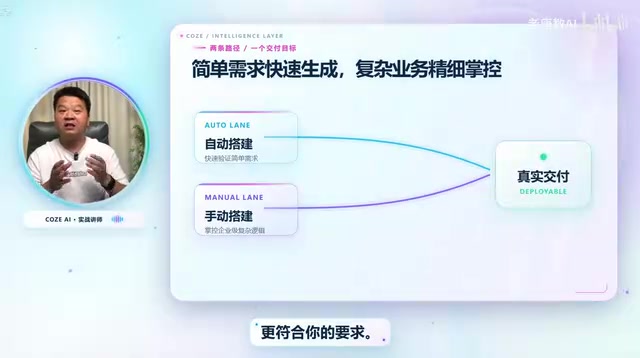
Manual Building: Handling Complex and Enterprise-Level Scenarios
Automatic building works well for straightforward tasks, but building complex or enterprise-grade agents still requires manual configuration. The tutorial goes beyond surface-level demos and dives into real-world deployment across multiple industries.
Key Concepts Explained
Coze is an AI agent development platform launched by ByteDance. It allows users to create, configure, and publish AI agents through a visual interface — no coding required. An agent is an AI program that perceives inputs, calls tools, executes multi-step tasks, and returns results. What sets it apart from a basic chatbot is its ability to chain together multiple capability modules (such as image generation, web search, and data processing) into an automated task pipeline. A workflow defines the execution path within an agent — specifying the trigger logic and data flow between nodes. A skill is a single-function unit that an agent can call, similar to installing a plugin. Understanding the hierarchical relationship between these three concepts will help you make better architectural decisions as you build.
Industry Use Cases Covered
The most valuable part of this tutorial series is how it grounds agent capabilities in concrete, industry-specific scenarios — walking learners through complete end-to-end workflows:
- Digital Humans: Input a script and automatically generate a digital avatar video.
- Animated Comics: Provide a brief description and generate a short animated comic video.
- E-Commerce: Upload a clothing photo and instantly produce high-quality product images — or even full promotional videos.
- Content Creators: Deconstruct the underlying logic behind viral short videos.
- Education: Essay grading assistants, idiom learning cards, teaching aid tools, and more.
- Finance, Accounting, and Legal: Relevant agents and workflows are also covered.
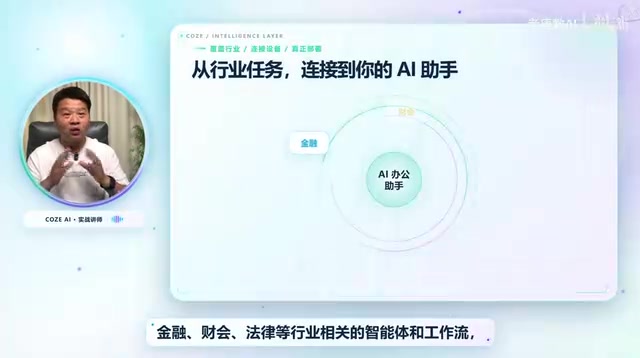
Organizing content around industry scenarios — rather than feature lists — makes it far easier for learners to understand what each capability actually solves in the real world.
Local Devices vs. Cloud Devices: AI for Every Work Context
The tutorial also covers Coze 3.0's local device and cloud device features, enabling Coze to go beyond being an online platform and become a truly comprehensive AI productivity assistant.
Understanding Local vs. Cloud Device Modes
Local device mode allows Coze agents to directly access the user's local file system, applications, or hardware resources — enabling read and write operations on local data rather than being limited to cloud-based processing. Cloud device mode runs tasks in a remote virtual environment, making it ideal for workflows that need to run continuously, trigger on a schedule, or support multi-user collaboration. Together, these two modes give Coze agents the flexibility to handle sensitive files stored locally while also supporting 24/7 automated workflows in the cloud — significantly expanding the platform's practical range. This is especially valuable for enterprise users: sensitive data can be processed locally, while workflows that need to run continuously can be delegated to the cloud.
Upcoming modules will focus primarily on Coze 3.0's latest features and manual workflow construction, helping learners build a complete path from zero to deployment.
The Core Value: Mindset Over Mechanics
This course progresses layer by layer — from design thinking and building techniques, to hands-on practice, to local deployment. The creator consistently emphasizes one point: this isn't just a technical course — it's about industry thinking and methodology.
The real goal is to use Coze as a starting point for developing universal, cross-platform AI application skills, ultimately enabling learners to build their own high-quality "AI team." For anyone who wants to embrace AI but worries about the learning curve, this progression from tools to mindset offers a genuinely clear path in.
Summary
This Coze agent tutorial series is built for complete beginners, with the core promise of "no coding required — anyone can learn this." Through both automatic and manual building approaches — combined with real-world use cases across e-commerce, education, digital humans, animated content, finance, and more — it guides learners from first steps to practical deployment. Rather than focusing purely on feature walkthroughs, the series prioritizes cultivating an AI product mindset: a skill that holds long-term value in a world where tools change faster than you can keep up.
Related articles

Chain of Thought Isn't Just for AI: How Humans Can Use CoT to Improve Thinking Quality
Chain of Thought isn't just a prompt trick for large models. Starting from a Hacker News discussion, this article analyzes why CoT works for human thinking too, breaks down actionable ways to transfer it, and highlights the key differences between human CoT and machine CoT.
Cloudflare Teams Up with OpenAI: Closi…
Cloudflare Teams Up with OpenAI: Closing the Loop from Vulnerability Discovery to Defense with AI
Cloudflare uses OpenAI Daybreak to investigate security vulnerabilities and generate reviewable remediation plans, while developers use Codex to boost coding efficiency and quality.

Orca Multi-Agent Orchestration in Practice: A Guide to Parallel Collaboration with Claude and Codex
Orca is Stable AI's free open-source agent workbench supporting 34 agents like Claude Code and Codex in parallel. Learn its Git worktree isolation, multi-model orchestration, and mobile management.