Coze Beginner's Guide: A Complete Breakdown of AI Agents and Workflow Building

A structured guide to Coze covering the Agent ecosystem, platform features, and an 8-module learning path.
This article uses a Bilibili creator's framework to categorize the AI tool market into three types: builder tools, Agent software, and development frameworks. Within this structure, Coze is positioned as a domestic Agent builder that has evolved into a hybrid Agent software with its 3.0 release. It offers prioritized learning advice for IT professionals and outlines an 8-module path — from concepts and platform hands-on to projects, the Skill Store, custom programming, and workflows — emphasizing a "big-picture first" learning strategy.
What Is Coze? Starting with the Agent Product Ecosystem
Before diving into Coze, it's worth clearing up a common point of confusion: how do you make sense of all the LLM and Agent products flooding the market right now? For most beginners, this is the biggest source of overwhelm.
According to a Bilibili content creator's breakdown, the entire Agent product ecosystem can be organized into three broad categories. Once you understand this framework, you'll have a much clearer picture of what each tool is actually for.
The first category is builder tools. These are platforms that let you construct an Agent — you're not the one doing the work directly, you're assembling an intelligent agent that does it for you. Typical examples include Coze Studio, Dify, and n8n. One nuance worth noting: Coze and Coze Studio can be thought of as two sides of the same product. Coze leans toward out-of-the-box usability (with some paid features) and requires no coding knowledge; Coze Studio, on the other hand, assumes a certain level of programming ability.
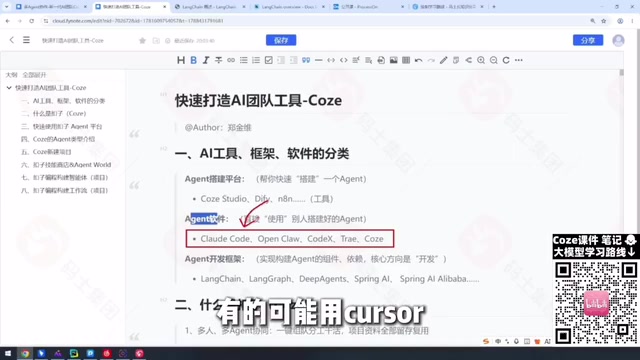
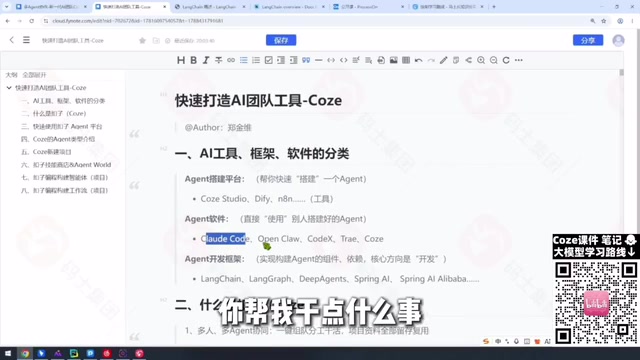
The second category is Agent software. These products do the work directly — you describe what you need, and they go execute it. Examples include Claude Code, various Web Coding tools, and Zhipu AI. The main challenges here are: first, how to install and deploy them; and second, how to phrase your requirements precisely enough. Interestingly, Coze started out more as a builder tool, but after iterating to version 3.0, it has evolved enough to also fit into this "Agent software" category.
The third category is development frameworks. This is the core domain for engineers, including LangChain and LangGraph within the LangChain ecosystem, as well as Spring AI and Spring AI Alibaba for Java developers.
Which One Should IT Professionals Learn?
The creator's advice is refreshingly direct: don't choose — learn them all, just prioritize.
In practice, the learning strategy differs by category:
- Builder tools: Dify is already widely adopted in many companies. Go deep if your company uses it; put it on the back burner if they don't.
- Agent software: Highly dependent on your company's tooling choices. Use whatever they pay for or specify — Claude Code, Codex, Cursor, whatever it is. If the company doesn't care, pick one that works for you.
- Development frameworks: If you're in this industry for the long haul, the Python-based LLM ecosystem is non-negotiable. LangChain, LangGraph — you need to know all of it.
This prioritization logic is especially useful for beginners. It avoids the trap of trying to learn everything at once and ending up with nothing truly mastered. The key is to let your career context and company needs drive what you focus on first.
What Problems Does Coze Actually Solve?
Coze is a domestically developed Agent builder platform — one reason Chinese users tend to have a smoother experience with it. Its core value proposition, in the product's own words, is "let Coze handle the work" — helping you quickly deploy intelligent agents and workflows, and even build an "AI team" that collaborates to complete projects.

Its applications span multiple industries:
- Programming scenarios: Coze can serve as an intermediary layer, connecting platforms like Claude to assist with code writing.
- Other industries: Whether you're in accounting, design, or other fields, Coze's rich skill library can handle a wide range of corresponding tasks.
One practical tip worth highlighting: navigating to the Coze homepage directly takes you straight into the workspace — you won't see any product overview. You need to append a specific path (like /overview) to reach the introduction page. Also, the official homepage gets redesigned fairly often, and newer versions have removed the "Documentation" entry point, making it hard to find. It's worth bookmarking the docs URL directly.
RAG (Retrieval-Augmented Generation) is one of the core underlying capabilities of builder tools like Coze. The idea is simple: before sending a question to the LLM, the system first retrieves relevant passages from an external knowledge base (such as company documents or product manuals), then feeds those passages along with the user's query into the model. This allows the model to answer questions about private information that wasn't part of its training data. Workflow is another key concept — it refers to chaining multiple AI steps or tool calls into an ordered sequence that implements the full cycle of: receive input → call tools → process intermediate results → produce final output. Coze's programming module and workflow module are both visual encapsulations of this capability.
The Full Learning Path: Eight Modules Explained
This tutorial series is organized into eight progressive learning modules, forming a complete path from beginner to proficient:
- Agent product concepts: Build a mental model of the product categories and understand where each tool fits.
- What is Coze: Use the official documentation to understand the product's positioning and the problems it solves.
- Coze Agent platform hands-on: Supports web, mobile, and desktop — just dive in and put it to work.
- Coze's internal Agent types: The Coze platform itself offers three types of Agents — try each one.
- Coze Projects (the pivot point): Define what project you want to build and which Agents need to collaborate to complete it.
- Skill Store: An Agent's capabilities come from the Skill Store — this is where it learns what it can "do." (Note: The Agent World feature isn't available yet, likely for security reasons.)
- Coze programming: When the Skill Store isn't enough, extend your Agent's capabilities through custom code.
- Workflows: Another core module for adding custom capability — works alongside the programming module.

Step five — Projects — is the conceptual hub of the whole system. Every individual Agent solves a piece of the puzzle, but the Project is what determines which Agents you need, how they collaborate, and how the whole thing fits together. This is where the "build an AI team" vision actually becomes concrete.
Final Thoughts
The real value of this Coze onboarding framework isn't any specific step-by-step instruction — it's the cognitive map it constructs. Start by understanding the three major categories of the Agent ecosystem. Then locate Coze within that landscape. Finally, work through the eight modules in order. For anyone looking to get started with AI agent building, this approach of "establish a big-picture view first, then get hands-on" is far more efficient than jumping straight into individual features.
One caveat: Coze iterates quickly and redesigns its site frequently, so some navigation paths and documentation URLs may change at any time. Always treat the latest official documentation as the authoritative source.
Background Notes
Dify is currently the most widely deployed open-source LLMOps platform in enterprise environments. It supports private deployment and provides a visual RAG (Retrieval-Augmented Generation) pipeline and workflow orchestration layer — making it a strong fit for teams with data security requirements. n8n is an open-source workflow automation tool similar to Zapier but self-hostable. In recent years it has added AI node support, and is commonly used to embed LLM capabilities into existing business automation pipelines. The difference between Coze Studio and standard Coze is that Coze Studio exposes lower-level configuration options to developers — custom plugins, function calling, more complex workflow logic — at the cost of a higher technical bar, but with significantly more customization freedom.
LangChain is currently the most mainstream LLM application development framework, offering a unified interface for calling different LLM services and encapsulating common development patterns like prompt management, vector database integration, and tool use. LangGraph is an upgrade within the LangChain ecosystem specifically designed for building stateful, multi-step Agent workflows. It uses a graph structure to describe the transition logic between nodes, making it better suited to complex scenarios that require cyclical reasoning or multi-Agent collaboration. Spring AI is the official Spring framework for Java developers integrating AI capabilities, while Spring AI Alibaba is Alibaba's extension that adapts it to domestic LLM services like Tongyi Qianwen — lowering the barrier for Java-stack enterprises to adopt Chinese AI capabilities.
Related articles

Should U.S. College Fraternities Be Banned? A Researcher's Incisive Observations
Why not just ban U.S. college fraternities? A researcher finds the key resistance comes from decision-makers' own fraternity identities and schools' "willful ignorance."

Microsoft Discovery: Accelerating Scientific Discovery with AI Agents
Microsoft's Discovery platform runs specialized AI agents to help researchers screen and prioritize the most promising compounds and experimental paths, reducing experiments and accelerating scientific discovery.

Cambridge Heavy Industries Secretly Develops Desktop-Scale Nuclear Fusion Device
Cambridge Heavy Industries is secretly developing a desktop-scale laser-driven nuclear fusion device, targeting the equipment supply market for fusion power plants. This article analyzes its miniaturization technology path, commercialization logic, and unique positioning in the fusion startup wave.