Coze Beginner's Guide: Building AI Agents Without Code — Core Capabilities Explained

ByteDance's Coze lets anyone build AI agents with workflows, plugins, knowledge bases, and memory — no
ByteDance's Coze is a no-code AI application development platform built for everyone. Whether or not you have a programming background, you can use it to quickly build large model–powered AI applications — from chatbots and PPT creation assistants to roleplay-style apps. This article is based on a Coze beginner tutorial from Bilibili, summarizing the platform's positioning, core capabilities, and practical usage paths to help newcomers build a solid understanding.
What Is Coze: ByteDance's No-Code AI Application Platform
Coze's core positioning is a "no-code AI chatbot and agent development platform." It lowers the barrier to AI application development, allowing users with no technical background to build their own agents.
Specifically, the platform serves two types of users with different usage paths: developers with programming experience can call and operate AI applications via API; users without programming experience can build applications directly on the platform and use them right away. This layered design allows Coze to meet the integration needs of professional developers while also serving casual creators who want instant, ready-to-use results.
In terms of product structure, Coze primarily supports the development of two types of AI applications: Bots and AI Apps. After visiting coze.cn, click "Developer Platform" → "Quick Start" to enter the development interface, where you can create a bot or app using the plus button.
Core Feature 1: Workflow Design Support
The first standout feature of Coze is its support for workflows. Both bots and AI apps can have workflows embedded within them — either conversation flows or standard workflows.
The value of workflows lies in their ability to make AI applications interact with large models according to strictly user-defined logic, enabling the model to complete a series of controlled tasks rather than simply answering one question at a time. The tutorial notes that this workflow design concept is "similar to Dify," making it relatively intuitive for users already familiar with AI application orchestration.
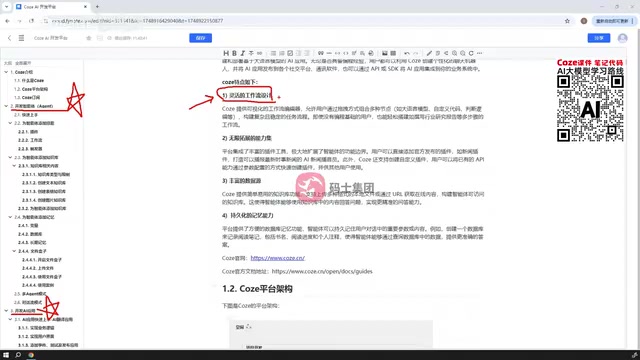
For users looking to build complex business logic, workflows are the key capability that sets Coze apart from simple conversational chatbots. They elevate AI from a pure Q&A tool to an automated assistant capable of executing tasks step by step.
A Workflow is an orchestration mechanism that chains multiple processing steps into an ordered sequence. In AI application development, workflows allow developers to define a complete "input → processing → output" pipeline, where each node can be a large model call, plugin execution, conditional branch, or data transformation. Take a "news summary assistant" as an example: the workflow could be designed as follows — first call a search plugin to fetch news → pass the results to a large model for summarization → finally format and deliver the output to the user, all without human intervention. Dify is another well-known open-source AI application orchestration framework that also centers on workflow design and supports local deployment; it has a strong reputation in the developer community. Coze's workflow design draws on similar orchestration logic, so users familiar with Dify can migrate their existing experience relatively quickly. A Conversation Flow is a workflow variant specifically optimized for multi-turn dialogue scenarios, handling context tracking and intent transitions more naturally.
Core Feature 2: Rich Plugin Extension Capabilities
The second feature is virtually unlimited extensibility, primarily through the large number of plugins integrated into the platform. These plugins can be used within workflows or referenced directly in bots and AI apps.
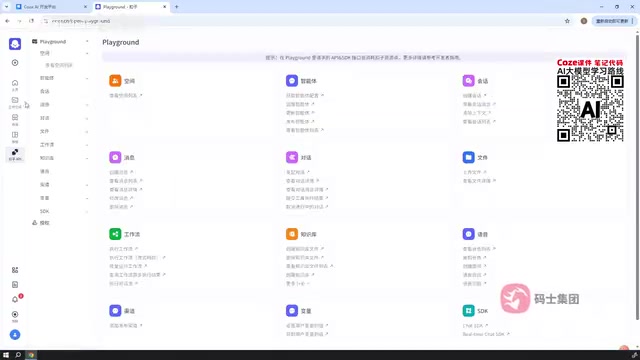
Using official plugins as examples, the tutorial demonstrates several commonly used plugin types:
- Link Reader: Enter a URL to read the content, files, or images from that web page
- Image Understanding: Provide an image URL and let the model interpret the image content
- Toutiao Search / Toutiao News: Search for relevant news content based on specified keywords or URLs
Taking a news plugin as an example, you can first use the plugin to retrieve news from the web, then have the AI generate a news summary based on the returned results. The range of plugin types is extensive, covering areas such as smart hardware, everyday utilities, and image processing.
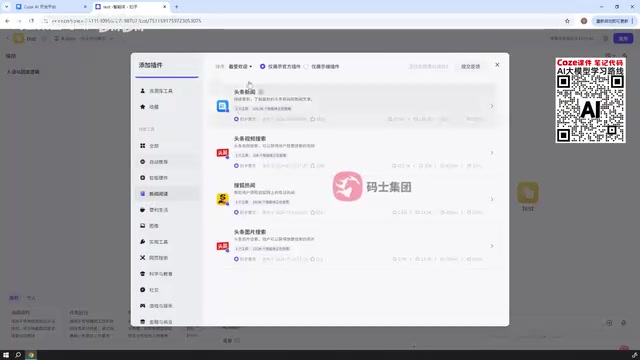
In practice, the plugin entry point only becomes visible after you've created a bot. The tutorial recommends that beginners start by creating a simple test bot (for example, named "Test") and then browse the available official and custom plugins from within it. When the number of plugins is large, you can use the search function to find what you need.
Core Feature 3: Rich Data Source Support
The third feature is rich data source support, primarily expressed through the Knowledge Base functionality. Users can create a knowledge base from local files, URLs, database tables, and other data formats, enabling the AI application to answer questions based on specific reference materials.
In addition, Coze has a built-in database concept. It's worth noting that this database does not connect to the user's local database; rather, it creates data tables within the Coze platform itself for applications to read from and write to. This design gives agents the ability to store and retrieve structured data.
A Knowledge Base is a practical implementation of RAG (Retrieval-Augmented Generation) technology. The core idea behind RAG is: split private documents into small chunks, convert them into vectors for storage, and when a user asks a question, the system first retrieves the most relevant text segments from the knowledge base and passes them as context to the large model to generate an answer. This approach addresses two major limitations of large models — the training data cutoff date and the lack of access to private information — enabling AI to answer questions based on your own contracts, manuals, reports, and other proprietary documents, while significantly reducing the probability of model "hallucinations" (fabricated answers). Coze's knowledge base supports multiple data formats including local files, URL links, and database tables, covering the most common data source types for both enterprise and individual users, with no need to build a vector database or deploy an embedding model yourself.
Core Feature 4: Persistent Memory
The fourth feature is persistent memory. When a user engages in multi-turn conversations with a bot or AI app, the conversation content can be persistently saved and retrieved at a future point in time.
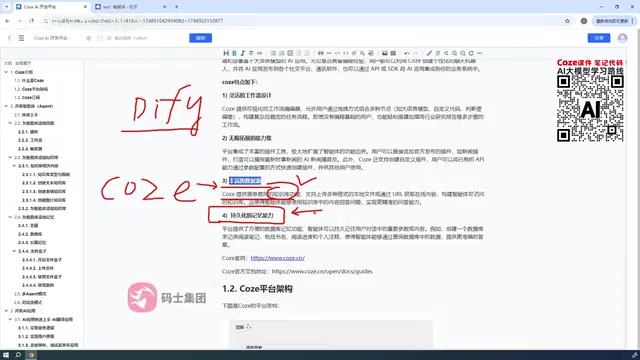
Coze has a built-in memory feature that allows users to record key information by setting variables, storing values or summaries from conversations into those variables. This enables agents to "remember" user preferences and historical interactions, delivering a more coherent experience.
How to Use It: Online-Only Construction
Regarding deployment, it's important to note that Coze only supports building AI applications online — unlike Dify, it cannot be downloaded and deployed locally. Users must log in to the Coze website and complete the construction of their AI applications on the platform.
For teams that require on-premises deployment, this is a limitation worth evaluating upfront. However, for most individual creators and lightweight application scenarios, online construction actually reduces the cost of environment setup.
Self-hosting refers to running software on servers or local machines that the user controls, without data passing through a third-party cloud. For application scenarios involving sensitive information — such as internal enterprise documents or user privacy data — local deployment is a compliance requirement for many teams. Open-source frameworks like Dify and Flowise are widely popular among enterprise users precisely because they support local deployment. Coze only offers a SaaS (Software as a Service) model, with user data stored on ByteDance's cloud servers. This means scenarios with strict data sovereignty requirements need careful evaluation. That said, Coze does offer an "Enterprise Edition" for business users with higher standards for data isolation and security protocols. Individual users and lightweight use cases can simply use the free online version without incurring any operational costs.
Summary
Through its four core capabilities — workflows, plugins, knowledge bases, and memory — Coze brings AI application development down to a truly no-code level. Its official documentation provides detailed usage guides, and this article has summarized the most commonly used core concepts.
For users just getting started with AI agent development, the recommended approach is to begin by creating a simple test bot, gradually get comfortable with plugin calls and workflow orchestration, and then progress to building more complex applications. Mastering these four core features gives you the foundation you need to dive into real-world Coze use cases.
Related articles

Felix Rieseberg Personal Homepage
Felix Rieseberg's personal homepage sparks attention on Hacker News. This article covers the Slack engineer's technical background, the rise and fall of nativefier, and the value of a developer homepage as a tech calling card.

@ai-sdk/vue 3.0.306 Patch Release Syncs with [email protected] Update
@ai-sdk/vue 3.0.306 released, synced with [email protected]. A routine patch release for the Vercel AI SDK ecosystem with no public API changes; the Vue adapter layer stays version-aligned with the core package.

Gemini 4 Argon API Launches: The Era of Million-Token Output Begins
Google launches Gemini 4 Argon with sparse MoE architecture, up to 1M output tokens, and a 68.90% Vals Index score, available across API, AI Studio, and the Gemini app.