Coze Expert Agent: A Complete 5-Step Guide to Building an AI Collaborative Team

A practical 5-step guide to building a collaborative AI team with Coze Expert Agents.
This guide walks through how to use Coze's Expert Agent Team feature to build a reusable, collaborative AI work team in five steps: creating Expert Agents, setting up a project, inviting members, adding more Agents, and assigning tasks. It's designed for individual creators and small teams who want to move beyond one-off prompts and build scalable AI workflows.
Article
As AI Agents move from concept to real-world deployment, enabling multiple AIs to collaborate and handle actual business tasks has become a key focus for individual creators and small teams alike. The "Expert Agent Team" feature from ByteDance's Coze platform is designed precisely to address this challenge. This guide walks you through five practical steps to build a ready-on-demand AI work team.
What is an AI Agent? An AI Agent is an AI system capable of autonomously perceiving its environment, making decisions, and executing tasks — distinct from the traditional "question-and-answer" model of chatbots. Agents are goal-oriented, able to break complex tasks into sub-steps and call external tools (such as search engines, databases, and code interpreters) to get things done. Multi-Agent collaboration systems take this further by enabling multiple specialized Agents to divide and coordinate work, much like a functional team composed entirely of AI — which is exactly the underlying design logic of Coze's team feature.
Why Use Expert Agents Instead of Writing Prompts from Scratch Every Time
Many people new to AI tools default to writing prompts from scratch each time. This approach is flexible but highly inefficient — you end up reinventing the wheel repeatedly, and output consistency is hard to guarantee.
The fundamental flaw in pure Prompt Engineering is statelessness — every conversation starts fresh, requiring you to re-inject context, role definitions, and domain knowledge every time. Output quality becomes heavily dependent on the prompt writer's experience, and standardized reuse across a team is nearly impossible. Expert Agents solve this "memory gap" problem at its root through persistent storage of role configurations and knowledge bases.
The core value of Expert Agents lies in templatization. Role definitions, knowledge bases, and workflows are already built in — users simply fill in the blanks and make minor adjustments. Think of an Expert Agent as "a colleague with a professional background" — far more attuned to your specific business context than a generic chatbot.
This design philosophy fundamentally upgrades AI capability from "reconfigured with every conversation" to a reusable, compounding asset. For users who repeatedly handle specific types of tasks, this shift delivers substantial efficiency gains.
The Four Core Capabilities of Coze Expert Agent Teams
The entire system is built around four interconnected components:
- Create Expert Agents: Define AI roles with specialized capabilities
- Set Up a Project: Organize Agents and members in a shared workspace
- Invite Members: Bring in human collaborators
- Assign Tasks: Delegate specific work to Agents or members
Once these four components are connected, you have a fully functional AI work team. The logic resembles "building with blocks" — each module stands independently yet combines flexibly. This evolution mirrors the software architecture shift from monolithic applications to microservices: specialization drives higher-quality output, while a coordination layer ensures overall coherence.
Step 1: Create an Expert Agent
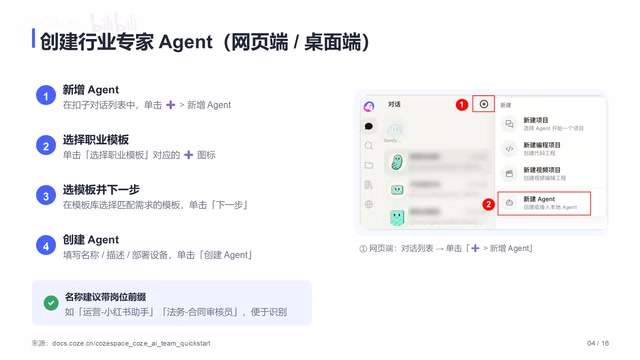
On the web, log into the Coze homepage, click the "Create" button on the left sidebar, select the "Expert Agent" template, fill in a name and a one-line description, upload a knowledge base or bind a workflow as needed, and click Save.
Two technical concepts are worth understanding here: Knowledge Bases are typically built on RAG (Retrieval-Augmented Generation) technology, which vectorizes private data — such as documents, FAQs, and business guidelines — for storage. When responding, the Agent retrieves relevant snippets in real time and incorporates them into its output, making responses more relevant to specific business contexts. Workflows chain multi-step tasks into repeatable automated pipelines — for example, a complete sequence of "receive request → call search → generate draft → format output." Together, these give Agents both domain knowledge depth and process execution capability.
You may not have noticed, but the mobile app workflow is nearly identical: open the app, tap the plus icon in the bottom-right corner, select Expert Agent, and fill in the name and purpose as prompted. Mobile is great for quick creation and fine-tuning, while the web interface is better suited for complex configurations — the two complement each other well across different scenarios.
Step 2: Set Up a Project
Once you have Expert Agents, the next step is creating a project to organize them. On the web, click "New Project" in the upper-left corner, enter a project name, select the Expert Agents you've already created, and click "Create Project."
A project is essentially a workspace that brings people and Agents together in a shared environment. This is also supported on mobile: go to the team page, tap "New Project," enter a name, and select the Agents you want to work with.
Step 3: Invite Members to Join the Project
Team collaboration requires human members too. On the web, enter the project and click "Invite Members" — you can invite via link or email, and assign roles (such as Admin or Member). Once they accept, they'll appear in the member list, and permissions can be adjusted at any time.
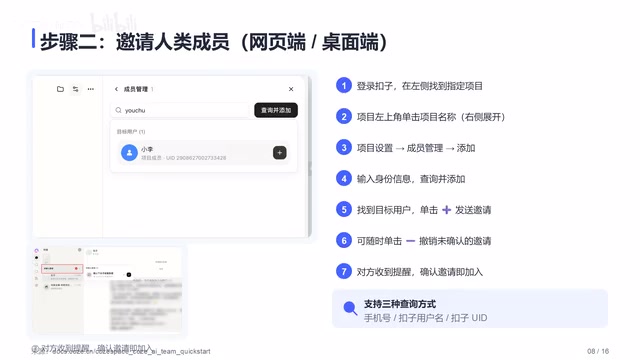
The mobile invite flow is equally straightforward: open the project details, tap "Invite Members," select contacts or share via link, set the appropriate role, and send. This consistent cross-platform experience lowers the barrier to entry for team members.
Step 4: Keep Adding More Agents
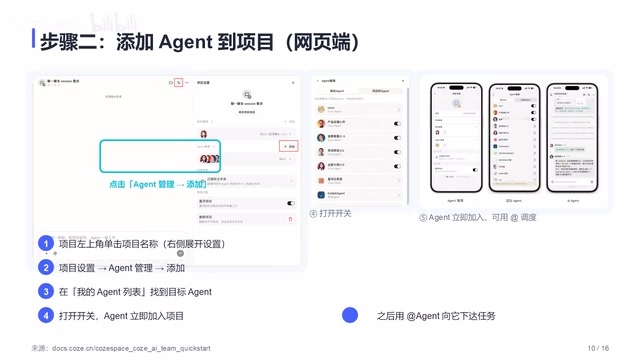
Projects can be expanded continuously. On the web, go to project settings and click "Add Agent" to select roles from the Expert library. A single project can include multiple Agents, each responsible for different tasks, effectively assembling a full AI squad.
Running multiple Agents in parallel involves an Orchestration mechanism: the system needs a scheduling layer to decompose the main task, distribute sub-tasks to individual Agents, and aggregate results upon completion. Leading open-source frameworks — including AutoGen, CrewAI, and LangGraph — are all exploring this space. Coze's team feature wraps this complex coordination logic into a visual interface, making multi-Agent collaboration accessible to non-technical users. In essence, the platform takes on the "systems integration" work itself.
Step 5: Assign Tasks for Clear Accountability
This is the most critical step in the entire workflow. In the task panel, you can assign specific work to an Agent or a team member, and set deadlines and delivery requirements.
The interface is intuitive: on the left is the task pool awaiting assignment; on the right are the executors. A single arrow maps each task to its owner. This visual assignment method makes collaboration relationships immediately clear, eliminating the confusion of "who is responsible for what" that plagues traditional teamwork. From a broader perspective, this step also represents a pivotal leap — from AI as a personal assistant to AI as an integrated part of organizational workflows, with clearly defined roles and responsibilities within the team.
Three Typical Use Cases
The following three usage patterns cover different scales, from individual to near-enterprise. They also map neatly onto the evolution of AI team organization: from monolithic chatbot → specialized single Agent → multi-Agent team — each level delivering higher collaborative efficiency and greater domain depth.
Use Case 1: One Person Leading a Team of Agents
You are both the manager and the sole human member. All execution is delegated to Agents; you only make decisions and review output. This model is ideal for individual creators and freelancers, leveraging maximum output with minimal human effort.
Use Case 2: Multiple People Sharing One Agent
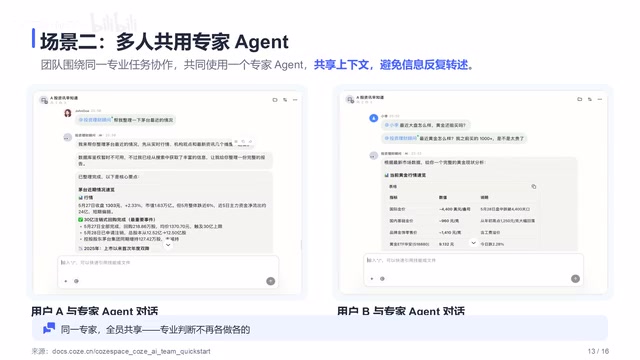
Several team members share a single Expert Agent — whoever needs it, uses it. Knowledge and configurations accumulate centrally, avoiding duplicated effort and ensuring everyone works from the same standard.
Use Case 3: Multiple People with Multiple Agents
Each member is paired with a dedicated Agent, and the project runs multiple specialists simultaneously — handling writing, analysis, customer support, and more. This is the closest equivalent to a real company structure and represents the most powerful way to use Coze's team feature. In this mode, the platform acts as middleware — coordinating Agent inputs and outputs, managing data access permissions, and ensuring the collaboration process remains traceable.
Quick FAQ
- What's the difference between an Expert Agent and a regular Agent? Expert Agents come with built-in role configurations and a knowledge base — ready to use out of the box, no setup from scratch required.
- Is there a limit on project members? This depends on your subscription plan.
- Can multiple Agents execute tasks in parallel? Yes — multi-Agent projects are specifically designed for parallel collaboration.
- Is project data secure? Project and member permissions are granularly controlled, with clearly defined data access boundaries.
Summary
From creating Expert Agents and setting up projects, to inviting members, adding Agents, and assigning tasks — these five steps form a complete path to building an AI team. The value goes beyond "being able to use AI": it upgrades AI from a point tool into a collaborative, compounding, and scalable team asset.
From a technology evolution standpoint, this shift from "prompt-driven single conversations" to "persistent Agent teams" signals that AI applications are migrating from the tool layer to the organizational layer. RAG-powered knowledge retrieval, automated workflow orchestration, and multi-Agent task scheduling together form the technical foundation of this system — and Coze packages all of this complexity into an interface that everyday users can operate directly.
For anyone looking to hand off repetitive work to AI, rather than endlessly tinkering with prompts, the better move is to follow this checklist and try it hands-on — and let your own Expert Agents start working for you today.
Key Takeaways
Related articles

DeepSeek Harness: A Beginner's Installation and Testing Guide
A DeepSeek Harness tutorial for test engineers: set up Node.js, launch with one NPX command, configure official and third-party models, and explore web search, file I/O, and trace-view agent observability.
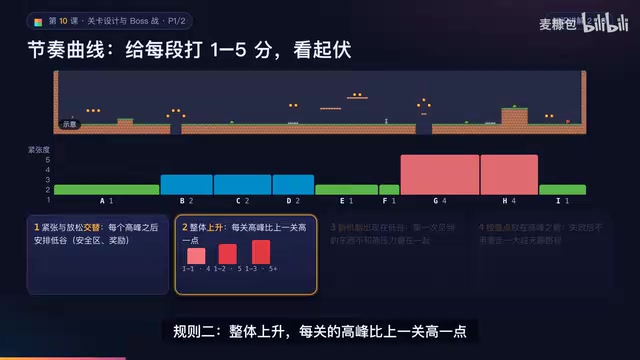
AI Game Development in Practice: Designing Levels with the Four-Step Method and Pacing Curves
AI game development lesson 10: design levels with the four-step method (teach, practice, combine, test) and a 1-5 pacing curve, plus sightline guidance and safety zones—implement Animatable Body 2D moving platforms and generate ASCII sketches for 1-2 Underground Cavern and 1-3 Guard Hall.

AI Game Development in Practice: Two-Phase Boss State Machines and Death Heatmap Tuning
AI game development lesson 10: implement a two-phase Boss with a state machine, guarantee fairness with color signals and a 0.4-second warning floor, locate difficulty cliffs with a death heatmap, and apply lightest-to-heaviest fixes one at a time, with an acceptance checklist and common pitfalls.