Coze vs Dify vs n8n: In-Depth Comparison of the Top 3 AI Workflow Platforms in 2025

In-depth comparison and selection guide for Coze, Dify, and n8n AI workflow platforms in 2025
This article systematically compares three major AI workflow platforms in 2025: Coze is ideal for individual users with zero cost and zero barrier; Dify suits enterprises needing quick deployment with streaming output and private deployment support; n8n offers the highest extensibility but steepest learning curve for deep customization. The article emphasizes that the core of AI workflows is automating structurally describable business processes, and demonstrates the optimization path from "functional" to "excellent" through a video editing case study, with human-AI collaboration as the key.
Why Do You Need an AI Workflow Platform?
When you want to build your own AI agent, it's easy to get overwhelmed by the sheer number of platforms available. Coze, Dify, and n8n are the three most representative AI workflow platforms in 2025, covering the full spectrum from individual users to enterprise teams, and from out-of-the-box solutions to deep customization.
It's worth noting that AI workflow platforms are fundamentally different from traditional automation tools (like Zapier or IFTTT). Traditional automation tools primarily handle deterministic tasks—when event A occurs, execute action B—with rigid logic. The core breakthrough of AI workflow platforms lies in introducing Large Language Models (LLMs) as decision-making nodes, giving workflows the ability to understand natural language, generate creative content, and make fuzzy judgments. This means workflows are no longer limited to processing structured data—they can also handle unstructured text, images, and even audio/video content, expanding the boundaries of automation from "rule-driven" to "intelligence-driven."
This article provides an in-depth analysis across three dimensions: what AI workflow platforms can do, how to choose among the three major platforms, and what the underlying nature of these platforms really is.
What Can AI Workflow Platforms Actually Do?
The Litmus Test: If You Can Explain the Steps, It Can Be Automated
Here's a simple rule of thumb: If you can clearly articulate every step of a task so that any inexperienced intern could fully understand it, then that task can be turned into an AI workflow.
Whether it's product marketing, social media copywriting with images, AI customer service, writing proposals, web novels, or business plans—as long as the process can be described in a structured manner, it can be automated with an AI workflow platform.
Take "writing a story" as an example: first create character profiles, then write an outline, generate the novel using the profiles and outline, define 10 evaluation criteria for scoring, pass anything above 80 points, and keep revising anything that doesn't meet the standard. That's a clear AI workflow.
Real-World Case: From Crude Splicing to Intelligent Video Editing
Most video generation workflows on the market are essentially just crude combinations of "copy + video clips." These workflows have three core problems: uninspiring copy, poor visual aesthetics, and weak text-to-image consistency.
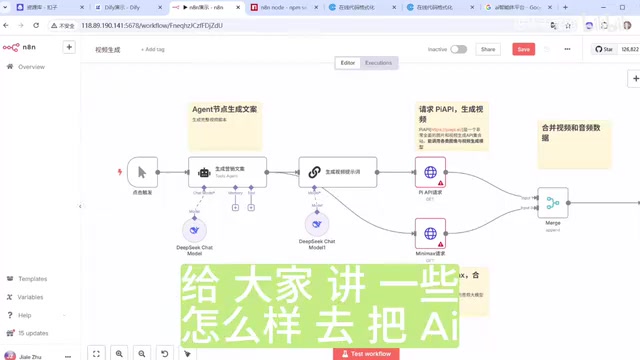
Building a basic video generation workflow in n8n isn't complicated: set up a trigger → use an Agent node to generate video copy → generate video prompts → call APIs to synthesize video and audio → combine data → upload to cloud storage. But the output from such a workflow is highly random and offers little real value.
The Key Upgrades from "Functional" to "Excellent"
A truly great workflow needs to answer these questions: Is the copy compelling? Are the materials high-quality enough? Do the AI-generated images and videos match the text? Is the editing sequence logical? Are key frames emphasized? Are transitions smooth?
An optimized workflow architecture includes these critical components:
- Dual-path input: Supporting both AI-generated copy and user-uploaded materials
- ASR audio recognition: Obtaining subtitles and timestamps to determine editing cut points
- User confirmation nodes: Introducing human review at critical steps
- AI intelligent editing: Finding key frames, processing materials, and generating transitions based on timestamp information
- Iterative feedback loop: Using "send and wait for response" to await user review and iterative optimization
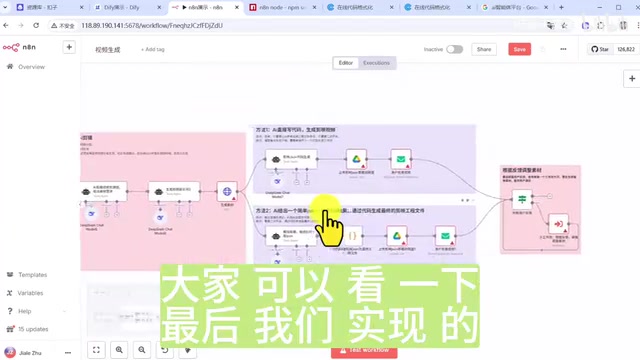
ASR (Automatic Speech Recognition) plays a critical role in this workflow. ASR isn't just for generating subtitles—its more important function is providing millisecond-precision timestamp information. These timestamps mark the start and end times of each sentence, serving as the core basis for AI-powered intelligent editing. By analyzing semantic breakpoints and pause positions, AI can automatically determine optimal scene cut points. Currently, mainstream ASR services include OpenAI's Whisper, Alibaba Cloud's Paraformer, and iFlytek speech recognition, all of which have achieved over 95% accuracy for Chinese recognition.
Another clever design leverages the principle behind CapCut (Jianying) project files—video editing is essentially about arranging tracks. CapCut uses two JSON-format files—meta info (material information) and content (track information)—to record all editing operations. JSON (JavaScript Object Notation) is a lightweight data interchange format with good readability and programmability. CapCut's meta info records metadata for all imported materials (file paths, resolution, duration, etc.), while content records each clip segment's start/end times, positions, effects, and transitions in a timeline track format. Since JSON is fundamentally structured text—something LLMs are naturally adept at generating and modifying—AI only needs to generate or modify JSON code in this format to complete video editing work, without needing to simulate human GUI operations.
Core philosophy: Every added step addresses standardizable but critically important repetitive work, while personalized elements are left for human adjustment in subsequent nodes.
Coze vs Dify vs n8n: Side-by-Side Comparison
One-Line Selection Guide
- Individual users → Go with Coze—completely free, zero barrier to entry
- Enterprises needing quick deployment → Choose Dify—easy to maintain, supports streaming output
- Enterprises needing deep customization → Choose n8n—highest extensibility but steepest learning curve
Coze: Top Choice for Individual Users and Content Creators
Strengths:
- Extremely easy to get started—click and use, with abundant ready-made templates covering virtually all daily needs
- Unique voice and video call features (nearly impossible to achieve with Dify and n8n)
- Built-in canvas functionality supporting image generation, background removal, video generation, and other media processing
- Customizable user interfaces with rich recommendation components
- Seamless integration with Douyin and Doubao ecosystem
- Detailed logs and statistics for monitoring token consumption
Tokens are the fundamental unit of measurement for how LLMs process text—one Chinese character typically corresponds to 1.5-2 tokens. In AI workflows, every LLM node call generates token consumption, including input tokens (prompts and context sent to the model) and output tokens (the model's generated responses). For enterprise applications, token costs may be the largest variable operating expense—a customer service workflow processing 10,000 requests daily could incur monthly token costs ranging from thousands to tens of thousands of yuan. Therefore, the platform's token consumption monitoring and statistics features are crucial for cost control. Optimization strategies include: streamlining prompts, setting appropriate context window lengths, using smaller and cheaper models for non-critical nodes, and implementing caching mechanisms to avoid redundant calls.
Limitations:
- Cannot be deployed locally—limited to cloud data only
- Limited model selection—doesn't support locally deployed models or some international models
- Closed-source web version with weak extensibility—cannot add many custom nodes
- The open-source version is currently far from enterprise-grade
Dify: The Balanced Choice for Enterprise AI Applications
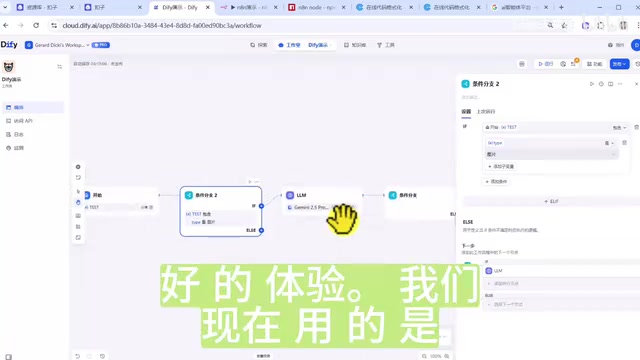
Strengths:
- Excellent workflow building experience with intelligent and convenient variable management
- Supports independent single-node testing—just fill in the preceding parameters without running the entire flow
- Supports streaming output (which n8n doesn't), especially suitable for conversational AI applications
- Comprehensive operations management: easy publishing, API access, interface embedding, cost monitoring, and log tracking all in one place
- Team collaboration-friendly with clear permission management
- Supports light secondary development: adding custom models, plugins, adjusting metrics, etc.
Streaming Output is an important technical advantage Dify has over n8n. It refers to the LLM pushing content to the frontend in real-time, character by character or token by token, rather than waiting for the complete response to be generated. The underlying implementation typically uses SSE (Server-Sent Events) or WebSocket protocols. For conversational AI applications, streaming output is crucial—if users have to wait 30 seconds after asking a question to see the complete answer, the experience would be terrible. Streaming output lets users see text gradually appearing within a few hundred milliseconds of asking, dramatically improving interaction fluidity and user retention.
Limitations:
- Slightly higher learning curve than Coze (involves professional concepts like LLM, Agent, etc.)
- Less node extensibility than n8n—adding custom nodes is more difficult
- Sacrifices some extensibility in exchange for usability and stability
n8n: The Ultimate Solution for Deep Customization and Complex Automation
Strengths:
- Highest extensibility—code execution nodes support Java and Python with free import of third-party libraries
- Extremely rich community ecosystem with massive third-party nodes available on npmjs.com
- Template marketplace with abundant ready-made workflows available for direct copying
- Strongest enterprise feature extensibility—fully customizable
- Ideal for building proactively triggered complex AI automation applications
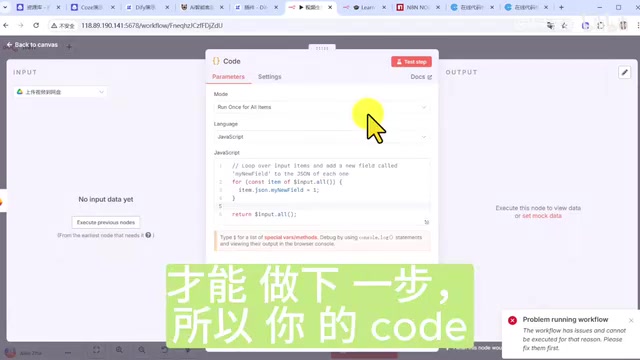
Limitations:
- Highest learning difficulty with a steep learning curve
- Does not support independent single-node testing: nodes cannot be tested if preceding nodes haven't been run
- After modifying a preceding node, the entire flow must be re-run to continue debugging
- No streaming output support—not ideal for building conversational applications
- Agent/LLM configuration is cumbersome (model, memory, and tools need separate connections)
- Relatively basic operations management interface—team workspaces require the enterprise version
- Most third-party nodes target overseas services with limited domestic (China) availability
The concept of Agent mentioned here is central to current AI application development and differs from simple LLM calls. An Agent possesses three key capabilities: perception (receiving user input and environmental information), reasoning (thinking and planning based on LLMs), and action (calling external tools to complete specific tasks). The core mechanism of an Agent is the ReAct (Reasoning + Acting) loop—the model first considers what it should do, then calls the appropriate tool to execute, then decides the next action based on the execution results, until the task is complete. In workflow platforms, Agent nodes typically require configuring three elements: the underlying model (determining reasoning capability), memory module (maintaining conversation context), and toolset (defining available external capabilities)—which is why Agent configuration in n8n tends to be more cumbersome.
The Underlying Nature of AI Workflow Platforms
It's Essentially Visual Code Orchestration
The underlying logic of all workflow platforms is the same: they integrate a large number of commonly used functions into code editing and visualize the whole thing. Like LEGO bricks, platforms provide various pre-built nodes that you connect according to your needs to quickly build AI applications.
Core Node Comparison Across the Three Platforms
Regardless of the platform, the core node types are similar:
| Node Type | Coze | Dify | n8n |
|---|---|---|---|
| AI Node | Large Model | LLM/Agent | Agent/Basic LLM Chain |
| Logic Node | Code Selector/Conditional Branch | Conditional Branch | If Node |
| Code Node | Code | Code Execution | Code (Java/Python) |
| Request Node | HTTP Request | HTTP Request | HTTP Request |
| Plugins | Plugin Market | Market Space | Apping App, etc. |
The Trade-offs Behind Integration Convenience
Integration always comes with trade-offs. Dify's HTTP requests have a 5-minute timeout limit, while some Agent node response times may far exceed this threshold. Although n8n offers extremely high openness, as workflows grow longer, the time cost of editing and debugging increases dramatically—modifying a preceding node might mean re-running the entire flow.
The key question is: what boundaries does the platform open to you beyond its underlying logic, what additional integrated features does it offer, and what does it still allow you to do beyond those boundaries? This is what truly determines a platform's value to you.
Considerations for On-Premise Deployment and Data Privacy
For enterprise users, on-premise deployment and data privacy are critical considerations when choosing an AI workflow platform. On-premise deployment means all data processing and model inference happen on the enterprise's own servers without passing through third-party clouds, thus meeting data compliance requirements (such as GDPR, China's Data Security Law, etc.). Both Dify and n8n support private deployment via Docker containerization, allowing enterprises to run complete platform instances on their own servers or private clouds. Coze currently only offers cloud-based SaaS services, with all data stored on ByteDance's servers—a significant limiting factor for enterprises dealing with customer privacy, trade secrets, or regulated industries (finance, healthcare, government, etc.). This is why data privacy capabilities often serve as the first screening criterion in enterprise platform selection.
Conclusion: How to Choose Without Regret?
The three platforms collectively cover virtually all AI workflow needs from individuals to enterprises. The core selection logic is simple:
- Content creators/individual use: Choose Coze without hesitation—free and user-friendly
- Enterprises needing data privacy + quick onboarding: Choose Dify—stable and controllable
- Enterprises with development resources + deep customization needs: Choose n8n—maximum freedom
What truly determines the quality of an AI workflow isn't the platform itself, but whether you can thoroughly map out your business processes and introduce human-AI collaboration mechanisms at critical junctures—pushing your workflow from "functional" to "excellent."
Related articles
 Product Reviews
The Programmer's Desk Setup Guide: Building a Workspace That Feels Like Home
Discover how programmers build productive, comfortable workspaces. From multi-monitor setups to ergonomic design, explore the desk philosophy that drives focus and flow.
 Product Reviews
Qoder vs Cursor Real-World Comparison: Which $20/Month AI IDE Is Better?
Hands-on comparison of Qoder vs Cursor AI IDEs: Agent autonomy, human interaction count, and architecture decisions. Qoder needed only 2 interactions vs Cursor's 8.
 Product Reviews
Cursor Cloud Agent Demo: Eliminating Bottlenecks Across the Entire Software Development Lifecycle
Deep analysis of Cursor's Cloud Agent demo showing how cloud VMs, automated test artifacts, and a full-chain control plane systematically eliminate human bottlenecks across the software development lifecycle.